SQL Tutorial: The Complete Learning Path from First Query to Transactions
Learn SQL in a deliberate order, using one small dataset to practise table creation, filtering, joins, grouping, subqueries and transactions.
KnowledgeGate Team
Exam prep & CS education
Updated 8 Aug 20267 min read
You want to learn SQL for placements, GATE DBMS, a bank IT officer paper, or simply to stop copying queries you do not understand. SQL is easy to sample and hard to sequence: learners pick up SELECT quickly, then stall because joins, grouping, and subqueries were never ordered. The full ladder runs from creating a table to committing a transaction, and one four-student dataset carries every stage from the third onwards.
1. The six-stage SQL learning path, and how long each stage takes
The path has six stages. Move up only when you can do each stage cold, not merely recognise it. At one hour a day, stages 1 and 2 take about a week between them, stage 3 takes another week, and stage 4 is the longest single stretch at one to two weeks, so stages 1 to 4 run roughly three to four weeks. Stage 5 takes about a week, stage 6 about a week, so the last two add two more. At 30 minutes a day, double every figure.
Two tables carry the whole ladder:
students(student_id, name, city)
enrollments(enrollment_id, student_id, course, marks)
The exact rows appear in stage 3 and remain unchanged. One schema lets you see what each new idea changes.
If your exam is next week and you only need MCQ recognition, use targeted practice instead. Query-writing skill needs the six stages in order.
2. Stages 1 and 2: tables, data types, DDL and DML
Stage 1 is the relational mental model. A table contains rows under one column contract; a key identifies a row. Read this definition clause by clause:
CREATE TABLE students (
  student_id INT PRIMARY KEY,
  name VARCHAR(50),
  city VARCHAR(30)
);
student_id is an integer primary key. name and city hold text within their stated limits. Explain every clause aloud.
Stage 2 is INSERT, UPDATE, and DELETE. Load the next section's four rows. In a disposable copy, update Chetan's city, then restore it:
UPDATE students SET city = 'Ajmer' WHERE student_id = 3;
UPDATE students SET city = 'Jaipur' WHERE student_id = 3;
Delete one row with WHERE. Reload the four rows, run DELETE FROM students;, and confirm the count becomes 0. Do this only in a scratch database: without WHERE, every row qualifies.
Checkpoint: create both tables and load them in under five minutes. DBMS Normalization Explained covers why these columns and keys are split the way they are.
3. Stage 3: SELECT, WHERE and ORDER BY
Every query from here on runs on exactly this data.
student_id | name | city |
|---|---|---|
1 | Asha | Jaipur |
2 | Bilal | Lucknow |
3 | Chetan | Jaipur |
4 | Divya | Patna |
enrollment_id | student_id | course | marks |
|---|---|---|---|
101 | 1 | DBMS | 82 |
102 | 1 | OS | 74 |
103 | 2 | DBMS | 91 |
104 | 3 | DBMS | 67 |
105 | 3 | CN | 88 |
Start with a filter:
SELECT name FROM students WHERE city = 'Jaipur';It returns Asha and Chetan, exactly 2 rows. Now add sorting:
SELECT course, marks
FROM enrollments
WHERE marks >= 80
ORDER BY marks DESC;
The output is (DBMS, 91), (CN, 88), (DBMS, 82), in that order, exactly 3 rows.
SQL is written as SELECT, FROM, WHERE, ORDER BY, but reason through this query as FROM, WHERE, SELECT, ORDER BY. Once that logical order feels natural, joins and grouping become much easier.
4. Stage 4: SQL joins and row-count prediction
This is where self-study often stalls. Predict the inner join's output before running it:
SELECT s.name, e.course, e.marks
FROM students s
JOIN enrollments e ON s.student_id = e.student_id;
Asha matches 101 and 102, Bilal matches 103, Chetan matches 104 and 105, and Divya matches nothing. The result has 2 + 1 + 2 + 0 = 5 rows.
Change JOIN to LEFT JOIN. The five matches remain, and Divya adds (Divya, NULL, NULL), making 6 rows. That difference is the inner-versus-outer concept.
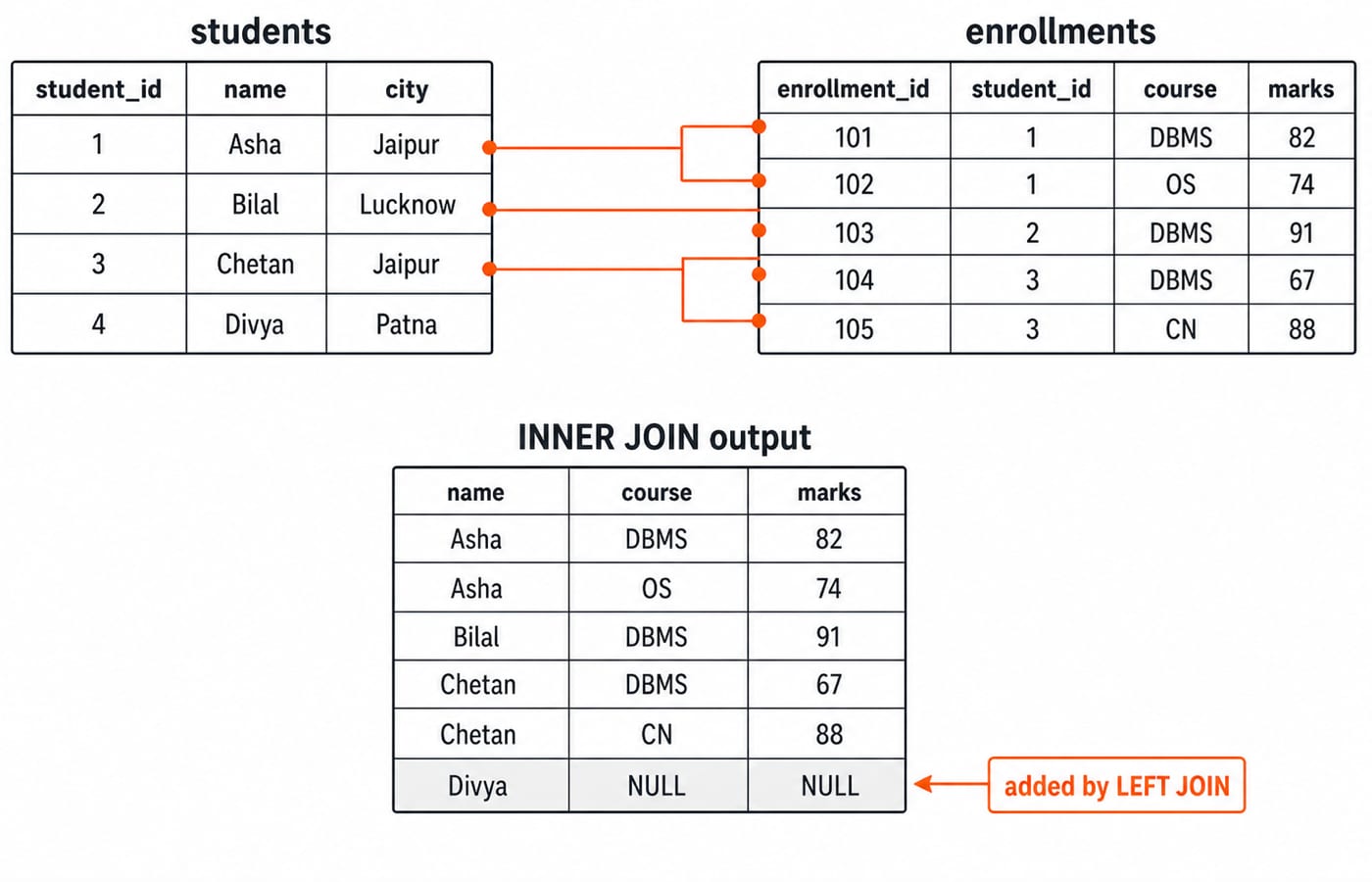
Predict every join's row count. If you cannot explain 5 inner rows and 6 left rows here, repeat the stage. SQL Queries and Joins in DBMS carries the same prediction habit into outer and self joins on an employees and departments dataset.
5. Stage 5: GROUP BY, HAVING and aggregate thinking
Now use the joined rows for the capstone query:
SELECT s.city, COUNT(*) AS enrolls, AVG(e.marks) AS avg_marks
FROM students s
JOIN enrollments e ON s.student_id = e.student_id
GROUP BY s.city
HAVING AVG(e.marks) > 70;
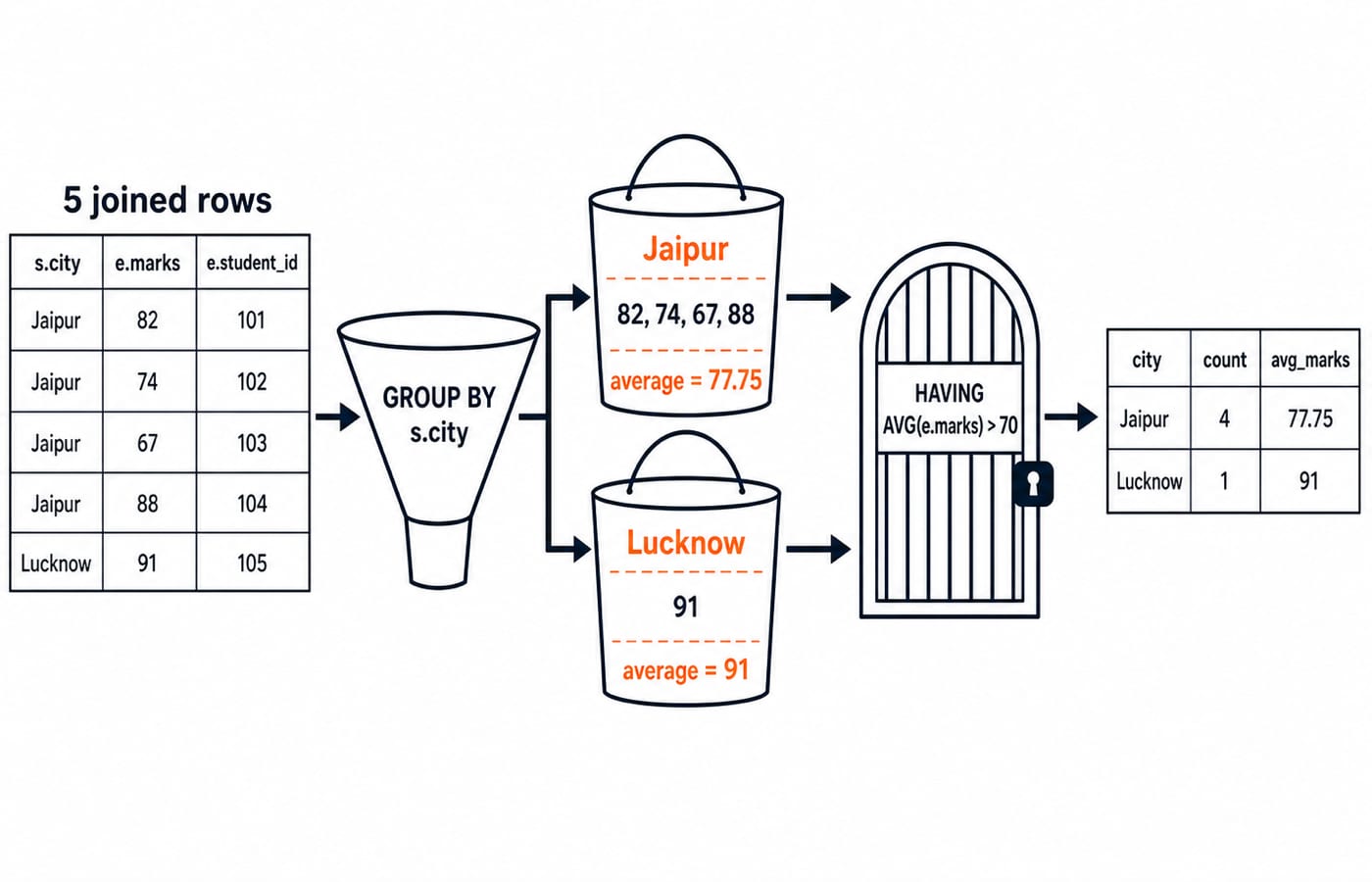
Jaipur has marks 82, 74, 67, and 88. Their sum is 82 + 74 + 67 + 88 = 311; 311 / 4 = 77.75, so Jaipur passes. Lucknow has one mark, so 91 / 1 = 91, and it passes. Patna is absent because the inner join removed Divya.
The final output is exactly 2 rows: (Jaipur, 4, 77.75) and (Lucknow, 1, 91).
Add WHERE e.course = 'DBMS' before GROUP BY. It removes OS and CN. Jaipur becomes (82 + 67) / 2 = 149 / 2 = 74.5; Lucknow remains 91. Both pass, but their counts become 2 and 1. WHERE filters rows; HAVING filters groups. GROUP BY and HAVING in SQL drills that split across more solved queries on an orders table.
6. Stage 6: subqueries, correlated subqueries and transactions
A subquery is a query used as a value. Ask which enrollments beat the overall average:
SELECT s.name, e.course, e.marks
FROM students s
JOIN enrollments e ON s.student_id = e.student_id
WHERE e.marks > (SELECT AVG(marks) FROM enrollments);
The inner query runs once over all five marks: 82 + 74 + 91 + 67 + 88 = 402, and 402 / 5 = 80.4. The outer query keeps only the marks above 80.4, so the result is (Asha, DBMS, 82), (Bilal, DBMS, 91) and (Chetan, CN, 88), exactly 3 rows. With no ORDER BY, their order is not guaranteed.
A correlated subquery names the outer row, so it reruns once per outer row:
SELECT name
FROM students s
WHERE EXISTS (
  SELECT 1 FROM enrollments e
  WHERE e.student_id = s.student_id AND e.marks > 85
);
Asha's best mark is 82, so the inner query finds nothing for her, and Divya has no enrollment row at all. Bilal has 91 and Chetan has 88, so the output is Bilal and Chetan, exactly 2 rows. SQL Subqueries and Correlated Subqueries drills this pattern through placement-test questions.
Transactions decide when a change becomes permanent. Run this on a scratch copy:
BEGIN;
UPDATE enrollments SET marks = 95 WHERE enrollment_id = 104;
SELECT marks FROM enrollments WHERE enrollment_id = 104;
ROLLBACK;
SELECT marks FROM enrollments WHERE enrollment_id = 104;
Inside the transaction the first SELECT returns 95. After ROLLBACK the second returns 67 again, because the block is undone as one unit: atomicity, the A in ACID. Swap that ROLLBACK for COMMIT and 95 stays. DBMS Interview Questions for Freshers takes ACID and locking further.
Checkpoint: name the inner query's value before reading the outer query, and know whether a block ends in COMMIT or ROLLBACK before you run it.
7. How exams and interviews test SQL
Placement interviews concentrate on stages 4 and 5. “Second highest marks” or “departments with more than N employees” test grouping, HAVING, and self-joins. Row-count prediction shows understanding.
GATE CS places SQL inside DBMS and commonly asks what a query returns on a small relation. The GATE CS subject weightage guide places DBMS in the wider paper. Bank IT officer papers test recognition across the same ladder, and the IBPS SO IT Professional Knowledge subject topic map places SQL inside that paper.
The ladder stays the same. Secure stages 1 to 5, then adjust stage 6 depth for your target.
8. SQL self-study traps and their fixes
Reading instead of predicting: Write the expected rows on paper before executing a query. Carry the stage 4 row-count habit into every exercise.
Skipping
NULL:WHERE marks <> 80excludes a row whose marks areNULL, because the comparison is unknown.COUNT(marks)also ignoresNULL, whileCOUNT(*)counts the row. A focused 15-minute session here prevents confusion during grouping.Changing tools repeatedly: Use one SQL engine for this whole ladder. Its error messages become part of your feedback loop.
9. The short version, and where to go next
Follow the stages in order:
Tables, column contracts, and keys
INSERT,UPDATE, andDELETESingle-table
SELECT, filtering, and sortingJoins, with row-count prediction
GROUP BY, aggregates, andHAVINGSubqueries and transactions
Keep three checkpoints: build the two tables in under five minutes, predict a join's row count before you run it, and name a subquery's value before you read the outer query.
For guided study, SQL sits inside DBMS in CS Fundamentals for Placements by Sanchit Sir. The Zero to Hero Complete CS Course is the broader self-study route, and the CS Fundamentals for Exams & Placements category lists the wider subject set. Pick the structured course or use this ladder on your own, but do the stages in order and write every query yourself.
Keep learning
Data Mining and Data Warehouse Explained: Concepts, OLAP and Worked Examples
Follow six orders from operational sources into a warehouse, calculate OLAP totals, and test an association rule on five shopping baskets.
Updated 4 Oct 20266 min readDBMS
Set Operations and Cartesian Product in Relational Algebra: Worked Examples and Exam Traps
Learn when relational set operations are legal, calculate exact union and difference results, enumerate a Cartesian product, and trace how a join filters it.
Updated 29 Sep 20266 min readDBMS
DBMS Interview Questions: Keys, Normalisation and Transactions Through One Worked Schema
Build defensible DBMS interview answers by tracing keys, normal forms, ACID and isolation through one university-enrolment database.
Updated 25 Sep 20265 min readDBMS
Super Key, Candidate Key and Primary Key: A Worked DBMS Example
Use one ENROLMENT relation to derive two candidate keys, enumerate every super key, select a primary key and translate the result into SQL.
Updated 24 Sep 20266 min readDBMS