GROUP BY and HAVING in SQL: Aggregation Questions from Placement Tests, Solved Step by Step
Trace two placement-style SQL queries from raw rows to grouped results. Learn exactly when to use WHERE, HAVING, COUNT(*), and COUNT(column).
KnowledgeGate Team
Exam prep & CS education
Updated 26 Jul 20265 min read

A placement-test question on GROUP BY is rarely difficult because of the arithmetic. It becomes difficult when you cannot tell which filter acts on rows and which filter acts on completed groups. Once the query pipeline is clear, these output questions become mechanical.
Every total and count below comes from a single seven-row Orders table, so you can check each query against the data instead of guessing what SQL does.
The mental model: a six-stage SQL pipeline
A grouped query is written with SELECT near the beginning, but SQL processes its logical parts in a different order:
FROMfinds the source rows.WHEREremoves individual rows.GROUP BYcollects the surviving rows into groups.HAVINGremoves groups after aggregate functions such asSUM()andCOUNT()produce values for them.SELECTshapes the result.ORDER BYsorts that result if requested.
The crucial distinction is simple: WHERE filters rows before grouping, while HAVING filters groups after aggregates have been calculated. A condition such as status = 'completed' describes one order, so it belongs in WHERE. A condition such as SUM(amount) > 800 describes a group, so it belongs in HAVING.
There is one more rule that prevents many syntax errors. In a portable grouped query, every selected column must either appear in GROUP BY or be inside an aggregate function. If you group by customer_id, selecting customer_id and SUM(amount) is valid. Selecting a bare amount is not, because a customer can have several different amounts.
Set up the Orders table
Here is the complete data set:
order_id | customer_id | amount | status |
|---|---|---|---|
1 | C1 | 500 | completed |
2 | C1 | 300 | completed |
3 | C2 | 700 | completed |
4 | C2 | 200 | cancelled |
5 | C3 | 400 | completed |
6 | C3 | 600 | completed |
7 | C3 | 100 | completed |
There are seven orders, three customers, and one cancelled order. Keep order 4 in view. Whether it is removed before or after grouping changes both sums and counts.
Worked example: WHERE and HAVING in one query
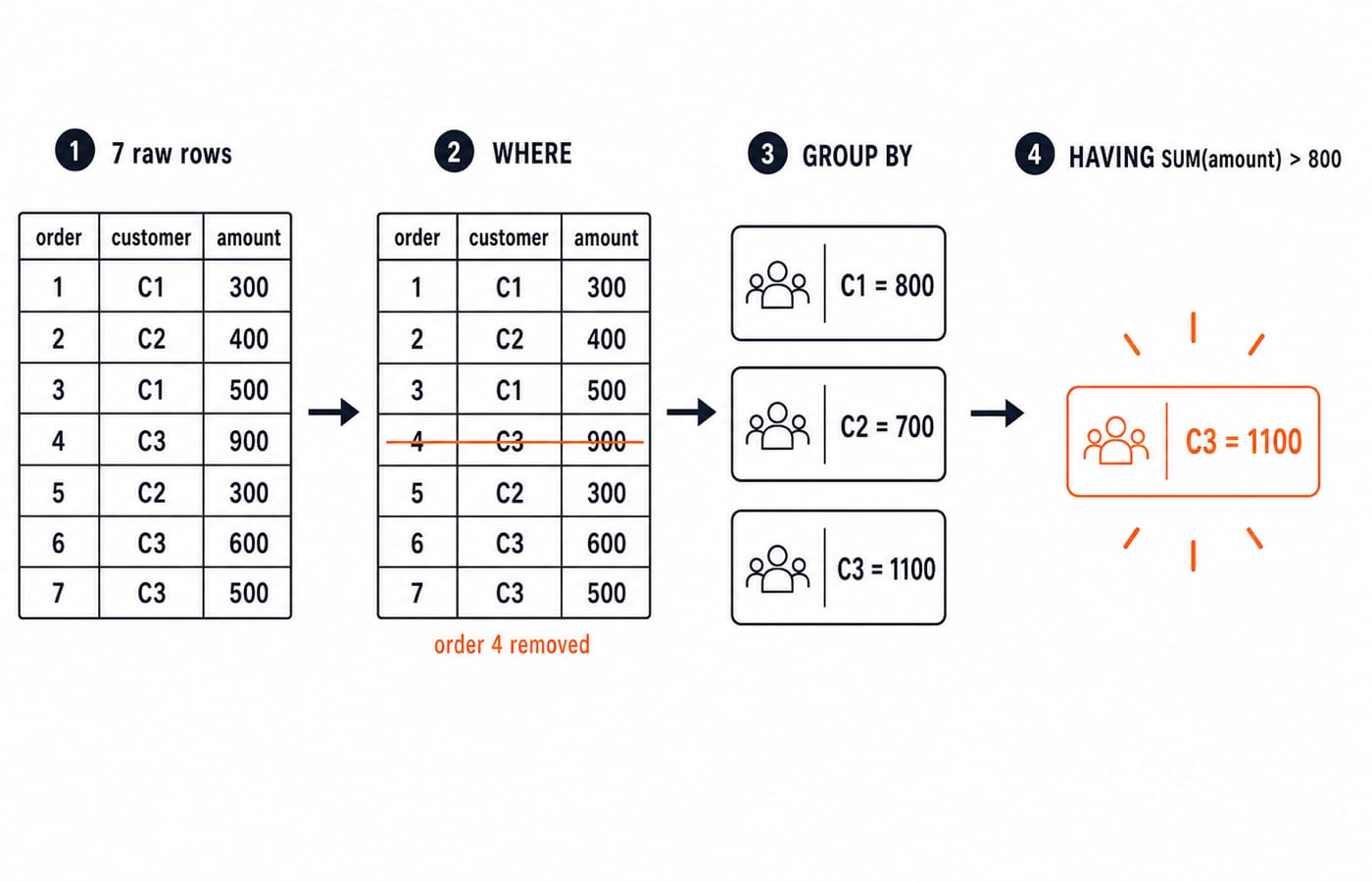
The question is: for completed orders only, show each customer's total, but keep only customers whose completed total exceeds 800.
SELECT customer_id, SUM(amount) AS total
FROM Orders
WHERE status = 'completed'
GROUP BY customer_id
HAVING SUM(amount) > 800;
Trace it in pipeline order.
First, FROM supplies all seven rows. Then WHERE removes order 4 because its status is cancelled, leaving six completed orders.
Next, GROUP BY customer_id forms three groups. Calculate each completed total:
C1:
500 + 300 = 800C2:
700C3:
400 + 600 + 100 = 1,100
Finally, HAVING SUM(amount) > 800 tests the three finished totals. C1 fails because 800 is equal to the cutoff, not greater than it. C2 fails because 700 is below it. C3 passes because 1,100 is greater than 800.
The result contains exactly one row:
customer_id | total |
|---|---|
C3 | 1100 |
The cancelled amount of 200 never enters C2's sum. That is the practical meaning of filtering in WHERE before grouping.
Worked example: COUNT and where its filter belongs
Now answer: which customers have more than two completed orders?
SELECT customer_id
FROM Orders
WHERE status = 'completed'
GROUP BY customer_id
HAVING COUNT(*) > 2;
Again, WHERE first removes the cancelled row. The completed-order counts are:
C1 has orders 1 and 2, so its count is 2.
C2 has order 3, so its count is 1.
C3 has orders 5, 6, and 7, so its count is 3.
The strict condition COUNT(*) > 2 rejects C1 and C2 and keeps C3. The answer is C3.
Notice how the English maps to the clauses. "Completed" is a property of each source row, so it goes in WHERE. "More than two" can be known only after rows have been counted within each customer group, so it goes in HAVING.
COUNT(*) vs COUNT(column), and other grouping subtleties
COUNT(*) counts rows. COUNT(column) counts non-NULL values in that column. If a three-row group has one NULL in coupon_code, COUNT(*) returns 3 while COUNT(coupon_code) returns 2. This difference is a common MCQ because both expressions look as though they are counting the same group.
A HAVING clause can also appear without an explicit GROUP BY. SQL then treats the entire input as one group. On our seven-row table:
SELECT COUNT(*)
FROM Orders
HAVING COUNT(*) > 5;
The one implicit group contains seven rows. Since 7 > 5, the query returns one row containing 7. If the condition were COUNT(*) > 7, it would return no row.
Grouping by several columns creates one group for each distinct combination. GROUP BY customer_id, status, for example, separates C2's completed order from C2's cancelled order. The number of output groups is the number of distinct (customer_id, status) combinations that survive WHERE, not simply the number of customers.
Traps that cost the mark
The same errors recur in tests and interviews:
Putting an aggregate in
WHERE.WHERE SUM(amount) > 800is invalid because no sums exist at that stage. Move the condition toHAVING.Selecting an ambiguous column.
SELECT customer_id, amount ... GROUP BY customer_idasks SQL for oneamounteven though a customer can have many. Aggregateamountor change the grouping.Moving a row filter after grouping. Do not use
HAVINGas a general replacement forWHERE. Strict database engines reject a non-grouped row column there, and a rewritten version can count rows you intended to remove.Assuming groups are sorted.
GROUP BYdoes not promise output order. Add an explicitORDER BY total DESCwhen the question asks for descending totals.Missing a strict inequality. A total of 800 does not satisfy
> 800. It would satisfy>= 800.
For a wider treatment of query structure, joins, and aggregation, read SQL Queries and Joins in DBMS. Then test the distinctions against the worked set in DBMS SQL Query MCQs.
How placement tests and interviews frame GROUP BY
Online assessments usually provide a small orders, employees, or marks table and ask you to predict the output. Another common version asks which clause is wrong and why. Interviews often begin with "What is the difference between WHERE and HAVING?" and then add a nullable column to see whether you understand COUNT(*) versus COUNT(column).
KnowledgeGate's question bank carries hundreds of SQL questions on aggregation, grouping, HAVING, and joins. The useful practice is not memorising outputs. It is tracing the rows through the same pipeline until each stage is visible.
The short version and your next step
Remember the order: FROM, WHERE, GROUP BY, HAVING, SELECT, ORDER BY. Put row conditions in WHERE, group conditions in HAVING, and make every bare selected column part of the grouping.
Next, solve a graded set in Coding for Placements, then combine grouping with joins in the SQL queries and joins guide above. The Coding & Skills category is the broader route when you want to place SQL alongside the other placement fundamentals.
Keep learning

Data Mining and Data Warehouse Explained: Concepts, OLAP and Worked Examples
Follow six orders from operational sources into a warehouse, calculate OLAP totals, and test an association rule on five shopping baskets.
Updated 4 Oct 20266 min readDBMS

Set Operations and Cartesian Product in Relational Algebra: Worked Examples and Exam Traps
Learn when relational set operations are legal, calculate exact union and difference results, enumerate a Cartesian product, and trace how a join filters it.
Updated 29 Sep 20266 min readDBMS

DBMS Interview Questions: Keys, Normalisation and Transactions Through One Worked Schema
Build defensible DBMS interview answers by tracing keys, normal forms, ACID and isolation through one university-enrolment database.
Updated 25 Sep 20265 min readDBMS

Super Key, Candidate Key and Primary Key: A Worked DBMS Example
Use one ENROLMENT relation to derive two candidate keys, enumerate every super key, select a primary key and translate the result into SQL.
Updated 24 Sep 20266 min readDBMS