SQL WHERE Clause and Filtering: Syntax, Operators, and Worked Examples
Learn SQL filtering on one runnable eight-row orders table. Trace WHERE conditions row by row, combine Boolean operators, handle NULL, and check exact results.
KnowledgeGate Team
Exam prep & CS education
Updated 18 Sep 20266 min read
SELECT * FROM orders returns every row, but you usually need something narrower: paid orders, orders within a date window, or customers from selected cities. The WHERE clause is the row-filtering part of a query. A WHERE condition is evaluated row by row, so each row either survives the filter or is removed.CS Fundamentals for Exams & Placements category places WHERE alongside the rest of the DBMS syllabus.
Related reading: SQL query MCQs and SQL learning path.
1. What the SQL WHERE Clause Does
The basic grammar is:
SELECT column_list
FROM table_name
WHERE condition;
The condition is evaluated for each candidate row. Only a row for which it is TRUE survives. A condition involving NULL can become UNKNOWN, so use IS NULL or IS NOT NULL for NULL checks.
For beginner-level reasoning, use this logical order: FROM identifies the rows, WHERE filters them, SELECT chooses the output columns, and ORDER BY sorts the survivors. SQL is declarative, so this model explains the result, not the database engine's physical execution plan.
SELECT * FROM orders;

SELECT * FROM orders
WHERE status = 'paid';
The first query has no row filter. The second keeps paid rows only. SQL uses = for equality. Text and date literals take single quotes, while numeric literals do not.
2. Build the Eight-Row Orders Table Used Throughout
Run this setup once:
CREATE TABLE orders (
    order_id INT PRIMARY KEY,
    customer VARCHAR(30) NOT NULL,
    city VARCHAR(20) NOT NULL,
    amount DECIMAL(10, 2) NOT NULL,
    status VARCHAR(10) NOT NULL,
    order_date DATE NOT NULL,
    coupon_code VARCHAR(10)
);

INSERT INTO orders
    (order_id, customer, city, amount, status, order_date, coupon_code)
VALUES
    (101, 'Asha',   'Delhi',  1250.00, 'paid',      '2026-01-05', 'NEW10'),
    (102, 'Bharat', 'Pune',    800.00, 'pending',   '2026-01-07', NULL),
    (103, 'Charu',  'Delhi',  2200.00, 'paid',      '2026-01-10', 'VIP20'),
    (104, 'Deepak', 'Jaipur',  450.00, 'cancelled', '2026-01-12', NULL),
    (105, 'Esha',   'Pune',   1750.00, 'paid',      '2026-01-15', 'SAVE15'),
    (106, 'Farhan', 'Delhi',  1800.00, 'pending',   '2026-01-18', NULL),
    (107, 'Gita',   'Jaipur', 3000.00, 'paid',      '2026-01-20', 'VIP20'),
    (108, 'Hari',   'Pune',   1200.00, 'paid',      '2026-01-22', NULL);
ID | Customer | City | Amount | Status | Order date | Coupon |
|---|---|---|---|---|---|---|
101 | Asha | Delhi | 1250.00 | paid | 2026-01-05 | NEW10 |
102 | Bharat | Pune | 800.00 | pending | 2026-01-07 | NULL |
103 | Charu | Delhi | 2200.00 | paid | 2026-01-10 | VIP20 |
104 | Deepak | Jaipur | 450.00 | cancelled | 2026-01-12 | NULL |
105 | Esha | Pune | 1750.00 | paid | 2026-01-15 | SAVE15 |
106 | Farhan | Delhi | 1800.00 | pending | 2026-01-18 | NULL |
107 | Gita | Jaipur | 3000.00 | paid | 2026-01-20 | VIP20 |
108 | Hari | Pune | 1200.00 | paid | 2026-01-22 | NULL |
LIKE case sensitivity and date handling vary between database engines, so check your database documentation before relying on engine-specific behaviour.
3. Work Through a SQL Filter Row by Row
Consider this query:
SELECT order_id, customer, amount
FROM orders
WHERE amount >= 1000 AND status = 'paid'
ORDER BY order_id;
ID |
|
| Result |
|---|---|---|---|
101 | TRUE | TRUE | Keep |
102 | FALSE | FALSE | Reject |
103 | TRUE | TRUE | Keep |
104 | FALSE | FALSE | Reject |
105 | TRUE | TRUE | Keep |
106 | TRUE | FALSE | Reject |
107 | TRUE | TRUE | Keep |
108 | TRUE | TRUE | Keep |
The exact output contains five rows: Asha 1250.00, Charu 2200.00, Esha 1750.00, Gita 3000.00, and Hari 1200.00, with IDs 101, 103, 105, 107, 108.
The comparison operators are =, <>, >, >=, <, and <=. <> is the standard not-equal form. Do not rely on == as a portable equality operator, or write amount >= '1000' and force an unnecessary type conversion.
4. Combine WHERE Conditions with AND, OR, NOT, and Parentheses
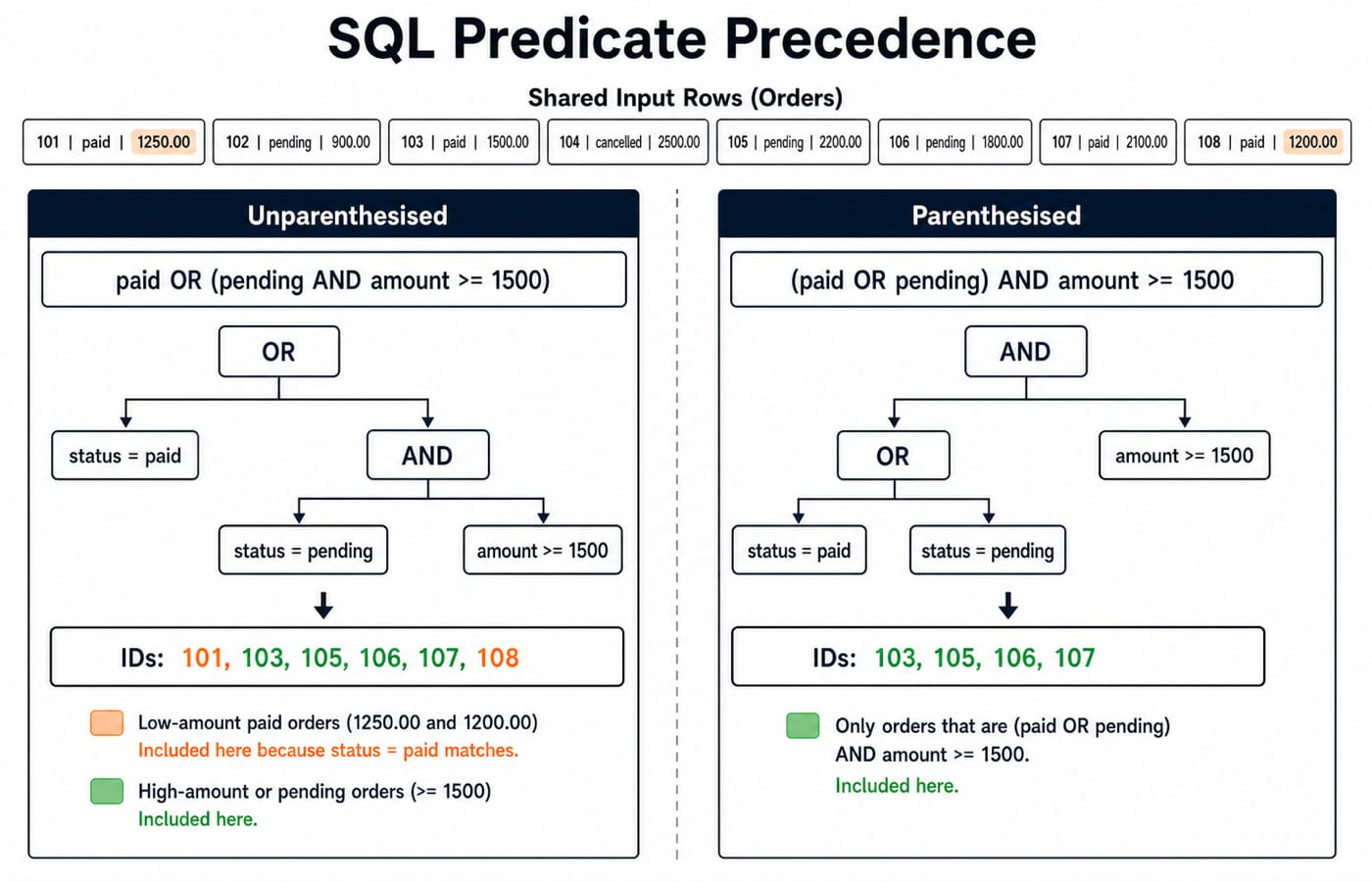
AND binds more tightly than OR. Therefore:
SELECT order_id
FROM orders
WHERE status = 'paid'
   OR status = 'pending' AND amount >= 1500
ORDER BY order_id;
SQL reads this as paid, or pending with an amount of at least 1500. Every paid row survives, and pending row 106 passes the amount test. The result is 101, 103, 105, 106, 107, 108.
Now add parentheses:
SELECT order_id
FROM orders
WHERE (status = 'paid' OR status = 'pending')
  AND amount >= 1500
ORDER BY order_id;
The amount test now applies to both statuses. Paid rows 101 and 108 disappear because 1250 and 1200 are below 1500. The result is 103, 105, 106, 107.
WHERE NOT (status = 'cancelled') returns every ID except 104. Use parentheses whenever mixed AND and OR conditions could be read in more than one way.
5. Use BETWEEN, IN, LIKE, and Date Ranges
These operators make common filters shorter:
Query | Meaning | Exact IDs |
|---|---|---|
| Inclusive of both endpoints |
|
| City equals either listed value |
|
| Customer begins with A |
|
IN replaces equality checks joined by OR; it is not a partial-text search.
For dates, a half-open range is reusable:
SELECT order_id, order_date
FROM orders
WHERE order_date >= '2026-01-10'
  AND order_date <  '2026-01-21'
ORDER BY order_id;
It returns 103, 104, 105, 106, 107. The exclusive upper boundary is especially useful if a column later contains timestamps. Do not assume every SQL engine parses implicit date formats identically. Once single-table filters are clear, SQL queries and joins in DBMS is the natural next concept, although a join is not part of WHERE syntax.
6. Handle NULL Correctly and Avoid Common WHERE Errors
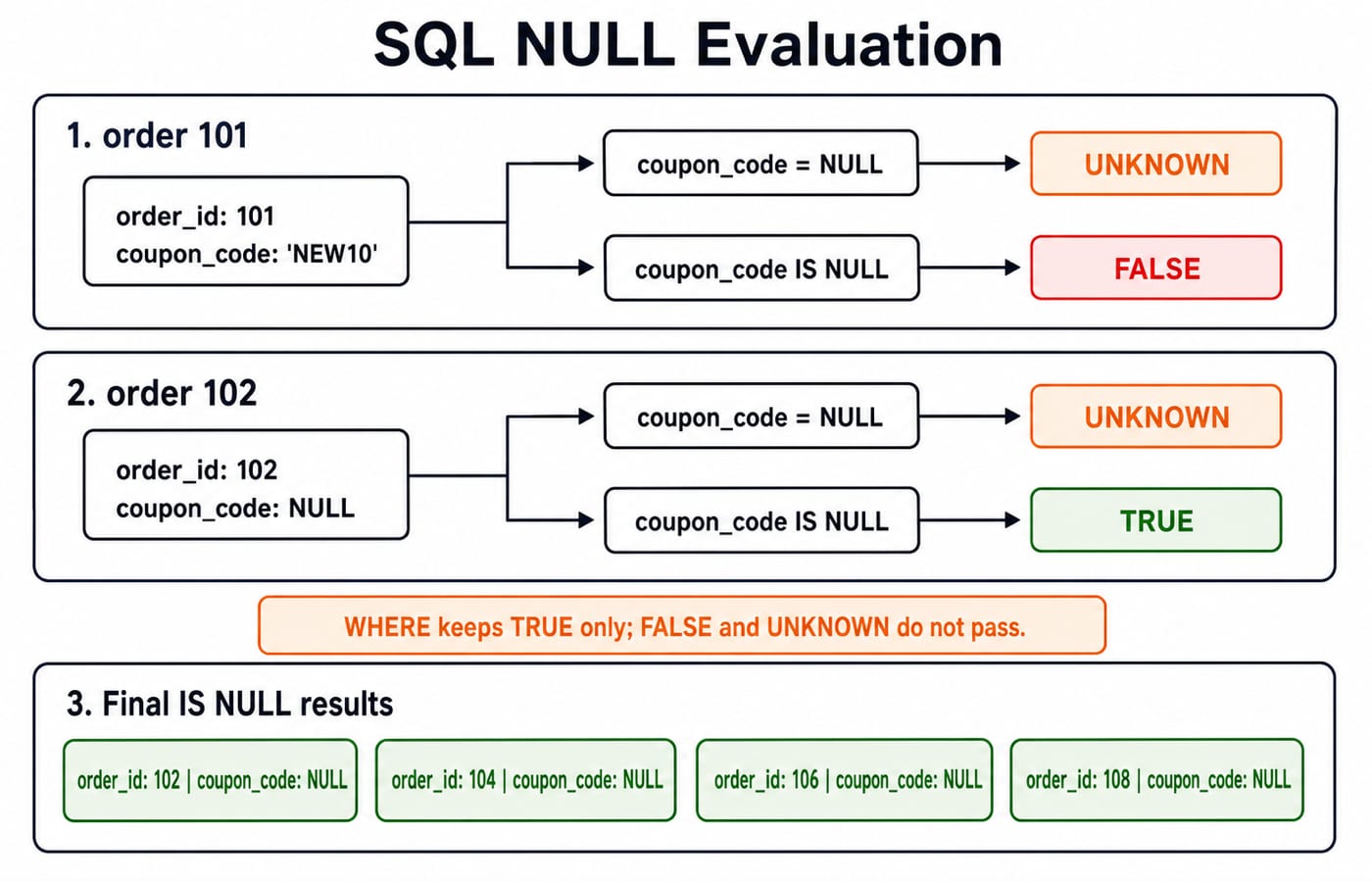
WHERE coupon_code IS NULL returns 102, 104, 106, 108. WHERE coupon_code IS NOT NULL returns 101, 103, 105, 107.
By contrast, coupon_code = NULL does not find the NULL rows. The comparison evaluates to UNKNOWN, not TRUE, and WHERE keeps only TRUE.
Fix these common errors:
Write
status = 'paid', not the unquotedstatus = paid.Write
amount > 1000 OR amount < 2000; repeat the column name.Remember that
BETWEENincludes both endpoints.Do not assume a
SELECTalias is available to the same query'sWHERE. Repeat the underlying expression or use a subquery.
Mixed AND and OR expressions can give surprising results, so use parentheses to make the intended grouping explicit.
7. Practise SQL Filtering for Exams and Interviews
Solve each task from the table before reading the answers. Together they test predicate translation, Boolean grouping, and exact row selection.
Predict IDs for
city = 'Pune' AND amount >= 1000.Predict IDs for
status <> 'cancelled' AND coupon_code IS NULL.Rewrite and solve: Delhi or Jaipur orders on or after 12 January 2026.
Answer key
105, 108. Pune row 102 is rejected because 800 is below 1000.102, 106, 108. Row 104 has a NULL coupon but is cancelled; rows 101, 103, 105, and 107 have coupons.(city = 'Delhi' OR city = 'Jaipur') AND order_date >= '2026-01-12'gives104, 106, 107. Delhi rows 101 and 103 are too early, while all Pune rows fail the city test.
For hiring-oriented practice, continue with SQL queries for placement interviews after you can justify every rejected row here.
8. Short Version and the Next Step
WHEREfilters rows.Quote text and date literals, but not numbers.
Use parentheses with mixed Boolean operators.
Use
IS NULL, not= NULL.Verify a filter with
SELECTbefore reusing it in any data-changing statement.
Now change one predicate in each Section 5 query. Predict the IDs on paper, run the query, and reconcile every mismatch row by row. Placement-focused readers can continue with CS Fundamentals for Placements by Sanchit Sir. Exam-oriented learners can use NTA-UGC-NET Paper - 2 for a broader DBMS path.
Filtering one table is the foundation. The next bridge is combining tables, then deciding which joined rows should survive.
Keep learning
Data Mining and Data Warehouse Explained: Concepts, OLAP and Worked Examples
Follow six orders from operational sources into a warehouse, calculate OLAP totals, and test an association rule on five shopping baskets.
Updated 4 Oct 20266 min readDBMS

Set Operations and Cartesian Product in Relational Algebra: Worked Examples and Exam Traps
Learn when relational set operations are legal, calculate exact union and difference results, enumerate a Cartesian product, and trace how a join filters it.
Updated 29 Sep 20266 min readDBMS
DBMS Interview Questions: Keys, Normalisation and Transactions Through One Worked Schema
Build defensible DBMS interview answers by tracing keys, normal forms, ACID and isolation through one university-enrolment database.
Updated 25 Sep 20265 min readDBMS
Super Key, Candidate Key and Primary Key: A Worked DBMS Example
Use one ENROLMENT relation to derive two candidate keys, enumerate every super key, select a primary key and translate the result into SQL.
Updated 24 Sep 20266 min readDBMS