ORDER BY and LIMIT in SQL: Tutorial with Exact Outputs
Learn to sort SQL results deterministically, resolve ties, select top rows, and paginate with LIMIT and OFFSET using one eight-row orders table.
KnowledgeGate Team
Exam prep & CS education
Updated 19 Sep 20266 min read

A query can return the right rows and still be unusable when their order changes between runs. Copying the first few displayed rows is also not the same as asking SQL for the top few. One runnable eight-row fulfilment table makes exact results, stable tie-breaking, top-N selection, pagination, and common mistakes visible. ORDER BY determines result order, while LIMIT keeps a requested number of rows after that ordering. PostgreSQL, MySQL, and SQLite use LIMIT ... OFFSET ...; other engines provide equivalent syntax.
What ORDER BY and LIMIT do
The general query shape is:
SELECT column_list
FROM table_name
WHERE condition
ORDER BY sort_expression [ASC|DESC], ...
LIMIT row_count OFFSET rows_to_skip;
ASC sorts lowest to highest and is the default. DESC reverses that key. Each comma-separated key can have its own direction.
Trace the logic as FROM, WHERE, SELECT, ORDER BY, OFFSET, then LIMIT. This is not an optimiser's physical execution plan. Without ORDER BY, order is not guaranteed. Without deterministic ordering, LIMIT means some N rows, not reliably the top N. SQL sorting and limiting build on the wider SQL and DBMS foundation in CS Fundamentals for Exams and Placements.
Build the eight-row fulfilment orders table
Run this before comparing outputs:
CREATE TABLE fulfilment_orders (
    order_id INT PRIMARY KEY,
    route VARCHAR(30) NOT NULL,
    warehouse VARCHAR(20) NOT NULL,
    priority INT NOT NULL,
    promised_date DATE NOT NULL
);

INSERT INTO fulfilment_orders
    (order_id, route, warehouse, priority, promised_date)
VALUES
    (101, 'Route A', 'West',    4, '2026-07-02'),
    (102, 'Route B', 'South',   2, '2026-07-01'),
    (103, 'Route C', 'West',    4, '2026-07-03'),
    (104, 'Route D', 'North',   5, '2026-07-04'),
    (105, 'Route E', 'Central', 1, '2026-07-02'),
    (106, 'Route F', 'West',    5, '2026-07-05'),
    (107, 'Route G', 'South',   4, '2026-07-03'),
    (108, 'Route H', 'North',   3, '2026-07-01');
order_id | route | warehouse | priority | promised_date |
|---|---|---|---|---|
101 | Route A | West | 4 | 2026-07-02 |
102 | Route B | South | 2 | 2026-07-01 |
103 | Route C | West | 4 | 2026-07-03 |
104 | Route D | North | 5 | 2026-07-04 |
105 | Route E | Central | 1 | 2026-07-02 |
106 | Route F | West | 5 | 2026-07-05 |
107 | Route G | South | 4 | 2026-07-03 |
108 | Route H | North | 3 | 2026-07-01 |
The ties are deliberate: Route D and Route F share 5; Route A, Route C, and Route G share 4; Route C and Route G share 2026-07-03. SELECT order_id, route, priority FROM fulfilment_orders; establishes membership only. Any displayed insertion order remains unguaranteed.
Sort one column, then add tie-breakers
ORDER BY priority ASC gives Route E 105, Route B 102, Route H 108, then tied sets {101, 103, 107} at 4 and {104, 106} at 5. Internal tie order is unspecified.
ORDER BY priority DESC gives groups 5, 4, 3, 2, 1, without resolving ties. Descending is not deterministic.
Now use:
SELECT order_id, route, priority, promised_date
FROM fulfilment_orders
ORDER BY priority DESC, promised_date ASC, order_id ASC;
Exact IDs are 104, 106, 101, 103, 107, 108, 102, 105. Priority ranks first. Promised dates place Route D before Route F and Route A before the other 4 rows. Unique order_id places Route C before Route G.
Fully worked top-N query
SELECT order_id, route, priority, promised_date
FROM fulfilment_orders
ORDER BY priority DESC, promised_date ASC, order_id ASC
LIMIT 5;
order_id | route | priority | promised_date |
|---|---|---|---|
104 | Route D | 5 | 2026-07-04 |
106 | Route F | 5 | 2026-07-05 |
101 | Route A | 4 | 2026-07-02 |
103 | Route C | 4 | 2026-07-03 |
107 | Route G | 4 | 2026-07-03 |
All eight rows enter. Priority puts 5 first, promised date places those two in order, and Route A leads the 4 rows. order_id resolves Route C against Route G. Then LIMIT 5 discards Route H, Route B, and Route E. It assigns no ranks and changes no stored data.
Filter before sorting and limiting
SELECT order_id, route, warehouse, priority
FROM fulfilment_orders
WHERE warehouse = 'West'
ORDER BY priority DESC, order_id ASC
LIMIT 2;
WHERE leaves Route A 101/4, Route C 103/4, and Route F 106/5. Sorting gives 106, 101, 103; limiting returns:
order_id | route | warehouse | priority |
|---|---|---|---|
106 | Route F | West | 5 |
101 | Route A | West | 4 |
The tie-breaker gives Route A second place. Remember: filter, sort, cut. SQL Queries and Joins in DBMS: Worked Join and GROUP BY shows how to combine tables before applying it.
Use OFFSET for pages
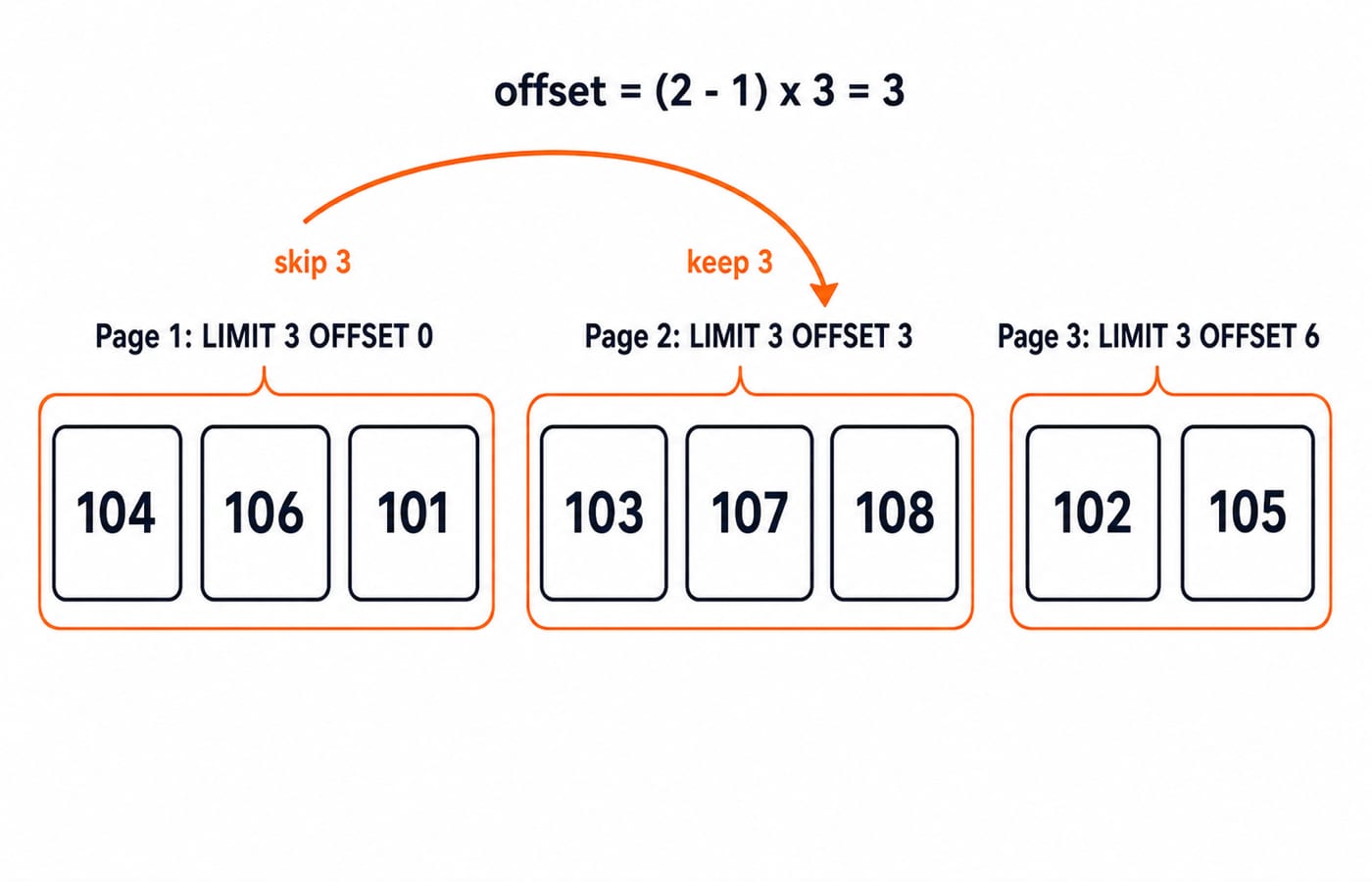
At page size 3, pages return 104, 106, 101; 103, 107, 108; then 102, 105. Use offset = (page_number - 1) * page_size, so page 2 needs (2 - 1) * 3 = 3.
SELECT order_id, route, priority, promised_date
FROM fulfilment_orders
ORDER BY priority DESC, promised_date ASC, order_id ASC
LIMIT 3 OFFSET 3;
OFFSET 3 skips three sorted rows; LIMIT 3 keeps positions 4 through 6. It does not start with order_id 3. Pages can shift as data changes. A stable snapshot or keyset pagination is a later choice. A unique tie-breaker cannot freeze data.
Common mistakes and assessment-style traces
Cause | Consequence | Repair |
|---|---|---|
| Any three rows may qualify | Add the exact ranking rule |
| Wrong clause order here | Sort before limiting |
| Date silently defaults to | Write both directions for clarity |
| It may sort one identical string literal | Use |
A non-unique last key | Remaining ties can move | End with a unique key such as |
LIMIT is not universal. Engines may provide TOP, FETCH FIRST, or OFFSET ... FETCH, so check their documentation. NULL placement also differs. Every sort column in this table is NOT NULL, removing that variable.
Solve these before reading the answers:
ORDER BY priority ASC, order_id ASC LIMIT 3ORDER BY priority DESC, promised_date ASC, order_id ASC LIMIT 2 OFFSET 1WHERE warehouse = 'South' ORDER BY priority DESC, order_id ASC LIMIT 2ORDER BY promised_date DESC, order_id DESC LIMIT 2
Answer key: A returns 105, 102, 108; Route A is rejected because priority 4 follows Route H at 3. B skips Route D and returns 106, 101; Route C follows Route A on promised date. C returns 107, 102; Route G has priority 4, Route B has 2, and Route E is excluded by its warehouse. D returns 106, 104; the next promised date is 2026-07-03, so those rows are rejected.
Practise predicting output, repairing unstable top-N, calculating offsets, and resolving ties with SQL Queries for Placement Interviews, Step by Step. Use Computer Science Fundamentals for Placements by Sanchit Sir for structured DBMS revision. Assessment questions commonly test clause order, ties, and output prediction.
Short version and the next step
ORDER BY is the only part here that guarantees result order. ASC is the default, while DESC reverses one key. Later keys break earlier ties. LIMIT keeps rows only after sorting, and OFFSET skips rows within that deterministic result. That is how the top five become 104, 106, 101, 103, 107.
For one final extension, change Route G's priority from 4 to 6. Predict 107, 104, 106, 101, 103: Route G moves above both 5 rows, while Route A still precedes Route C among the remaining 4 rows.
Retype the setup, run the four assessment queries, then reverse one sort direction at a time and predict the IDs before execution. For a broader structured CS route, continue with Zero to Hero Complete CS Course.
Keep learning
Data Mining and Data Warehouse Explained: Concepts, OLAP and Worked Examples
Follow six orders from operational sources into a warehouse, calculate OLAP totals, and test an association rule on five shopping baskets.
Updated 4 Oct 20266 min readDBMS
Set Operations and Cartesian Product in Relational Algebra: Worked Examples and Exam Traps
Learn when relational set operations are legal, calculate exact union and difference results, enumerate a Cartesian product, and trace how a join filters it.
Updated 29 Sep 20266 min readDBMS
DBMS Interview Questions: Keys, Normalisation and Transactions Through One Worked Schema
Build defensible DBMS interview answers by tracing keys, normal forms, ACID and isolation through one university-enrolment database.
Updated 25 Sep 20265 min readDBMS
Super Key, Candidate Key and Primary Key: A Worked DBMS Example
Use one ENROLMENT relation to derive two candidate keys, enumerate every super key, select a primary key and translate the result into SQL.
Updated 24 Sep 20266 min readDBMS