INNER JOIN in SQL: Syntax, Worked Examples, and Common Errors
Build INNER JOIN intuition with a customer-order dataset. Trace exact row matches, handle one-to-many results, extend to payments, and practise common interview patterns.
KnowledgeGate Team
Exam prep & CS education
Updated 25 Oct 20266 min read
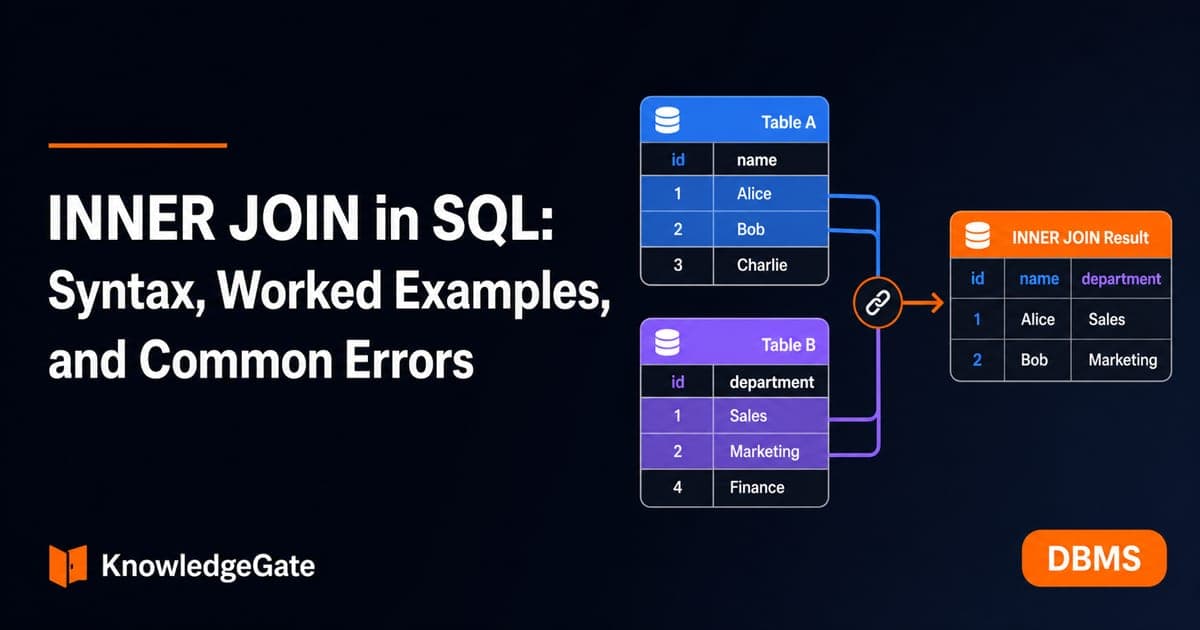
Real databases usually split related data across tables. You may know how to use SELECT and WHERE, yet still be unsure how to combine only related rows without creating confusing repeats or losing track of unmatched data. An INNER JOIN keeps only matching key pairs; one-to-many data can repeat a left-side row, while chaining another INNER JOIN narrows the result again. It fits into the wider set of CS fundamentals used in DBMS study and placement preparation.
What INNER JOIN Does
An INNER JOIN returns one result row for every pair of input rows that satisfies its ON condition. It does not simply place two tables side by side. It also does not retain an unmatched row from either table.
The reusable form is:
SELECT c.customer_id, c.customer_name, o.order_id, o.amount
FROM Customers AS c
INNER JOIN Orders AS o
  ON c.customer_id = o.customer_id;
Here, c and o are aliases that make the query shorter and show which table supplies each column. The predicate after ON defines the relationship: a customer row matches an order row when their customer_id values are equal. Qualifying a shared column as c.customer_id or o.customer_id also prevents ambiguity.
Worked Example: Match Customers to Their Orders
Create and populate these tables. Order 5004 deliberately refers to customer 105, who is absent from Customers. That makes both kinds of unmatched row visible for learning, though orphan orders are not good production design.
CREATE TABLE Customers (
  customer_id INT PRIMARY KEY,
  customer_name VARCHAR(30),
  city VARCHAR(20)
);

CREATE TABLE Orders (
  order_id INT PRIMARY KEY,
  customer_id INT,
  amount DECIMAL(10, 2),
  status VARCHAR(10)
);

INSERT INTO Customers VALUES
  (101, 'Asha', 'Delhi'),
  (102, 'Bilal', 'Pune'),
  (103, 'Charu', 'Delhi'),
  (104, 'Dev', 'Jaipur');

INSERT INTO Orders VALUES
  (5001, 101, 1200.00, 'PAID'),
  (5002, 103, 750.00, 'PAID'),
  (5003, 101, 450.00, 'PENDING'),
  (5004, 105, 999.00, 'PAID');
Now run the join and order the result by order ID:
SELECT c.customer_id, c.customer_name, o.order_id, o.amount
FROM Customers AS c
INNER JOIN Orders AS o
  ON c.customer_id = o.customer_id
ORDER BY o.order_id;
customer_id | customer_name | order_id | amount |
|---|---|---|---|
101 | Asha | 5001 | 1200.00 |
103 | Charu | 5002 | 750.00 |
101 | Asha | 5003 | 450.00 |
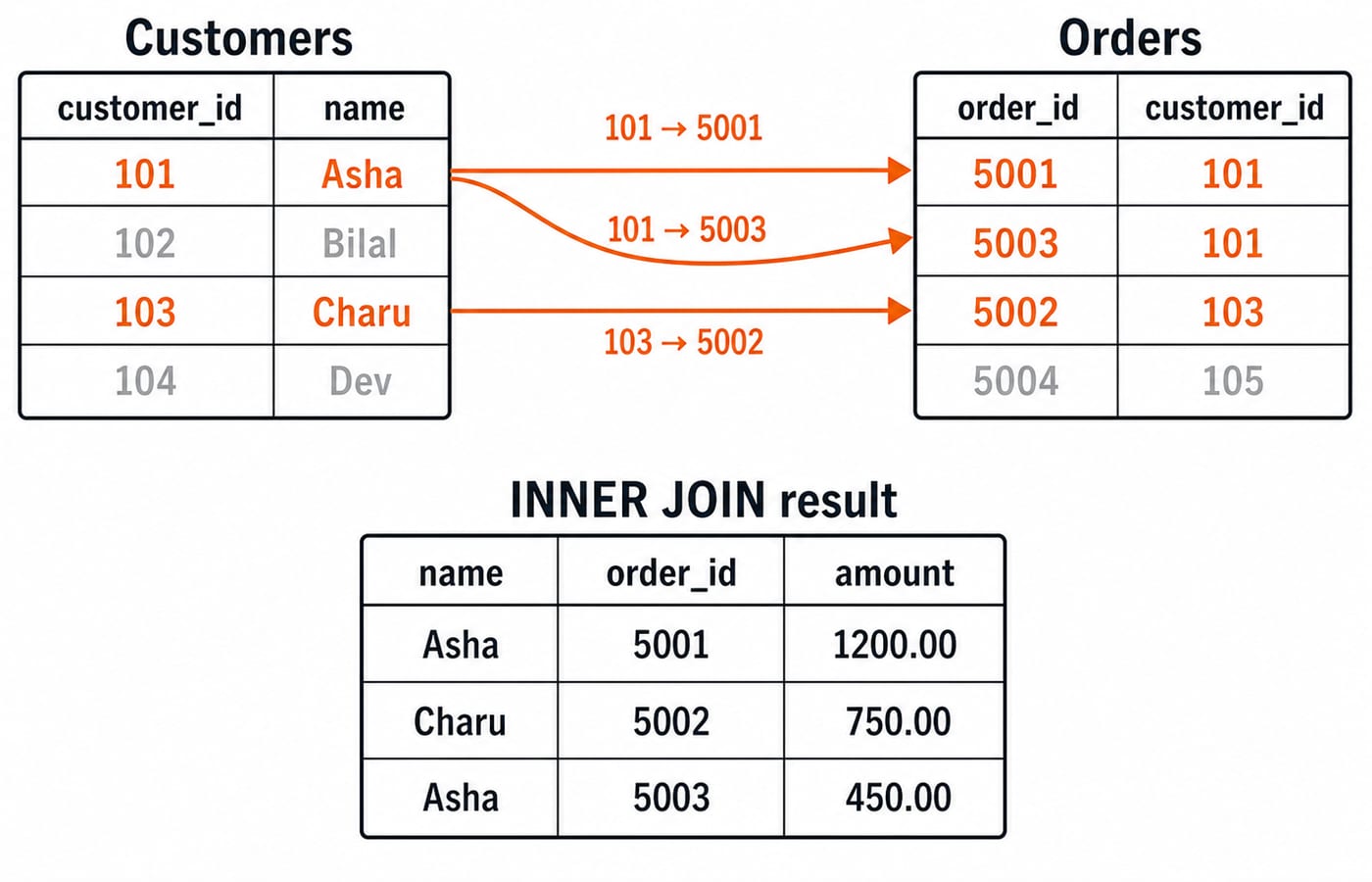
Asha appears twice because customer 101 matches two different orders. Charu matches order 5002. Bilal and Dev have no orders, so they disappear. Order 5004 also disappears because customer 105 has no matching customer row.
Four customer rows and four order rows produce three output rows because exactly three pairs match. Result size depends on matching pairs, not the smaller input.
Duplicates, Filters, Aggregates, and LEFT JOIN Contrast
Asha's repeated name is expected one-to-many behaviour, not an SQL duplicate bug. COUNT(*) over the joined rows is 3, while COUNT(DISTINCT c.customer_id) is 2. The first expression counts matched pairs. The second counts different matched customers.
Filters apply after the relationship is established:
SELECT c.customer_name, o.order_id, o.amount
FROM Customers AS c
INNER JOIN Orders AS o
  ON c.customer_id = o.customer_id
WHERE c.city = 'Delhi' AND o.status = 'PAID'
ORDER BY o.order_id;
This returns Asha's order 5001 and Charu's order 5002. Their total is 1200.00 + 750.00 = 1950.00.
If you group the original, unfiltered join by c.customer_id, c.customer_name, Asha has order_count = 2 and total_amount = 1200.00 + 450.00 = 1650.00. Charu has order_count = 1 and total_amount = 750.00.
Changing the original query to Customers LEFT JOIN Orders produces five rows: Asha twice, Charu once, plus Bilal and Dev once each with NULL order columns. Use an inner join when only matches belong in the answer. Use a left join when every left-side row must remain.
Continue to SQL OUTER JOINs: LEFT, RIGHT, and FULL with Worked Examples for preserved-side behaviour across LEFT, RIGHT, FULL, NULL extension, and ON-versus-WHERE effects. The LEFT JOIN here serves only as a contrast for INNER JOIN's match-only rule.
Extending the Pattern to Three Tables
Add a payment table and three rows:
CREATE TABLE Payments (
  payment_id INT PRIMARY KEY,
  order_id INT,
  paid_amount DECIMAL(10, 2)
);

INSERT INTO Payments VALUES
  (9001, 5001, 1200.00),
  (9002, 5002, 750.00),
  (9003, 5004, 999.00);

SELECT c.customer_name, o.order_id, p.payment_id, p.paid_amount
FROM Customers AS c
INNER JOIN Orders AS o
  ON c.customer_id = o.customer_id
INNER JOIN Payments AS p
  ON o.order_id = p.order_id
ORDER BY o.order_id;
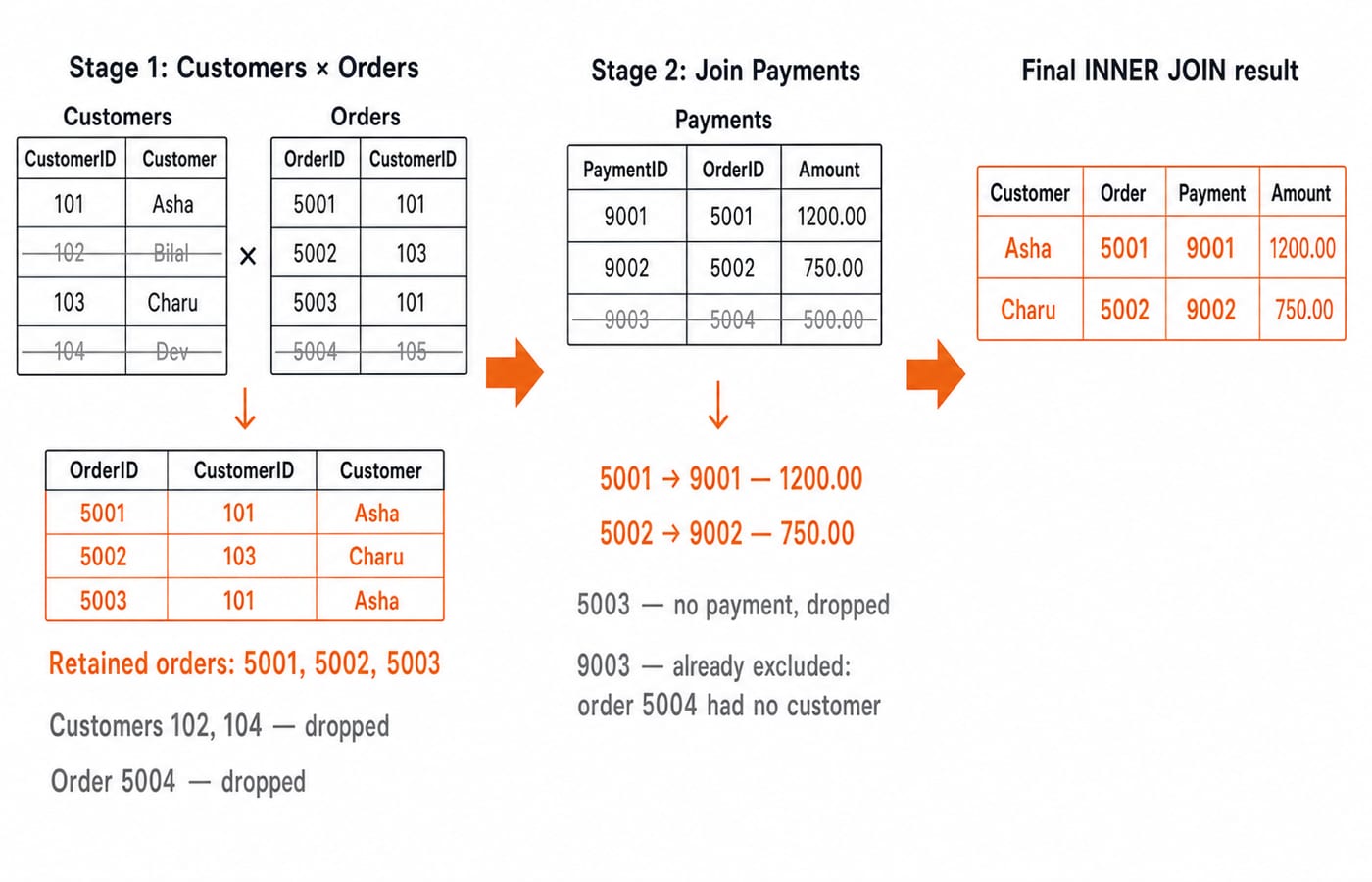
The exact result is (Asha, 5001, 9001, 1200.00) and (Charu, 5002, 9002, 750.00). Order 5003 is removed because it has no payment. Payment 9003 cannot survive because its order 5004 already failed the customer match.
Read each ON clause separately: identify the aliases it connects, then list the pairs it retains. This prepares you for longer interview queries.
Common INNER JOIN Errors and How to Fix Them
The most damaging error is a wrong predicate:
ON c.customer_id = c.customer_idThis tautology pairs all four customers with all four orders: 4 x 4 = 16 rows. Fix it with ON c.customer_id = o.customer_id. Prefer stable keys to descriptive fields such as city.
For unexpected repeats or missing rows, check the relationship cardinality, NULL join keys, compatible data types, and whitespace or case differences in text keys. In a normal equality join, NULL = NULL is not true, so two NULL keys do not match. Do not add DISTINCT automatically, because it can hide a faulty predicate.
For readable SQL, qualify columns with aliases and avoid SELECT *. Keep relationship conditions in ON, and result filters such as o.status = 'PAID' in WHERE. With an inner join, either place can sometimes return the same rows, but clear placement exposes intent.
How Exams and Interviews Test INNER JOIN
Stable question patterns include tracing an output table, counting matched row pairs, finding a wrong predicate, distinguishing an inner join from a left join, and explaining repetition in a one-to-many relationship. The worked data gives a compact trace question: how many rows and distinct customers does the original join return? It returns three rows but only two distinct customers, because Asha contributes two matched pairs. After adding WHERE o.status = 'PAID', COUNT(*) is 2.
Practice Exercises with Answer Checkpoints
Treat each exercise as independent and start from the original data unless the instruction adds a row.
Insert
(5005, 104, 300.00, 'PAID')intoOrders, then rerun the original query. Checkpoint: four rows, with Dev and order5005added. Order5004remains absent.Return only paid matched orders with an amount of at least
800.00. Checkpoint: only(Asha, 5001, 1200.00).Before the new insert, compare
COUNT(*)withCOUNT(DISTINCT c.customer_id). Checkpoint:3versus2.Change only
INNER JOINtoLEFT JOINin the original customer-order query. Checkpoint: five rows, including Bilal and Dev withNULLorder columns.
The SQL Query MCQs collection is useful for checking these distinctions under question conditions. KnowledgeGate has 30+ live practice questions on SQL join operations, so you can practise output tracing as well as query correction.
INNER JOIN in One Minute and the Next Step
Keep three ideas together: INNER JOIN keeps matching pairs, ON defines what a match means, and a one-to-many relationship legitimately repeats the row from the one side. Predict the matches on paper before running the query.
For placement-focused DBMS revision, continue with Computer Science Fundamentals for Placements. For a broader structured path across core computer science, use Zero to Hero. Run the SQL shown above, modify one input row, and explain every output row before moving to outer joins.
Keep learning
Types of Indexing in DBMS: Primary, Clustering, Secondary and Multilevel Examples
Learn how file order, uniqueness and entry coverage determine an index type. Two worked examples build index levels and count simplified block reads.
Updated 24 Oct 20266 min readDBMS
SQL Joins Explained: INNER, LEFT, RIGHT, FULL, CROSS and SELF with Runnable Examples
Trace all six SQL join types on one support-agent dataset, with runnable queries, exact outputs, NULL behaviour, row counts and filter-placement traps.
Updated 21 Oct 20265 min readDBMS
GROUP BY and HAVING in SQL: Syntax and Worked Examples
Trace eight sales rows through WHERE, GROUP BY, aggregates, and HAVING, then tackle multiple columns, NULLs, COUNT variants, and common query traps.
Updated 17 Oct 20265 min readDBMS
SQL Aggregate Functions: COUNT, SUM, AVG, MIN and MAX with Examples
Use one runnable sales table to see exactly how SQL aggregates treat rows, NULL values, duplicates and groups. Every result includes the arithmetic behind it.
Updated 13 Oct 20265 min readDBMS