Self Join in SQL: Syntax, Worked Examples, and Exercises
Learn how SQL aliases let one table play several roles. Run exact examples for reporting lines, salary comparisons, city pairs, revision changes, and three-level chains.
KnowledgeGate Team
Exam prep & CS education
Updated 22 Sep 20266 min read
An employee and that employee's manager can live in the same table, even though joins are usually introduced with two different tables. A self join solves this by giving the same table two or more aliases. It is not a separate SQL keyword. Those aliases reveal hierarchies, compare colleagues, generate unique pairs, and measure changes between revisions. The key is to decide what role each alias plays before writing the relationship condition.
1. Build the Employee Table for the Hierarchy and Salary Examples
Run this setup first:
CREATE TABLE employees (
    employee_id INT PRIMARY KEY,
    employee_name VARCHAR(30) NOT NULL,
    manager_id INT NULL,
    department VARCHAR(20) NOT NULL,
    salary INT NOT NULL,
    FOREIGN KEY (manager_id) REFERENCES employees(employee_id)
);

INSERT INTO employees
    (employee_id, employee_name, manager_id, department, salary)
VALUES
    (101, 'Asha',  NULL, 'Sales',       72000),
    (102, 'Ravi',  101,  'Sales',       68000),
    (103, 'Meera', 101,  'Sales',       76000),
    (104, 'Kabir', 102,  'Engineering', 80000),
    (105, 'Nila',  NULL, 'Engineering', 80000),
    (106, 'Om',    105,  'Engineering', 74000);
employee_id | employee_name | manager_id | department | salary |
|---|---|---|---|---|
101 | Asha | NULL | Sales | 72000 |
102 | Ravi | 101 | Sales | 68000 |
103 | Meera | 101 | Sales | 76000 |
104 | Kabir | 102 | Engineering | 80000 |
105 | Nila | NULL | Engineering | 80000 |
106 | Om | 105 | Engineering | 74000 |
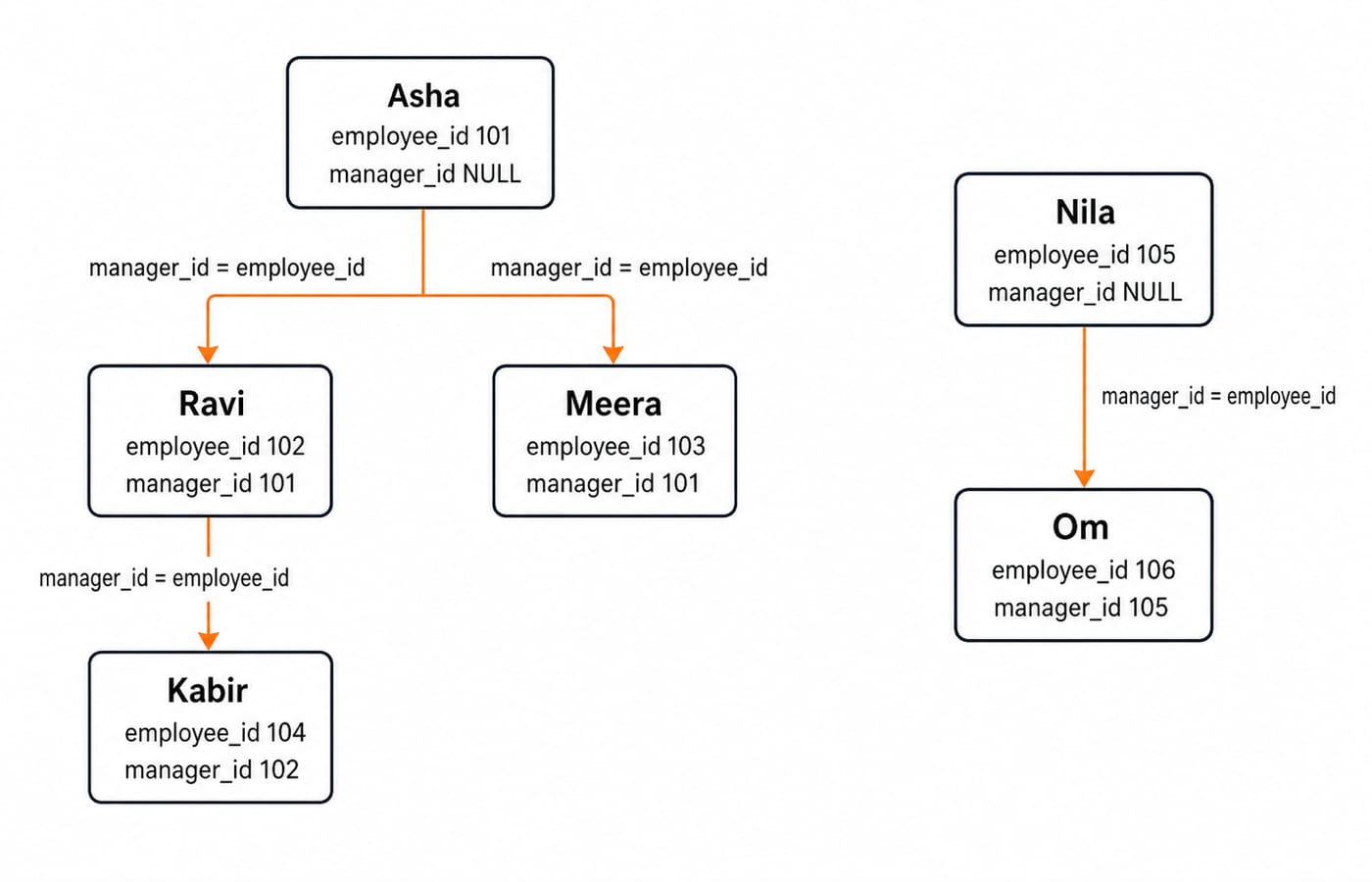
manager_id points back to employee_id. Ravi and Meera report to Asha, Kabir reports to Ravi, and Om reports to Nila. Asha and Nila have NULL managers. One alias can now represent the employee side and another the manager side. Both expose the same five columns, but the join condition gives them different roles.
An alias does not duplicate stored data. It labels each table reference so SQL can evaluate the intended relationship between the roles.
2. Write the Basic Employee-Manager Self Join
SELECT
    e.employee_id,
    e.employee_name AS employee,
    m.employee_name AS manager
FROM employees AS e
JOIN employees AS m
  ON e.manager_id = m.employee_id
ORDER BY e.employee_id;
For Ravi, e.manager_id is 101. It matches Asha's m.employee_id, so SQL produces (102, Ravi, Asha). The full result is:
employee_id | employee | manager |
|---|---|---|
102 | Ravi | Asha |
103 | Meera | Asha |
104 | Kabir | Ravi |
106 | Om | Nila |
The qualifiers make e.employee_name and m.employee_name unambiguous even though both come from one physical table. SQL has no portable SELF JOIN clause. This is an ordinary JOIN whose two sources happen to be the same table. The earlier SQL OUTER JOINs: LEFT, RIGHT, and FULL with Worked Examples owns preserved-side joins between different tables; this tutorial owns role matching between rows of one table.
3. Choose INNER or LEFT Self Join Without Losing Root Rows
Keep the employee alias on the left and change only the join type:
SELECT
    e.employee_id,
    e.employee_name AS employee,
    m.employee_name AS manager
FROM employees AS e
LEFT JOIN employees AS m
  ON e.manager_id = m.employee_id
ORDER BY e.employee_id;
The result is (101, Asha, NULL), (102, Ravi, Asha), (103, Meera, Asha), (104, Kabir, Ravi), (105, Nila, NULL), and (106, Om, Nila). The inner join returned four rows because the two roots had no matching manager. The left join retains all six employees.
Requirement | Join |
|---|---|
Show only matched relationships |
|
Keep root or unmatched rows |
|
Adding WHERE m.employee_id IS NOT NULL after this left join removes Asha and Nila, so this dataset behaves like the inner-join result again.
4. Compare Rows Within the Same Department
Aliases can also compare peers:
SELECT
    low.department,
    low.employee_name AS lower_paid,
    low.salary AS lower_salary,
    high.employee_name AS higher_paid,
    high.salary AS higher_salary
FROM employees AS low
JOIN employees AS high
  ON low.department = high.department
 AND low.salary < high.salary
ORDER BY low.department, low.salary, high.salary, high.employee_id;
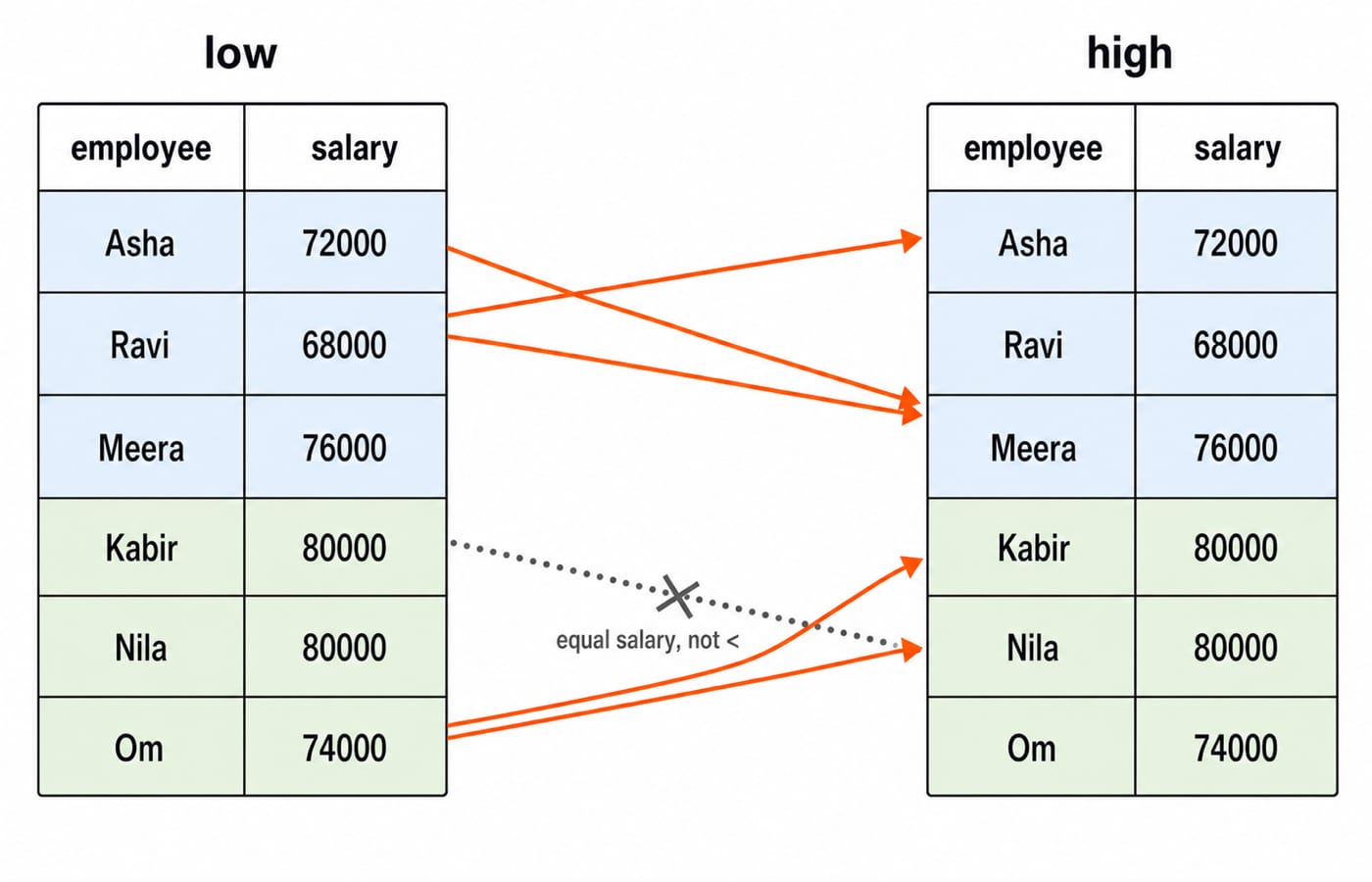
The five rows, in query order, are:
Engineering | Om   | 74000 | Kabir | 80000
Engineering | Om   | 74000 | Nila  | 80000
Sales       | Ravi | 68000 | Asha  | 72000
Sales       | Ravi | 68000 | Meera | 76000
Sales       | Asha | 72000 | Meera | 76000
Department equality limits candidates to colleagues. The strict salary inequality gives every surviving pair a direction. Kabir and Nila both earn 80000, so neither is higher than the other. The earlier SQL Queries for Placement Interviews: Second Highest Salary, Joins and GROUP BY Step by Step owns the manager-salary interview variant and broad ranking/grouping checklist; this section owns peer salary comparisons within one department.
5. Generate Each Same-City Pair Once
Use a separate table to make the pair rule clear:
CREATE TABLE customers (
    customer_id INT PRIMARY KEY,
    customer_name VARCHAR(30) NOT NULL,
    city VARCHAR(20) NOT NULL
);

INSERT INTO customers VALUES
    (1, 'Apex Stores',    'Kochi'),
    (2, 'Beacon Labs',    'Indore'),
    (3, 'Cedar Works',    'Kochi'),
    (4, 'Delta Foods',    'Shimla'),
    (5, 'Evergreen Co',   'Indore'),
    (6, 'Falcon Systems', 'Kochi');

SELECT
    c1.city,
    c1.customer_name AS customer_1,
    c2.customer_name AS customer_2
FROM customers AS c1
JOIN customers AS c2
  ON c1.city = c2.city
 AND c1.customer_id < c2.customer_id
ORDER BY c1.city, c1.customer_id, c2.customer_id;
Kochi produces Apex Stores-Cedar Works, Apex Stores-Falcon Systems, and Cedar Works-Falcon Systems. Indore produces Beacon Labs-Evergreen Co; Shimla produces none. The < condition removes self-pairs and fixes one direction. Replacing it with <> would return eight rows because all four pairs would also appear in reverse.
6. Compare Each Revision with the Previous Revision
A self join can use a composite key instead of a hierarchy:
CREATE TABLE price_history (
    product_id VARCHAR(5) NOT NULL,
    revision_no INT NOT NULL,
    price INT NOT NULL,
    PRIMARY KEY (product_id, revision_no)
);

INSERT INTO price_history VALUES
    ('P10', 1, 500),
    ('P10', 2, 540),
    ('P10', 3, 525),
    ('P20', 1, 800),
    ('P20', 2, 760);

SELECT
    curr.product_id,
    curr.revision_no,
    prev.price AS previous_price,
    curr.price AS current_price,
    curr.price - prev.price AS price_change
FROM price_history AS curr
JOIN price_history AS prev
  ON curr.product_id = prev.product_id
 AND curr.revision_no = prev.revision_no + 1
ORDER BY curr.product_id, curr.revision_no;
product_id | revision_no | previous_price | current_price | price_change |
|---|---|---|---|---|
P10 | 2 | 500 | 540 | +40 |
P10 | 3 | 540 | 525 | -15 |
P20 | 2 | 800 | 760 | -40 |
Revision 1 is absent for each product because it has no previous revision. A fixed self join suits adjacent revisions or a known number of levels. An arbitrary-depth hierarchy usually needs a recursive CTE.
7. Extend to Three Aliases and Repair Common Self-Join Errors
Add a third role for a fixed employee-manager-grandmanager chain:
SELECT
    e.employee_name AS employee,
    m.employee_name AS manager,
    gm.employee_name AS grandmanager
FROM employees AS e
JOIN employees AS m
  ON e.manager_id = m.employee_id
JOIN employees AS gm
  ON m.manager_id = gm.employee_id;
The only result is (Kabir, Ravi, Asha). Om has a manager but no grandmanager. Ravi and Meera report to Asha, who has no manager. Left joins can preserve partial chains.
Common errors have concrete consequences:
Omitting aliases makes repeated column names ambiguous.
Omitting the pairing condition gives
6 x 6 = 36Cartesian combinations.Using an inner join drops Asha and Nila.
Using
<>instead of<for city pairs returns eight mirrored rows.Joining
e.employee_id = m.employee_idpairs every row only with itself.
The primary key already indexes employee_id. On a larger table, an index on manager_id can help the hierarchy lookup, but inspect the actual plan with EXPLAIN. An optimiser is not required to choose every available index.
8. Self-Join Exercises, Recall Rules, and the Next Step
Solve these before reading the answers:
List each same-department colleague pair once using
a.department = b.department AND a.employee_id < b.employee_id.Modify the left employee-manager join to show only employees with no manager.
Add
WHERE curr.price < prev.priceto the revision query.
Answers: The first query returns six pairs. Sales has Asha-Ravi, Asha-Meera, and Ravi-Meera; Engineering has Kabir-Nila, Kabir-Om, and Nila-Om. The second uses WHERE m.employee_id IS NULL and returns (101, Asha) and (105, Nila). The third returns P10 revision 3 with -15 and P20 revision 2 with -40.
Keep five rules in mind: alias every copy, qualify repeated columns, write the relationship before filters, choose inner or left deliberately, and use a stable ordering predicate such as < when each unordered pair should appear once.
Continue through the CS Fundamentals for Exams & Placements category for the wider subject route, or use the Computer Science Fundamentals for Placements course for structured DBMS coverage. Run all three exercises, then compare every output row with its source table.
Keep learning
Data Mining and Data Warehouse Explained: Concepts, OLAP and Worked Examples
Follow six orders from operational sources into a warehouse, calculate OLAP totals, and test an association rule on five shopping baskets.
Updated 4 Oct 20266 min readDBMS
Set Operations and Cartesian Product in Relational Algebra: Worked Examples and Exam Traps
Learn when relational set operations are legal, calculate exact union and difference results, enumerate a Cartesian product, and trace how a join filters it.
Updated 29 Sep 20266 min readDBMS
DBMS Interview Questions: Keys, Normalisation and Transactions Through One Worked Schema
Build defensible DBMS interview answers by tracing keys, normal forms, ACID and isolation through one university-enrolment database.
Updated 25 Sep 20265 min readDBMS
Super Key, Candidate Key and Primary Key: A Worked DBMS Example
Use one ENROLMENT relation to derive two candidate keys, enumerate every super key, select a primary key and translate the result into SQL.
Updated 24 Sep 20266 min readDBMS