SQL SELECT Basics: Syntax, Output, and Runnable Examples
Learn how SELECT shapes a result without changing stored data. Run one small table through column lists, aliases, arithmetic expressions, and DISTINCT.
KnowledgeGate Team
Exam prep & CS education
Updated 16 Sep 20265 min read
SELECT looks simple, yet beginners often cannot tell what chooses columns, where rows come from, why headings change, or whether a query edits data. A SELECT projection chooses returned columns and computed values. Asterisk, aliases, expressions, and DISTINCT change the result shape; WHERE performs a separate row-filtering step.
What SELECT does in SQL
SELECT reads values and shapes a result table. Its smallest useful form is:
SELECT column_name FROM table_name;Items after SELECT name result columns or expressions; FROM names the source. The query evaluates them per row and assigns headings without editing stored data. INSERT, UPDATE, and DELETE change data.
Uppercase keywords and lowercase identifiers aid readability; SQL does not require that casing. SELECT sits within DBMS and wider CS Fundamentals. Joins come later.
Create one practice table and know every stored value
CREATE TABLE students (
    student_id INT PRIMARY KEY,
    student_name VARCHAR(30),
    city VARCHAR(20),
    score INT,
    stipend DECIMAL(8, 2)
);

INSERT INTO students (student_id, student_name, city, score, stipend) VALUES
    (101, 'Asha',  'Delhi', 82, 12000.00),
    (102, 'Ravi',  'Jaipur', 76,  9500.00),
    (103, 'Meera', 'Delhi', 91, 15000.00),
    (104, 'Kabir', 'Pune', 76,  9500.00),
    (105, 'Zoya',  NULL, 88, 11000.00);
student_id | student_name | city | score | stipend |
|---|---|---|---|---|
101 | Asha | Delhi | 82 | 12000.00 |
102 | Ravi | Jaipur | 76 | 9500.00 |
103 | Meera | Delhi | 91 | 15000.00 |
104 | Kabir | Pune | 76 | 9500.00 |
105 | Zoya | NULL | 88 | 11000.00 |
NULL marks a missing or unknown value, not the text 'NULL'. We display student_id order for easy tracing, but SQL guarantees no row order unless a query requests one.
SELECT star versus an explicit column list
This query returns all five stored columns and the five rows shown above:
SELECT * FROM students;* helps inspect a tiny table. In an application, it may return unneeded data, and its output depends on the current column set.
An explicit list makes the intended result clear:
SELECT student_id, student_name, score FROM students;Its rows are (101, Asha, 82), (102, Ravi, 76), (103, Meera, 91), (104, Kabir, 76), and (105, Zoya, 88). Projection keeps every source row but exposes only requested columns.
Column-list order controls output-column order. SELECT score, student_name FROM students; gives headings score, then student_name, and pairs (82, Asha), (76, Ravi), (91, Meera), (76, Kabir), (88, Zoya). It does not reorder rows.
Aliases and computed columns: the fully worked SELECT
Run the centrepiece query:
SELECT
    student_id,
    student_name,
    score AS original_score,
    score + 5 AS score_after_bonus,
    stipend * 12 AS annual_stipend
FROM students;
student_id | student_name | original_score | score_after_bonus | annual_stipend |
|---|---|---|---|---|
101 | Asha | 82 | 87 | 144000.00 |
102 | Ravi | 76 | 81 | 114000.00 |
103 | Meera | 91 | 96 | 180000.00 |
104 | Kabir | 76 | 81 | 114000.00 |
105 | Zoya | 88 | 93 | 132000.00 |
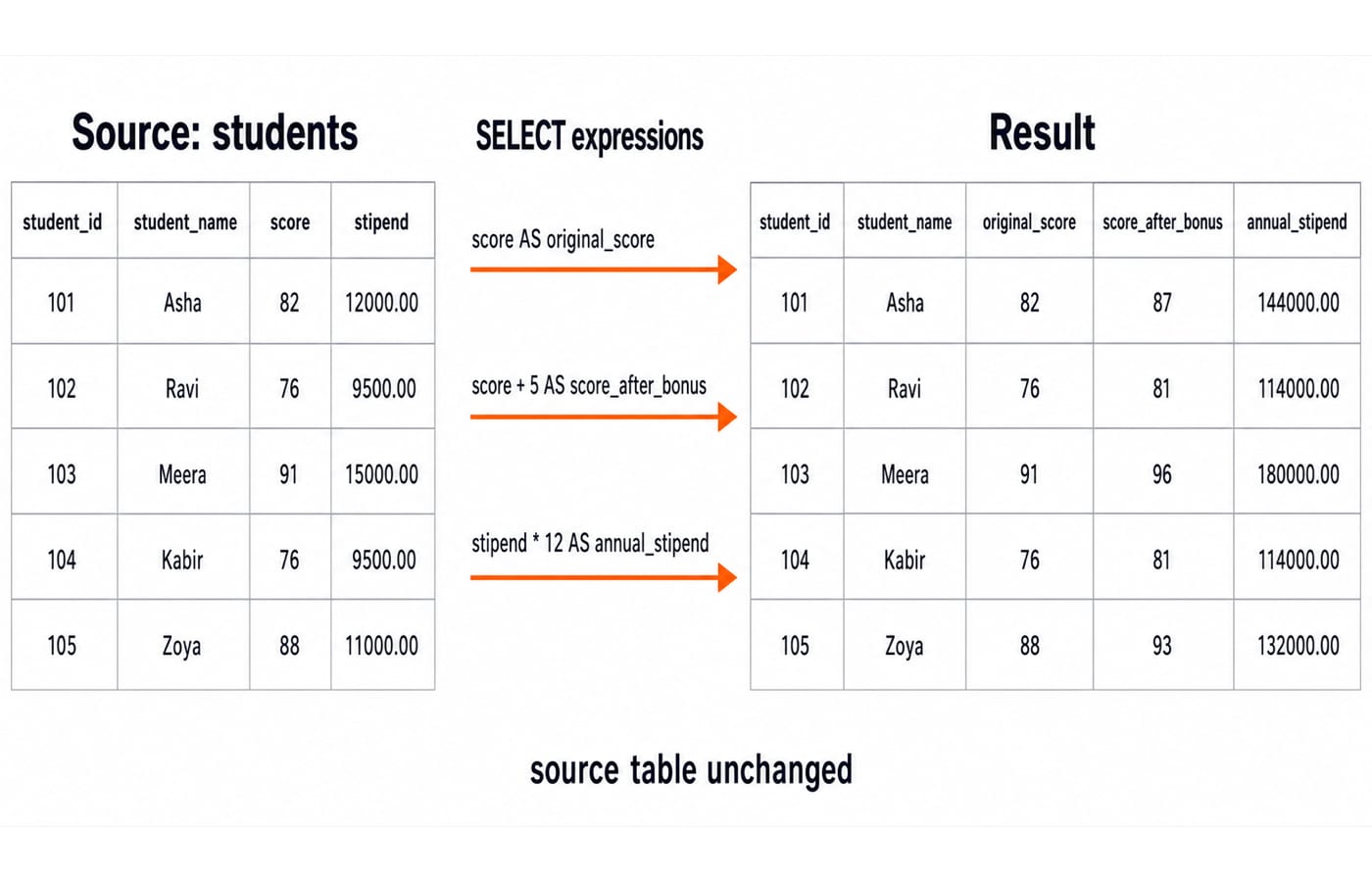
For Asha, SQL reads score = 82, labels it original_score, calculates 82 + 5 = 87 and 12000.00 * 12 = 144000.00, then returns them without changing stored data. AS changes a result heading, not the underlying column. A client may hide trailing decimal zeroes, but the arithmetic value is unchanged.
DISTINCT removes duplicate result rows
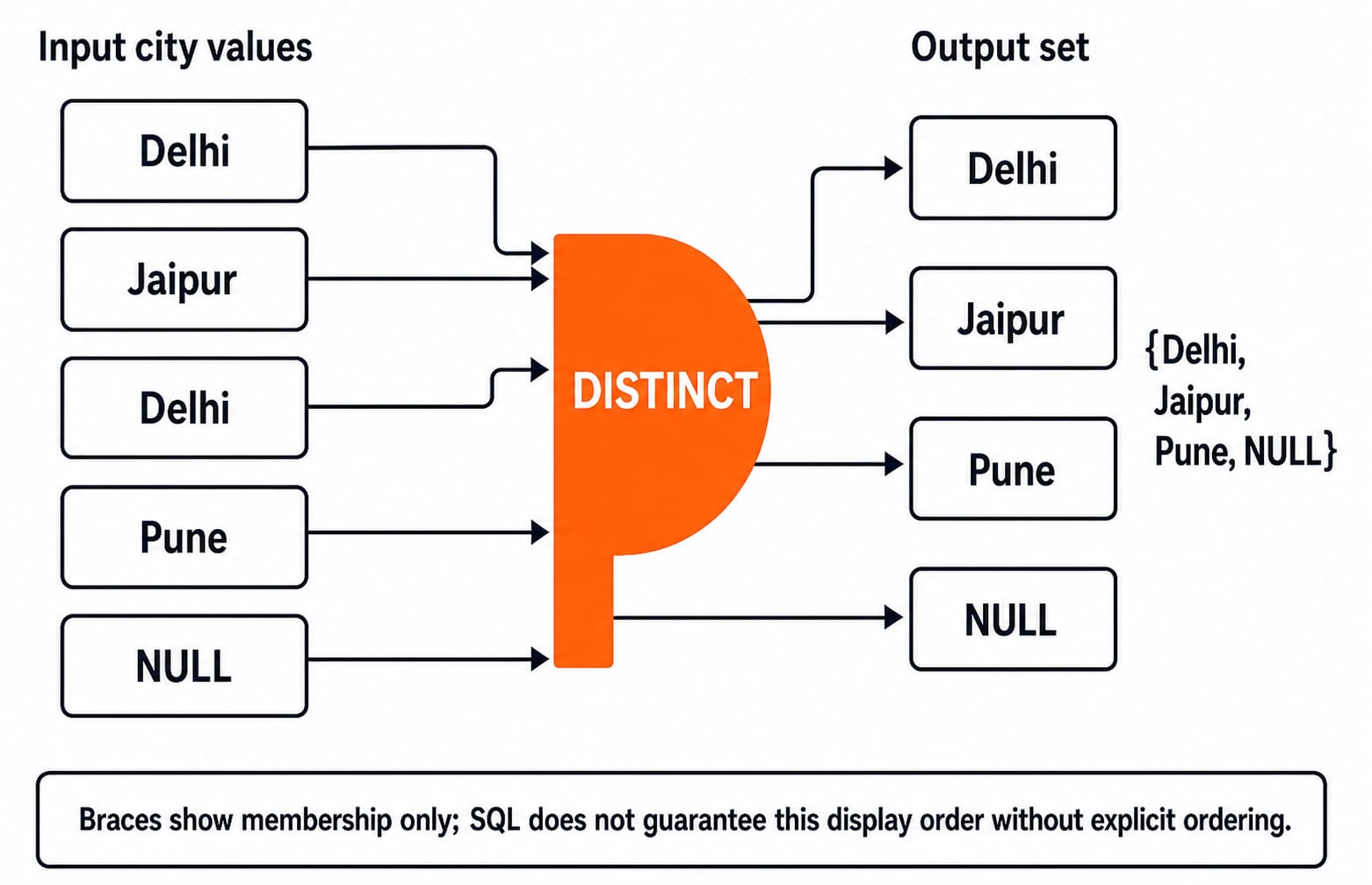
SELECT city FROM students; returns the multiset Delhi, Jaipur, Delhi, Pune, NULL. Now run:
SELECT DISTINCT city FROM students;The membership is {Delhi, Jaipur, Pune, NULL}. Two Delhi values collapse, while NULL remains one distinct entry. Display order is not guaranteed.
DISTINCT applies to the whole selected row. SELECT DISTINCT city, score FROM students; returns (Delhi, 82), (Jaipur, 76), (Delhi, 91), (Pune, 76), and (NULL, 88). Both Delhi rows remain because their scores differ.
Use DISTINCT when duplicate result rows are unwanted, not to hide an unexplained join or data-model problem.
Read and write a basic SELECT without guessing
Read a basic query with four questions:
What is the source after
FROM?Which stored columns are read?
Which expressions are calculated for each row?
What headings will the result expose?
Here the source is students. The query reads student_id, student_name, score, and stipend; calculates score + 5 and stipend * 12; then exposes five named columns.
To write one, name the required values, choose their source table, then alias expressions clearly:
SELECT student_name, stipend, stipend + 1000 AS revised_stipend
FROM students;
Results are Asha/12000.00/13000.00, Ravi/9500.00/10500.00, Meera/15000.00/16000.00, Kabir/9500.00/10500.00, and Zoya/11000.00/12000.00.
This logical reading order predicts the result even when a query optimiser chooses a different physical execution plan.
Common SELECT mistakes and how assessments test them
Misspelt column:
SELECT student_names FROM students;fails because the stored name isstudent_name. Repair the spelling.Missing comma:
SELECT student_id student_name FROM students;may be read as an alias. WriteSELECT student_id, student_name FROM students;.Quoted text:
SELECT 'score' FROM students;returns the literalscoreonce per row. WriteSELECT score FROM students;for stored values.Alias reuse assumption: do not assume
SELECT score + 5 AS bonus_score, bonus_score + 1 FROM students;works across databases. Repeat the expression or use a later query layer.
Two traps remain. SELECT * means every column from the named source, not every table. A computed column does not update stored data. Identifier quoting varies, so we use portable underscore aliases such as annual_stipend.
Assessments may ask you to predict headings, distinguish a literal from a column, spot a missing comma, trace two-column DISTINCT, or say whether an expression changes data. After these single-table projection skills, SQL Queries for Placement Interviews, Step by Step adds WHERE filters and interview-style multi-clause queries. Use Computer Science Fundamentals for Placements by Sanchit Sir for structured DBMS revision.
Exercises, the short version, and the next step
Exercises
Return only
student_nameandcity.Return
student_name,score, andscore * 2asdouble_score.List distinct scores.
Predict
SELECT DISTINCT city, score FROM students;.
Answers:
SELECT student_name, city FROM students;SELECT student_name, score, score * 2 AS double_score FROM students;Asha givesAsha/82/164; Meera givesMeera/91/182.SELECT DISTINCT score FROM students;has membership{82, 76, 91, 88}because Ravi and Kabir share76.The five pairs are
(Delhi, 82),(Jaipur, 76),(Delhi, 91),(Pune, 76), and(NULL, 88)because no complete pair repeats.
For the next relational step, SQL Queries and Joins in DBMS: A Clear Guide teaches joins and subqueries; this page stays with single-table projection.
The short version
SELECT chooses output values. FROM names the source. Explicit lists are clearer than * for intentional queries. Aliases label results, expressions compute result-only values, and DISTINCT removes duplicate selected rows. Asha's 82 becomes 87; distinct cities are {Delhi, Jaipur, Pune, NULL}.
Retype the setup and centrepiece query. Change Ravi's inserted score from 76 to 79, then predict score_after_bonus = 84 while Kabir remains at 81. Rerun the distinct-score exercise and predict {82, 79, 91, 76, 88}. If you want a structured route across core computer-science subjects, continue with ZERO TO HERO.
Keep learning

Data Mining and Data Warehouse Explained: Concepts, OLAP and Worked Examples
Follow six orders from operational sources into a warehouse, calculate OLAP totals, and test an association rule on five shopping baskets.
Updated 4 Oct 20266 min readDBMS

Set Operations and Cartesian Product in Relational Algebra: Worked Examples and Exam Traps
Learn when relational set operations are legal, calculate exact union and difference results, enumerate a Cartesian product, and trace how a join filters it.
Updated 29 Sep 20266 min readDBMS
DBMS Interview Questions: Keys, Normalisation and Transactions Through One Worked Schema
Build defensible DBMS interview answers by tracing keys, normal forms, ACID and isolation through one university-enrolment database.
Updated 25 Sep 20265 min readDBMS
Super Key, Candidate Key and Primary Key: A Worked DBMS Example
Use one ENROLMENT relation to derive two candidate keys, enumerate every super key, select a primary key and translate the result into SQL.
Updated 24 Sep 20266 min readDBMS