useMemo and useCallback in React: Runnable Examples, Render Counts and Traps
Learn which identity each React hook preserves, then test the result with a 20,000-product filter and three memoised child rows.
KnowledgeGate Team
Exam prep & CS education
Updated 21 Aug 20266 min read

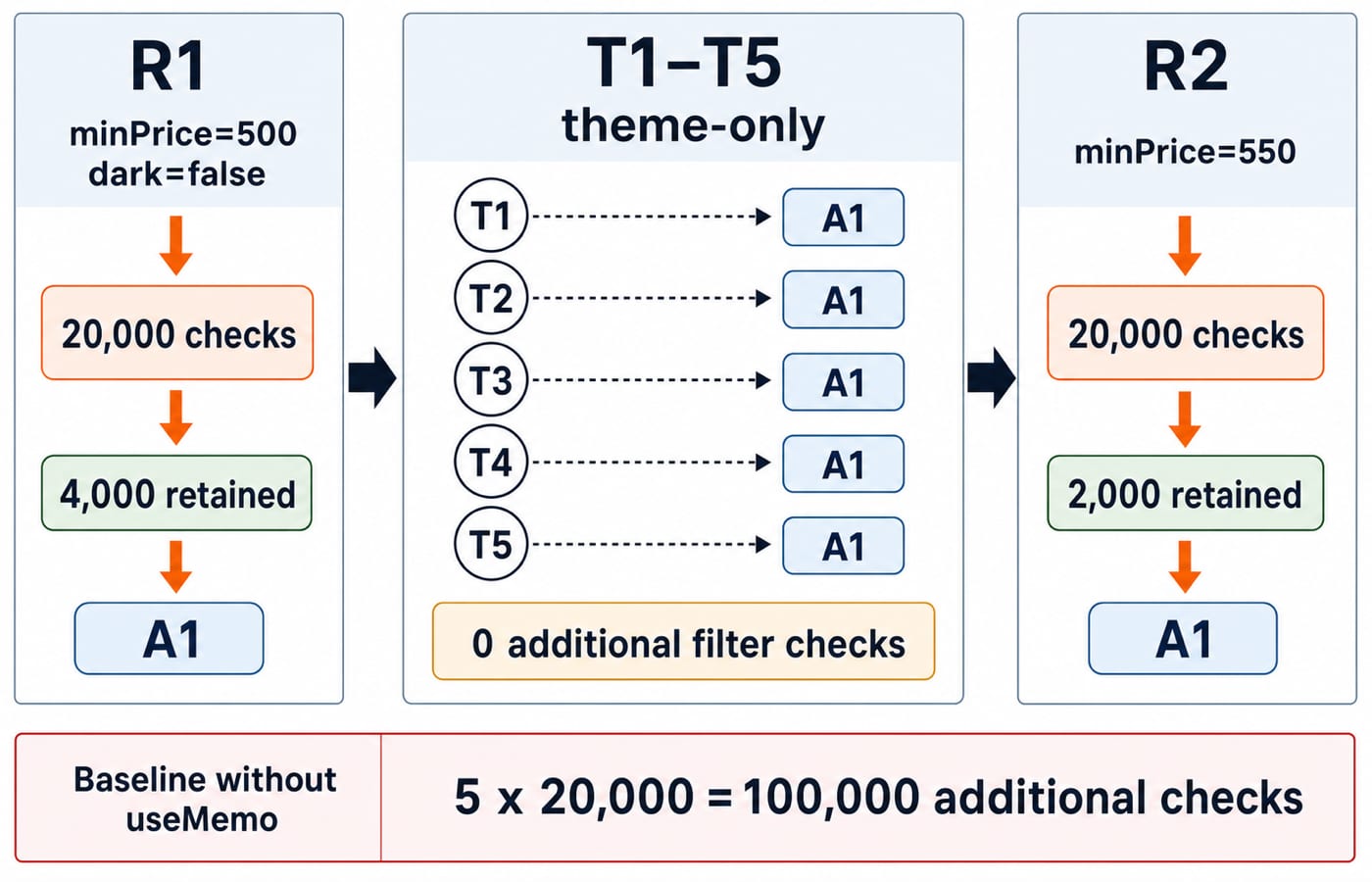
useMemo and useCallback are both called performance hooks, so beginners often add them everywhere. Then a child still re-renders, or a calculation starts returning stale data. The key questions are what each hook keeps stable, which render it can actually avoid, and when the cache costs more complexity than it saves. Five theme toggles create a 100,000-check contrast in the filter, while one stable callback avoids three additional child renders on a separate theme toggle.
useMemo and useCallback in React: the value-versus-function model
Calling a component again recreates local arrays, objects, and functions. useMemo(() => calculation, dependencies) reuses the calculated value while its dependencies are unchanged. useCallback(callback, dependencies) reuses the function reference under the same condition. Neither stops the parent from rendering.
Trace the identities. Render R1 gives array A1 and function F1. A theme-only R2 with unchanged dependencies reuses both. Change a listed dependency for R3, and React produces A2 and F2. The code must remain correct if either is recreated because these hooks optimise performance, not store state.
memo is the child-side partner. A memoised child can skip work when every prop is unchanged, so stable references can matter. The Free Courses & Guidance by Prashant Sir category provides a route through the wider JavaScript and React learning sequence.
useMemo in React: filter 20,000 products only when the threshold changes
The component filters a module-level catalogue and exposes both relevant and unrelated updates:
import { useMemo, useState } from "react";

const PRODUCTS = Array.from({ length: 20_000 }, (_, i) => ({
  id: i + 1,
  price: 100 + (i % 500),
}));

export default function ProductTable() {
  const [minPrice, setMinPrice] = useState(500);
  const [dark, setDark] = useState(false);

  const visibleProducts = useMemo(() => {
    console.count("product filter");
    return PRODUCTS.filter((product) => product.price >= minPrice);
  }, [minPrice]);

  return (
    <section className={dark ? "dark" : "light"}>
      <p>{visibleProducts.length} products match.</p>
      <button onClick={() => setDark((value) => !value)}>
        Toggle theme
      </button>
      <button onClick={() => setMinPrice(500)}>Minimum 500</button>
      <button onClick={() => setMinPrice(550)}>Minimum 550</button>
    </section>
  );
}
Prices 100 through 599 repeat 40 times because 20,000 / 500 = 40. At minPrice = 500, the filter examines 20,000 products and retains 100 prices per cycle, so 100 x 40 = 4,000. Five theme toggles leave minPrice unchanged. A non-memoised baseline therefore performs 5 x 20,000 = 100,000 additional predicate checks, while this memoised calculation performs zero additional filter checks. Set the threshold to 550 and the invalidated calculation performs 20,000 checks, retaining 50 x 40 = 2,000 products.
Development diagnostics may duplicate logs, so check whether a theme update invokes the filter, not the startup total. Timings vary by hardware and build.
useCallback in React: keep a memoised child's callback prop stable
A callback passed to a memoised child stays stable when the parent uses three module-level product objects:
import { memo, useCallback, useState } from "react";

const PRODUCTS = [
  { id: 1, name: "Keyboard" },
  { id: 2, name: "Mouse" },
  { id: 3, name: "Webcam" },
];

const ProductRow = memo(function ProductRow({ product, onSelect }) {
  console.count("row-" + product.id);
  return (
    <button onClick={() => onSelect(product.id)}>{product.name}</button>
  );
});

export default function ProductPicker() {
  const [selectedId, setSelectedId] = useState(null);
  const [dark, setDark] = useState(false);
  const handleSelect = useCallback((id) => setSelectedId(id), []);
  const selected = PRODUCTS.find((product) => product.id === selectedId);

  return (
    <section className={dark ? "dark" : "light"}>
      <p>Selected: {selected?.name ?? "None"}</p>
      {PRODUCTS.map((product) => (
        <ProductRow key={product.id} product={product} onSelect={handleSelect} />
      ))}
      <button onClick={() => setDark((value) => !value)}>Toggle theme</button>
    </section>
  );
}
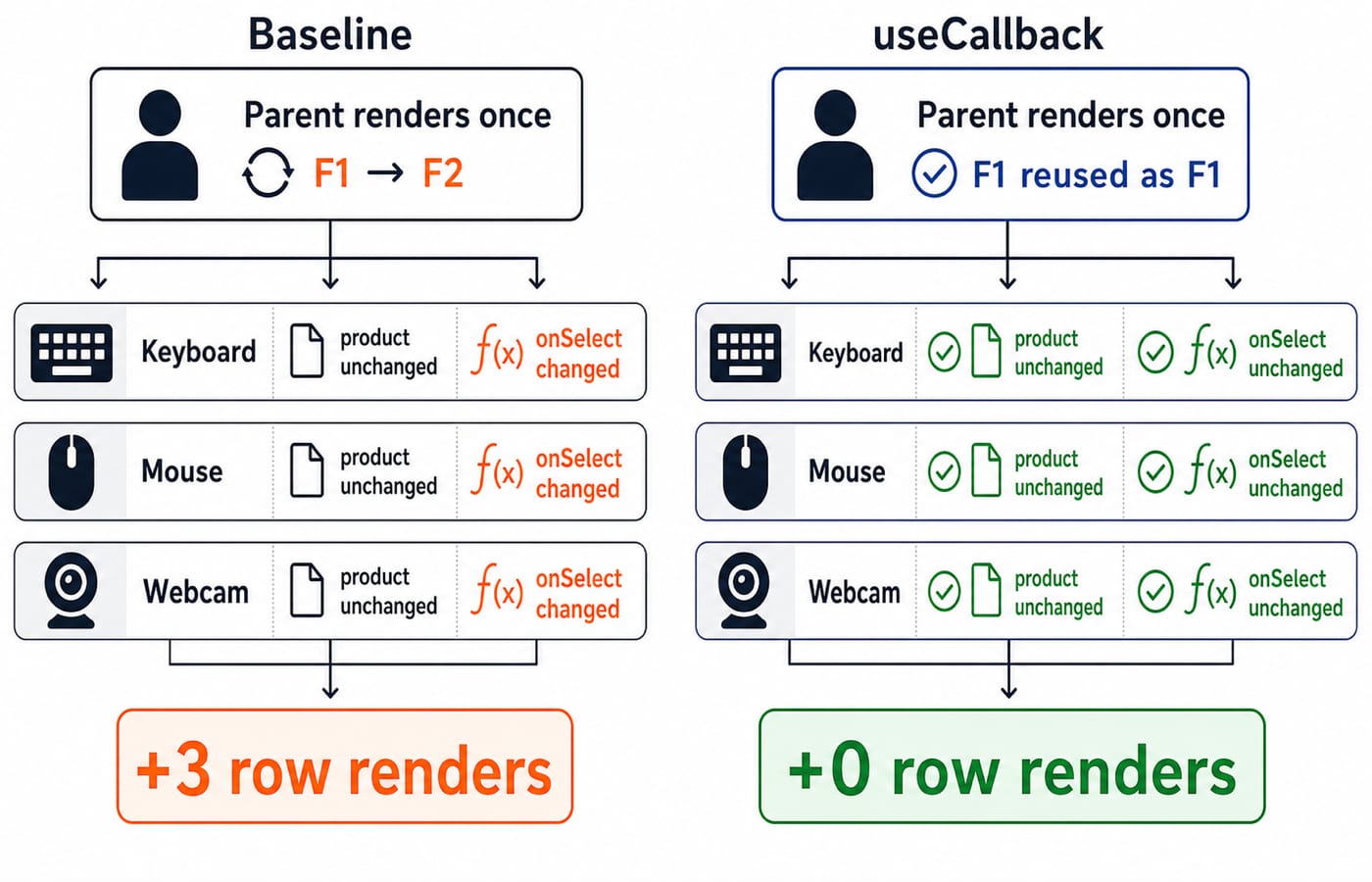
The baseline const handleSelect = id => setSelectedId(id) creates a function per parent render. A theme toggle changes onSelect, causing three additional row renders. With useCallback, the state setter is stable and id is an argument, so no changing value is captured. The toggle changes no row prop and causes zero additional row renders. Initial rendering still renders all three rows.
The parent still renders, and useCallback offers no child-skip benefit without memo or another identity-sensitive consumer. Keeping selectedId outside each row makes the zero-row result honest.
useMemo vs useCallback: choose the identity that must stay stable
Situation | Hook | Preserved identity | Consumer that benefits |
|---|---|---|---|
Expensive derived number or list |
| Calculation result | Current component or memoised child |
Function passed to a memoised child |
| Function reference | Child comparing its props |
Fresh options object passed to a memoised child |
| Object reference | Child comparing its props |
Cheap local primitive calculation | Neither | None needed | No identity-sensitive consumer |
useCallback(fn, deps) resembles memoising a function value, but communicates that the result is callable. It does not run the function body less often. It only stabilises the reference between eligible renders.
Dynamic Programming Explained: 0/1 Knapsack uses “memoisation” differently. Its memo table stores many subproblem answers such as (itemIndex, remainingCapacity). A React hook cache reuses one render value according to dependencies; it does not implement dynamic programming.
useMemo and useCallback dependencies: stale values and broken caches
Mistake | Consequence | Correction |
|---|---|---|
| With | Use |
| Each render creates | Build it inside the calculation and depend on |
|
| Use |
Do not fetch data, set state, or write to the DOM inside a memo calculation. Call Hooks at the top level of a component or custom Hook, never in a condition or loop.
Callbacks follow the same rule. setCount((current) => current + 1) avoids capturing count, while a callback reading query must list query.
useMemo and useCallback performance: measure before keeping them
If React Compiler is enabled for the component, it can memoise values and functions automatically, so manual useMemo and useCallback may be unnecessary. The hooks still provide explicit control when a particular value or function identity must stay stable.
The 20,000-product filter does a full O(n) pass. Five unrelated renders repeat substantial work without caching. Filtering a six-item menu is only six predicate checks, so useMemo may add complexity without solving a bottleneck. No universal threshold exists because calculation cost, render frequency, and device speed differ. Time Complexity & Asymptotic Notation: Big-O explains how work grows; profiling shows whether the actual interaction is costly enough to optimise.
Use a repeatable check:
Profile the same interaction before and after the change.
Run five theme toggles for the filter example.
Compare whether the filter ran and which components rendered.
Keep the hook only when it removes meaningful repeated work without stale dependencies.
Render count and elapsed time differ. Record both when useful, but do not invent timings.
useMemo and useCallback interview checks and exercises
Classroom, code-review, and interview questions test reasoning: identify what the hook returns, predict whether a memoised child can skip, repair a dependency, or explain why a new object defeats prop comparison. “It improves performance” is not enough. Name the stable reference and its consumer.
Set
minPriceto 575. There are 25 accepted prices in each 500-value cycle, so25 x 40 = 1,000products remain. Then addmaxPrice = 579, use an inclusive range, and list[minPrice, maxPrice]. Five accepted values per cycle give5 x 40 = 200products.Add a boolean
selectedprop to each row. From no selection, choosing Mouse changes only Mouse totrue, so one row renders. Choosing Webcam next changes Mouse tofalseand Webcam totrue, so two rows render when the product objects and callback remain stable.Repair the discount example by adding
discount. Explain why2000 x (1 - 0.25) = 2000 x 0.75 = 1500is fresh while 1800 is stale.
useMemo and useCallback in React: the short version and next step
Use
useMemowhen recomputing a derived value meaningfully costs work.Use
useCallbackwhen a consumer cares about function identity.Include every reactive dependency.
Keep memo calculations pure.
Profile the real interaction before and after.
The React and Redux Course is the structured next step for hands-on React, state-management concepts, and projects. If closures, array methods, or function references are unclear, start with the Complete JavaScript Course.
Keep learning

JavaScript Event Delegation: Bubbling, target and currentTarget with Runnable Examples
Learn how browser events travel through the DOM, then build one delegated listener that handles nested controls and rows added later.
Updated 6 Oct 20265 min readWeb Development

JavaScript Operators: Types, Precedence and Runnable Examples
Learn how JavaScript arithmetic, assignment, comparison, logical and modern operators behave by tracing one score program from inputs to final output.
Updated 2 Oct 20266 min readWeb Development

JavaScript Data Types and Coercion: Beginner Tutorial with Runnable Examples
Learn how JavaScript stores values, copies primitives and objects, converts input, compares values and produces surprising output. Trace each rule in the console.
Updated 27 Sep 20265 min readWeb Development

JavaScript Conditionals and Loops: Beginner Tutorial with Runnable Examples
Learn how JavaScript chooses a branch and repeats work. Build from small syntax examples to a complete score classifier with a traced average.
Updated 25 Sep 20265 min readWeb Development