

Testing React Components: A Runnable Vitest and Testing Library Tutorial
Build and test a small React progress component from its initial render through completion. The examples use accessible queries, awaited actions, and an exact mock assertion.
KnowledgeGate Team
Exam prep & CS education
Updated 15 Nov 20266 min read

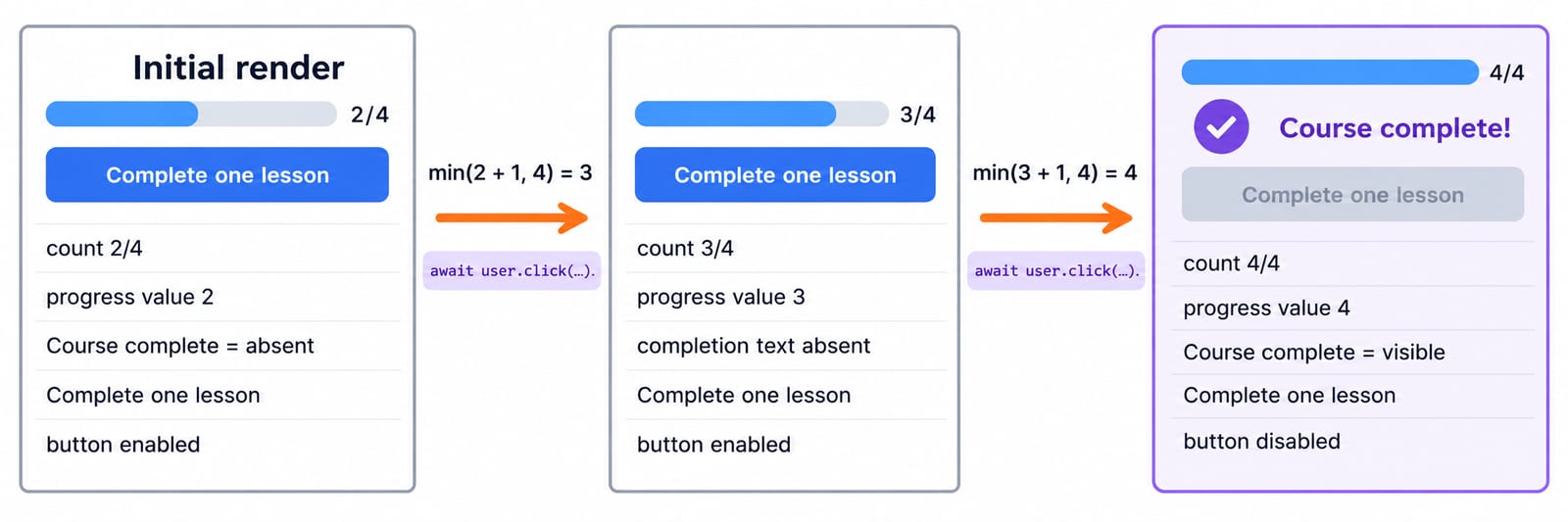
A React component can look correct in the browser while its test checks wrong text, misses a user-driven state change, or passes before an asynchronous update finishes. A useful component test must observe the UI as a learner uses it. The StudyProgress example starts at 2/4, moves through 3/4 to 4/4, disables a button, and proves an asynchronous save receives exactly 3.
What a React component test should prove
Use a three-part loop. Arrange by rendering Asha's React Testing plan at 2/4. Act by clicking Complete one lesson. Assert that the screen reports 3 of 4 lessons complete.
This test checks observable behaviour, not private variable names. It integrates the component, React state, rendered DOM, click handler, and a callback passed through props. Its boundary stays clear: it does not call a real backend or launch a full browser. That boundary distinguishes a component test from a full browser test.
JSX in React: Syntax, Expressions, Lists and a Runnable Worked Example develops the list-based StudyProgress renderer. A stateful variant isolates clicks, async saves, and accessible queries. Follow the Web Development path; use the Complete JavaScript Course if props, useState, async functions, or destructuring are unfamiliar.
Set up Vitest, jsdom, and Testing Library
Assume you already have a Vite React app. Install the five test dependencies without pinning versions:
npm install --save-dev vitest jsdom @testing-library/react @testing-library/jest-dom @testing-library/user-eventAdd "test": "vitest" to the scripts object in package.json. Then merge this block into the existing vite.config.js, retaining its React plugin and other settings:
test: {
  environment: "jsdom",
  setupFiles: ["./src/test/setup.js"],
},
Create src/test/setup.js:
import { cleanup } from "@testing-library/react";
import "@testing-library/jest-dom/vitest";
import { afterEach } from "vitest";

afterEach(() => cleanup());
The jsdom environment supplies browser-like DOM APIs. The matcher import adds toBeInTheDocument, toBeEnabled, and toHaveAttribute. The afterEach(cleanup) hook removes the previous render so later role queries cannot see stale components.
Run npm test. It should discover src/StudyProgress.test.jsx. If it finds no test, check the filename and script before changing dependencies. This simple check separates test discovery problems from component failures.
Build the exact component under test
Create src/StudyProgress.jsx with this complete component:
import { useState } from "react";

export default function StudyProgress({
  learner,
  topic,
  initialCompleted,
  total,
  saveProgress,
}) {
  const [completed, setCompleted] = useState(initialCompleted);
  const [status, setStatus] = useState("Not saved");
  const isComplete = completed === total;

  function completeOne() {
    setCompleted((current) => Math.min(current + 1, total));
  }

  async function save() {
    setStatus("Saving...");
    await saveProgress(completed);
    setStatus(`Saved ${completed}/${total}`);
  }

  return (
    <section>
      <h2>{learner}'s {topic} plan</h2>
      <p>{completed} of {total} lessons complete</p>
      <progress
        aria-label={`${topic} progress`}
        value={completed}
        max={total}
      />
      <button onClick={completeOne} disabled={isComplete}>
        Complete one lesson
      </button>
      <button onClick={save}>Save progress</button>
      {isComplete && <p>Course complete</p>}
      <p role="status">{status}</p>
    </section>
  );
}
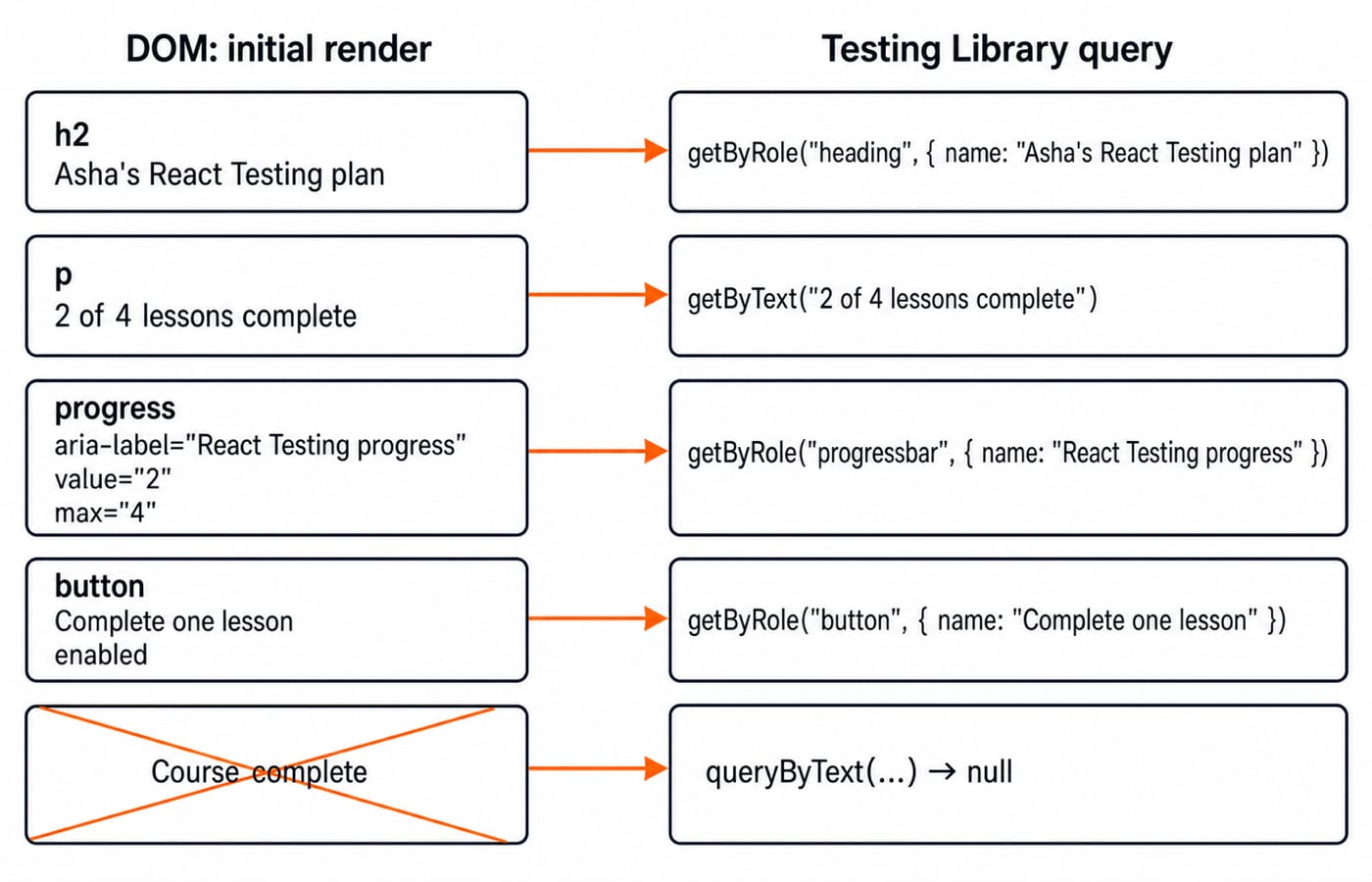
With learner="Asha", topic="React Testing", initialCompleted={2}, and total={4}, the first render shows Asha's React Testing plan and 2 of 4 lessons complete. The progress element has value="2" and max="4". The completion button is enabled, Course complete is absent, and the status reads Not saved.
Those outputs describe the component's starting contract. The learner and topic props form the heading and accessible progress name. The two numeric props form both the sentence and progress attributes. State controls the button, completion message, and save status. Tests can therefore verify useful behaviour without reaching inside the component.
Test the initial render with accessible queries
Begin src/StudyProgress.test.jsx with the required imports, then add the first test:
import { render, screen } from "@testing-library/react";
import userEvent from "@testing-library/user-event";
import { describe, expect, it, vi } from "vitest";
import StudyProgress from "./StudyProgress";

describe("StudyProgress", () => {
  it("renders the initial progress", () => {
    render(
      <StudyProgress
        learner="Asha"
        topic="React Testing"
        initialCompleted={2}
        total={4}
        saveProgress={vi.fn()}
      />,
    );

    expect(screen.getByRole("heading", { name: "Asha's React Testing plan" })).toBeInTheDocument();
    expect(screen.getByText("2 of 4 lessons complete")).toBeInTheDocument();
    const progress = screen.getByRole("progressbar", { name: "React Testing progress" });
    expect(progress).toHaveAttribute("value", "2");
    expect(progress).toHaveAttribute("max", "4");
    expect(screen.getByRole("button", { name: "Complete one lesson" })).toBeEnabled();
    expect(screen.queryByText("Course complete")).not.toBeInTheDocument();
  });
});
The official Testing Library query guide prefers role plus accessible name when suitable. Here, getBy... requires content that must exist now, while queryBy... represents an expected absence. A data-testid is unnecessary because each element already has visible text, a role, or an accessible name.
These queries also describe the page in learner-facing terms. A heading named for Asha, a progressbar named for React Testing, and an enabled completion button are meaningful even if their wrapper elements or CSS classes change. The assertions fail when the accessible output changes, which is exactly when a component test should ask for attention.
Test user clicks and the 2 -> 3 -> 4 state transition
Add a fresh test inside describe. The user-event guide recommends creating a user session first and awaiting its interactions:
it("completes the remaining lessons", async () => {
  const user = userEvent.setup();
  render(
    <StudyProgress
      learner="Asha"
      topic="React Testing"
      initialCompleted={2}
      total={4}
      saveProgress={vi.fn()}
    />,
  );
  const completeButton = screen.getByRole("button", { name: "Complete one lesson" });
  const progress = screen.getByRole("progressbar", { name: "React Testing progress" });

  await user.click(completeButton);
  expect(screen.getByText("3 of 4 lessons complete")).toBeInTheDocument();
  expect(progress).toHaveAttribute("value", "3");
  expect(screen.queryByText("Course complete")).not.toBeInTheDocument();
  expect(completeButton).toBeEnabled();

  await user.click(completeButton);
  expect(screen.getByText("4 of 4 lessons complete")).toBeInTheDocument();
  expect(progress).toHaveAttribute("value", "4");
  expect(screen.getByText("Course complete")).toBeInTheDocument();
  expect(completeButton).toBeDisabled();
});
The updater gives min(2 + 1, 4) = 3, then min(3 + 1, 4) = 4. It caps progress at 4, and the disabled button prevents a third UI click. The same stored button and progressbar references remain useful because React updates their properties in the rendered DOM.
React's act reference explains that assertions belong after pending updates have been applied. Here, awaiting each Testing Library interaction handles that sequence without a manual wrapper. Reading the screen only after each awaited click makes the transition explicit and reproducible.
Test an asynchronous save with a mock callback
The third test uses Vitest's mock behaviour to record arguments without making a real network request. Keeping the mock inside the test also prevents call counts from leaking:
it("saves the updated progress", async () => {
  const saveProgress = vi.fn().mockResolvedValue({ ok: true });
  const user = userEvent.setup();
  render(
    <StudyProgress
      learner="Asha"
      topic="React Testing"
      initialCompleted={2}
      total={4}
      saveProgress={saveProgress}
    />,
  );

  await user.click(screen.getByRole("button", { name: "Complete one lesson" }));
  expect(screen.getByText("3 of 4 lessons complete")).toBeInTheDocument();
  await user.click(screen.getByRole("button", { name: "Save progress" }));

  expect(saveProgress).toHaveBeenCalledTimes(1);
  expect(saveProgress).toHaveBeenCalledWith(3);
  expect(await screen.findByText("Saved 3/4")).toBeInTheDocument();
});
The argument is 3, not the original 2, because the first awaited interaction lets React render the updated state before the save click. The order matters: update the count, observe 3 of 4, save, inspect the mock call, then await the final status. That sequence proves both the value sent across the component boundary and the result shown to the learner.
findByText carries the asynchronous wait because the final status is set after await saveProgress(completed). Do not demand a permanent Saving... state from an immediately resolved promise. Test loading with a deliberately controllable unresolved promise, not an arbitrary timeout.
Fix the failures that make component tests misleading
Use the symptom to find the cause before changing the setup:
Still sees
2 of 4after a click:user.clickwas not awaited. Useawait user.click(...).getByText("Saved 3/4")fails immediately: saving is asynchronous. AwaitfindByText("Saved 3/4")..green-buttonbreaks after a CSS rename: query the button by role and name.The progressbar query fails after deleting
aria-label: restore the component's accessible name, not a weaker query.The callback expectation is
2after one click: the visible state moved to3, so expect3.A mock reports two calls: create
vi.fn()inside each test, or clear an intentionally shared mock before every test.
Debug in this order: read accessible output, confirm the interaction was awaited, check the current value, distinguish immediate from asynchronous queries, then inspect mock calls. Snapshot-only coverage and random dependency reinstalls hide these signals.
React component testing exercises, interview prompts, and next step
Exercises: with initialCompleted={0} and total={2}, prove two clicks show 2 of 2 lessons complete; use rerender to change Asha to Kabir and expect Kabir's React Testing plan; render Save failed for vi.fn().mockRejectedValue(new Error("offline")), without showing the error text.
Interview prompts: explain why role queries resist markup refactors. Distinguish getBy, queryBy, and findBy using Course complete and Saved 3/4.
The short version
Render what the user sees, perform the user's action, await updates, and assert output plus meaningful callback arguments. Continue with the React and Redux Course, browse Programming Languages, or explore Free Courses for GATE, Placements & CS.
Keep learning

Future Internet Explained: Architecture, a Worked IoT Example and Exam Traps
Learn how device, edge, network, cloud and application layers cooperate, then solve a smart-campus example for data reduction and control-loop latency.
Updated 16 Nov 20266 min readWeb Development

React Performance Optimization Tutorial: Profiler, memo, useMemo, and useCallback Examples
Build one React lab, measure its render and calculation counts, then remove avoidable work while keeping typing responsive.
Updated 14 Nov 20266 min readWeb Development

Node.js Path and OS Modules: Build Portable Scripts with Runnable Examples
Learn how Path and OS remove hard-coded assumptions from Node.js scripts. Follow deterministic examples, memory maths, and a complete system-report build.
Updated 13 Nov 20265 min readWeb Development

NPM and package.json in Node.js: Setup, Scripts, Dependencies, and SemVer
Build a small Node.js project from an empty folder, install Lodash, add reusable npm scripts, compare the manifest and lockfile, and practise SemVer ranges.
Updated 12 Nov 20266 min readWeb Development