

useReducer in React: Build Predictable State with Runnable Examples
Learn when a reducer makes React state clearer. Build a score reducer and a complete study-task app, then verify every transition and test the reducer without a browser.
KnowledgeGate Team
Exam prep & CS education
Updated 7 Nov 20266 min read
As related state multiplies, separate setters can hide which event changes each value. useReducer names events and calculates predictable next states. A score reducer handles earned and penalty events, and a study-task reducer traces a plan from 0 of 2 complete, 50 minutes remaining. For the same 20/30-minute Study Planner implemented with an app-wide store, generated actions, selectors and async thunks, use Redux Toolkit Integration in React. Here the shared baseline isolates local useReducer: one component handles transitions with a pure reducer and manual immutable updates.
1. Choose useReducer for transitions, not merely for more state
Keep useState for an independent value such as isMenuOpen. Prefer useReducer when next state depends on current state, fields change together, or add, toggle, filter and remove need rules. It is not inherently faster or always better for objects. React's official useReducer reference defines the hook's arguments and return values.
The model:
State is the current snapshot.
Action describes what happened.
Reducer receives the current state and action, then returns the next state.
Dispatch sends an action.
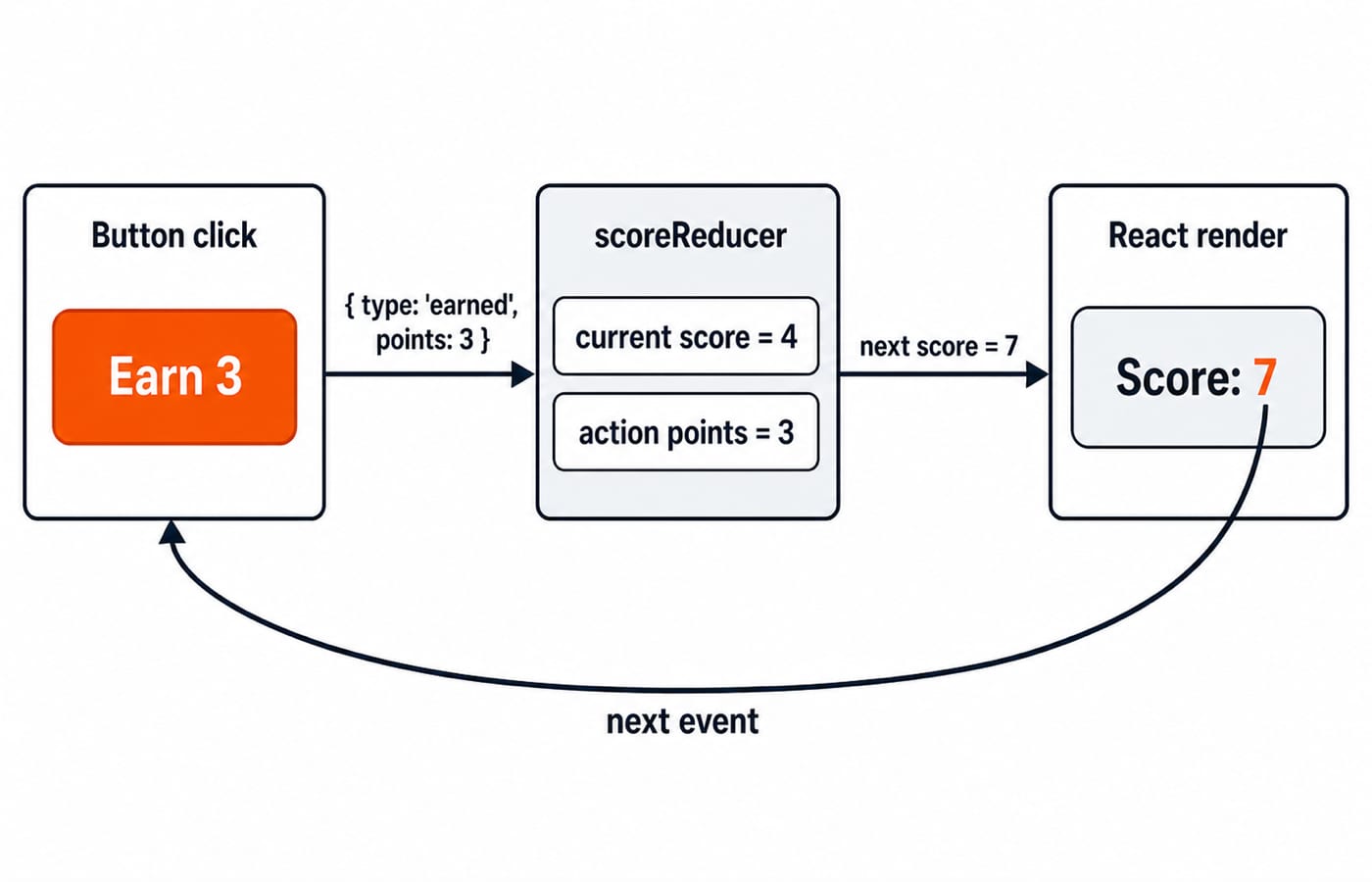
The contract is nextState = reducer(currentState, action). scoreReducer(4, { type: 'earned', points: 3 }) gives 7; feeding 7 into { type: 'penalty', points: 2 } gives 5. The reducer calculates; dispatch reports the event and value.
2. Read the useReducer data flow once, with actual values
With const [score, dispatch] = useReducer(scoreReducer, 4), the first render has score = 4. Dispatching { type: 'earned', points: 3 } sends both to the reducer; it returns 7, so React renders score = 7.
function scoreReducer(score, action) {
  switch (action.type) {
    case 'earned':
      return score + action.points;
    case 'penalty':
      return Math.max(0, score - action.points);
    default:
      throw new Error(`Unknown action: ${action.type}`);
  }
}
From score = 1, penalty 4 evaluates Math.max(0, 1 - 4) = Math.max(0, -3), producing 0, not -3. Reducers are plain JavaScript functions, so this needs no render.
3. Build the worked study-task reducer with one state object
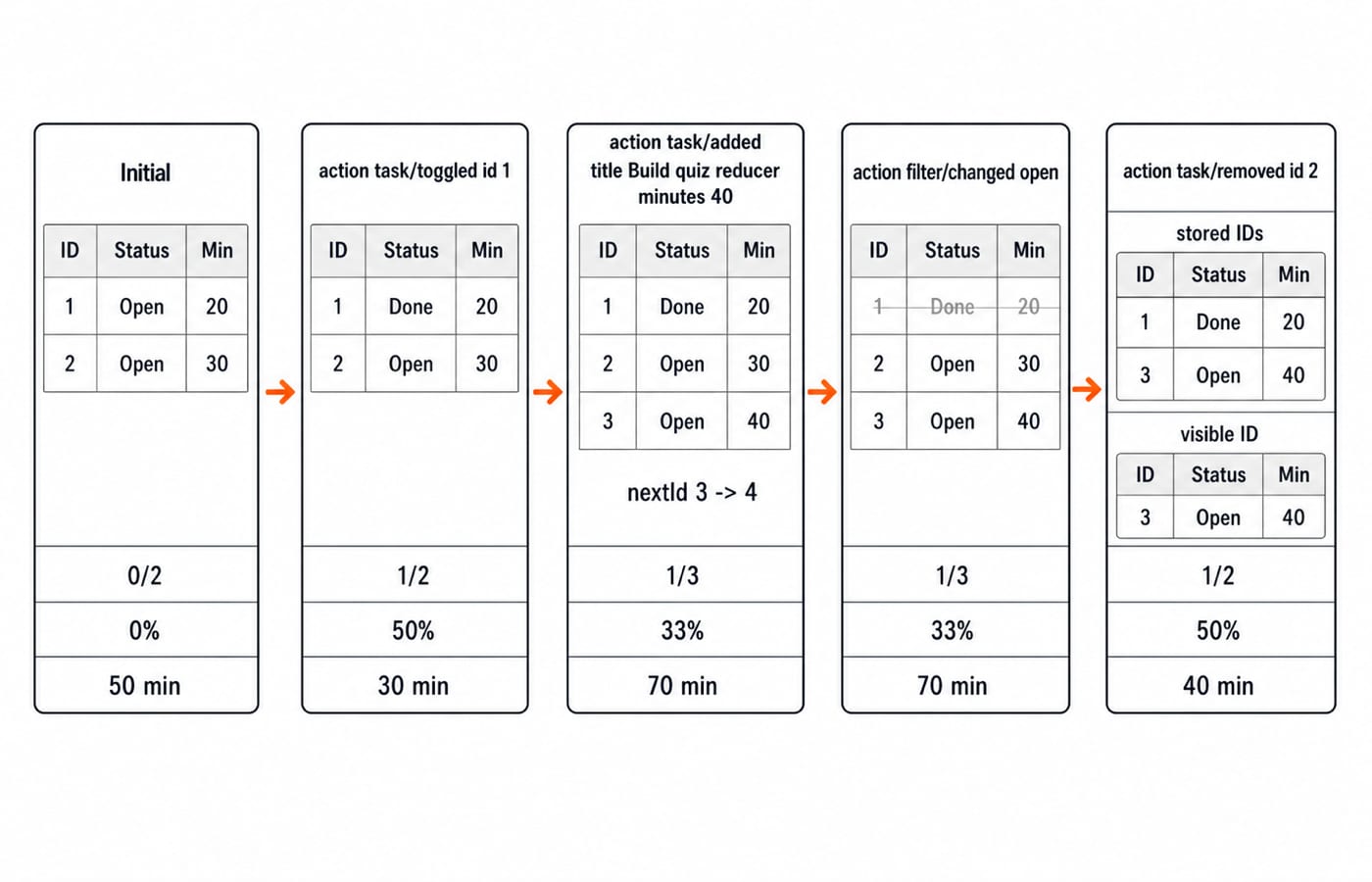
The initial snapshot has open tasks Read reducer notes for 20 minutes and Solve three hook questions for 30. Thus the display starts at 0 of 2 complete, 0% complete, and 50 minutes remaining. Put this example in src/App.jsx:
import { useReducer } from 'react';

const initialState = {
  tasks: [
    { id: 1, title: 'Read reducer notes', minutes: 20, done: false },
    { id: 2, title: 'Solve three hook questions', minutes: 30, done: false },
  ],
  filter: 'all',
  nextId: 3,
};

function studyReducer(state, action) {
  switch (action.type) {
    case 'task/toggled':
      return {
        ...state,
        tasks: state.tasks.map((task) =>
          task.id === action.id ? { ...task, done: !task.done } : task,
        ),
      };
    case 'task/added':
      return {
        ...state,
        tasks: [
          ...state.tasks,
          {
            id: state.nextId,
            title: action.title,
            minutes: action.minutes,
            done: false,
          },
        ],
        nextId: state.nextId + 1,
      };
    case 'filter/changed':
      return { ...state, filter: action.filter };
    case 'task/removed':
      return {
        ...state,
        tasks: state.tasks.filter((task) => task.id !== action.id),
      };
    default:
      throw new Error(`Unknown action: ${action.type}`);
  }
}

export default function App() {
  const [state, dispatch] = useReducer(studyReducer, initialState);

  const completedCount = state.tasks.filter((task) => task.done).length;
  const completionPercent = state.tasks.length === 0
    ? 0
    : Math.round((completedCount / state.tasks.length) * 100);
  const remainingMinutes = state.tasks
    .filter((task) => !task.done)
    .reduce((total, task) => total + task.minutes, 0);
  const visibleTasks = state.filter === 'open'
    ? state.tasks.filter((task) => !task.done)
    : state.tasks;

  return (
    <main>
      <h1>Reducer Study Plan</h1>
      <p>{completedCount} of {state.tasks.length} complete</p>
      <p>{completionPercent}% complete</p>
      <p>{remainingMinutes} minutes remaining</p>

      <ul>
        {visibleTasks.map((task) => (
          <li key={task.id}>
            {task.title} ({task.minutes} min) {task.done ? 'Done' : 'Open'}
          </li>
        ))}
      </ul>

      <button onClick={() => dispatch({ type: 'task/toggled', id: 1 })}>
        Toggle task 1
      </button>
      <button
        onClick={() => dispatch({
          type: 'task/added',
          title: 'Build quiz reducer',
          minutes: 40,
        })}
      >
        Add 40-minute quiz task
      </button>
      <button onClick={() => dispatch({ type: 'filter/changed', filter: 'open' })}>
        Show open tasks
      </button>
      <button onClick={() => dispatch({ type: 'task/removed', id: 2 })}>
        Remove task 2
      </button>
    </main>
  );
}
Store tasks, filter and nextId; derive completion and remaining minutes each render so they cannot drift from tasks.
4. Trace four dispatches and verify every screen value
Refresh the app, then click the four buttons once each in order:
Stage | Stored state and calculation | Visible result |
|---|---|---|
Initial | IDs | Both rows; |
Toggle task 1 | ID | Both rows; |
Add quiz task | ID | Three rows; |
Show open tasks | State still has IDs |
|
Remove task 2 | State retains IDs | Only |
Dispatch uses current state, so task/added reads nextId = 3. Each case returns new state without editing its input.
5. Keep reducer updates immutable and actions precise
Running task.done = true for ID 1 and returning state mutates the snapshot. The correct case uses map for a new array and { ...task, done: !task.done } for a new ID 1 object; other tasks retain their references.
Here, map changes one task, the array spread appends ID 3, and filter removes ID 2. filter/changed copies the state and replaces only filter.
Actions describe events. Unlike { type: 'update', data: ... }, { type: 'task/toggled', id: 1 } keeps the rule in the reducer and makes logs readable.
6. Fix the errors that make reducers look unpredictable
Symptom | Cause | Fix |
|---|---|---|
Screen does not update |
| Return new objects and arrays as |
State becomes | A case forgot | Return state from every case; throw for an unknown type. |
A click does nothing | Dispatch sent | Use the exact type and inspect the action. |
Minutes concatenate | A form supplied text such as | Use |
Counts disagree with the list | Derived values were stored separately. | Derive them from |
Debug in order: log the action and previous state, call the reducer with both, inspect the result, then check rendering. Event handlers should dispatch, not call studyReducer.
7. Test the reducer and practise two new transitions
Reducer tests need no browser. Call studyReducer(initialState, { type: 'task/toggled', id: 1 }). Assert that the result differs from initialState, task 1 is done, task 2 is open, and original task 1 remains open. Feed the result into the add action; the new task needs ID 3, the shown title and minutes, and nextId === 4.
Then practise two transitions:
Add
{ type: 'plan/reset' }, returninitialState, and add a Reset button. From the final traced state, reset must show0 of 2,0%,50 minutes, filterall, and visible IDs1,2.Add
{ type: 'task/clearedCompleted' }withfilter. From the final traced state, remove completed task1while keeping open task3. The screen moves from1 of 2 complete, 50%, 40 minutesto0 of 1 complete, 0%, 40 minutes.
A pure reducer gives identical results for identical inputs without changing the original. Practise explaining purity, predicting all five summaries, and choosing useState for a modal flag but useReducer for this plan. If hooks are the blocker, revise with React Hooks Explained.
8. Short version and the next step
State is the current snapshot.
Actions name events.
Dispatch sends actions.
The reducer returns a new snapshot.
Derived values come from that snapshot.
Unknown actions fail loudly.
Take the React and Redux Course as your next React step. Browse Coding & Skill Development Courses for the wider catalogue, or choose the MERN Stack Course for a full-stack path.
Keep learning

Future Internet Explained: Architecture, a Worked IoT Example and Exam Traps
Learn how device, edge, network, cloud and application layers cooperate, then solve a smart-campus example for data reduction and control-loop latency.
Updated 16 Nov 20266 min readWeb Development

Testing React Components: A Runnable Vitest and Testing Library Tutorial
Build and test a small React progress component from its initial render through completion. The examples use accessible queries, awaited actions, and an exact mock assertion.
Updated 15 Nov 20266 min readWeb Development

React Performance Optimization Tutorial: Profiler, memo, useMemo, and useCallback Examples
Build one React lab, measure its render and calculation counts, then remove avoidable work while keeping typing responsive.
Updated 14 Nov 20266 min readWeb Development

Node.js Path and OS Modules: Build Portable Scripts with Runnable Examples
Learn how Path and OS remove hard-coded assumptions from Node.js scripts. Follow deterministic examples, memory maths, and a complete system-report build.
Updated 13 Nov 20265 min readWeb Development