Buffers in Node.js: A Practical Tutorial with Binary Data Examples
Learn how Node.js Buffers represent bytes, then practise safe allocation, encoding, binary field access, copying, concatenation, and boundary checks.
KnowledgeGate Team
Exam prep & CS education
Updated 23 Aug 20265 min read

When a file, stream, or network callback gives you <Buffer 4e 6f 64 65>, it can look like a puzzle. JavaScript strings describe text, but many Node.js APIs must move raw bytes. Node.js APIs let you create, inspect, encode, read, write, copy, and safely modify buffers.
What a Buffer represents in Node.js
A byte is an integer from 0 to 255. A Buffer is a fixed-length byte sequence whose values remain mutable. The official Node.js Buffer documentation defines this model, explains that Buffer extends Uint8Array, and recommends referring to it explicitly through node:buffer even though it is globally available.
import { Buffer } from 'node:buffer';

const word = Buffer.from([78, 111, 100, 101]);

console.log([...word]);             // [78, 111, 100, 101]
console.log(word.toString('hex'));  // 4e6f6465
console.log(word.toString('utf8')); // Node
These are three views of four bytes: decimal [78, 111, 100, 101], hexadecimal 4e6f6465, and UTF-8 text Node. Buffers hold encoded text, file contents, compressed or encrypted data, protocol fields, and chunks from byte-oriented I/O. A stream chunk is not always a Buffer because code can set a text encoding or use object mode.
Creating buffers safely with from(), alloc(), and allocUnsafe()
Choose the constructor according to where the bytes come from:
console.log([...Buffer.from('KG', 'utf8')]); // [75, 71]
console.log([...Buffer.alloc(4)]);           // [0, 0, 0, 0]
console.log([...Buffer.alloc(4, 0xff)]);     // [255, 255, 255, 255]
Use Buffer.from() for existing content and Buffer.alloc(size) for a known number of writable bytes. The official documentation specifies that Buffer.alloc() zero-fills storage unless you supply another value. Avoid teaching with the legacy new Buffer(...) constructor.
Buffer.allocUnsafe(4) is an advanced, performance-oriented allocation. The same documentation warns that its bytes are not initialised, so never assume a predictable starting value. Fully overwrite every byte before reading or exposing it. Otherwise, use zero-filled Buffer.alloc().
Strings, encodings, and byte length are not the same thing
Run this example exactly as written:
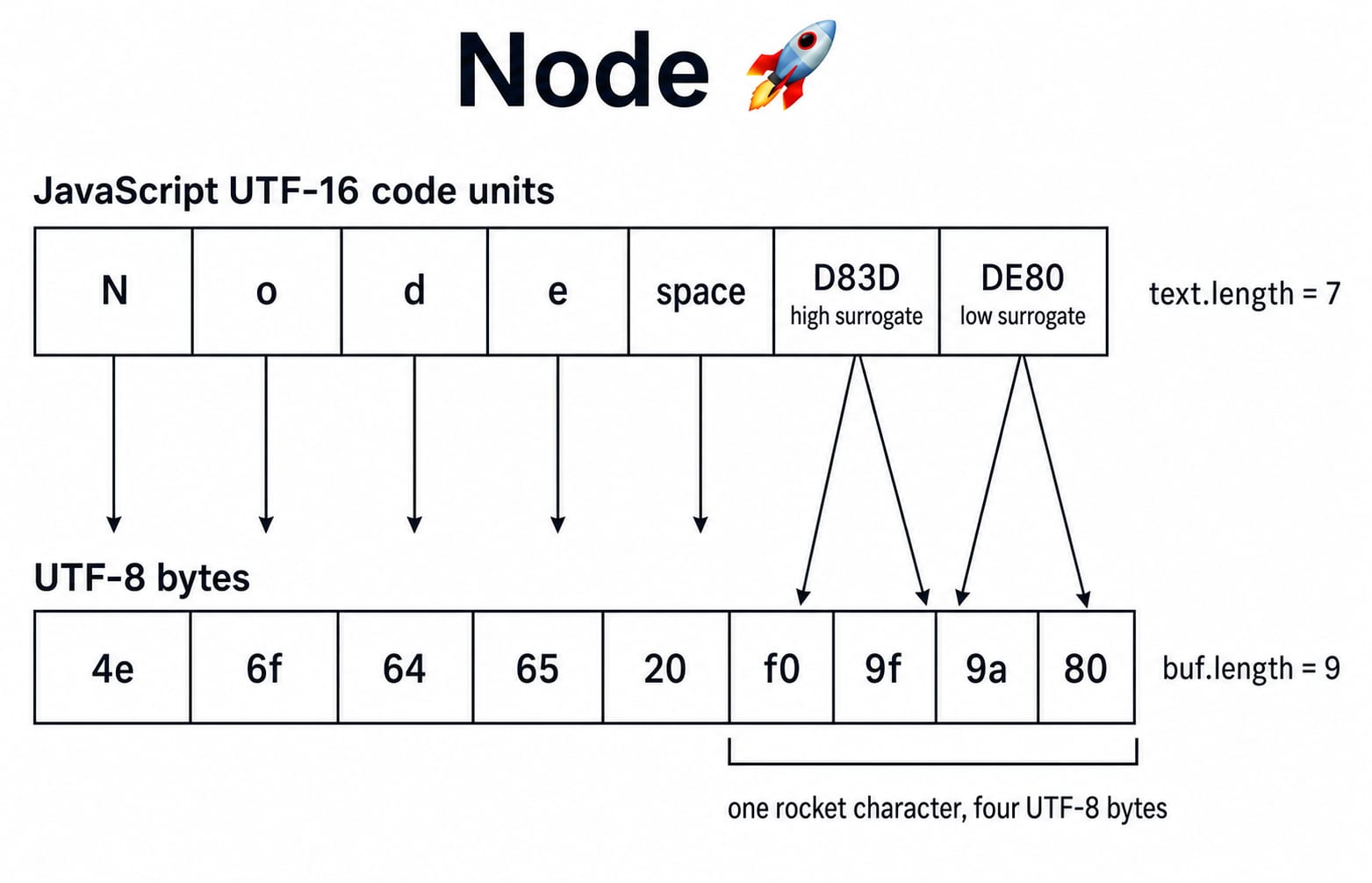
const text = 'Node 🚀';
const buf = Buffer.from(text, 'utf8');

console.log(text.length);                     // 7 UTF-16 code units
console.log(Buffer.byteLength(text, 'utf8')); // 9 bytes
console.log(buf.length);                      // 9 bytes
console.log(buf.toString('hex'));             // 4e6f646520f09f9a80
console.log(buf.toString('base64'));          // Tm9kZSDwn5qA
console.log(buf.toString('utf8'));            // Node 🚀
The bytes are N=4e, o=6f, d=64, e=65, space=20, and rocket=f0 9f 9a 80. The five ordinary characters take five bytes. The rocket takes two UTF-16 code units but four UTF-8 bytes, so text.length is 7 while both byte measurements are 9.
The documentation specifies UTF-8 as Buffer's default string encoding and explains its conversions. JavaScript string length counts UTF-16 code units, so it is not a safe byte-count proxy for Unicode text. Use Buffer.byteLength(text, encoding) before allocation, or inspect buf.length after construction.
Fully worked binary packet: offsets and endianness
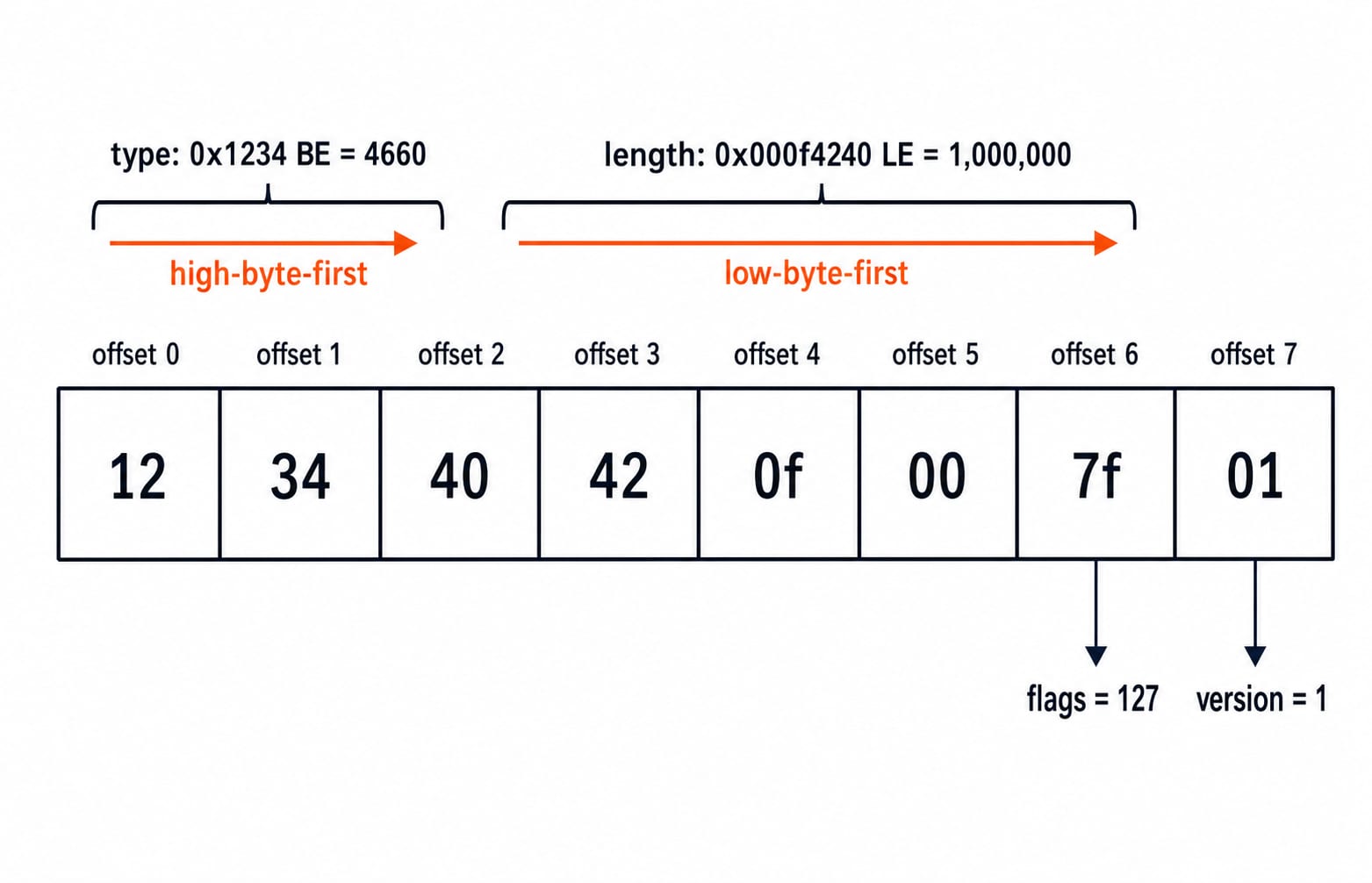
Suppose an eight-byte header stores a message type in bytes 0 and 1, payload length in bytes 2 to 5, flags at byte 6, and protocol version at byte 7.
const frame = Buffer.alloc(8);
frame.writeUInt16BE(0x1234, 0);
frame.writeUInt32LE(1_000_000, 2);
frame.writeUInt8(0x7f, 6);
frame.writeUInt8(0x01, 7);

console.log(frame.toString('hex'));  // 123440420f007f01
console.log([...frame]);             // [18, 52, 64, 66, 15, 0, 127, 1]

console.log(frame.readUInt16BE(0));  // 4660
console.log(frame.readUInt32LE(2));  // 1000000
console.log(frame.readUInt8(6));     // 127
console.log(frame.readUInt8(7));     // 1
Walk through the order. Unsigned 0x1234 is decimal 4660 and becomes 12 34 in big-endian order, high byte first. The length 1,000,000 is 0x000f4240, so little-endian order stores it as 40 42 0f 00. The flags and version occupy one byte each. The same API documentation specifies that readUInt* and writeUInt* use the stated width, byte order, and zero-based offset.
Views, copies, concatenation, and real I/O boundaries
subarray() creates a view over shared memory, not an independent copy:
const original = Buffer.from([10, 20, 30, 40]);
const view = original.subarray(1, 3);
view[0] = 99;

console.log([...original]); // [10, 99, 30, 40]
console.log([...view]);     // [99, 30]

const copy = Buffer.from(view);
copy[1] = 77;

console.log([...copy]);     // [99, 77]
console.log([...original]); // [10, 99, 30, 40]
The shared view changed original; the copied Buffer did not. This is the documented subarray() behaviour.
Use Buffer.concat() when separate chunks must become one Buffer:
const combined = Buffer.concat([
  Buffer.from([0x4b, 0x47]),
  Buffer.from('OK')
]);

console.log([...combined]);             // [75, 71, 79, 75]
console.log(combined.toString('hex'));  // 4b474f4b
console.log(combined.toString('utf8')); // KGOK
File reads and byte-oriented streams commonly provide binary chunks. Applications may decode, parse, or accumulate them. The distinction between chunks and messages also matters at the transport boundary, covered in TCP vs UDP: Comparison Table, Headers, Exam Angle.
How interviews and coding tests probe Buffer understanding
Try three precise checks, then compare the immediate answer:
What are the byte length and hex value of
Node 🚀in UTF-8? Answer: 9 bytes and4e6f646520f09f9a80.What unsigned 16-bit big-endian value does
12 34represent? Answer:0x1234, which is 4660.Why does changing a
subarray()change its original Buffer? Answer: both objects view the same underlying memory region.
Now test a boundary. An eight-byte Buffer cannot accept writeUInt32LE(value, 6). A four-byte write beginning at offset 6 needs offsets 6, 7, 8, and 9, but the Buffer ends at offset 7. Check offset + field width <= buffer.length; here, 6 + 4 <= 8 is false. The method documentation specifies this range enforcement.
Practise the same reasoning on unfamiliar byte sequences: write the offsets above the bytes, choose the field width and byte order, and predict each read before running the code.
Common Buffer mistakes and their fixes
Using string.length to reserve bytes can mishandle Unicode because code-unit and byte counts differ. Use Buffer.byteLength() or the constructed Buffer's length.
Mixing endianness or offsets changes a decoded number and can overlap the next field. Write a field-layout table first. Keep the width in the method name, then pair writeUInt32LE with readUInt32LE at the same offset.
Treating subarray() as a copy causes unexpected mutation, so use Buffer.from(view) when you need independent bytes. Reading allocUnsafe() before fully overwriting it risks exposing old memory, so choose Buffer.alloc() for safe zero-filled storage. Decoding arbitrary binary as UTF-8 can replace or distort byte sequences, so inspect hex or use the encoding required by the protocol. Application Layer Protocols: DNS Walk-Through, HTTP gives useful context for how a protocol defines those meanings.
Buffers in Node.js, the short version and next step
Keep this six-line checklist beside your next binary-data exercise:
Bytes are integers from 0 to 255.
Buffer length is fixed.
Encoding maps text to bytes.
Offsets are zero-based.
Endianness must match the data format.
Views may share memory.
Rerun the string and packet examples, change one value at a time, and predict the output before executing the code. Then continue with the Node.js, Express.js & MongoDB Course for structured backend practice. If arrays, strings, numbers, or functions still need work, use the Complete JavaScript Course. The Coding & Skill Development Courses is the broader route through related learning.
Keep learning
Functions and Arrow Functions in JavaScript: Syntax, Scope and Runnable Examples
Build function declarations, expressions and arrows in JavaScript, then trace parameters, closures, lexical this and array callbacks through exact outputs.
Updated 19 Oct 20266 min readWeb Development

Modules in JavaScript: Import, Export, and Runnable Examples
Build JavaScript modules from scratch with a shopping-cart project that runs in Node.js and the browser. Learn live bindings, re-exports, lazy loading, and practical fixes.
Updated 15 Oct 20265 min readWeb Development

LocalStorage and Cookies in JavaScript: Store, Read and Delete Data
Run one lesson-progress object and one preference cookie through their complete life cycles, then learn which browser store fits a feature and which security traps to avoid.
Updated 11 Oct 20266 min readWeb Development

JavaScript Event Delegation: Bubbling, target and currentTarget with Runnable Examples
Learn how browser events travel through the DOM, then build one delegated listener that handles nested controls and rows added later.
Updated 6 Oct 20265 min readWeb Development