React Hooks Explained: useState, useEffect, useMemo, and Custom Hooks with Interview Questions
Build the right mental model for React Hooks, then trace a debounced search component from keystroke to filtered result.
KnowledgeGate Team
Exam prep & CS education
Updated 9 Aug 20266 min read

Hooks copied from a tutorial often seem easy until a component loops, an effect reads an old value, or development mode runs an effect twice. All three failures follow from two facts. React calls a function component again for every render, and a dependency array tells a hook which changing values matter.
The React Hooks mental model and rules
A function component is a function that React calls to describe the current UI. Its local variables are created again on the next render, but hook state survives between those calls. That is why useState can remember a search query even though the component function runs from the top again.
React associates each hook call with stored state by its position in the call sequence. Two rules follow:
Call hooks only at the top level, never inside a condition, loop, or nested callback.
Call hooks only from React function components or custom hooks.
If one render calls useState, skips useEffect, and then calls another useState, React can no longer match the same positions reliably. Keep the order identical on every render. Put the condition inside the hook when necessary, not around the hook call.
useState and useEffect in depth
useState(initialValue) returns a pair: the current value and a setter. Calling the setter schedules another render. It does not rewrite the value captured by code that is already running in the current render.
const [count, setCount] = useState(0);

setCount(count + 1);
console.log(count); // still 0 in this render
When the next render begins, React supplies the updated value. If a new value depends on the previous one, the functional form is safer: setCount(previous => previous + 1).
useEffect(setup, dependencies) runs side-effect code after React commits a render. Its common forms are:
useEffect(fn)runs after every render.useEffect(fn, [a, b])runs after the first committed render and again whenaorbchanges.useEffect(fn, [])has no changing dependency, so it runs for the mount and cleans up on unmount.
An effect may return a cleanup function. React runs that cleanup before rerunning the effect with changed dependencies and when the component unmounts. Cleanup clears timers, removes event listeners, and unsubscribes from external services. Prashant Sir walks through the same setup and cleanup cycle on screen in the useEffect hook class of the MERN Stack track.
In React development Strict Mode, React may deliberately perform an extra setup and cleanup cycle to expose unsafe effects. That explains many reports that an empty-dependency effect ran twice. The effect should still be written so setup followed by cleanup is safe.
A worked debounced course search
Suppose a page receives 200 courses and should filter them only after the learner pauses typing. A custom debounce hook and useMemo make the data flow explicit.
function useDebounced(value, delay = 300) {
  const [debounced, setDebounced] = useState(value);
  useEffect(() => {
    const id = setTimeout(() => setDebounced(value), delay);
    return () => clearTimeout(id);        // cancel the previous timer
  }, [value, delay]);
  return debounced;
}

function CourseSearch({ courses }) {       // courses = 200 items
  const [query, setQuery] = useState('');
  const debouncedQuery = useDebounced(query, 300);
  const results = useMemo(
    () => courses.filter(c =>
      c.title.toLowerCase().includes(debouncedQuery.toLowerCase())),
    [courses, debouncedQuery]
  );
  return (/* input bound to query; render results.length items */);
}
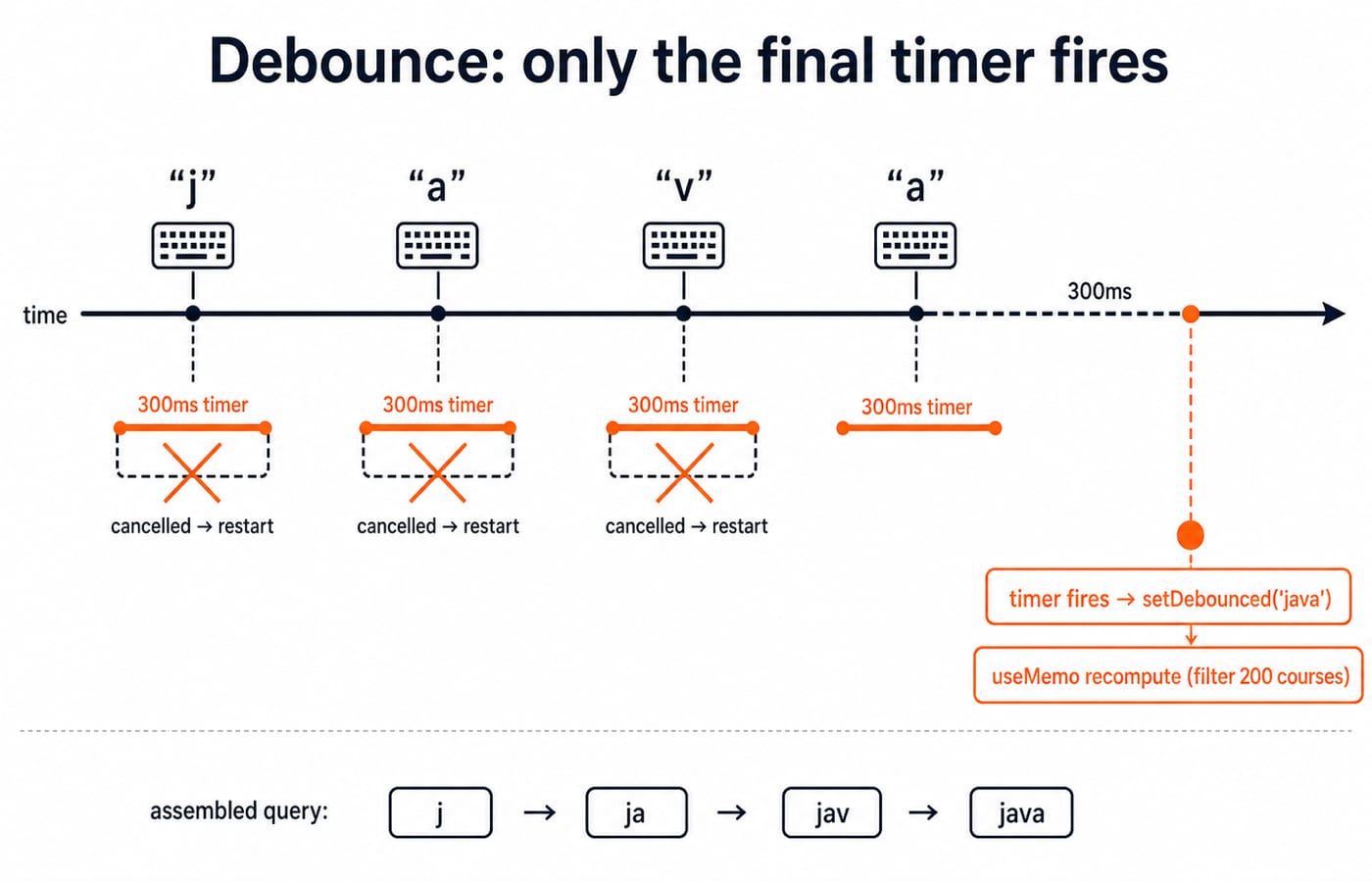
Now trace four fast keystrokes, j, a, v, a:
Typing
jsetsquerytoj. The component renders and the debounce effect starts a 300 ms timer.Typing
abefore 300 ms changesquerytoja. Before the new effect runs, cleanup clears the first timer. A fresh 300 ms timer starts.The
vand finalarepeat the same cleanup and restart. Three earlier timers are cancelled.Typing stops. The fourth timer survives for 300 ms, then sets
debouncedtojava.debouncedQuerychanges once, so the memoized filter examines the 200 courses once for this completed burst, instead of once per character.
Count the timers. Four query updates create four timers, cleanup cancels the first three, and the fourth one fires. The mount run schedules one timer before any typing, which the first keystroke also cancels if it lands inside that 300 ms window. The burst therefore ends in a single post-pause filter recomputation in the normal committed flow, against four if the filter ran on every character.
useMemo versus useCallback
useMemo(fn, deps) caches the value returned by fn. In the example, that value is the filtered array. React can reuse it while courses and debouncedQuery remain unchanged.
useCallback(fn, deps) caches the function reference itself. Conceptually, it is useMemo(() => fn, deps). A stable callback matters when a memoized child should not rerender for a new function identity, or when an effect genuinely depends on that function.
Do not memoize everything. Memoization adds dependency bookkeeping, comparisons, and code that can itself become stale. Use it for a measured expensive calculation or a reference whose stability affects another optimization or effect.
Writing a reusable custom hook
A custom hook is a function whose name starts with use and which may call other hooks. useDebounced packages one state value, one effect, and timer cleanup behind a small interface. The consuming component provides a value and delay, then receives the settled value.
The same hook can debounce a course search, a form-field check, or a resize-derived value without changing its internal logic. Custom hooks share stateful logic, not one shared state instance. Each component call receives its own hook state.
React Hooks interview questions: five traps and how to answer them
Why does my effect read an old value even after the state changed?
Because the effect captured that value in the render that created it, and the dependency array leaves it out, so React never rebuilds the closure. That is a stale closure. Add the value to the dependencies, restructure the effect so it does not read it, or use the functional setter form when the previous value is all you need.
An effect sets state and the component now renders forever. What is wrong?
The effect depends on an object or array literal built fresh on every render, so its reference differs every time. The effect runs, sets state, renders, and the comparison fails again. Depend on the primitive fields instead, move the literal inside the effect, or memoize it when the identity genuinely matters.
Can I call useState inside an if when I only sometimes need it?
No. React matches each hook to its stored state by call position, so a hook present in one render and absent in the next shifts every later hook onto the wrong slot. Call it unconditionally and branch on the value afterwards. The same rule pushes conditions inside an effect body as an early return, never around the useEffect call.
What breaks if an effect returns no cleanup?
React raises no warning. Timers, subscriptions and listeners created by setup outlive the next dependency change and the unmount. Delete return () => clearTimeout(id) from the debounce hook above and all four keystroke timers survive, so debounced is set four times in turn and the filter runs once per character again.
Why does console.log(count) straight after setCount(count + 1) still print the old number?
Because the setter schedules a render, it does not assign to the variable. The count of the current render was bound when React called the component, and it cannot change while that call is still running. The new value arrives as a fresh count on the next render.
For more output-based prompts, work through React interview questions for freshers before your interview.
The short version and next step
Components run from top to bottom on each render. State survives those runs, dependency arrays control when effects and memoized values react, and cleanup reverses the previous effect. When the same stateful pattern repeats, extract a custom hook.
KnowledgeGate's MERN track carries over 600 practice questions, React included. Study the library in depth in Complete React and Redux, or take it alongside data structures in the MERN Stack and DSA bundle. Then trace the debounce example once more without looking, and say out loud which timer survives.
Keep learning

JavaScript Event Delegation: Bubbling, target and currentTarget with Runnable Examples
Learn how browser events travel through the DOM, then build one delegated listener that handles nested controls and rows added later.
Updated 6 Oct 20265 min readWeb Development
JavaScript Operators: Types, Precedence and Runnable Examples
Learn how JavaScript arithmetic, assignment, comparison, logical and modern operators behave by tracing one score program from inputs to final output.
Updated 2 Oct 20266 min readWeb Development

JavaScript Data Types and Coercion: Beginner Tutorial with Runnable Examples
Learn how JavaScript stores values, copies primitives and objects, converts input, compares values and produces surprising output. Trace each rule in the console.
Updated 27 Sep 20265 min readWeb Development
JavaScript Conditionals and Loops: Beginner Tutorial with Runnable Examples
Learn how JavaScript chooses a branch and repeats work. Build from small syntax examples to a complete score classifier with a traced average.
Updated 25 Sep 20265 min readWeb Development