Python Multithreading Tutorial: Threads, Locks and Runnable Examples
Learn when Python threads help, then run deterministic examples using Thread, ThreadPoolExecutor, Lock and Queue. You will also diagnose races and practise safe coordination.
KnowledgeGate Team
Exam prep & CS education
Updated 22 Sep 20266 min read
A script may wait for a slow file, API response or database call before starting the next, even when the waits are independent. Two Thread objects can overlap independent waits; a thread pool applies one function to several inputs, Lock protects shared state, and Queue hands work between threads. Threads can overlap waits but do not make every program faster. Each example stores results by input position or sorts them before printing, so scheduling does not change the displayed output.
Related reading: threads and process creation and threading model MCQs.
1. What multithreading means in Python and when to use it
A process is a running program with its resources. A thread is an execution path inside it. Threads share memory, easing data exchange but enabling shared-state bugs. Concurrency means tasks progress during overlapping periods. Parallelism means they execute simultaneously.
The official Python threading documentation says the GIL in default CPython builds lets only one thread execute Python code at a time. Threads therefore suit I/O-bound waits, while Multiprocessing in Python Tutorial covers separate processes, pools and CPU-bound chunking; ProcessPoolExecutor is the other standard comparison for CPU-bound pure-Python work. Free-threaded builds can disable the GIL, but are not the default. This CPython boundary does not govern every Python implementation.
Workload | Starting choice |
|---|---|
Five independent responses, each waiting 200 ms | Consider threads |
Five images resized with CPU-heavy Python loops | Compare processes |
One short calculation | Stay sequential |
The broader Coding & Skill Development Courses category can help you place concurrency inside a wider learning path.
2. Create, start and join two threads
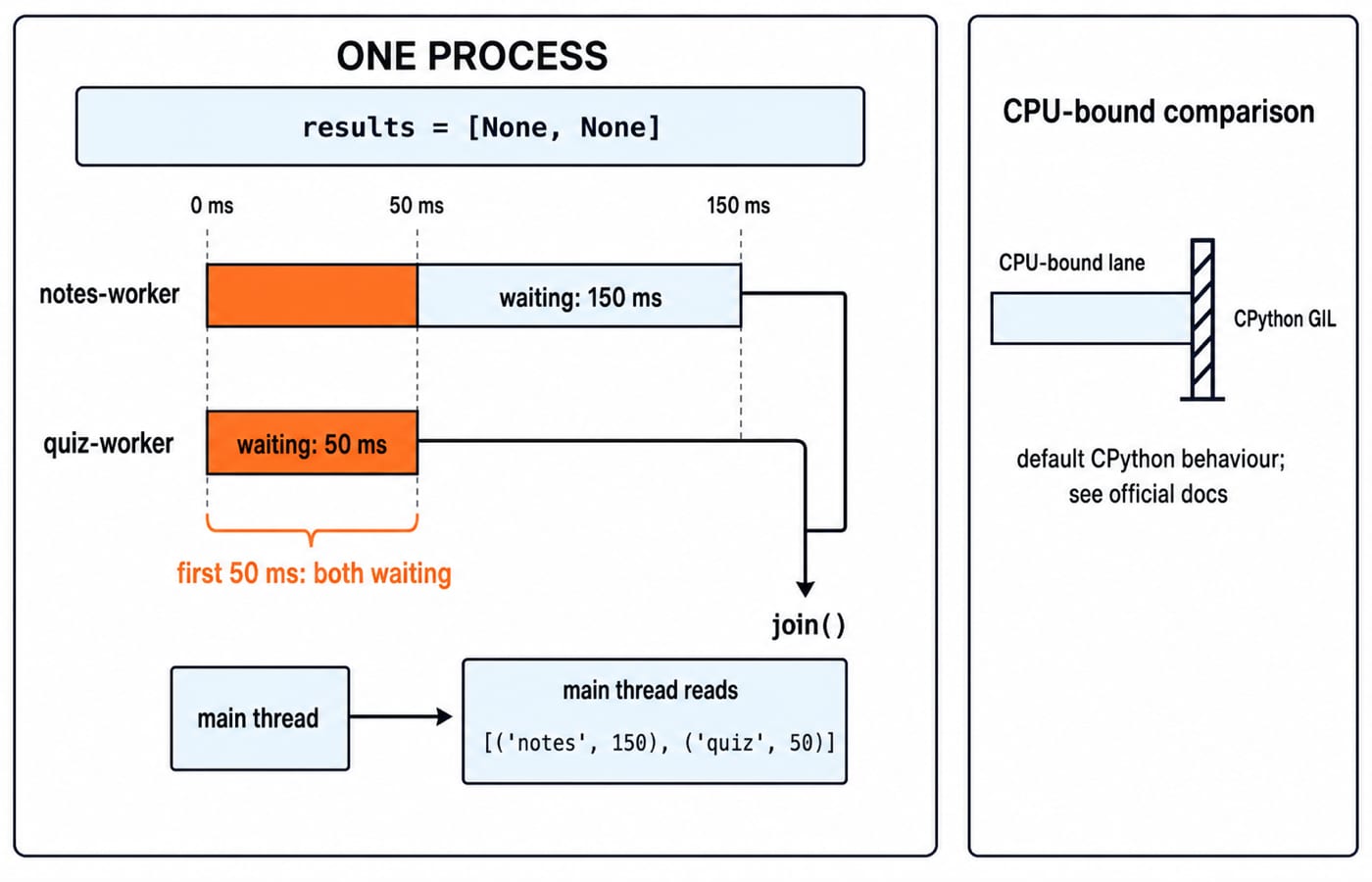
Each worker owns one result slot. The main thread reads the list only after both joins, so completion order cannot change the printed value.
from threading import Thread
from time import sleep

results = [None, None]

def load(slot, name, delay):
    sleep(delay)
    results[slot] = (name, int(delay * 1000))

threads = [
    Thread(target=load, args=(0, "notes", 0.15), name="notes-worker"),
    Thread(target=load, args=(1, "quiz", 0.05), name="quiz-worker"),
]

for thread in threads:
    thread.start()
for thread in threads:
    thread.join()

print(results)
The exact output is [('notes', 150), ('quiz', 50)]. In the official threading reference, target is the callable, args supplies its positional arguments, start() invokes it in a separate thread, and join() blocks until it terminates. Calling thread.run() directly executes in the current thread. A Thread can be started only once. The shorter delay does not guarantee that quiz-worker finishes first.
3. Worked example: check four independent pages with a thread pool
ThreadPoolExecutor is a higher-level choice when the job is to apply the same independent function to several inputs. The function uses sleep to model I/O latency, so it runs without network access.
from concurrent.futures import ThreadPoolExecutor
from time import sleep

tasks = [
    ("course", 0.30, 200),
    ("quiz", 0.10, 200),
    ("notes", 0.20, 503),
    ("profile", 0.10, 200),
]

def check_page(name, delay, status):
    sleep(delay)
    return name, status

with ThreadPoolExecutor(max_workers=2) as pool:
    futures = [pool.submit(check_page, *task) for task in tasks]
    results = sorted(future.result() for future in futures)

print(results)
print([name for name, status in results if status != 200])
Sorting gives [('course', 200), ('notes', 503), ('profile', 200), ('quiz', 200)]. Filtering non-200 results gives ['notes'].
Sequential waiting would take 0.30 + 0.10 + 0.20 + 0.10 = 0.70 seconds before overhead. Two workers overlap waits, but the machine, scheduler and load determine wall time, so there is no fixed speed-up. max_workers=2 is a resource limit, not a universal optimum.
The official concurrent.futures reference says leaving the context manager shuts down the executor and waits for pending futures. future.result() returns the task value or re-raises its exception.
4. See a race condition, then protect the critical section with Lock
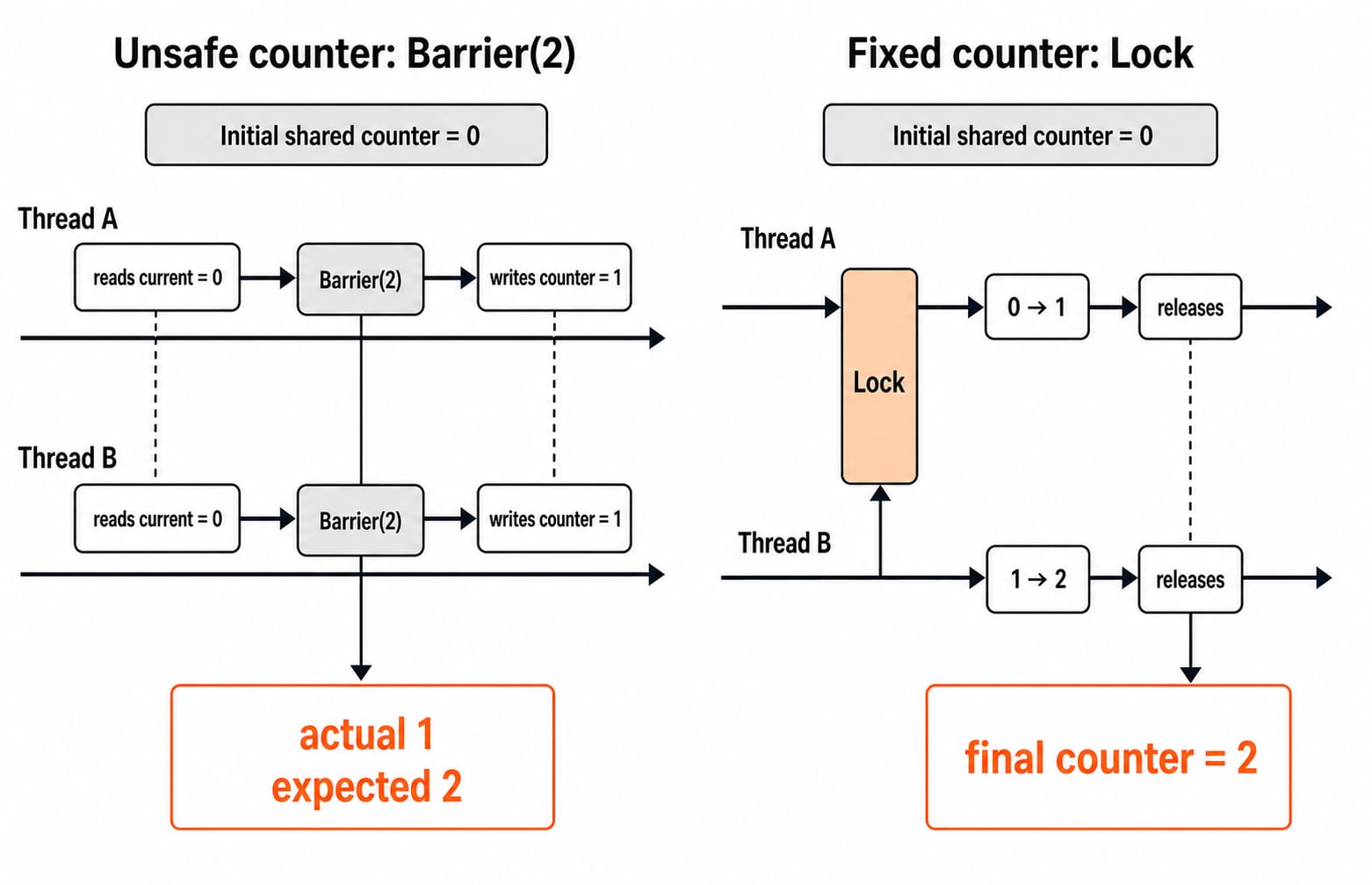
A Barrier stages a lost update by making both threads capture 0 before either writes.
from threading import Barrier, Lock, Thread

counter = 0
gate = Barrier(2)

def unsafe_increment():
    global counter
    current = counter
    gate.wait()
    counter = current + 1

threads = [Thread(target=unsafe_increment) for _ in range(2)]
for thread in threads:
    thread.start()
for thread in threads:
    thread.join()

print(counter)  # 1
Both threads read 0, then both store 1. The actual result is 1, although two increments logically suggest 2. Resetting the state and protecting the read-modify-write critical section produces the correct total.
counter = 0
lock = Lock()

def safe_increment():
    global counter
    with lock:
        counter += 1

threads = [Thread(target=safe_increment) for _ in range(2)]
for thread in threads:
    thread.start()
for thread in threads:
    thread.join()

print(counter)  # 2
The official threading documentation defines lock acquisition and release. The critical section is the shared read-modify-write operation, not the whole worker. The GIL cannot replace an application-level invariant. Holding a lock during a slow wait can serialise the program. Process Synchronization and Semaphores explains the operating-system concept; Python's Lock applies it to a shared read-modify-write section.
5. Pass work safely between threads with Queue
A synchronized Queue transfers work ownership without workers repeatedly inspecting and changing one shared list.
from queue import Queue
from threading import Thread

jobs = Queue()
results = Queue()

def worker():
    while True:
        number = jobs.get()
        try:
            if number is None:
                return
            results.put((number, number * number))
        finally:
            jobs.task_done()

workers = [Thread(target=worker) for _ in range(2)]
for thread in workers:
    thread.start()

for number in [3, 5, 7, 9]:
    jobs.put(number)
for _ in workers:
    jobs.put(None)

jobs.join()
for thread in workers:
    thread.join()

output = sorted(results.get() for _ in range(4))
print(output)
The exact output is [(3, 9), (5, 25), (7, 49), (9, 81)]. The official queue reference says Queue supplies locking and join() unblocks after every enqueued item has a matching task_done(). Missing one call can make jobs.join() wait forever. One sentinel leaves one of two workers blocked. Do not use qsize() to decide work is finished.
6. Common Python multithreading errors and their fixes
Symptom | Cause | Fix |
|---|---|---|
Code stays sequential |
| Use |
Main thread reads | Workers are unfinished | Join before reading |
Output order changes | Scheduling is not fixed | Collect by key, or sort only for presentation |
| A used thread was restarted | Create a new |
Shared total is wrong | A read-modify-write invariant raced | Lock the smallest critical section |
Program hangs | Lock order, self-join or | Inspect each coordination path |
Throughput collapses | Slow I/O runs inside a lock | Move the wait outside the lock |
For concept drills rather than Python syntax, practise identifying critical sections, lock scope and legal output orders. Do not depend on daemon threads for important cleanup because official docs warn they can stop abruptly. Retrieve executor futures so task exceptions are observed, and never hide worker failures with except Exception: pass.
7. How interviews and tests probe threads, plus exercises
Common question shapes ask you to predict the legal output orders, identify the critical section in a shared counter, or select sequential code, threads or processes for a workload. Threads & Process Creation MCQs (GATE OS) cover the operating-system model. KnowledgeGate has about 70 live practice questions about operating-system threads and process models, but they are conceptual practice rather than Python-API questions.
Try these extensions and check the exact results:
In section 2, change the delays to
0.04and0.12while preserving slots. The result must be[('notes', 40), ('quiz', 120)].In section 3, add
("dashboard", 0.05, 404). Sorted failures must become['dashboard', 'notes'].In section 5, add
11to the queue jobs. The new tuple is(11, 121), and the result count becomes five.
For one more reasoning exercise, stage three unsafe increments so every thread reads counter = 0 before any write. Draw the interleaving before running it. The unsafe final value is 1, not 3; with the lock fix it is 3.
8. Short version and the next practical step
Use Thread to learn lifecycle control, ThreadPoolExecutor for repeated independent I/O waits, Lock for a shared invariant, and Queue to hand work between threads. join() marks the point where the main thread may rely on completed results, but completion order is not a contract. Rerun all four examples and complete the extensions, then use the Python Course: Concepts, MCQs & Coding to strengthen the language foundation.
Keep learning

Paging and TLB Explained: Address Translation, EMAT and Exam Traps
Follow one virtual address from its VPN through the TLB to a physical frame, then calculate page-table size, TLB reach and effective memory access time.
Updated 4 Oct 20266 min readOperating Systems
Operating System Scenarios: Solve Scheduling, Concurrency, and Page Replacement
Learn one state-trace method for three common OS problem families, then apply it to complete Round Robin, concurrency, FIFO, and LRU examples.
Updated 29 Sep 20265 min readOperating Systems
Tower Research Hiring Process: Stage-by-Stage Prep for Quant and Dev Roles
Prepare for a Tower Research application without treating one online account as a universal process. Use this role-led map, worked drills, and seven-day plan.
Updated 25 Sep 20265 min readOperating Systems

Capital One Recruitment Process: Stage-by-Stage Guide for India Applicants
Prepare for a Capital One India application with a cautious five-stage map, worked technical and case drills, and a practical 14-hour schedule.
Updated 24 Sep 20265 min readOperating Systems