

Asyncio in Python: Event Loops, Coroutines and Runnable Examples
Build a clear mental model of Python's event loop, then run two dependency-free examples covering concurrent waits, result ordering, timeouts and cleanup.
KnowledgeGate Team
Exam prep & CS education
Updated 15 Nov 20266 min read
You have seen async def and await, yet a coroutine warning still appears, output order changes unexpectedly, and asyncio seems as if it should make every program faster. With simulated I/O delays, a local event loop exposes completion order, gather result ordering, and timeout cleanup without network access or third-party packages.
What asyncio solves, and what it does not
The Python Software Foundation's official coroutines and Tasks reference describes asyncio as a way to write concurrent code with async and await, commonly for I/O-bound work such as network operations. Its concurrency is cooperative. One task runs until it reaches an await that can pause; while it waits, the event loop can advance another ready task.
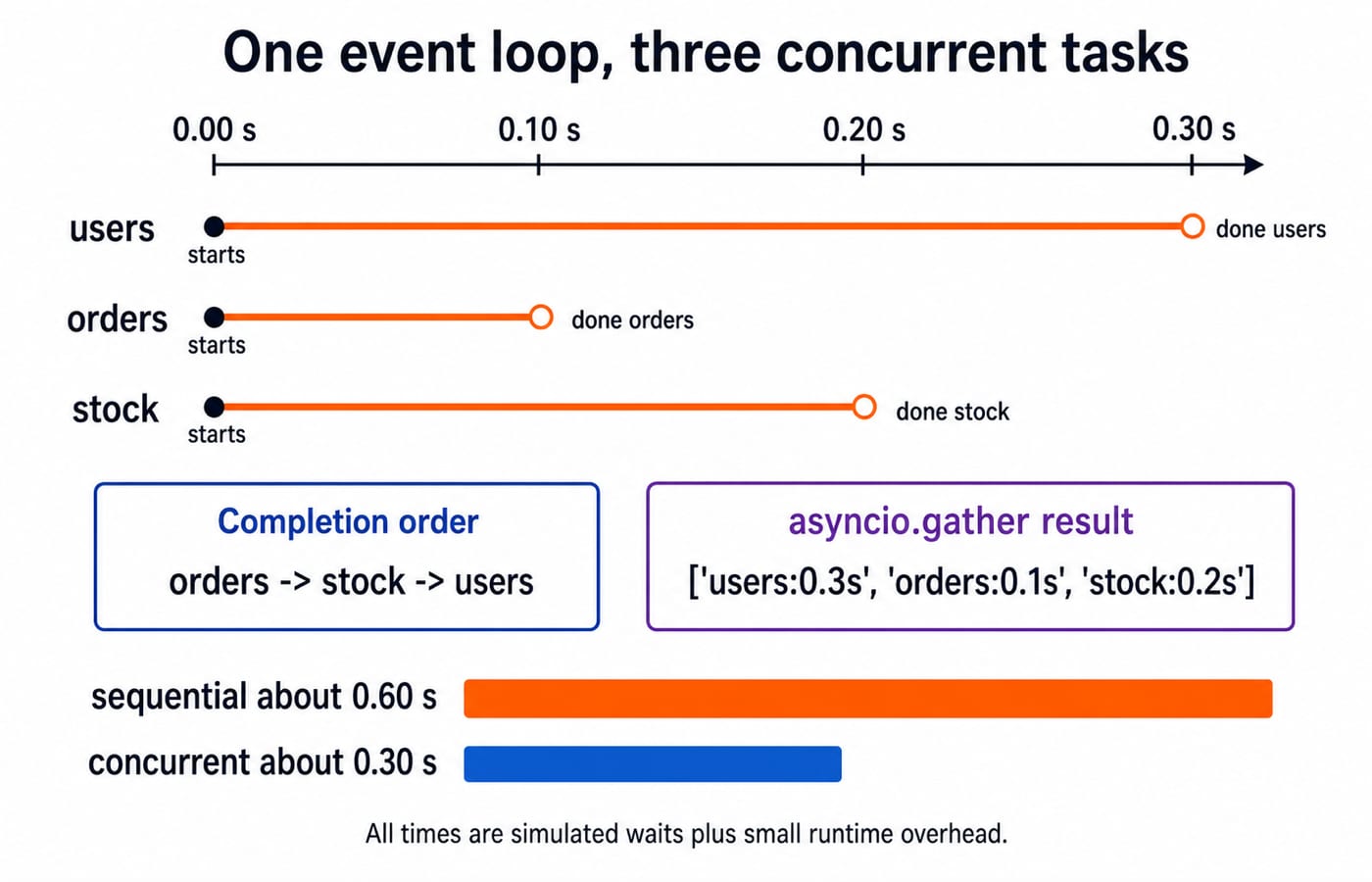
That overlap matters when time would otherwise be idle. Three simulated waits of 0.30, 0.10, and 0.20 seconds take about 0.60 seconds when awaited sequentially because 0.30 + 0.10 + 0.20 = 0.60. When overlapped, wall time is about the longest wait, 0.30 seconds. Scheduling and printing add small overhead, so these are approximate timings.
Concurrency does not make a CPU-heavy loop parallel, create one thread per coroutine, or guarantee a speed-up. For connections to threads, processes, scheduling, and other programming foundations, use the Coding & Skill Development course category.
Coroutines, awaitables, Tasks and the event loop
Start with the call-versus-execution distinction:
import asyncio


async def status():
    return "ready"


async def main():
    print(await status())


asyncio.run(main())
The output is exactly:
readyA coroutine function is declared with async def. Calling status() creates a coroutine object but does not, by itself, run the body. An awaitable is any object accepted by await; coroutines, Tasks and Futures are the main kinds.
A Task schedules a coroutine on the event loop and retains its eventual result or exception. A Future is the lower-level object representing an eventual result, which application code normally receives from a library rather than creates directly. In a normal script, asyncio.run(main()) creates and manages the loop for the top-level coroutine. If a loop is already running, await work or create a Task inside that async context instead of nesting another asyncio.run().
Asyncio worked example: overlap three simulated API calls
This complete program starts three simulated operations together:
import asyncio


async def fetch(name, delay):
    print(f"start {name}")
    await asyncio.sleep(delay)
    print(f"done {name}")
    return f"{name}:{delay:.1f}s"


async def main():
    results = await asyncio.gather(
        fetch("users", 0.30),
        fetch("orders", 0.10),
        fetch("stock", 0.20),
    )
    print(results)


asyncio.run(main())
A typical observed output on the default local event loop is:
start users
start orders
start stock
done orders
done stock
done users
['users:0.3s', 'orders:0.1s', 'stock:0.2s']
All three coroutines start and reach asyncio.sleep. orders becomes ready near 0.10 seconds, stock near 0.20, and users near 0.30, so their completion order is orders, stock, users. Intermediate print ordering should be treated as an observation, not a universal promise across every event-loop implementation.
The official guarantee that matters is different: gather returns results in the order of its input awaitables. Therefore the result list is users, orders, stock even though users finishes last. Sequential delay is 0.30 + 0.10 + 0.20 = 0.60 seconds; concurrent delay is approximately max(0.30, 0.10, 0.20) = 0.30 seconds. The Python Course provides a structured route for practising the language around this example.
Direct await, create_task and gather are different choices
Directly awaiting fetch("users", 0.30), then orders, then stock makes each operation finish before the next starts. The delays therefore add to about 0.60 seconds. asyncio.gather(...) takes the three coroutines, schedules their progress concurrently, and waits for all of them.
With task = asyncio.create_task(fetch("profile", 0.20)), one coroutine is scheduled while the current coroutine can do other async work. You still collect it with result = await task. A Task is not a new thread, and creating one is not permission to ignore its result or exception. Retain the reference and decide how failure is handled.
Python 3.11 and later also provide TaskGroup for related tasks that should be managed as a unit. If one task fails with an exception other than CancelledError, the context cancels unfinished siblings and waits for them before it exits. For an overlap pattern in which every result is required, gather is the smaller tool.
Asyncio timeouts, cancellation and cleanup
Timeouts are cancellation paths, so cleanup must be part of the design:
import asyncio


async def slow_job():
    try:
        await asyncio.sleep(0.50)
        return "ready"
    finally:
        print("cleanup report")


async def main():
    try:
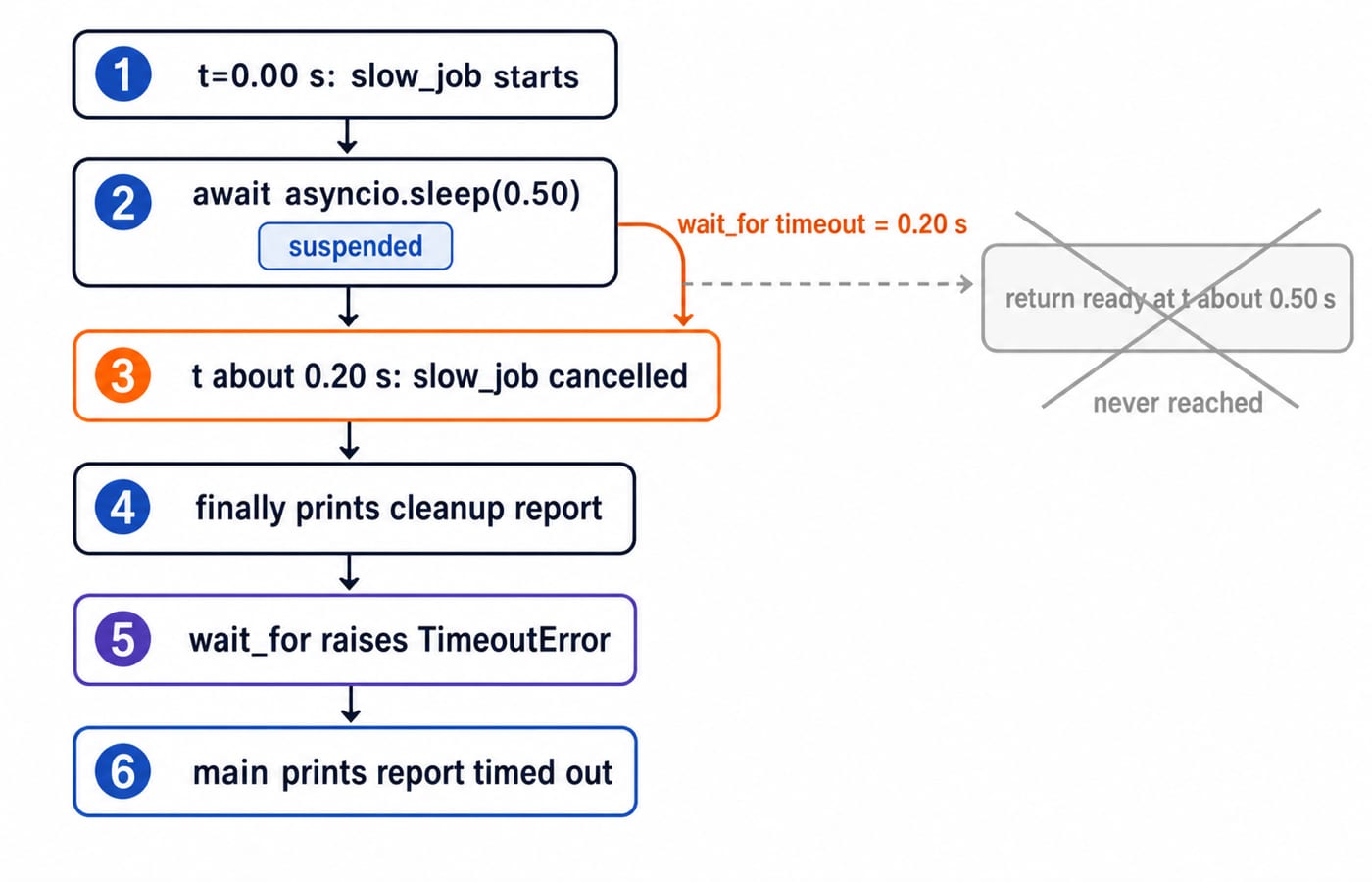
        await asyncio.wait_for(slow_job(), timeout=0.20)
    except TimeoutError:
        print("report timed out")


asyncio.run(main())
Its exact output is:
cleanup report
report timed out
The 0.50-second sleep has not finished when the 0.20-second timeout expires. wait_for cancels slow_job, its finally block prints first, and then TimeoutError reaches main. The return "ready" line is never reached.
Cancellation is delivered to a task as CancelledError at an opportunity where the task can respond. Put resource release, file closure and other essential cleanup in finally. If code catches CancelledError explicitly, it should generally perform cleanup and then propagate cancellation rather than silently swallowing it.
Common asyncio mistakes and precise fixes
Calling fetch("users", 0.30) without awaiting or scheduling it happens when a learner mistakes coroutine creation for execution. The call only returns a coroutine object and may produce a "coroutine was never awaited" warning. Await it when the next step needs its result, or create and later await a Task when work should overlap.
Writing time.sleep(0.20) inside async def is a different error. It blocks the event-loop thread, so other tasks pause too. Use await asyncio.sleep(0.20) for this simulated wait. Similarly, decorative async syntax does not accelerate CPU-heavy calculations; genuinely blocking work needs an appropriate interface.
Finally, asyncio.run() fails when called inside a notebook or framework callback that already owns a running loop. Await from that host async context instead. A discarded Task is also unsafe because its failure may go unobserved. Keep the Task reference, await it, and handle its exception deliberately. Exact host commands vary, but these principles do not.
How assessments and interviews test the asyncio model
Assessments and interviews commonly ask you to distinguish a coroutine function from its returned object, predict sequential versus concurrent waits, calculate approximate elapsed time, identify a blocking call, or explain why completion order differs from gather result order. The official Python reference remains the API authority.
Three quick self-checks in that style, with the reasoning behind each:
Direct waits of
0.15,0.20, and0.10seconds total about0.45seconds. Withgather, they take about0.20seconds, the maximum delay.Calling
async def answer(): return 42withoutawaitdoes not run its body merely because it was called. The call returns a coroutine object.time.sleep(0.25)blocks all tasks on the event-loop thread;await asyncio.sleep(0.25)yields control while waiting.
For the conceptual boundary, compare asyncio Tasks with Threads and Process Creation MCQs. Then use Process Synchronization and Semaphores to widen the coordination model.
The short version and the next step
Use asyncio to overlap I/O waits, remember that calling an async function only creates a coroutine object, and let await yield control. Choose Tasks or gather only when work should overlap, then handle timeouts, exceptions and cleanup deliberately.
Now add fetch("billing", 0.40) as the fourth and last argument to gather. Completion becomes orders, stock, users, billing; the returned list keeps input order and ends with 'billing:0.4s'; wall time becomes about 0.40 seconds. For a longer problem-solving path, continue with the DSA Using Python course.
Keep learning
Python Dictionaries Explained: Keys, Methods, Worked Examples and Exam Traps
Learn how Python dictionaries store, retrieve and mutate values. Trace a complete frequency counter, then practise the membership, aliasing and duplicate-key traps that make output questions tricky.
Updated 18 Nov 20265 min readPython

Python Conditional Statements Explained: if, elif, else, Nested Logic and Worked Examples
Learn a reliable way to trace Python branches, from Boolean expressions and short-circuiting to nested decisions, truthiness, boundary checks, and a complete scholarship classifier.
Updated 17 Nov 20266 min readPython
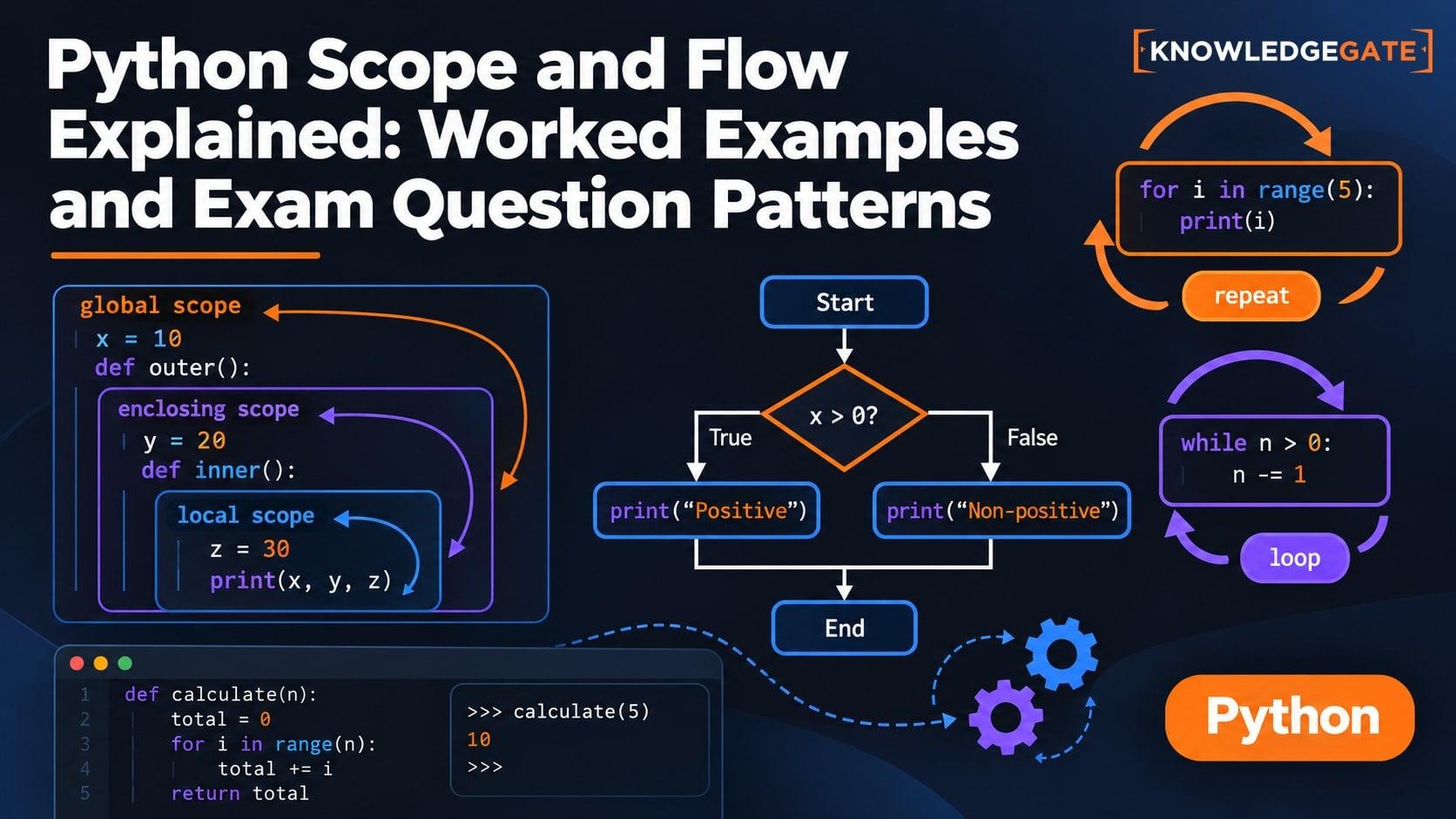
Python Scope and Flow Explained: Worked Examples and Exam Question Patterns
Learn to separate Python name resolution from execution order with a nested-function trace, an UnboundLocalError repair, module examples, and exam-style checks.
Updated 16 Nov 20266 min readPython
Python Memory Model and Garbage Collection: References, Cycles, and Profiling
Build a practical model of Python references, then trace aliases, collect a two-object cycle, and measure allocation growth by line.
Updated 15 Nov 20265 min readPython