

Python Virtual Environments and Pip: A Runnable Project Setup Tutorial
Build two isolated Python projects from zero, check exactly where pip installs a package, and reproduce a working setup from a requirements file.
KnowledgeGate Team
Exam prep & CS education
Updated 12 Nov 20265 min read

pip install can report success while your program still raises ModuleNotFoundError, because the package and the program may be using different Python interpreters. If Python 3 is not installed and verified, complete Python Introduction and Setup Tutorial: Install, Verify, and Run Your First Programs first; its checkpoints are launcher choice, project creation, and first-program execution. Dependency isolation begins after those checkpoints: a project-local .venv owns one dependency set, python -m pip installs into that selected interpreter, and requirements.txt can rebuild the package set. The Coding & DSA Courses for Placements page is the broader route after the environment is reproducible.
Python virtual environments and pip: what each tool controls
score-app requires colorama==0.4.4, while report-app requires colorama==0.4.6. A given interpreter can expose only one version from one site-packages directory. Separate environments keep both on the same machine.
Tool or file | What it controls |
|---|---|
Base interpreter | Creates new environments. |
| Provides a disposable project-local interpreter context and package directory. |
pip | Installs distributions into the interpreter environment from which it runs. |
| Records install requirements that can rebuild an environment. |
Keep source files beside .venv, not inside it. Prefer python -m pip after selecting Python because it visibly couples pip to that interpreter. The first-party Python Packaging User Guide documents creation, activation and installation. Activation changes shell command lookup but is unnecessary when you call the environment's Python by its full path.
Create, activate and verify a .venv
On macOS or Linux with bash or zsh:
mkdir score-app
cd score-app
python -m venv .venv
source .venv/bin/activate
On Windows Command Prompt:
mkdir score-app
cd score-app
py -m venv .venv
.venv\Scripts\activate.bat
In PowerShell, create with py -m venv .venv, then activate with .\.venv\Scripts\Activate.ps1.
Do not trust the (.venv) prompt alone. Verify it:
python -c "import sys; print(sys.prefix != sys.base_prefix); print(sys.executable)"
python -m pip --version
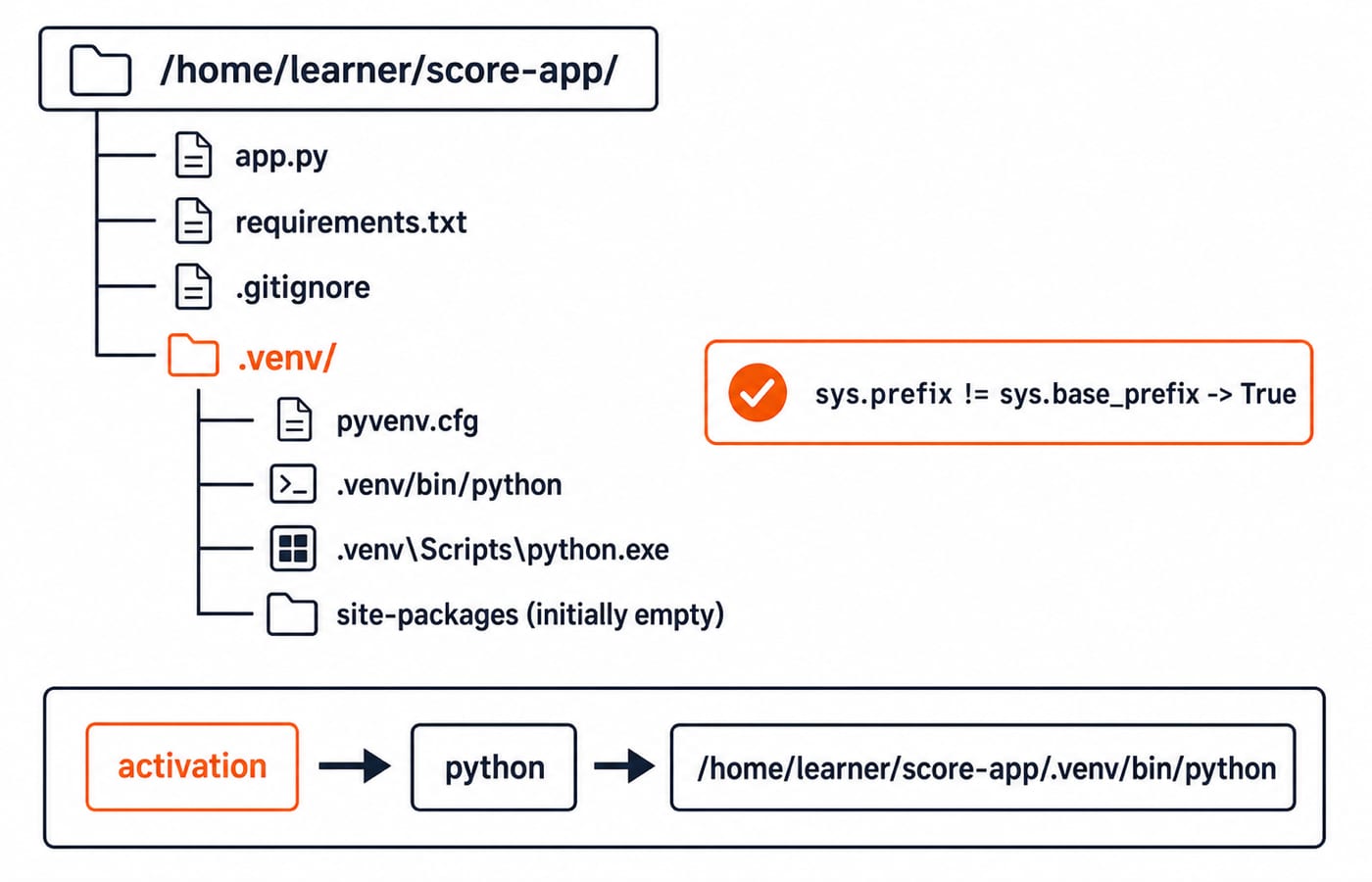
The first line must be True. At /home/learner/score-app, the POSIX executable must be /home/learner/score-app/.venv/bin/python. At C:\Users\Learner\score-app, the Windows path must end in score-app\.venv\Scripts\python.exe. pip must also resolve inside that .venv.
Before installation, the essential tree is:
score-app/
+-- .venv/
    +-- pyvenv.cfg
    +-- bin/python                 # POSIX alternative
+-- Scripts\python.exe # Windows alternativeapp.py, requirements.txt and .gitignore will become siblings of .venv at the root.
Pip installation: pair the package with the selected Python
With score-app/.venv active, install and inspect:
python -m pip install colorama==0.4.4
python -m pip show colorama
The checked fields are Name: colorama and Version: 0.4.4, with Location inside score-app/.venv. Pinning 0.4.4 makes the output reproducible; a real project should choose versions from its compatibility and security requirements.
Create this exact app.py:
import colorama

scores = [72, 86, 91]
average = sum(scores) / len(scores)

print(f"colorama={colorama.__version__}")
print(f"Average={average:.2f}")
Run python app.py. The output is:
colorama=0.4.4
Average=83.00
The arithmetic is 72 + 86 + 91 = 249, then 249 / 3 = 83. For the language foundation behind imports, lists and formatted strings, begin with the Python course.
Run deactivate, which stops shell selection but does not delete .venv. Run .venv/bin/python app.py on POSIX or .\.venv\Scripts\python.exe app.py on Windows. Explicit interpreter selection produces the same two lines.
Two Python projects with conflicting package versions: full isolation example
From the common parent, keep score-app and create report-app on POSIX:
python -m venv report-app/.venv
report-app/.venv/bin/python -m pip install colorama==0.4.6
On Windows, install with report-app\.venv\Scripts\python.exe -m pip install colorama==0.4.6.
Verify both without activation:
score-app/.venv/bin/python -c "import colorama; print(colorama.__version__)"
report-app/.venv/bin/python -c "import colorama; print(colorama.__version__)"
They print 0.4.4 and 0.4.6. Two directories, interpreter paths and separate site-packages locations prove that installing 0.4.6 in report-app did not upgrade score-app.
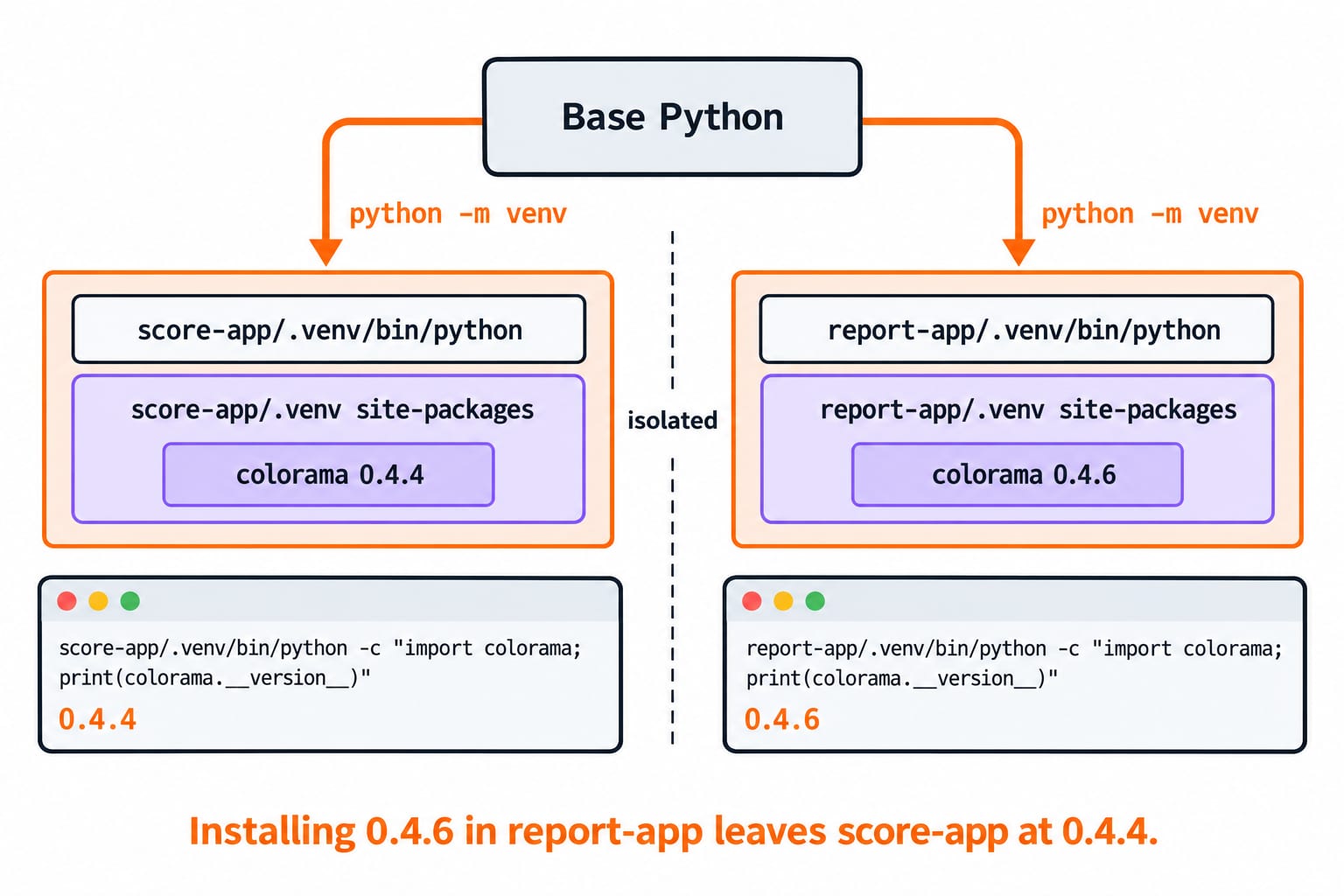
Packages belong to interpreter environments, not every Python command on the computer. If output differs, inspect sys.executable, python -m pip --version and python -m pip show colorama before reinstalling.
Requirements files: rebuild the environment instead of copying it
In clean score-app, run .venv/bin/python -m pip freeze on POSIX or .\.venv\Scripts\python.exe -m pip freeze on Windows. Because colorama has no dependencies, the relevant line is:
colorama==0.4.4Save it in requirements.txt. pip freeze reports installed distributions in requirements format, not whether each was a deliberate top-level choice.
Add these entries to .gitignore:
.venv/
.venv-copy/
Share app.py, requirements.txt and .gitignore, never the environment directory. Rebuild on POSIX:
python -m venv .venv-copy
.venv-copy/bin/python -m pip install -r requirements.txt
.venv-copy/bin/python app.py
On Windows, use .\.venv-copy\Scripts\python.exe -m pip install -r requirements.txt, then .\.venv-copy\Scripts\python.exe app.py. It prints colorama=0.4.4 and Average=83.00. If the path or base Python changes, recreate the environment and reinstall requirements instead of moving or repairing .venv.
Virtual environment and pip errors: diagnose the interpreter first
Symptom | Likely cause | Checked repair |
|---|---|---|
| Install and run used different interpreters. | Compare |
| pip selected another environment. | Run |
An IDE still imports from base Python | The IDE selected its default interpreter. | Select the project's |
Activation disappeared in a new terminal | Activation applies only to the previous shell session. | Reactivate or invoke the full environment path. |
Match shell and activation: bin/activate for POSIX bash or zsh, Scripts\activate.bat for Command Prompt, and Scripts\Activate.ps1 for PowerShell. If local policy blocks PowerShell activation, call .\.venv\Scripts\python.exe directly. Do not weaken machine-wide security policy.
deactivate does not uninstall packages, and deleting .venv does not delete app.py. Moving an environment can stale path-sensitive references; freezing a cluttered one can record unrelated packages. Recover by deleting only the environment, recreating it, installing the deliberate requirements and rerunning the program. Avoid sudo pip install and global installation shortcuts.
Python venv and pip exercises: command choice, output and debugging
Classify four candidates. python -m venv .venv creates an environment; python -m pip install -r requirements.txt installs recorded requirements. pip freeze requirements.txt and python requirements.txt do neither. Capture correctly with python -m pip freeze > requirements.txt.
Diagnose a mismatch: pip install colorama, followed by /usr/bin/python3 app.py, can raise ModuleNotFoundError. Pair .venv/bin/python -m pip install colorama==0.4.4 with .venv/bin/python app.py; do not blame the package.
Test transfer with colorama==0.4.4 in .venv-a and colorama==0.4.6 in .venv-b. Each interpreter must print its version before and after the other runs. Then place a small script in each environment and confirm that full interpreter paths select the expected dependency set. KnowledgeGate has 400+ Python practice questions spanning the wider language rather than virtual environments alone.
Python virtual environments and pip: the short version and next step
Keep this six-command mental model:
Create with
python -m venv .venv.Select by activation or full path.
Verify
sys.executable.Install with
python -m pip.Capture with
python -m pip freeze > requirements.txt.Rebuild with
python -m pip install -r requirements.txt.
The anchor result: score-app stays on colorama 0.4.4 while report-app uses 0.4.6. Finally, delete only .venv-copy, recreate it, install requirements.txt, and run app.py. Success is exactly colorama=0.4.4 and Average=83.00. On failure, inspect the interpreter and pip path before changing dependencies.
Next, use DSA Using Python for structured problem solving inside an isolated project.
Keep learning
Python Dictionaries Explained: Keys, Methods, Worked Examples and Exam Traps
Learn how Python dictionaries store, retrieve and mutate values. Trace a complete frequency counter, then practise the membership, aliasing and duplicate-key traps that make output questions tricky.
Updated 18 Nov 20265 min readPython

Python Conditional Statements Explained: if, elif, else, Nested Logic and Worked Examples
Learn a reliable way to trace Python branches, from Boolean expressions and short-circuiting to nested decisions, truthiness, boundary checks, and a complete scholarship classifier.
Updated 17 Nov 20266 min readPython
Python Scope and Flow Explained: Worked Examples and Exam Question Patterns
Learn to separate Python name resolution from execution order with a nested-function trace, an UnboundLocalError repair, module examples, and exam-style checks.
Updated 16 Nov 20266 min readPython

Asyncio in Python: Event Loops, Coroutines and Runnable Examples
Build a clear mental model of Python's event loop, then run two dependency-free examples covering concurrent waits, result ordering, timeouts and cleanup.
Updated 15 Nov 20266 min readPython