RDBMS Concepts and SQL Basics: A Beginner Tutorial with Examples
Build a three-table college database in SQLite, then use exact rows and queries to understand relations, keys, constraints, joins and data anomalies.
KnowledgeGate Team
Exam prep & CS education
Updated 15 Sep 20266 min read
A database, a DBMS, an RDBMS and SQL are related but distinct. Definitions alone do not show how tables work together. The college-registration database uses empty tables, populated tables and a joined result to show each term's role. The code runs in SQLite 3 with foreign-key enforcement and uses common SQL. Other relational systems differ in setup and data types, so check your engine's documentation. Use CS Fundamentals for Exams & Placements for the broader DBMS, operating-systems and computer-networks route.
Database, DBMS, RDBMS and SQL are four different layers
Values such as 101, Asha, CS101 and 78 are data. A database is the organised collection holding student, course and enrolment data. A DBMS stores, validates and retrieves that collection. An RDBMS organises it as related tables with declared constraints. SQL defines and queries those tables; it is not a database product.
A CSV file can hold rows, but cannot guarantee that every enrolment refers to an existing student and course. Our RDBMS enforces that rule through primary keys, foreign keys and checks.
The relational model through three small tables
The schema has three relations:
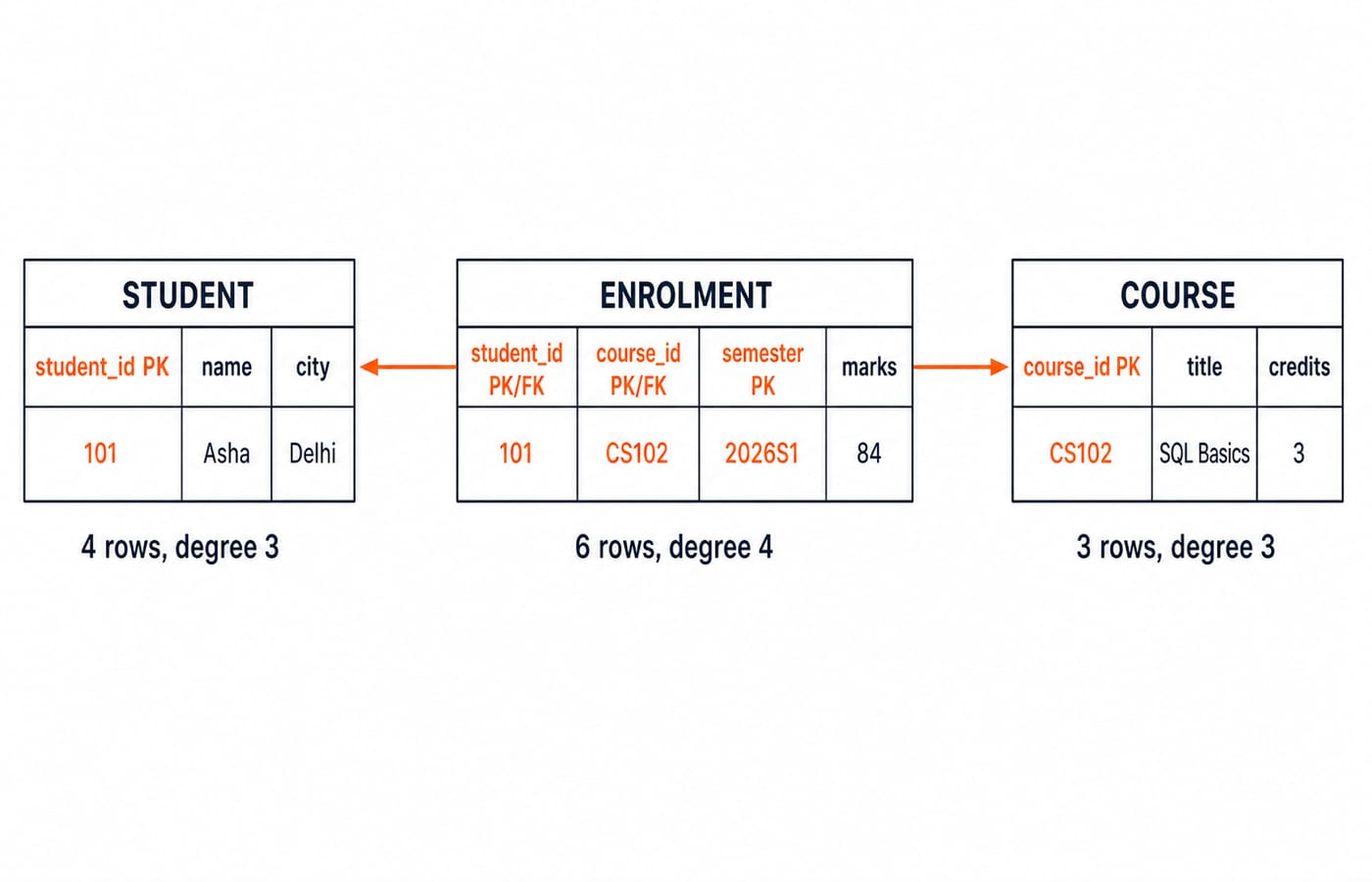
STUDENT(student_id, name, city), withstudent_idas its primary key.COURSE(course_id, title, credits), withcourse_idas its primary key.ENROLMENT(student_id, course_id, semester, marks), with(student_id, course_id, semester)as a composite primary key. Its first two columns are also foreign keys.
ENROLMENT represents the many-to-many relationship. It avoids putting a comma-separated course list inside STUDENT.
Table | Exact rows |
|---|---|
|
|
|
|
|
|
A relation is a table, a tuple a row, and an attribute a column. A domain is an attribute's permitted values. The schema is the design; the instance is the current rows. STUDENT has degree 3 and cardinality 4. COURSE has degree 3 and cardinality 3. ENROLMENT has degree 4 and cardinality 6.
Create the schema with keys, domains and relationships
Run the parent tables before the child table:
PRAGMA foreign_keys = ON;

CREATE TABLE student (
    student_id INTEGER PRIMARY KEY,
    name       TEXT NOT NULL,
    city       TEXT NOT NULL
);

CREATE TABLE course (
    course_id TEXT PRIMARY KEY,
    title     TEXT NOT NULL,
    credits   INTEGER NOT NULL CHECK (credits BETWEEN 1 AND 6)
);

CREATE TABLE enrolment (
    student_id INTEGER NOT NULL,
    course_id  TEXT NOT NULL,
    semester   TEXT NOT NULL,
    marks      INTEGER NOT NULL CHECK (marks BETWEEN 0 AND 100),
    PRIMARY KEY (student_id, course_id, semester),
    FOREIGN KEY (student_id) REFERENCES student(student_id),
    FOREIGN KEY (course_id) REFERENCES course(course_id)
);
The keys 101 and CS102 uniquely identify Asha and SQL Basics. The composite key prevents a second (101, CS102, 2026S1) enrolment. The marks domain admits 84 but rejects 112. NOT NULL requires a value; a foreign key requires a matching parent.
CREATE TABLE is data definition language because it defines the schema. The INSERT and SELECT statements below change or read the current instance.
Insert the rows, filter them and join the relations
Run these only after all three tables have been created successfully:
INSERT INTO student VALUES
    (101, 'Asha', 'Delhi'),
    (102, 'Ravi', 'Jaipur'),
    (103, 'Meera', 'Pune'),
    (104, 'Kabir', 'Delhi');

INSERT INTO course VALUES
    ('CS101', 'Database Fundamentals', 4),
    ('CS102', 'SQL Basics', 3),
    ('CS103', 'Operating Systems', 4);

INSERT INTO enrolment VALUES
    (101, 'CS101', '2026S1', 78),
    (101, 'CS102', '2026S1', 84),
    (102, 'CS101', '2026S1', 69),
    (103, 'CS102', '2026S1', 91),
    (104, 'CS101', '2026S1', 74),
    (104, 'CS103', '2026S1', 88);
Now filter the students from Delhi:
SELECT name, city
FROM student
WHERE city = 'Delhi'
ORDER BY name;
The exact result is Asha | Delhi, then Kabir | Delhi. FROM chooses the table, WHERE keeps Delhi rows, SELECT chooses displayed columns, and ORDER BY makes their order explicit.
The three-table join is:
SELECT s.name, c.title, e.marks
FROM enrolment AS e
JOIN student AS s ON s.student_id = e.student_id
JOIN course AS c ON c.course_id = e.course_id
WHERE e.marks >= 80
ORDER BY e.marks DESC;
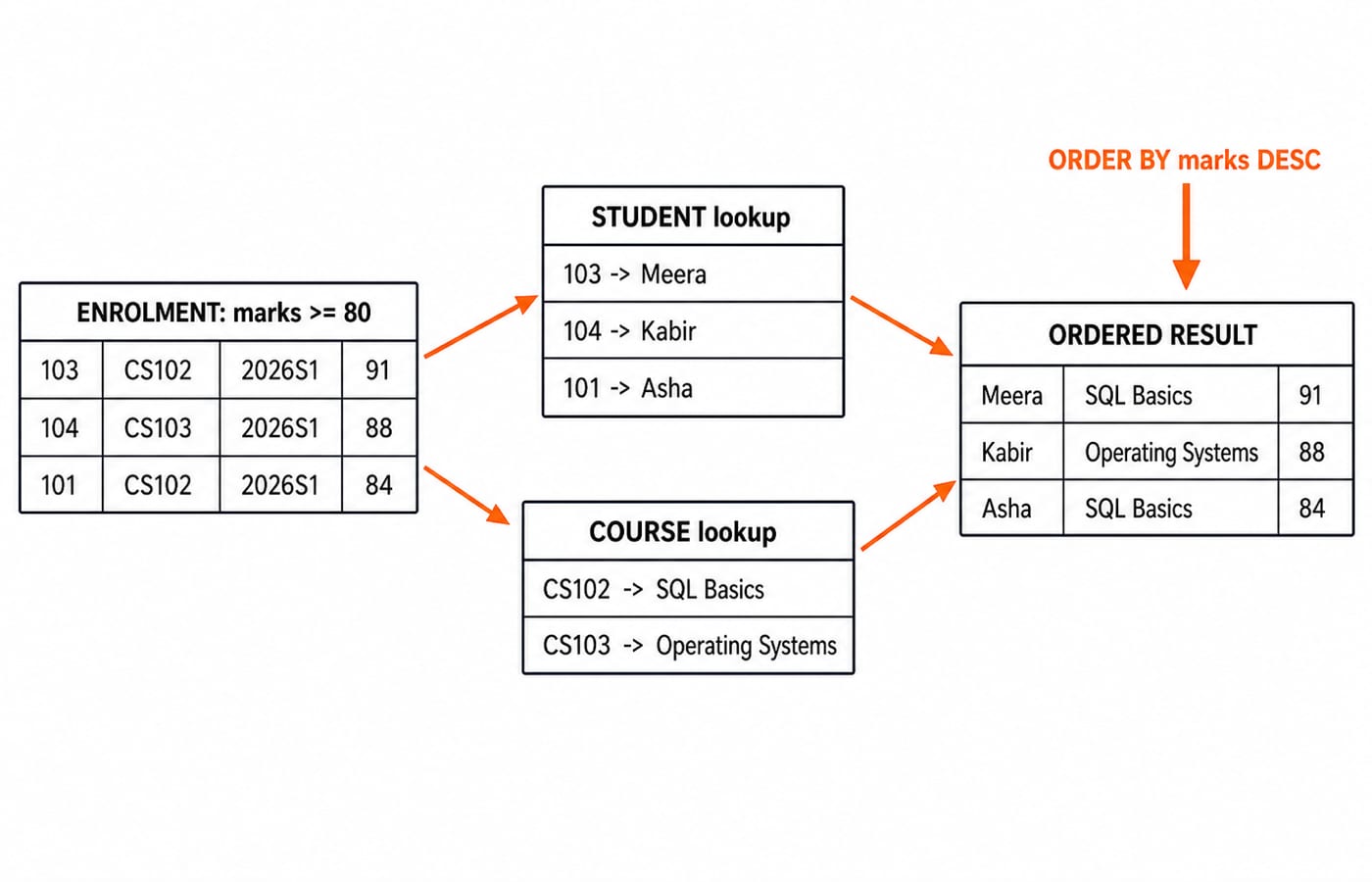
It returns Meera | SQL Basics | 91, Kabir | Operating Systems | 88, then Asha | SQL Basics | 84. The first row begins as (103, CS102, 2026S1, 91): student 103 supplies Meera, while course CS102 supplies SQL Basics. Continue with SQL Queries and Joins in DBMS for joins, sublanguages and grouping.
Let the RDBMS reject invalid states
Test these statements separately after loading the valid rows:
INSERT INTO student VALUES (101, 'Nisha', 'Patna');
INSERT INTO enrolment VALUES (102, 'CS999', '2026S1', 75);
INSERT INTO enrolment VALUES (102, 'CS103', '2026S1', 112);
The first violates the student primary key because 101 exists. The second violates the course foreign key because CS999 has no parent. The third violates the marks check because 112 is outside 0 to 100.
Forms can validate input for usability. Database constraints also protect stored state when other clients write data. They do not replace authentication, authorisation, backups or transaction design.
This statement succeeds:
INSERT INTO enrolment VALUES (102, 'CS103', '2026S1', 75);Student 102 and course CS103 exist, the composite key is new, and 75 is permitted. ENROLMENT now has cardinality 7 but still has degree 4.
Why relationships beat one repeated flat file
Suppose we instead use REGISTRATION_FLAT(student_id, student_name, city, course_id, course_title, credits, semester, marks) with these rows:
(101, Asha, Delhi, CS101, Database Fundamentals, 4, 2026S1, 78)(101, Asha, Delhi, CS102, SQL Basics, 3, 2026S1, 84)(103, Meera, Pune, CS102, SQL Basics, 3, 2026S1, 91)
Asha's name and city appear twice. SQL Basics and its credit value 3 also appear twice.
Update anomaly: changing only one Asha row from Delhi to Noida gives student
101two cities.Insertion anomaly:
CS104, Computer Networks, 4cannot be represented cleanly if each row also requires a student.Deletion anomaly: deleting Meera's only row also erases her student details from this flat file.
The three-table design gives each fact one natural home. DBMS Normalization Explained Simply for GATE develops this design instinct without mixing every fact into one row.
Common RDBMS traps and how assessments test them
Four traps recur. Calling SQL a database blurs language and storage, so name the engine. Using name as a key fails when two students are called Asha, so use stable student_id. Inserting ENROLMENT before its parents triggers a foreign-key failure, so populate parents first. Row order is unsafe without ORDER BY.
Verify each of these against the instance you built:
In the original instance,
ENROLMENThas cardinality 6 and degree 4.CS102in two enrolment rows is a valid foreign-key reference to one course fact, not unwanted duplication.After Ravi's successful enrolment,
SELECT COUNT(*) FROM enrolment WHERE course_id = 'CS103';returns2: Kabir with88and Ravi with75.
Assessments ask learners to distinguish DBMS, RDBMS and SQL, compute degree and cardinality, choose a key, identify a failed constraint, trace a join or spot an update anomaly. Placement-style query practice should follow these foundations.
RDBMS and SQL basics: the short version and next exercise
A database is the organised data.
A DBMS manages it.
An RDBMS stores related tables under integrity rules.
Keys identify and connect rows.
SQL defines, changes and queries the schema and its current instance.
Redraw the ENROLMENT -> STUDENT + COURSE trace from memory.
Now add (105, Nisha, Patna) to STUDENT, then (105, CS103, 2026S1, 82) to ENROLMENT. Predict first: STUDENT cardinality becomes 5, and ENROLMENT cardinality becomes 8 after Ravi's successful row. The marks >= 80 join returns four rows in descending order: Meera 91, Kabir 88, Asha 84, Nisha 82.
Finally run:
UPDATE course
SET title = 'SQL Foundations'
WHERE course_id = 'CS102';
Both Asha's and Meera's joined results now show SQL Foundations because the course fact was updated once. Beginners who want a wider semester route can continue with ZERO TO HERO. For an interview-oriented continuation across DBMS, operating systems and computer networks, use Computer Science Fundamentals for Placements by Sanchit Sir. The DBMS Fundamentals practice bank has over 50 questions; attempt them once you can predict each result above without running the query.
Keep learning

Data Mining and Data Warehouse Explained: Concepts, OLAP and Worked Examples
Follow six orders from operational sources into a warehouse, calculate OLAP totals, and test an association rule on five shopping baskets.
Updated 4 Oct 20266 min readDBMS

Set Operations and Cartesian Product in Relational Algebra: Worked Examples and Exam Traps
Learn when relational set operations are legal, calculate exact union and difference results, enumerate a Cartesian product, and trace how a join filters it.
Updated 29 Sep 20266 min readDBMS
DBMS Interview Questions: Keys, Normalisation and Transactions Through One Worked Schema
Build defensible DBMS interview answers by tracing keys, normal forms, ACID and isolation through one university-enrolment database.
Updated 25 Sep 20265 min readDBMS
Super Key, Candidate Key and Primary Key: A Worked DBMS Example
Use one ENROLMENT relation to derive two candidate keys, enumerate every super key, select a primary key and translate the result into SQL.
Updated 24 Sep 20266 min readDBMS