SQL DML: INSERT, UPDATE, and DELETE with Transaction-Safe Examples
Follow one employees table through deliberate inserts, a calculated update, a targeted delete, and a savepoint rollback in PostgreSQL.
KnowledgeGate Team
Exam prep & CS education
Updated 13 Sep 20265 min read
You may be comfortable reading rows with SELECT but still hesitate before changing real data. One missing predicate can affect an entire table. On one PostgreSQL employees table, INSERT, UPDATE, DELETE, SAVEPOINT, ROLLBACK, and COMMIT each has an exact affected-row count and a defined recovery boundary.
Related reading: SQL command category MCQs and transaction management.
SQL DML: what INSERT, UPDATE, and DELETE change
INSERT adds rows, UPDATE changes values in existing rows, and DELETE removes rows. SELECT reads data, while CREATE TABLE changes the schema. Teaching sources sometimes classify SELECT as DML and sometimes as DQL, so focus on what each statement does.
Create the PostgreSQL-compatible table below. CREATE TABLE is DDL, but it gives every worked section the same starting structure.
CREATE TABLE employees (
    employee_id   INTEGER PRIMARY KEY,
    employee_name VARCHAR(40) NOT NULL,
    department    VARCHAR(20) NOT NULL,
    salary        NUMERIC(10, 2) CHECK (salary >= 0)
);
The safe write sequence is simple: inspect target rows with SELECT, write an explicit column list or WHERE predicate, check the affected-row count, then commit. SQL in DBMS: Complete Guide with Queries, Joins and Worked Results follows a wider three-table path through DDL, SELECT, joins, aggregates, and subqueries; the employee trace below isolates row-changing DML and transaction recovery. The broader CS Fundamentals for Exams & Placements route helps you compare DBMS with the other core subjects.
SQL INSERT: add rows deliberately
Seed the empty table with three rows:
INSERT INTO employees (employee_id, employee_name, department, salary)
VALUES
    (101, 'Asha',  'Sales',   50000.00),
    (102, 'Ravi',  'Support', 42000.00),
    (103, 'Meera', 'Sales',   60000.00);
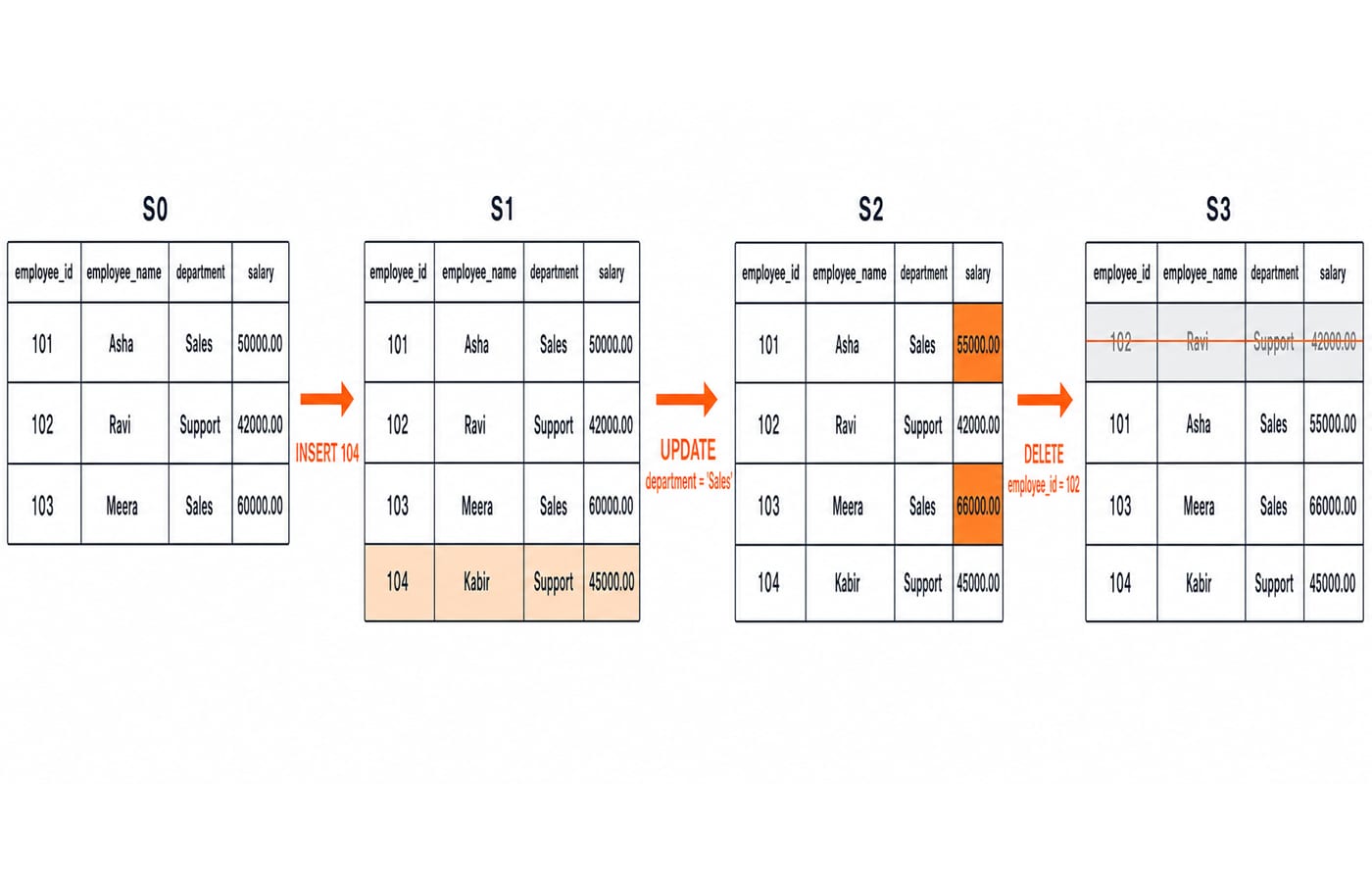
Ordered by employee_id, the table contains Asha, Ravi, and Meera with IDs 101, 102, and 103. Now add Kabir:
employee_id | employee_name | department | salary |
|---|---|---|---|
101 | Asha | Sales | 50000.00 |
102 | Ravi | Support | 42000.00 |
103 | Meera | Sales | 60000.00 |
INSERT INTO employees (employee_id, employee_name, department, salary)
VALUES (104, 'Kabir', 'Support', 45000.00);
This affects one row, producing a four-row table with IDs 101, 102, 103, and 104. An explicit column list remains correct even if the table's physical column order changes. Text literals use quotes, while numbers do not. The primary key rejects duplicate IDs, NOT NULL requires names and departments, and the CHECK blocks negative salaries. INSERT ... SELECT is a useful next-level pattern, but it is not needed here.
SQL UPDATE: preview and compute new values
Preview the target before changing it:
SELECT employee_id, employee_name, salary
FROM employees
WHERE department = 'Sales'
ORDER BY employee_id;
The result is Asha at 50000.00 and Meera at 60000.00, so exactly two rows should change.
UPDATE employees
SET salary = salary * 1.10
WHERE department = 'Sales'
RETURNING employee_id, employee_name, salary;
Asha becomes 50000.00 × 1.10 = 55000.00. Meera becomes 60000.00 × 1.10 = 66000.00. Ravi stays at 42000.00, and Kabir stays at 45000.00. RETURNING is PostgreSQL syntax; on another DBMS, run a SELECT with the same predicate after the update. Without WHERE, the dangerous UPDATE employees SET salary = salary * 1.10; would change all four rows.
SQL DELETE: remove the intended row
Preview employee_id = 102, then delete that exact match:
SELECT * FROM employees WHERE employee_id = 102;

DELETE FROM employees
WHERE employee_id = 102
RETURNING employee_id, employee_name, department, salary;
PostgreSQL returns 102, Ravi, Support, 42000.00, and the affected-row count is 1. The remaining IDs are 101, 103, and 104, with salaries 55000.00, 66000.00, and 45000.00.
DELETE ... WHERE ... targets matching rows but leaves the table definition available for later inserts. DELETE without a predicate removes every row. TRUNCATE clears a table without a row predicate and has DBMS-specific transaction behaviour. DROP TABLE removes the table object itself. These scopes are not interchangeable shortcuts.
SQL transactions: set a recovery boundary
Reset the table to the original three-row seed, then run this transaction:
BEGIN;

INSERT INTO employees (employee_id, employee_name, department, salary)
VALUES (104, 'Kabir', 'Support', 45000.00);

UPDATE employees
SET salary = salary * 1.10
WHERE department = 'Sales';

SAVEPOINT before_delete;

DELETE FROM employees
WHERE employee_id = 102;

ROLLBACK TO SAVEPOINT before_delete;
COMMIT;
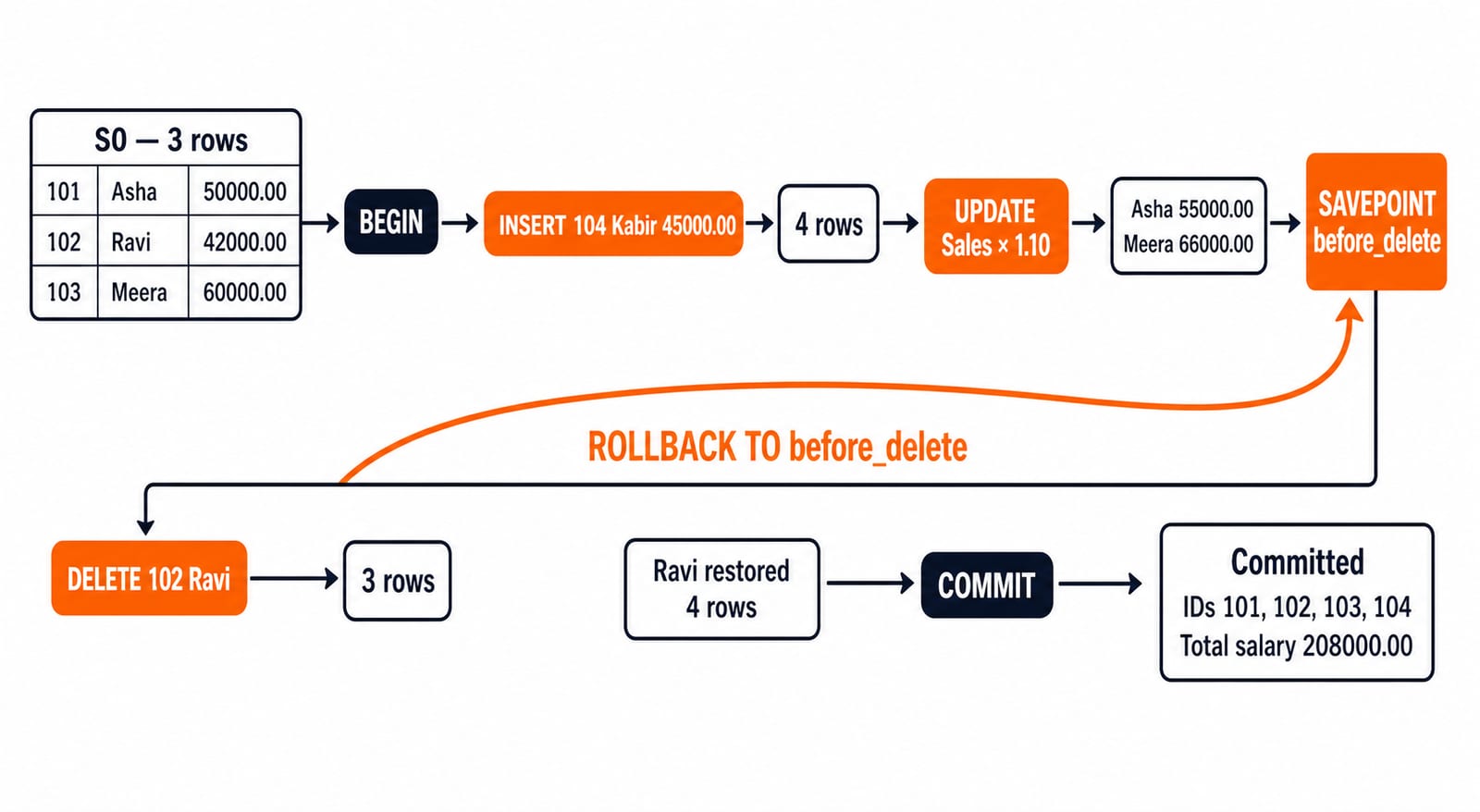
The insert produces four rows. The update makes Asha 55000.00 and Meera 66000.00. The delete temporarily leaves three rows, but ROLLBACK TO SAVEPOINT before_delete restores Ravi while retaining the earlier insert and raises. COMMIT makes this four-row state durable:
employee_id | employee_name | department | salary |
|---|---|---|---|
101 | Asha | Sales | 55000.00 |
102 | Ravi | Support | 42000.00 |
103 | Meera | Sales | 66000.00 |
104 | Kabir | Support | 45000.00 |
The row count is 4. The total salary is 55000.00 + 42000.00 + 66000.00 + 45000.00 = 208000.00; the Sales total is 55000.00 + 66000.00 = 121000.00. A full ROLLBACK before the commit would undo Kabir's insert and both raises. A savepoint undoes only later work. An already autocommitted statement cannot be rescued by starting a transaction afterwards. For the wider ACID and schedule context, continue with DBMS Transactions: ACID, Serializability, 2PL Explained.
SQL DML failures and recovery
The same constraints reject invalid rows. Inserting ID 101 again violates the primary key. (105, 'Nisha', 'Sales', -500.00) violates CHECK (salary >= 0), and a null employee name violates NOT NULL. PostgreSQL rejects the data rather than repairing it silently.
By contrast, this valid statement affects zero rows because ID 999 does not exist:
UPDATE employees SET salary = 47000.00 WHERE employee_id = 999;If the application expected one row, 0 is a reason not to commit. Inside an open PostgreSQL transaction, recover from the failed insert through its savepoint:
SAVEPOINT before_bad_row;
INSERT INTO employees VALUES (105, 'Nisha', 'Sales', -500.00);
ROLLBACK TO SAVEPOINT before_bad_row;
Check your actual DBMS for autocommit defaults, error handling, RETURNING, and TRUNCATE behaviour.
How exams and interviews test SQL DML
Typical tasks ask you to classify a statement, predict the final table, spot a missing WHERE, count affected rows, distinguish DELETE from DROP, or trace a savepoint rollback.
Trace item | Result |
|---|---|
Inserted rows | 1 |
Rows updated by the Sales predicate | 2 |
Rows temporarily deleted | 1 |
Final rows after rollback and commit | 4 |
Final salary total | 208000.00 |
Final Sales total | 121000.00 |
The delete affected one row when executed even though rollback removed its effect. The key checks concern the update predicate, the savepoint rollback, and the duplicate-key case. Removing the update predicate changes 4 rows. Replacing the savepoint rollback with full ROLLBACK restores the original three rows and salaries. Attempting duplicate ID 101 fails before a fifth row is added. Use SQL Query MCQs: 12 Solved (SELECT, Joins, Subqueries) for more query-reading practice.
SQL DML: the short version and next step
Name columns on insert. Preview and constrain updates. Preview and constrain deletes. Wrap related changes in an explicit transaction, verify affected-row counts, and only then commit. Constraints protect data validity; transactions protect the whole unit of work.
For a structured path that places DBMS alongside other core CS subjects, continue with CS Fundamentals for Placements by Sanchit Sir.
Keep learning
Data Mining and Data Warehouse Explained: Concepts, OLAP and Worked Examples
Follow six orders from operational sources into a warehouse, calculate OLAP totals, and test an association rule on five shopping baskets.
Updated 4 Oct 20266 min readDBMS

Set Operations and Cartesian Product in Relational Algebra: Worked Examples and Exam Traps
Learn when relational set operations are legal, calculate exact union and difference results, enumerate a Cartesian product, and trace how a join filters it.
Updated 29 Sep 20266 min readDBMS
DBMS Interview Questions: Keys, Normalisation and Transactions Through One Worked Schema
Build defensible DBMS interview answers by tracing keys, normal forms, ACID and isolation through one university-enrolment database.
Updated 25 Sep 20265 min readDBMS
Super Key, Candidate Key and Primary Key: A Worked DBMS Example
Use one ENROLMENT relation to derive two candidate keys, enumerate every super key, select a primary key and translate the result into SQL.
Updated 24 Sep 20266 min readDBMS