JavaScript Data Types and Coercion: Beginner Tutorial with Runnable Examples
Learn how JavaScript stores values, copies primitives and objects, converts input, compares values and produces surprising output. Trace each rule in the console.
KnowledgeGate Team
Exam prep & CS education
Updated 27 Sep 20265 min read

You can declare a JavaScript variable, yet still wonder why "5" + 2 gives "52", "5" - 2 gives 3, and Boolean("false") gives true. Browser inputs often arrive as strings, so unnoticed conversion can corrupt a total or flip a condition without a syntax error. The key rules concern primitive values, object references, explicit conversion, operators and equality. A traced study-time calculation shows how the same inputs produce either the string "452" or the number 90.
JavaScript's Value Types: The Map Before the Rules
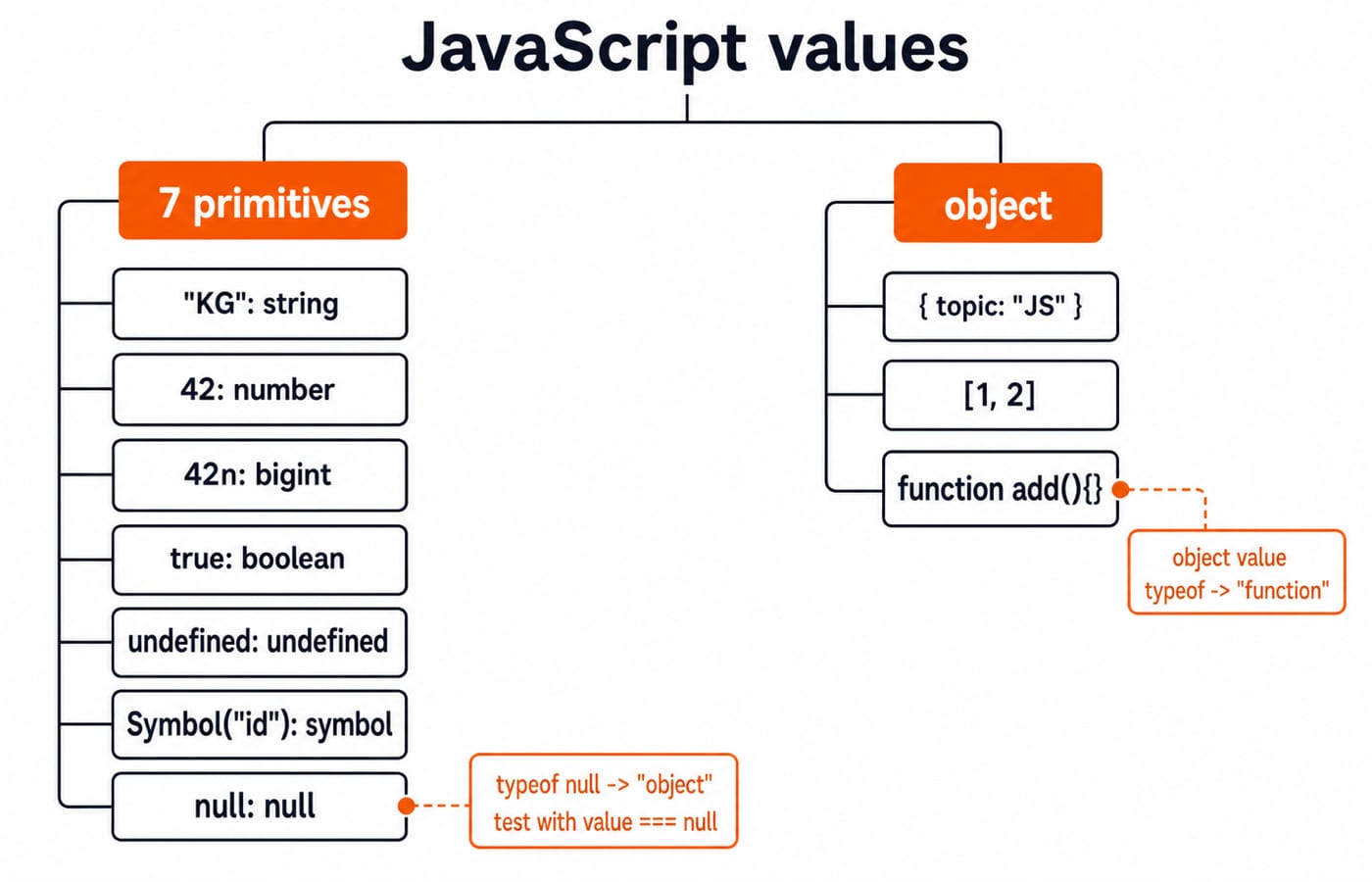
JavaScript has eight language-level type categories. Seven are primitives: string, number, bigint, boolean, undefined, symbol and null. The eighth is object. Sample values are "KG", 42, 42n, true, undefined, Symbol("id"), null and { topic: "JS" }. Arrays and functions are specialised objects, although typeof function () {} returns "function".
console.log(typeof "KG");          // "string"
console.log(typeof 42);            // "number"
console.log(typeof 42n);           // "bigint"
console.log(typeof true);          // "boolean"
console.log(typeof undefined);     // "undefined"
console.log(typeof Symbol("id"));  // "symbol"
console.log(typeof null);          // "object"
console.log(typeof []);            // "object"
typeof null === "object" is a historical language quirk. Test null with value === null, not with typeof.
Primitives, Objects and What Assignment Copies
Assignment copies a primitive value. Reassigning the copy leaves the first variable unchanged.
let first = 7;
let second = first;
second = 9;
console.log(`first=${first}, second=${second}`); // first=7, second=9
Object variables, including arrays, can refer to the same mutable object:
const topics = ["types"];
const sameTopics = topics;
sameTopics.push("coercion");

console.log(topics);                              // ["types", "coercion"]
console.log(topics === sameTopics);               // true
console.log(topics === ["types", "coercion"]); // false
topics.push("equality");                       // allowed
The second array literal creates a different object, so equality is false. const prevents rebinding topics; it does not make the array immutable. Freezing or copying it is separate. This section establishes the primitive-versus-reference assignment rule. The earlier Objects in JavaScript: Beginner Tutorial with Runnable Examples develops property operations, aliasing and shallow copies.
Explicit Conversion: Number, String and Boolean
Explicit conversion makes the intended type visible.
Expression | Result | Reason |
|---|---|---|
|
| The complete string is numeric |
|
| The complete string is not numeric |
|
| An empty string converts to zero |
|
| The boolean becomes text |
|
| An empty string is falsy |
|
| A non-empty string is truthy |
|
| Zero is falsy |
|
| Arrays are objects, and objects are truthy |
The falsy primitive values are exactly false, 0, -0, 0n, "", null, undefined and NaN. Browsers also retain the legacy host object document.all as a special falsy exception. Other objects and arrays are truthy, including [] and {}.
console.log(Number.isNaN(Number("42px"))); // true
console.log(Number.parseInt("42px", 10));  // 42
Prefix parsing with parseInt should be deliberate. It is not a substitute for validating an entire numeric input.
Implicit Coercion and the + Operator: A Worked Study Tracker
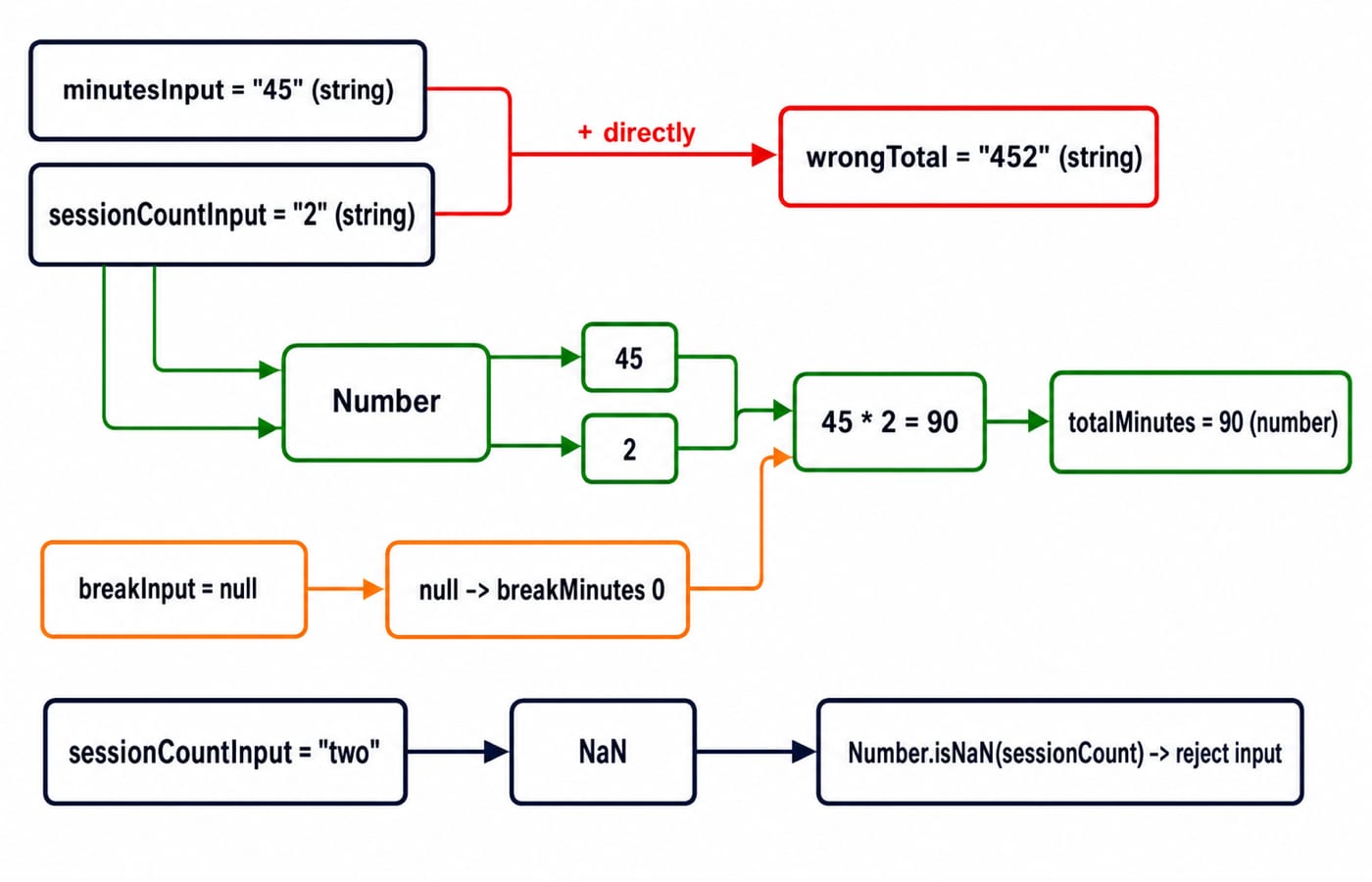
The + operator can add or concatenate, creating a common input bug.
const minutesInput = "45";
const sessionCountInput = "2";
const breakInput = null;

const wrongTotal = minutesInput + sessionCountInput;
const minutes = Number(minutesInput);
const sessionCount = Number(sessionCountInput);
const studyMinutes = minutes * sessionCount;
const breakMinutes = breakInput === null ? 0 : Number(breakInput);
const totalMinutes = studyMinutes + breakMinutes;

console.log(wrongTotal, typeof wrongTotal); // "452" "string"
console.log(totalMinutes, typeof totalMinutes); // 90 "number"
Both inputs are strings, so "45" + "2" concatenates to "452", a string. Conversion produces 45 and 2. Multiplication gives 45 * 2 = 90. The null branch makes breakMinutes equal 0. Numeric addition gives 90 + 0 = 90, a number.
If sessionCountInput is "two", then Number("two") becomes NaN. Reject it with Number.isNaN(sessionCount) before calculating.
Other operators show why guessing is risky:
Expression | Result | Trace |
|---|---|---|
|
|
|
|
|
|
|
|
|
|
|
|
|
|
|
|
| Both operands are BigInt |
10n + 2 throws a TypeError. Do not mix BigInt and Number arithmetic.
Loose Equality, Strict Equality and Object.is
Strict equality, ===, does not coerce types. Loose equality, ==, follows rules that are easy to misread.
Expression | Result |
|---|---|
|
|
|
|
|
|
|
|
|
|
|
|
|
|
Default to === and !==. Convert at the boundary when input should be numeric or boolean. value == null deliberately checks for either null or undefined, but is not the default style. After tracker conversion, compare sessionCount === 2, not sessionCount == "2".
Common Coercion Errors and Direct Fixes
Symptom | Why it happens | Exact example | Fix |
|---|---|---|---|
A total becomes text |
|
| Validate, then call |
A false-looking string passes a condition | Non-empty strings are truthy |
| Parse the allowed text explicitly |
A null check fails |
|
| Use |
A calculation becomes | Invalid numeric text was converted |
| Reject with |
Objects can produce surprising primitives. String([]) gives "", so [] + 1 gives "1". String([1]) gives "1", so [1] + 1 gives "11". These are boundary examples, not production patterns. Normalise and validate inputs, then keep calculations on one intended type.
Output-Based Questions and Four Checks
Trace consistently: annotate each literal's type, evaluate parentheses, apply the operator's conversion rule, then record the intermediate value and type before moving right.
console.log("10" + 5 - 3)prints102. First,"10" + 5gives"105"; subtraction converts it to105, then calculates105 - 3 = 102.console.log(Boolean("0"), Boolean(0))printstrue false. The first value is a non-empty string; the second is numeric zero.console.log(null == undefined, null === undefined)printstrue false. Loose equality has a special match here; strict equality keeps the types distinct.console.log(Number(""), Number("7x"))prints0 NaN. The empty string converts to zero; invalid numeric text becomesNaN.
For a cross-language comparison, try Python Output-Based Questions. Each language has its own conversion rules, but disciplined tracing works across them.
JavaScript Data Types and Coercion: Short Version and Next Step
Keep five rules:
Know whether a value is a primitive or an object.
Treat browser input as untrusted text.
Convert explicitly at boundaries.
Validate
NaNand null before calculation.Prefer strict equality.
Run the study-time example. Change "45" to "45.5", then change "2" to "two". Predict every value and type before rerunning it.
Continue with the Complete JavaScript Course for the immediate language path. After the basics, the MERN Stack Course is a later full-stack path. Browse the Coding & Skills category for the broader course hub.
Keep learning

JavaScript Event Delegation: Bubbling, target and currentTarget with Runnable Examples
Learn how browser events travel through the DOM, then build one delegated listener that handles nested controls and rows added later.
Updated 6 Oct 20265 min readWeb Development
JavaScript Operators: Types, Precedence and Runnable Examples
Learn how JavaScript arithmetic, assignment, comparison, logical and modern operators behave by tracing one score program from inputs to final output.
Updated 2 Oct 20266 min readWeb Development

JavaScript Conditionals and Loops: Beginner Tutorial with Runnable Examples
Learn how JavaScript chooses a branch and repeats work. Build from small syntax examples to a complete score classifier with a traced average.
Updated 25 Sep 20265 min readWeb Development

Mongoose Validation: Enforce Schema Invariants and Avoid Update Traps
Trace one Plan model through saves, query updates and database errors. The worked cases show exactly where Mongoose rules hold and where an update can bypass them.
Updated 23 Sep 20265 min readWeb Development