Storing one value feels simple, but a program can get confusing when it must manage a list. A JavaScript array keeps ordered values under one variable. The key distinction is what each method returns and whether it changes the source array, so trace both the output and the source after every call.
Build the right mental model for a JavaScript array
An array is an ordered, zero-indexed, mutable collection. Its first value is at position 0, not 1.
const scores = [72, 88, 64, 91];

console.log(scores[0]);    // 72
console.log(scores[3]);    // 91
console.log(scores.at(-1)); // 91
console.log(scores.length); // 4

scores[2] = 70;
console.log(scores); // [72, 88, 70, 91]
const prevents rebinding scores to a different array. It does not prevent changes inside this array.
Type checking has a surprise:
console.log(typeof scores);         // "object"
console.log(Array.isArray(scores)); // true
Array.isArray is the reliable check. Use an array when order and numeric positions matter, and an object when named properties matter.
Read, update, and traverse values without off-by-one errors
At length 4, valid indices run from 0 through length - 1, or 3. scores[4] is undefined, not the last item. Use scores[scores.length - 1] or scores.at(-1) for the last value.
Use forEach for a side effect such as printing:
scores.forEach((score, index) => {
  console.log(`${index}: ${score}`);
});
// 0: 72
// 1: 88
// 2: 70
// 3: 91
forEach returns undefined. Use map when you need a new array.
Add, remove, and copy items
The four end methods all mutate the source:
const queue = ["Asha", "Ravi", "Meera"];
queue.push("Kabir"); // returns 4
queue.shift();       // returns "Asha"

const ends = ["Ravi", "Meera"];
ends.unshift("Neha"); // returns 3
ends.pop();            // returns "Meera"
After the first two calls, queue is ["Ravi", "Meera", "Kabir"]. Compare slice and splice:
const selected = queue.slice(1, 3);
// selected: ["Meera", "Kabir"]
// queue:    ["Ravi", "Meera", "Kabir"]

const removed = queue.splice(1, 1, "Ishaan", "Zoya");
// removed: ["Meera"]
// queue:   ["Ravi", "Ishaan", "Zoya", "Kabir"]
slice(1, 3) excludes index 3. splice starts at index 1, removes one item, inserts two, and changes the source.
Method call | Returned value | Source after call | Mutates source? |
|---|---|---|---|
|
|
| Yes |
|
|
| Yes |
|
|
| Yes |
|
|
| Yes |
|
|
| No |
|
|
| Yes |
Transform and select values with array methods
Use one array method for each transformation:
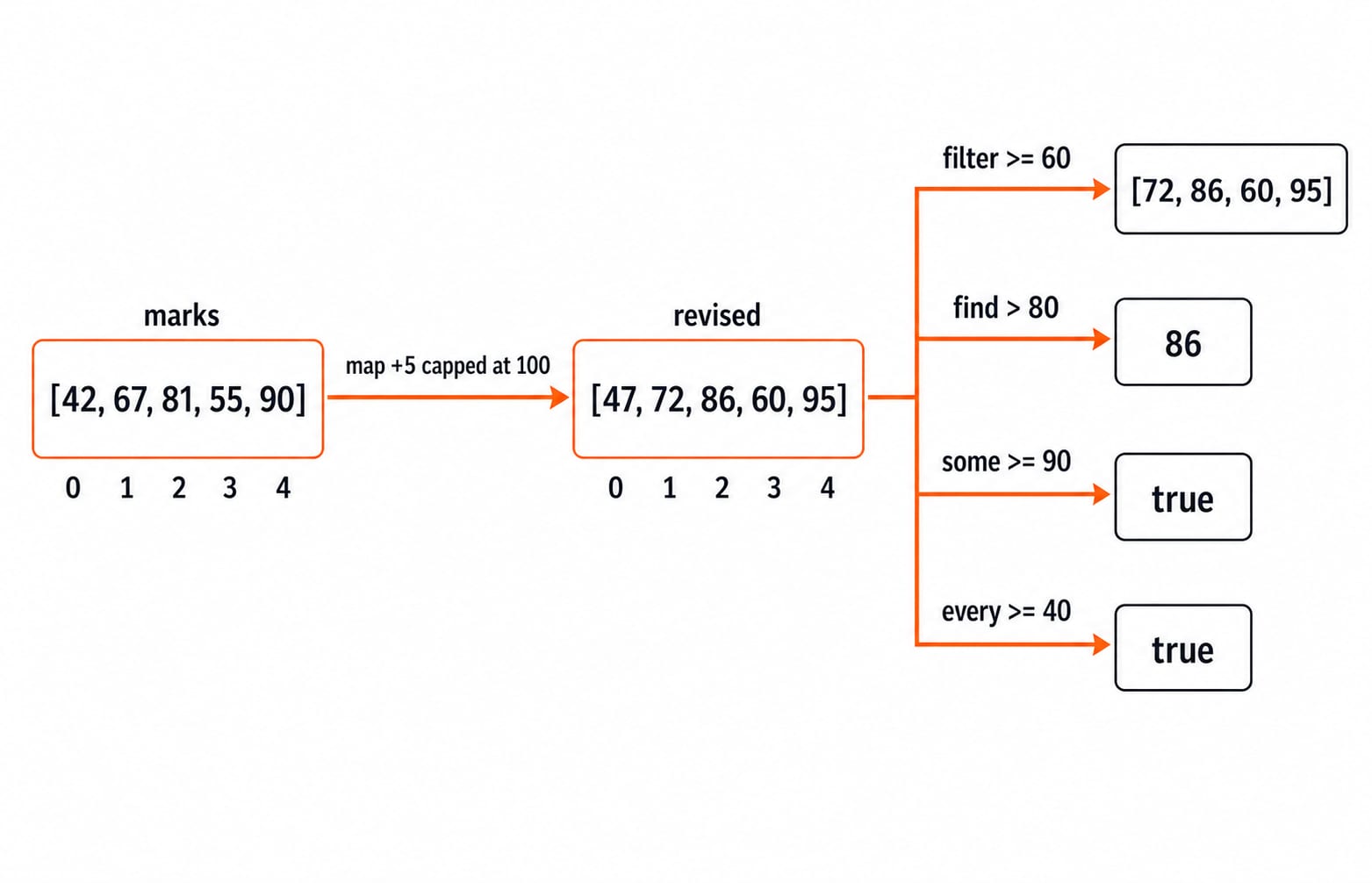
const marks = [42, 67, 81, 55, 90];
const revised = marks.map(mark => Math.min(mark + 5, 100));
const passing = revised.filter(mark => mark >= 60);
const firstAbove80 = revised.find(mark => mark > 80);

console.log(revised);      // [47, 72, 86, 60, 95]
console.log(passing);      // [72, 86, 60, 95]
console.log(firstAbove80); // 86
console.log(revised.some(mark => mark >= 90)); // true
console.log(revised.every(mark => mark >= 40)); // true
map transforms every item and preserves the count. filter can reduce it. find returns the first match or undefined. some asks whether at least one item passes; every asks whether all pass. These calls do not mutate marks, which remains [42, 67, 81, 55, 90].
Reduce an array to one result
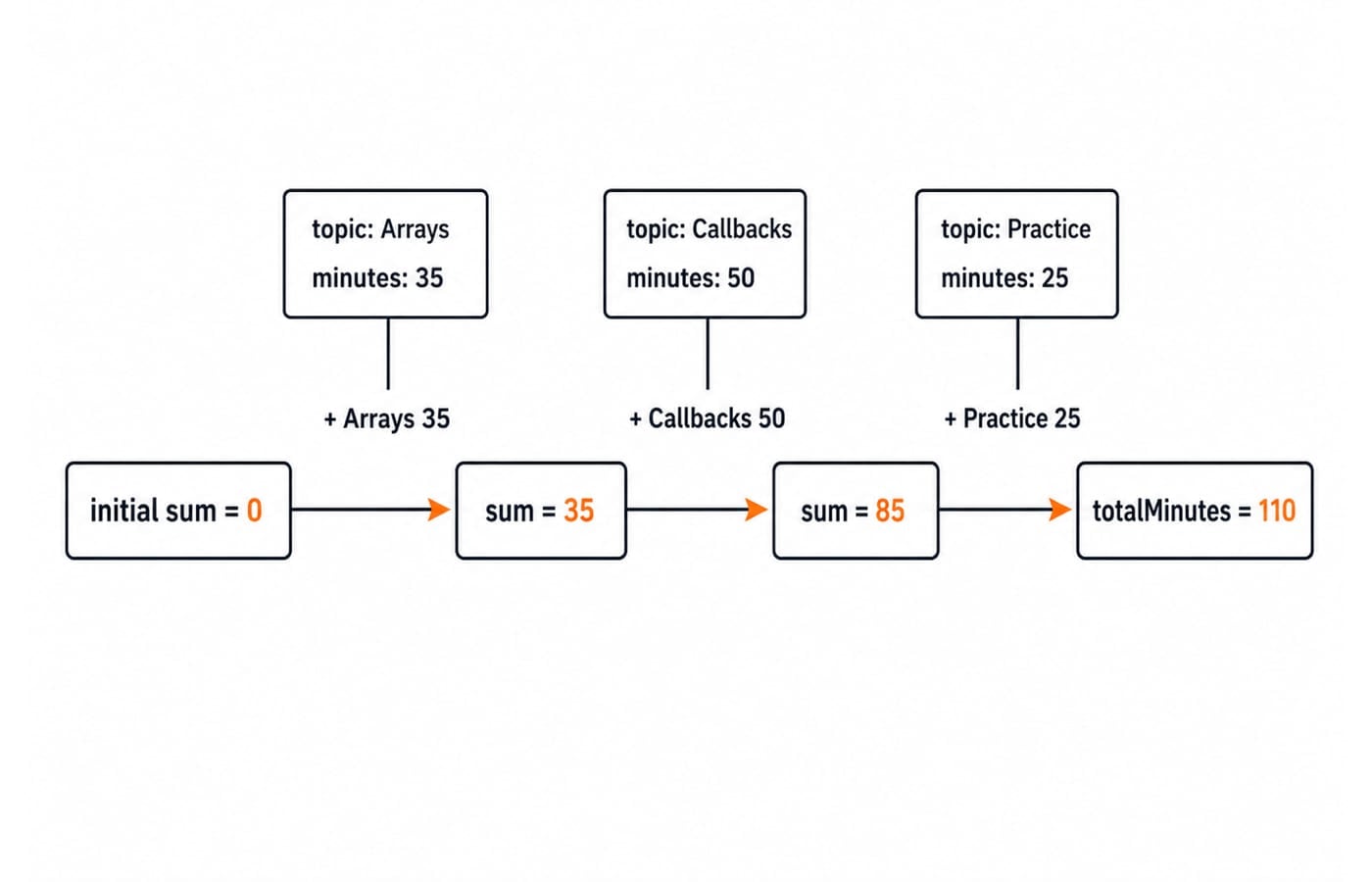
reduce carries an accumulator through the array. Here it is a study total:
const sessions = [
  { topic: "Arrays", minutes: 35 },
  { topic: "Callbacks", minutes: 50 },
  { topic: "Practice", minutes: 25 }
];

const totalMinutes = sessions.reduce(
  (sum, session) => sum + session.minutes,
  0
);

console.log(totalMinutes); // 110
The explicit initial value is 0. After Arrays it is 0 + 35 = 35; after Callbacks, 35 + 50 = 85; after Practice, 85 + 25 = 110. Initialising with 0 also makes an empty sessions array return 0 safely.
Avoid sorting, callback, mutation, and reference traps
Default sort compares string forms, and it mutates the array on which it runs:
const attempts = [3, 12, 7, 1];
console.log([...attempts].sort());              // [1, 12, 3, 7]
console.log([...attempts].sort((a, b) => a - b)); // [1, 3, 7, 12]
Spread copies the array, so attempts stays unchanged. For numeric ascending order, copy first and pass (a, b) => a - b.
A block-bodied arrow callback needs an explicit return:
[1, 2, 3].map(n => { n * 2; }); // [undefined, undefined, undefined]
[1, 2, 3].map(n => n * 2);      // [2, 4, 6]
The first callback calculates but returns nothing. Use the expression body shown, or write { return n * 2; }.
Arrays compare by reference identity, not matching contents:
const a = [1, 2];
const b = [1, 2];
console.log(a === b); // false

const alias = a;
alias.push(3);
console.log(a); // [1, 2, 3]
a and b are separate arrays, so equality is false. alias and a share one array, so either name reveals its mutations. Use [...a] for a separate shallow copy.
Practise method choice and output traces
Practise method choice and output tracing with these tasks:
Keep values divisible by
10in[5, 10, 15, 20], then halve them. Expected result:[5, 10].Flatten
[[2, 4], [6], [8, 10]]by one level. Expected result:[2, 4, 6, 8, 10].Reduce
["bug", "fixed", "bug", "open", "bug", "fixed"]into{ bug: 3, fixed: 2, open: 1 }.
Try-it-first break
Run your code and inspect the result and original. Compare the result with the original array:
const values = [5, 10, 15, 20];
const answer1 = values.filter(n => n % 10 === 0).map(n => n / 2);
// [10, 20] becomes [5, 10]

const answer2 = [[2, 4], [6], [8, 10]].flat(1);
// [2, 4, 6, 8, 10]

const answer3 = ["bug", "fixed", "bug", "open", "bug", "fixed"].reduce(
  (counts, status) => {
    counts[status] = (counts[status] ?? 0) + 1;
    return counts;
  },
  {}
);
// { bug: 3, fixed: 2, open: 1 }
Predict the output of this shared-reference example:
const x = [2, 4];
const y = x;
y.pop();
console.log(x.length); // 1
It prints 1 because x and y reference the same array. Put such method-selection and output-tracing tasks into a coding-round practice routine. Also learn where JavaScript fits into web technologies.
Array method checklist
Use an index or
atto read.Use
pushorspliceto mutate deliberately.Use
sliceto copy a range.Use
mapto transform.Use
filterorfindto select.Use
reduceto combine.
Check what a method returns and whether it changes the source. Build the full sequence in Complete JavaScript, then browse the Free Courses category. React and Redux is a later step, after JavaScript arrays, functions, objects, and DOM basics feel comfortable.