An object can look like a group of variables inside braces, but the important ideas are property names, values, methods, and reference behaviour. One student record, { name: "Aarav", score: 72 }, is enough to practise every core operation, including the trap where two variables silently share one object and a change through either shows through both. Every snippet works in a browser console or a JavaScript runtime.
What an object represents in JavaScript
An object is a collection of key-value properties. The primitive values "Aarav" and 72 each hold one value, while { name: "Aarav", score: 72 } groups related values under meaningful keys.
The braces create an object literal. name and score are property keys, while "Aarav" and 72 are their values. A property value may be a string, number, boolean, array, function, or another object. That flexibility is why objects appear throughout browser code and other web technologies.
Create, read, update, add, and delete properties
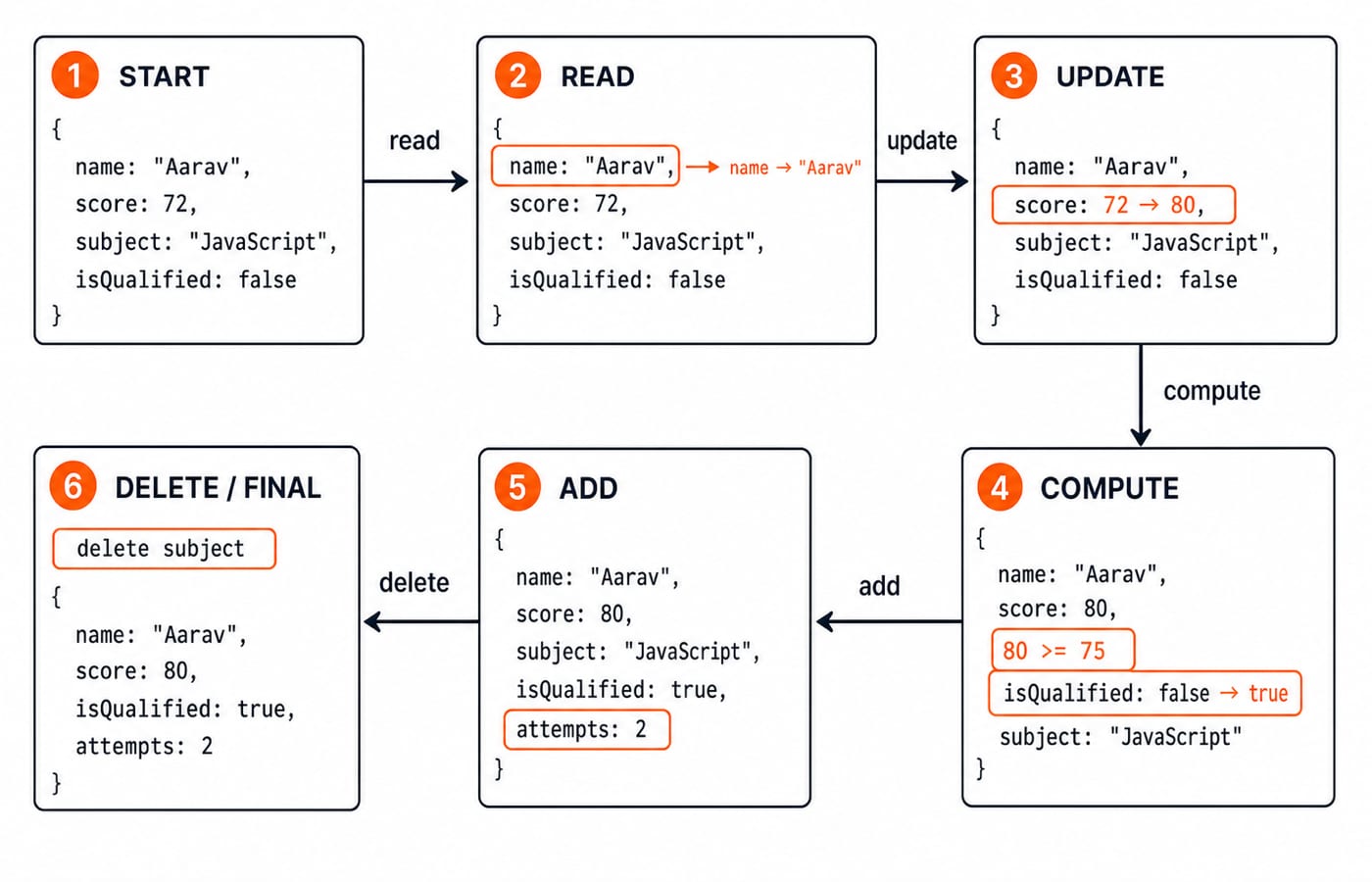
Start with one object:
const student = {
  name: "Aarav",
  score: 72,
  subject: "JavaScript",
  isQualified: false
};
Now trace each operation in order:
student.name;                 // "Aarav"
student["score"];             // 72

student.score += 8;
student.score;                // 80

student.isQualified = student.score >= 75;
student.isQualified;          // true

student.attempts = 2;
student.attempts;             // 2

delete student.subject;
student;
// { name: "Aarav", score: 80, isQualified: true, attempts: 2 }
The score calculation is 72 + 8 = 80. Since 80 >= 75, isQualified becomes true. Declaring student with const prevents reassignment such as student = {}, but it does not freeze the object's properties.
Dot notation, bracket notation, and dynamic keys
Dot notation is usually clearest when the key is known: student.score. Bracket notation is required when a variable supplies the key:
const field = "score";
student[field];   // 80
student.field;    // undefined
The first expression uses the value inside field. The second searches for a literal property named field, which this object does not have. Brackets also handle keys that ordinary dot notation cannot:
const profile = { "exam centre": "Jaipur" };
profile["exam centre"];       // "Jaipur"
profile["attempt number"] = 2;
profile;
// { "exam centre": "Jaipur", "attempt number": 2 }

const subject = "javascript";
const marks = { [subject]: 80 };
marks;                         // { javascript: 80 }
[subject] is a computed property. JavaScript uses the variable's value, "javascript", as the key.
Methods, this, and object behaviour
A function stored as an object property is a method:
const practice = {
  correct: 7,
  total: 10,
  accuracy() {
    return (this.correct / this.total) * 100;
  }
};

practice.accuracy();  // 70
practice.correct = 8;
practice.accuracy();  // 80
For these regular method calls, this refers to practice. The calculations are (7 / 10) * 100 = 70 and (8 / 10) * 100 = 80. An arrow function does not create the same method receiver binding, so it is not an equivalent replacement here. For the wider comparison with classes and inheritance, read OOP concepts such as classes and inheritance.
Nested objects, arrays, destructuring, and spread
Objects can combine several data shapes:
const learner = {
  name: "Mira",
  scores: { js: 68, dbms: 74 },
  attempts: [62, 68]
};

learner.scores.js;       // 68
learner.attempts[1];     // 68

const { name, scores: { dbms } } = learner;
name === "Mira";         // true
dbms === 74;             // true
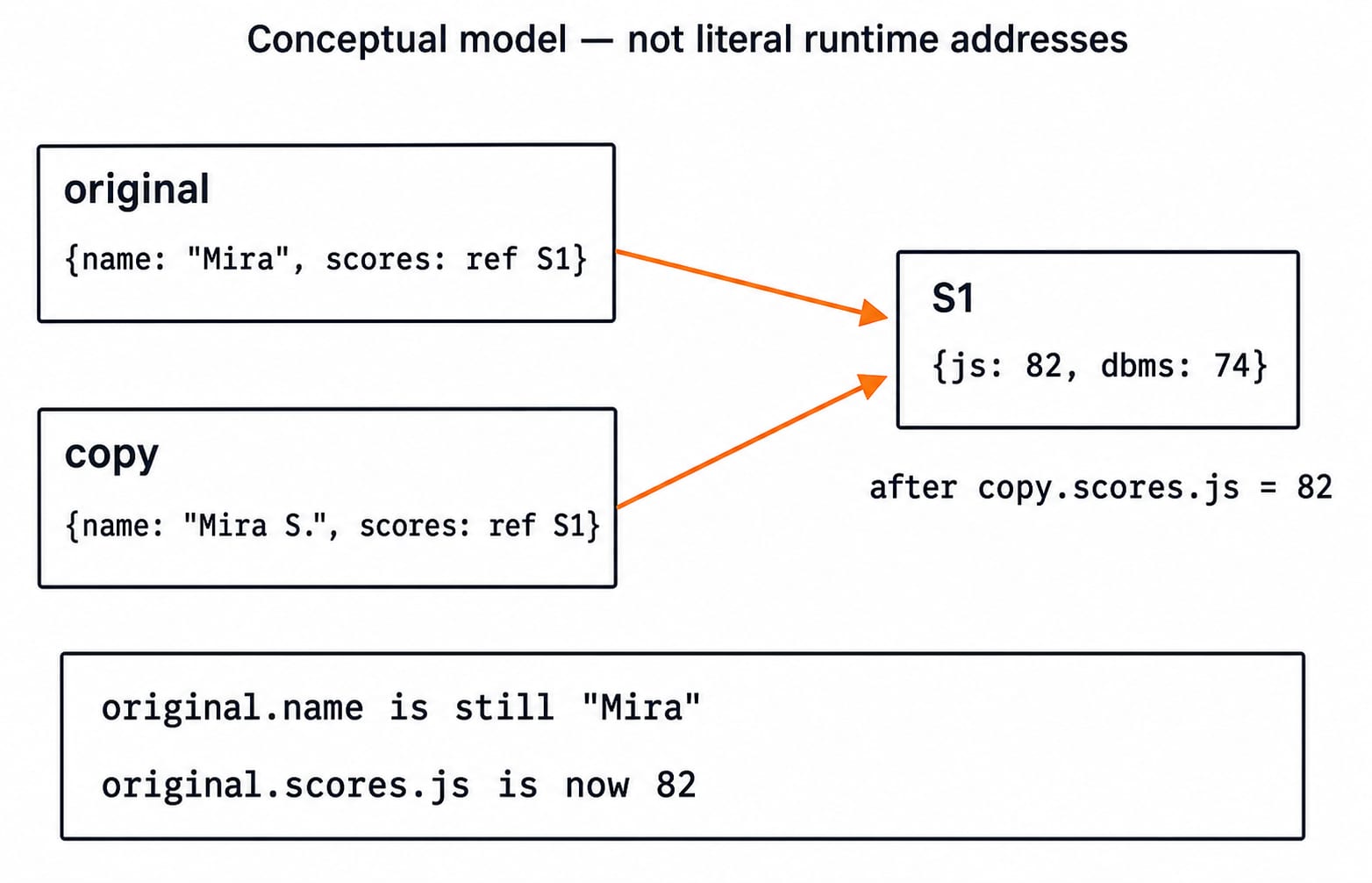
Spread syntax makes a shallow copy, which means it copies only one level:
const original = { name: "Mira", scores: { js: 68, dbms: 74 } };
const copy = { ...original };

copy.name = "Mira S.";
copy.scores.js = 82;

original.name;       // "Mira"
original.scores.js;  // 82
The two outer objects have separate name properties, but both still refer to the same nested scores object. structuredClone is a modern deep-copy option for supported data, not a universal replacement for every object type. Rename patterns, defaults, rest collection, and the full set of spread traps are worked through in JavaScript Destructuring and Spread: Syntax, Rest Patterns, and Worked Examples.
Inspect, loop over, and test object properties
JavaScript provides direct ways to inspect an object's own enumerable properties:
const attempts = { day1: 4, day2: 6, day3: 5 };

Object.keys(attempts);    // ["day1", "day2", "day3"]
Object.values(attempts);  // [4, 6, 5]
Object.entries(attempts); // [["day1", 4], ["day2", 6], ["day3", 5]]

Object.values(attempts).reduce((sum, value) => sum + value, 0); // 15

for (const [day, count] of Object.entries(attempts)) {
  console.log(`${day}: ${count}`);
}
// day1: 4
// day2: 6
// day3: 5
The total is 4 + 6 + 5 = 15. Ownership checks answer a different question: Object.hasOwn(attempts, "day2") is true, while Object.hasOwn(attempts, "toString") is false. However, "toString" in attempts is true because in also sees inherited properties.
Common object mistakes and how to debug them
Assignment can create a shared reference:
const a = { score: 70 };
const b = a;
b.score = 85;
a.score; // 85

const c = { score: 70 };
const d = { ...c };
d.score = 85;
c.score; // 70
The spread copy works independently here because score is a top-level primitive. Other common traps are predictable:
With
const key = "score",student.keyisundefined, butstudent[key]is80.student.rankisundefined. A deeper read such asstudent.rank.positionfails, whilestudent.rank?.positionsafely returnsundefined.const getAccuracy = practice.accuracy;removes the method from its original receiver. A standalone call cannot readpracticethroughthis. Callpractice.accuracy()or usepractice.accuracy.bind(practice).
When output is surprising, log the whole object, inspect Object.keys, verify spelling and case, then check whether two variables share one reference.
How coding tests check objects
Typical tasks ask you to predict aliasing output, select dot or bracket notation, transform data with Object.keys or Object.values, or explain a shallow copy.
First predict the result of each example, then compare it with the explanation:
After
const a = { score: 70 }; const b = a; b.score = 85;, what isa.score? It is85becauseaandbrefer to the same object.Start with
const inventory = { pen: 3, notebook: 2 };. Setinventory.pen = 5, addinventory.marker = 1, then totalObject.values(inventory). The values are[5, 2, 1], so the total is5 + 2 + 1 = 8.With
const key = "score", writestudent[key]. It returns80because the value ofkeyselectsscore;student.keysearches for a literalkeyproperty and returnsundefined.
The short version and your next step
Objects group key-value data. Dot and brackets access properties. Methods add behaviour. Assignments can share references. Spread is shallow.
Continue with the Complete JavaScript Course for the immediate next step. Move to the MERN Stack Course when you want to apply JavaScript objects in projects, or browse the wider Coding & Skills course directory for another route. Run the examples, change one value at a time, and predict the result before checking the console.