SMTP, POP3 and IMAP Explained with Worked Examples
Follow one email from sender to mailbox, then compare SMTP dialogue, POP3 deletion, IMAP synchronisation, timing and bandwidth through closed examples.
KnowledgeGate Team
Exam prep & CS education
Updated 14 Sep 20266 min read
SMTP, POP3 and IMAP are often memorised as three expansions, but protocol questions demand more. You must know who starts each connection, where the mailbox remains, and when a message or flag changes state. An email travels from alice@sender.example to bob@receiver.example; its exact SMTP dialogue, 520 ms delivery phase, and the difference between POP3 and IMAP across five messages show how the protocols work. Use the GATE CS exam category to connect these protocol details with the wider syllabus.
Related reading: email protocol MCQs and application-layer protocols.
SMTP sends mail; POP3 and IMAP access the delivered mailbox
SMTP submits and transfers mail. POP3 retrieves messages through a download-oriented session. IMAP works with mailbox state retained on the server. Neither POP3 nor IMAP replaces SMTP for sending.
Alice's mail user agent submits to the sender's server. It resolves the MX destination for receiver.example. Application Layer Protocols: DNS Walk-Through, HTTP explains DNS hierarchy, HTTP methods and the layer-wide port map. SMTP, POP3 and IMAP instead use command sequences that change envelope, deletion and multi-device mailbox state. A mail server relays to the recipient server for storage in Bob's mailbox. His devices later use POP3 or IMAP.
Protocol | Primary job | Typical initiator | Server state after access | Official specification |
|---|---|---|---|---|
SMTP | Submit and transfer mail | Sending client or mail server | Recipient mailbox is outside SMTP retrieval | RFC 5321, RFC 6409 |
POP3 | Retrieve mailbox messages | Recipient client | Depends on | RFC 1939 |
IMAP | Inspect and synchronise server mailbox | Recipient client | Messages and flags normally remain server-side | RFC 9051 |
RFC 6409 specifies submission on TCP 587; SMTP relay conventionally uses TCP 25 under RFC 5321. POP3 and IMAP examples use cleartext ports 110 and 143. Port numbers guarantee neither encryption nor authentication, and support varies.
SMTP conversation: envelope, message data and server replies
The envelope sender is alice@sender.example; its recipient is bob@receiver.example. Visible headers are content inside DATA.
S: 220 mx.receiver.example ready
C: EHLO mail.sender.example
S: 250 mx.receiver.example
C: MAIL FROM:<alice@sender.example>
S: 250 sender accepted
C: RCPT TO:<bob@receiver.example>
S: 250 recipient accepted
C: DATA
S: 354 end data with <CRLF>.<CRLF>
C: From: Alice <alice@sender.example>
C: To: Bob <bob@receiver.example>
C: Subject: CN revision
C:
C: Revise SMTP, POP3 and IMAP.
C: .
S: 250 message accepted for delivery
C: QUIT
S: 221 closing connection
Under RFC 5321, EHLO starts the extended session, MAIL FROM starts a transaction, and each RCPT TO adds an envelope recipient. Content follows only after DATA receives 354; a line containing only . ends it. Final 250 means this server accepted responsibility, not that the message reached Bob's inbox.
For two recipients on one server, send two RCPT TO commands before one DATA; send the body once. After a permanent 550 for Bob, later DATA does not deliver to Bob.
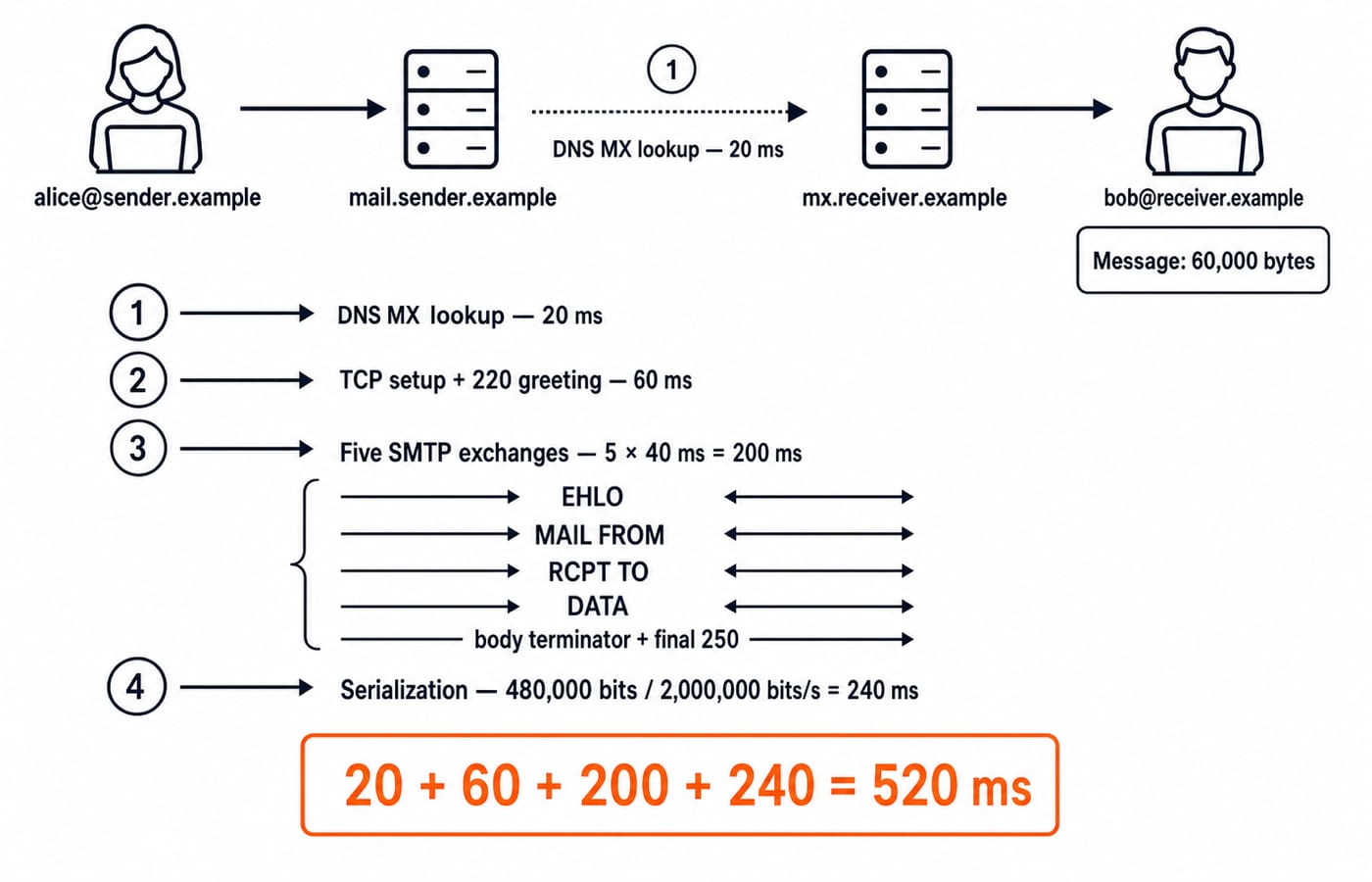
Worked SMTP timing example: calculate the delivery phase exactly
Here DNS MX lookup is 20 ms, TCP setup plus initial 220 is 60 ms, and RTT is 40 ms. EHLO, MAIL FROM, one RCPT TO, DATA, and the terminator acknowledgement take five serial RTTs. TLS, retransmission, queueing and QUIT are excluded.
For a 60,000-byte message over a 2,000,000-bit/s bottleneck:
Message bits =
60,000 x 8 = 480,000 bits.Serialisation =
480,000 / 2,000,000 = 0.24 s = 240 ms.Protocol time =
5 x 40 = 200 ms.Total =
20 + 60 + 200 + 240 = 520 ms.
The 520 ms result applies only to this serial model. A second accepted recipient adds one RCPT TO RTT: 520 + 40 = 560 ms. Data is still sent once to this server.
POP3 session states and when deletion actually happens
RFC 1939 orders POP3 states as AUTHORIZATION, TRANSACTION, then UPDATE. Authentication enters TRANSACTION, where STAT, LIST, RETR and DELE operate. QUIT then enters UPDATE; a successful update removes marked messages.
Five messages contain 120,000, 180,000, 250,000, 300,000 and 150,000 octets. Their 1,000,000 total makes STAT return +OK 5 1000000. After RETR 4 and DELE 4, message 4 is only marked. Successful QUIT removes it, leaving four messages and 1,000,000 - 300,000 = 700,000 octets. If TCP drops before QUIT reaches UPDATE, deletion did not complete.
POP3 neither downloads every message nor erases every retrieved one inherently. The client chooses RETR, DELE and whether to complete the update.
IMAP synchronises mailbox state across devices
Bob's laptop selects INBOX, fetches UID 314 metadata, then stores \Seen. His phone later sees the same flag; the message remains server-side unless separately deleted.
A001 SELECT INBOX
A002 UID FETCH 314 (BODY.PEEK[HEADER] RFC822.SIZE FLAGS)
* 4 FETCH (UID 314 RFC822.SIZE 300000 FLAGS ())
A003 UID STORE 314 +FLAGS.SILENT (\Seen)
Under RFC 9051, BODY.PEEK does not implicitly set \Seen. A phone fetch later reports UID 314 with FLAGS (\Seen). The UID is stable only within this mailbox's UIDVALIDITY context, not globally or forever. Sequence number 4 is a relative position that can change after expunges. IMAP may cache mail offline, but its defining advantage here is synchronised server state.
POP3 versus IMAP worked example: bandwidth and two-device state
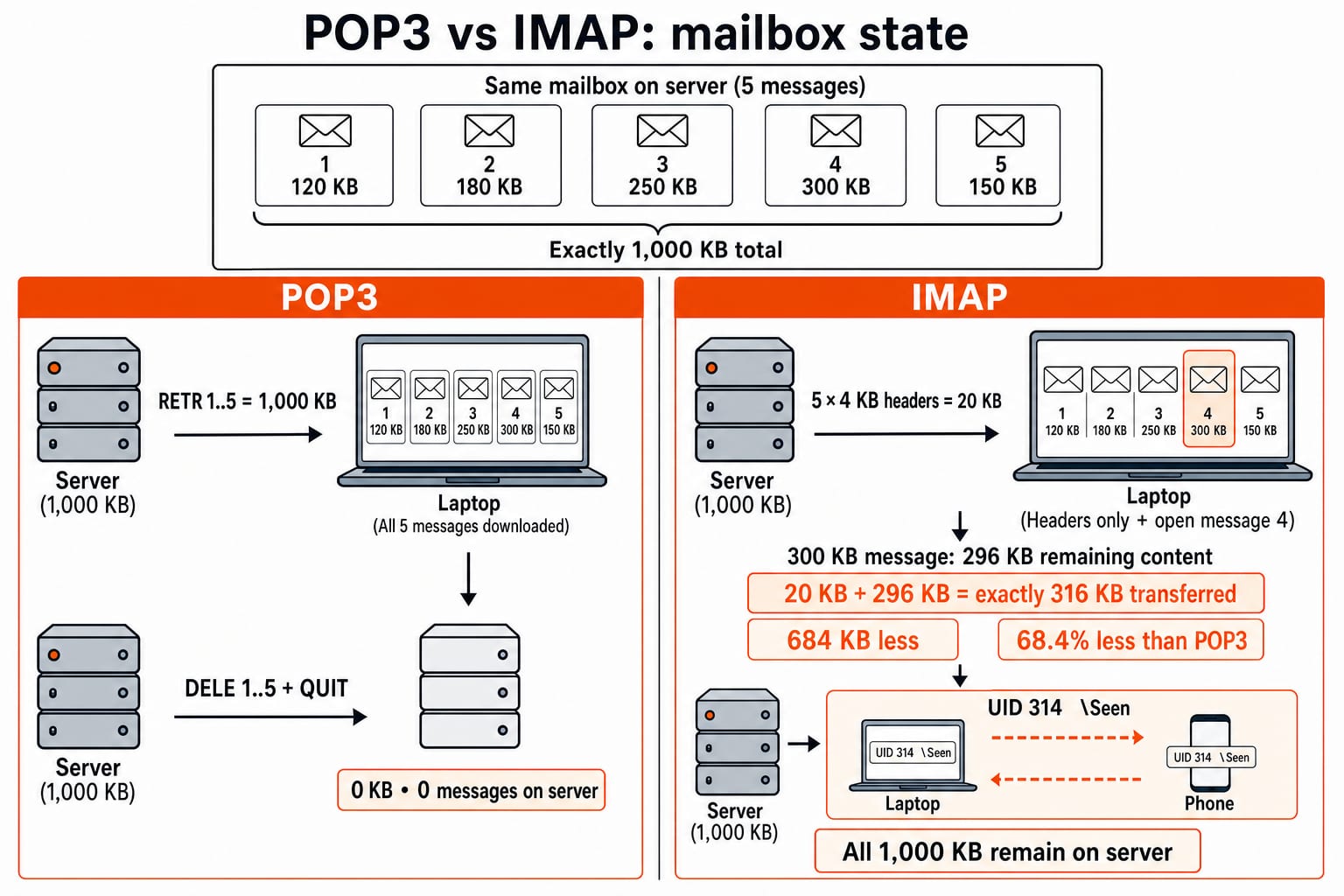
Reuse message sizes 120, 180, 250, 300 and 150 KB, exactly 1,000 KB. POP3 retrieval of all five followed by DELE 1..5 and QUIT transfers 1,000 KB and leaves 0 KB server-side. The phone cannot retrieve those copies.
IMAP first fetches five 4 KB headers: 5 x 4 = 20 KB. Opening only the 300 KB message needs 300 - 4 = 296 KB more. Transfer is 20 + 296 = 316 KB; all 1,000 KB remain server-side. The saving is 1,000 - 316 = 684 KB, or 684 / 1,000 x 100 = 68.4%.
Described action or policy | Choose |
|---|---|
Submit or transfer a new message | SMTP |
Download-oriented, local-device retrieval | POP3 |
Synchronised folders, flags and multi-device state | IMAP |
This is conditional. Full IMAP downloads shrink the advantage; selective POP3 retrieval or leaving copies changes the outcome.
SMTP, POP3 and IMAP exam traps and question patterns
Prompt clue | Correct protocol or verdict | Why |
|---|---|---|
Sender submits a new message | SMTP | SMTP handles submission. |
Two mail servers relay a message | SMTP | SMTP transfers mail between servers. |
Client retrieves selected mail | POP3 |
|
Two devices share folders and read flags | IMAP | Server mailbox state is synchronised. |
POP3 client marks a message, then disconnects before update | Do not assume deletion completed | Successful |
Server returns SMTP | Accepted at that SMTP stage | Inbox placement is not guaranteed. |
Three closed checks:
A:
20 msDNS +60 mssetup + five40 msexchanges +240 msserialisation =520 ms.B: Successful POP3 deletion of the
300 KBfourth message leaves700 KB.C: IMAP headers plus one opened message transfer
316 KB, saving684 KBunder this policy.
For a statement set: “SMTP is a push protocol for mail transfer” is true here because senders initiate transfer. “POP3 always deletes immediately after RETR” is false because DELE and successful UPDATE are separate. “IMAP can synchronise server-side flags” is true because flags are mailbox state. “IMAP sends outgoing mail instead of SMTP” is false because retrieval and sending are different jobs.
For layer-wide DNS and HTTP timing, ports and mixed-protocol practice, use Application Layer: DNS and HTTP Worked Examples for GATE. Email-specific questions instead turn on SMTP envelopes, POP3 UPDATE and IMAP flags.
Continue with Application Layer MCQs: 12 Solved DNS, HTTP, Email. Its email questions test the same command, state and timing distinctions.
SMTP, POP3 and IMAP: the short version and next step
SMTP moves a new message towards the recipient.
POP3 retrieves messages according to the client's download and deletion policy.
IMAP synchronises a server-resident mailbox and its state.
One journey can use SMTP first and POP3 or IMAP later.
Recompute two variations: 90,000 x 8 / 2,000,000 = 0.36 s = 360 ms, giving 20 + 60 + 200 + 360 = 640 ms. Opening the 250 KB IMAP message after five 4 KB headers transfers 20 + (250 - 4) = 20 + 246 = 266 KB.
Use GATE Guidance by Sanchit Sir for a guided GATE CS preparation path that places email protocols inside the complete network stack.
Keep learning
Computer Networks Hardware Basics: Devices, Domains and Worked Examples
Learn what hubs, switches, routers, gateways and access points actually do, then count network domains and trace frames through a two-LAN topology.
Updated 6 Oct 20266 min readComputer Networks
Data Link Layer Framing Explained: Byte Stuffing, Bit Stuffing and a Cross-Concept Numerical
Frame one four-byte payload in two ways, decode it, and then reuse the verified frame sizes in link-load and Stop-and-Wait calculations.
Updated 1 Oct 20266 min readComputer Networks
Byte Stuffing in Computer Networks: Worked Framing Example and Exam Traps
Learn a precise byte-stuffing convention, trace a payload containing both FLAG and ESC, reverse it safely, and calculate frame overhead and transmission time.
Updated 26 Sep 20266 min readComputer Networks
Go-Back-N Protocol Explained: Sliding Windows, Worked Numericals and Exam Traps
Trace Go-Back-N through a lost frame, calculate its legal window and link utilisation, and avoid the ACK and wrap-around traps that spoil numericals.
Updated 24 Sep 20266 min readComputer Networks