Application Layer Protocols: DNS, HTTP, and email, with a DNS walk-through
Application layer protocols explained: client-server vs P2P, DNS hierarchy and resolution, HTTP methods and status codes, SMTP POP IMAP, and FTP connections.
KnowledgeGate Team
Exam prep & CS education
Updated 14 Jul 20266 min read57 views
Every web page you open fires a chain of application-layer protocols: a DNS lookup to find the server, an HTTP request to fetch the page, and often SMTP or IMAP in the background for mail. Networking exams test this layer heavily because it is concrete and traceable. It is also the layer you can count: one cold-cache name lookup descends root, then TLD, then authoritative server, and every hop on that descent is a round trip you can put a number on.
Client-server versus peer-to-peer
The application layer runs on end hosts, not routers, and organises communication in one of two models.
In the client-server model, an always-on server with a fixed address waits for requests, and clients initiate them. Web, email, and DNS all follow this. In the peer-to-peer (P2P) model, hosts talk directly and each peer acts as both client and server, so the system scales as peers join. File-sharing systems use P2P. The trade-off is clear: client-server is simple to manage but the server is a bottleneck and single point of failure, while P2P is self-scaling but harder to secure and manage.
DNS: the internet's directory
The Domain Name System maps human-readable names like www.example.com to IP addresses. It is a distributed, hierarchical database, not one giant server.
The name space is a tree. At the top sit the root servers, below them the top-level domain (TLD) servers for .com, .org, .in and so on, and below those the authoritative servers that actually hold the records for a domain. No single server knows everything; each knows only its zone and whom to ask next.
DNS also caches aggressively. A local resolver remembers answers for a time bounded by each record's TTL, so most lookups never reach the root.
DNS record types
A maps a name to an IPv4 address; AAAA maps to an IPv6 address.
NS names the authoritative server for a zone.
CNAME makes one name an alias of another.
MX names the mail server for a domain.
Iterative versus recursive resolution
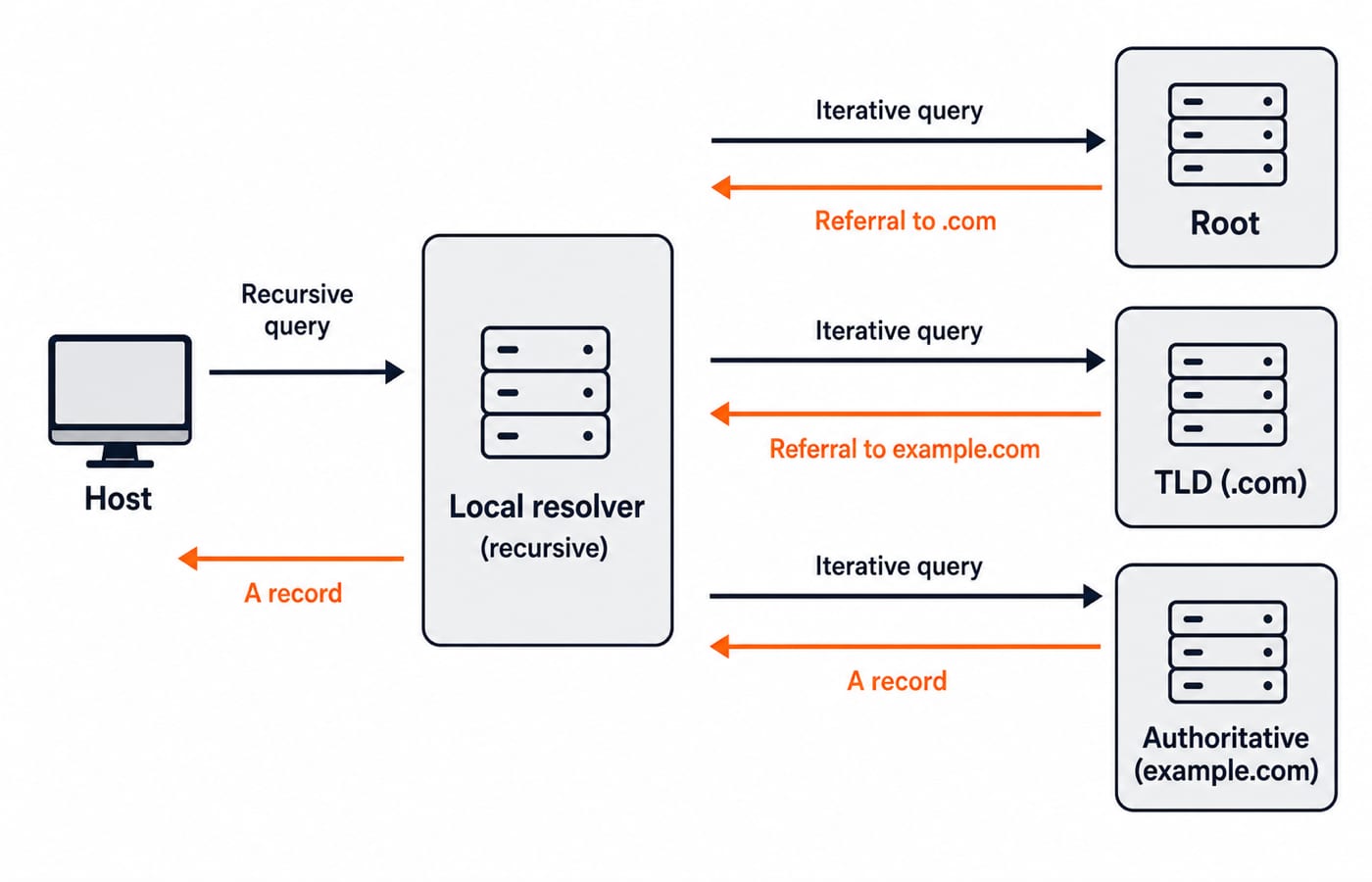
In recursive resolution, the client asks its local DNS resolver for the final answer and the resolver does all the chasing, returning only the finished result. In iterative resolution, each server that does not know the answer returns a referral ("ask this next server"), and the querying resolver follows the chain itself. In practice the client-to-resolver step is recursive, and the resolver-to-server steps are iterative.
A worked DNS resolution
Suppose your resolver has an empty cache and you request www.example.com.
Your host sends a recursive query to its local resolver: "give me the address of www.example.com."
The resolver asks a root server. The root does not know the address but replies iteratively: "for .com, ask this TLD server."
The resolver asks the .com TLD server. It replies: "for example.com, ask this authoritative server," giving the NS record.
The resolver asks the authoritative server for example.com. It returns the A record: the IPv4 address of www.example.com.
The resolver caches the answer under its TTL and returns the address to your host.
That is one recursive query from your host plus three iterative round trips from the resolver (root, then TLD, then authoritative) on a cold cache; on a warm cache the resolver answers from its cache and the iterative trips drop to zero. This "root, then TLD, then authoritative" descent is the exact sequence exams ask you to order.
HTTP: fetching the page
HTTP is a request-response protocol running over TCP. A client sends a request with a method, and the server replies with a status code and body.
Common methods: GET retrieves a resource, POST submits data, PUT replaces a resource, DELETE removes one, HEAD fetches only headers. Status codes group by leading digit: 2xx success (200 OK), 3xx redirection (301 Moved Permanently, 304 Not Modified), 4xx client error (404 Not Found, 403 Forbidden), 5xx server error (500 Internal Server Error).
A key distinction: non-persistent HTTP opens a fresh TCP connection per object, so a page with many images pays repeated connection setup. Persistent HTTP (the default since HTTP/1.1) reuses one connection for multiple objects, cutting round trips. Persistence is a favourite exam contrast.
Persistent versus non-persistent HTTP: a worked page-load count
Take a page of one HTML file plus eight embedded images, a round-trip time (RTT) of 100 ms, and transmission times small enough to ignore. Non-persistent HTTP pays two RTTs per object, one for the TCP handshake and one for the request and its response, so nine objects cost 2 x 9 = 18 RTT, or 1,800 ms. Persistent HTTP pays the handshake once and then one RTT per object: 1 + 9 = 10 RTT, or 1,000 ms. If the client pipelines, the eight images are requested as one batch, so the whole page costs 1 RTT to open the connection, 1 RTT for the HTML and 1 RTT for all eight images: 3 RTT, or 300 ms.
Scheme | Round trips (1 HTML + 8 objects) | Time at RTT = 100 ms |
|---|---|---|
Non-persistent, one connection per object | 2 x 9 = 18 | 1,800 ms |
Persistent, no pipelining | 1 + 9 = 10 | 1,000 ms |
Persistent with pipelining | 1 + 1 + 1 = 3 | 300 ms |
A cold-cache DNS lookup sits in front of all three figures: its four round trips add another 400 ms at the same RTT before the first TCP handshake even starts. Change the object count or the RTT and the same three expressions still give the answer, which is how the numerical is usually set.
Email and file transfer protocols
Email splits sending from retrieval. SMTP pushes mail from a sender to the recipient's mail server, and between servers; it is a push protocol. To retrieve mail from your server, you use POP3 (downloads and typically deletes from the server) or IMAP (keeps mail on the server and syncs across devices).
FTP transfers files and is distinctive for using two connections: a control connection (on port 21) that carries commands and stays open for the session, and a separate data connection that opens for each file transfer and closes after. This out-of-band control channel is exactly what exams ask about.
Default ports: which application-layer protocol listens where
Port numbers are the cheapest marks in this layer, and recall questions come straight off this list. These are the well-known defaults every client assumes; move a server off its default and the port must be named explicitly in the URL.
Protocol | Transport | Default port |
|---|---|---|
DNS | UDP (TCP for zone transfers and oversized replies) | 53 |
HTTP | TCP | 80 |
HTTPS | TCP | 443 |
SMTP | TCP | 25 |
POP3 | TCP | 110 |
IMAP | TCP | 143 |
FTP control | TCP | 21 |
FTP data (active mode) | TCP | 20 |
FTP is the only entry that reserves two ports, one for its control connection and one for its data connection. DNS is the only one that answers over UDP by default, because a query and its reply normally fit in a single datagram and a lost one is cheaper to re-send than a connection is to set up.
How application-layer protocols are tested in GATE, NET, and placements
GATE CS asks you to count DNS round trips on a cold versus warm cache, order the root-TLD-authoritative sequence, distinguish iterative from recursive queries, and compute page-load time for persistent versus non-persistent HTTP. Match-the-port and match-the-status-code items are common one-mark questions. Drill these with the solved Computer Networks application layer MCQs.
UGC NET Computer Science favours recall: which protocol uses which port, SMTP versus POP versus IMAP roles, and DNS record-type meanings. Precise definitions score here.
Placement and company tests ask what happens when you type a URL and press enter, expecting the DNS-then-HTTP story, and probe why FTP needs two connections or why HTTP moved to persistent connections.
The short version
The application layer is where names become addresses and requests become pages. Fix the client-server-versus-P2P split, memorise the DNS descent and its record types, keep HTTP methods and status-code families straight, learn the port table, and remember SMTP pushes while POP and IMAP pull. Be able to turn a page of N objects into an RTT count both ways: 2(N+1) non-persistent, N+2 persistent without pipelining. Trace one cold-cache DNS lookup until the full descent (recursive query, then root, TLD and authoritative) is automatic. The full Computer Networks learn module sequences this with the transport and network layers, and GATE Guidance by Sanchit Sir threads it through the whole stack. For a structured route, begin at the GATE CS exam category. Learn the DNS walk-through cold, and this layer becomes dependable marks.
Keep learning
Data Transmission Modes and Connection Types: Simplex, Half-Duplex and Full-Duplex
Learn to classify simplex, half-duplex, full-duplex, point-to-point and multipoint links, then calculate completion time without relying on memorised examples.
Updated 22 Oct 20265 min readComputer Networks
Computer Networks Interview Questions: Trace OSI, TCP/IP and Routing Step by Step
Follow one synthetic web request across DNS, ARP, TCP, NAT and longest-prefix routing, then turn each step into a strong interview answer.
Updated 18 Oct 20266 min readComputer Networks

Basics of Cyber Security: CIA Triad, Risks and a Worked Defence
Learn a consistent security vocabulary, connect common attack paths to suitable controls, and calculate how two defensive layers reduce account takeovers.
Updated 14 Oct 20266 min readComputer Networks
Cyber Threats and Attacks Explained: Types, Worked DDoS Example and Exam Traps
Learn to separate threats, vulnerabilities, vectors and attacks, then apply the distinctions to a calculated DDoS scenario and exam-style questions.
Updated 10 Oct 20266 min readComputer Networks