

Internet Protocols and Web Services: DNS, HTTP, Email and FTP with Worked Examples
Trace a browser request through DNS, TCP and HTTP, then separate email from FTP.
KnowledgeGate Team
Exam prep & CS education
Updated 11 Nov 20265 min read

Internet protocols become useful when each name is tied to a layer, endpoint and message. Internet Fundamentals: Architecture, Connections, DNS, URLs and Worked Examples owns network architecture, connection types, packetisation and throughput. Internet Fundamentals for GATE: DNS, HTTP and a Worked Web Request Trace owns the cold browser journey through DNS, TCP, TLS and cache timing. The protocol lab below solves a different problem: selecting transports and endpoints across DNS, HTTP, email and FTP, including FTP's separate control and data channels.
Internet protocols and services: one layered model instead of a list
A protocol defines message rules between peers. A service is what a layer offers above. TCP offers an ordered byte stream; HTTP uses it for requests and responses.
Layer | Main job | Examples | Addressing unit |
|---|---|---|---|
Application | User-facing service | DNS, HTTP, SMTP, IMAP, FTP | Names, resource identifiers |
Transport | Process delivery | TCP, UDP | Ports |
Internet | Host forwarding | IP, ICMP | IP addresses |
Link | Current-network delivery | Ethernet, Wi-Fi, ARP | Link-layer addresses |
ARP resolves an IPv4 neighbour's link-layer address on the current network; textbooks may place it at the link/internet boundary. A client at 192.0.2.44 uses resolver 198.51.100.53:53, opens HTTPS to 203.0.113.80:443, and later retrieves mail from 203.0.113.90:143. The addresses identify interfaces; the ports select DNS, HTTPS and IMAP endpoints.
Internet addressing and ports: identify the host, process and resource
Parse https://services.example.net/report as scheme https, host services.example.net, implicit port 443 and path /report. After DNS returns 203.0.113.80, the client chooses ephemeral port 54000.
The client-to-server 4-tuple is (192.0.2.44, 54000, 203.0.113.80, 443). The reverse direction swaps source and destination. A second client can use the same server endpoint because its source address or source port makes the 4-tuple different.
Service | Protocol | Default teaching endpoint | Transport |
|---|---|---|---|
Web | HTTP | 80 | TCP |
Secure HTTP/1.1 or HTTP/2 | HTTPS | 443 | TCP |
Name lookup | DNS | 53 | Usually UDP; TCP also defined |
Mail relay | SMTP | 25 | TCP |
Mailbox access | POP3 / IMAP | 110 / 143 | TCP |
File control | FTP | 21 | TCP |
Defaults are not mandatory. HTTPS adds TLS; HTTP/3 uses QUIC over UDP.
TCP and UDP services: choose the transport, then trace the handshake
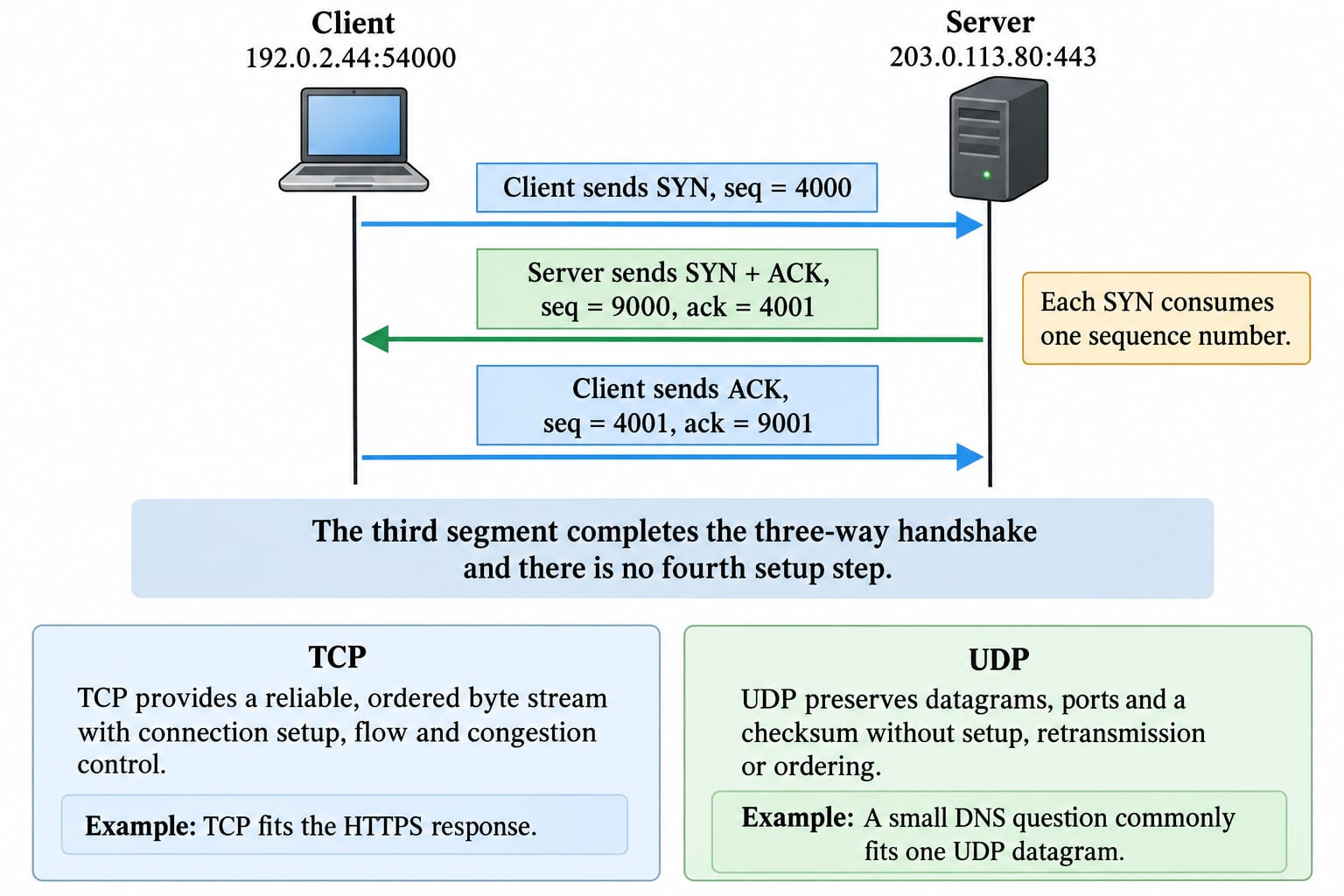
TCP provides a reliable, ordered byte stream with connection setup, flow and congestion control. UDP preserves datagrams, ports and a checksum without setup, retransmission or ordering. Applications can add recovery; UDP = unreliable application is false.
Client sends
SYN, seq = 4000from192.0.2.44:54000to203.0.113.80:443.Server sends
SYN + ACK, seq = 9000, ack = 4001.Client sends
ACK, seq = 4001, ack = 9001.
Each SYN consumes one sequence number, so the acknowledgements are 4001 and 9001. The third segment completes the three-way handshake; there is no fourth setup step.
TCP fits the HTTPS response because the bytes must arrive completely and in order. A small DNS question commonly fits one UDP datagram, avoiding connection setup; a resolver retries if no answer arrives. DNS also uses TCP in defined cases, including conventional zone transfers. Transport choice therefore follows the service's delivery needs, not the slogan UDP = unreliable application.
DNS resolution and caching: turn a name into the right IP address
With caches cold, a recursive resolver follows root, the .net TLD and the example.net authoritative server. Root and TLD responses are referrals; the final answer is services.example.net. 240 IN A 203.0.113.80.
At t = 0 s, the TTL is 240 s. At t = 75 s, 240 - 75 = 165 s remains, so the resolver can answer from cache. At t = 241 s, that A record has expired, although root and TLD referrals may still be cached. TTL is cache lifetime, not a transport timeout.
For mail, MX 10 mail1.example.net precedes MX 20 mail2.example.net; lower wins and the second is fallback. MX selection differs from address lookup.
HTTP messages and persistent connections: solve a three-object transfer
An established HTTP/1.1 connection carries three sequential GET requests for /index.html, /app.css and /app.js. Their bodies are 1500, 3500 and 5000 bytes, and each response has 300 bytes of headers. Content-Length counts a response body, not its headers or the other objects.
Assume no pipelining or overlap, a 35 ms request-to-response wait for each object, and a 10 Mbps link. DNS, TCP and TLS have already completed:
Body bytes:
1500 + 3500 + 5000 = 10,000 bytes.Response-header bytes:
3 x 300 = 900 bytes.Total response bytes:
10,000 + 900 = 10,900 bytes.Serialised bits:
10,900 x 8 = 87,200 bits.Serialisation time:
87,200 / 10,000,000 s = 0.00872 s = 8.72 ms.Sequential wait plus serialisation:
3 x 35 + 8.72 = 113.72 ms.
This classroom model excludes request bytes, TLS records, TCP/IP headers, loss, processing and concurrent transfer. Reusing one TCP connection removes repeated handshakes in the stated model; it does not remove the three sequential application waits.
Email and FTP services: do not confuse delivery, retrieval and data channels
A sender submits mail to an outgoing service, and that service uses the recipient domain's MX records for relay. With MX 10 mail1.example.net and MX 20 mail2.example.net, the lower preference value is tried first and the second is a fallback. SMTP submits or relays mail; IMAP synchronises a mailbox, while POP3 retrieves messages. SMTP does not fetch an inbox.
FTP has two connections. Control runs 192.0.2.10:53100 to 203.0.113.70:21. Passive reply (195,80) gives 195 x 256 + 80 = 49,920 + 80 = 50,000, so data connects separately to 203.0.113.70:50000. In active mode, the server initiates data from its conventional port after receiving a client endpoint.
DHCP configures hosts over UDP. ARP finds an IPv4 neighbour's local link address, not a domain. ICMP reports network conditions and supports diagnostics, not web delivery.
Protocol and service questions: the patterns and traps to practise
Practise layer and endpoint matching, 4-tuples, TCP sequences, DNS TTL, persistent HTTP arithmetic, mail roles and FTP's two channels.
Trap | Wrong move | Correction |
|---|---|---|
Domain | Equals IP or full URL | All three differ |
Port | Names a machine | Names a process endpoint |
DNS | UDP only | TCP also exists |
SYN | No sequence increment | Consumes one number |
MX | Larger first | Lower first |
| Includes | Body only here |
FTP | Carries passive data | Separate data connection |
| Means |
|
Self-test | Answer |
|---|---|
TTL at |
|
Preferred MX? |
|
Server socket? |
|
Acknowledgement of server SYN? |
|
Passive FTP port? |
|
Three-object transfer time? |
|
Each answer follows from the endpoint, sequence, cache, or byte calculation immediately above.
Drill the same distinctions with Application Layer MCQs: 12 Solved DNS, HTTP, Email, or browse the GATE CS Exam Preparation line-up.
Internet protocols and web services: the short version and next step
DNS maps services.example.net to 203.0.113.80; IP identifies the interface; TCP joins 192.0.2.44:54000 and 203.0.113.80:443; HTTP requests resources; SMTP relays; IMAP or POP3 accesses mail; FTP separates control and data channels.
Reconstruct 4001, 9001, TTL 165 s, FTP port 50,000, and transfer time 113.72 ms. GATE Guidance by Sanchit Sir structures wider GATE CS preparation if you want a guided path; otherwise keep drilling the linked MCQs.
Go deeper with the full courseGATE Guidance by Sanchit Sir
Keep learning
Internet Fundamentals for GATE: DNS, HTTP and a Worked Web Request Trace
Connect Internet, Web, DNS, IP, ports and HTTP in one request lifecycle. Trace a cold HTTPS request and calculate latency, cache freshness and DNS expiry.
Updated 29 Oct 20266 min readGATE Strategy & Roadmap
Application Layer Protocols: DNS, HTTP, and email, with a DNS walk-through
Application layer protocols explained: client-server vs P2P, DNS hierarchy and resolution, HTTP methods and status codes, SMTP POP IMAP, and FTP connections.
Updated 30 Oct 20266 min read76 viewsComputer Networks

Internet and Web Technology: How Websites, Browsers, and Web Services Actually Work
Follow one website request from DNS lookup to browser rendering. Along the way, learn URL parts, web protocols, browser services, and the HTTP facts exams test.
Updated 1 Nov 20266 min readGATE Strategy & Roadmap
Internet Fundamentals: Architecture, Connections, DNS, URLs and Worked Examples
Build a clean mental model of the Internet and Web, then trace a browser request and calculate transfer time, cache expiry and segment count.
Updated 6 Aug 20266 min readGATE Strategy & Roadmap