2-D Transformations and Viewing in Computer Graphics: Matrices, Rotation, and Worked Examples
Build 2-D transformations from column vectors to homogeneous matrices, then work through pivot rotation, composite order, and viewport mapping.
KnowledgeGate Team
Exam prep & CS education
Updated 14 Sep 20266 min read
Memorising the 2 by 2 rotation matrix is easy. The trouble starts when a question moves the pivot away from the origin, combines transforms in a particular order, or asks where a world point lands on a device. Homogeneous matrices extend column-vector transformations to arbitrary-pivot rotation, composite order, and window-to-viewport calculations.
Related reading: computer graphics fundamentals and projection and clipping.
Every 2-D transform is a matrix acting on a point
Represent a point as the column vector [x, y]^T. A geometric transform multiplies that vector to produce a new point.
Translation slides, scaling resizes, rotation spins, reflection flips, and shear slants. Scaling and counter-clockwise rotation about the origin use these 2 by 2 matrices:
S(sx, sy) = [[sx, 0], [0, sy]]
R(theta)  = [[cos(theta), -sin(theta)], [sin(theta), cos(theta)]]
Translation gives (x', y') = (x + tx, y + ty), which is vector addition rather than a 2 by 2 multiplication. We cannot combine a translation and a rotation into one 2 by 2 matrix product.
Homogeneous coordinates unify the transforms
Add a third coordinate, w = 1, so the point becomes [x, y, 1]^T. Translation is now a matrix multiplication, and every affine transform can use a 3 by 3 matrix. With column vectors and matrices applied on the left:
T(tx, ty) = [[1, 0, tx], [0, 1, ty], [0, 0, 1]]
S(sx, sy) = [[sx, 0, 0], [0, sy, 0], [0, 0, 1]]
R(theta)  = [[cos(theta), -sin(theta), 0],
             [sin(theta),  cos(theta), 0],
             [0,           0,          1]]
Check scaling on (2, 3). Multiplying S(2, 2) by [2, 3, 1]^T gives [2x2, 2x3, 1]^T = [4, 6, 1]^T, so the new point is (4, 6). Directly doubling both coordinates also gives (4, 6), which confirms the calculation.
The core 2-D transforms in one reference table
Transform | Homogeneous matrix | Effect |
|---|---|---|
Translation |
| Slide by |
Scaling |
| Resize about the origin; equal factors preserve shape |
Rotation |
| Rotate counter-clockwise about the origin |
Reflect in x-axis |
| Map |
Reflect in y-axis |
| Map |
Reflect in |
| Swap the coordinates |
Reflect in origin |
| Negate both coordinates |
Shear in x |
| Change x in proportion to y |
Shear in y |
| Change y in proportion to x |
These forms assume standard mathematical axes and counter-clockwise positive angles. A device screen may point its positive y direction downwards, which matters during viewing.
Rotate a point about an arbitrary pivot
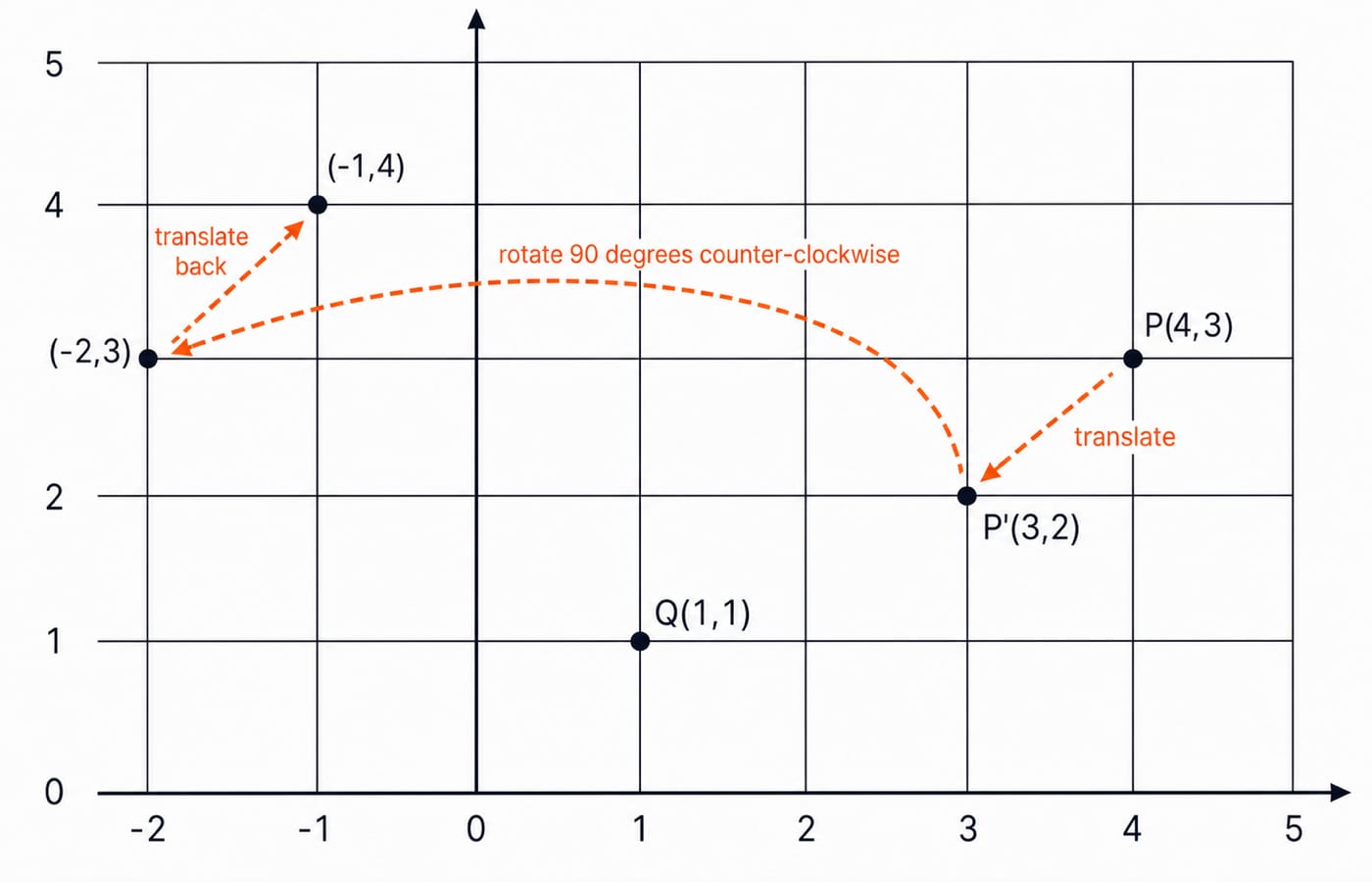
Rotate P(4, 3) through 90 degrees counter-clockwise about Q(1, 1).
Translate the pivot to the origin. Subtract
QfromP:P' = (4 - 1, 3 - 1) = (3, 2).Rotate about the origin. Since
cos 90 = 0andsin 90 = 1, the rule is(x, y) -> (-y, x). Thus(3, 2) -> (-2, 3).Translate back by adding
Q:(-2 + 1, 3 + 1) = (-1, 4).
Therefore, P maps to (-1, 4).
The single composite matrix is M = T(1,1) R(90) T(-1,-1). The rightmost matrix acts first. Multiplication gives:
M = [[0, -1, 2], [1, 0, 0], [0, 0, 1]]
M [4, 3, 1]^T = [-3 + 2, 4, 1]^T = [-1, 4, 1]^T
The composite calculation independently confirms (-1, 4). The general rule is translate to the origin, perform the rotation, scaling, or reflection, then translate back.
Composite transforms and why order matters
Matrix multiplication is associative but not commutative. The same transforms in a different order can produce a different point.
Start with P(2, 3). Scale by (2, 2) and then translate by (3, 1): (2, 3) -> (4, 6) -> (7, 7). Reverse the order: (2, 3) -> (5, 4) -> (10, 8).
The matrices provide a second check. T(3,1)S(2,2) = [[2,0,3],[0,2,1],[0,0,1]], which maps [2,3,1]^T to [7,7,1]^T. However, S(2,2)T(3,1) = [[2,0,6],[0,2,2],[0,0,1]], which gives [10,8,1]^T.
For column vectors, M = M3 M2 M1 means M1 happens first. Read the application order from right to left.
Map a window to a viewport
A window is a rectangle in world coordinates. A viewport is its target rectangle in device coordinates. Viewing maps points inside the window onto the viewport.
For corresponding horizontal and vertical limits:
sx = (xv_max - xv_min) / (xw_max - xw_min)
sy = (yv_max - yv_min) / (yw_max - yw_min)
xv = xv_min + (xw - xw_min) sx
yv = yv_min + (yw - yw_min) sy
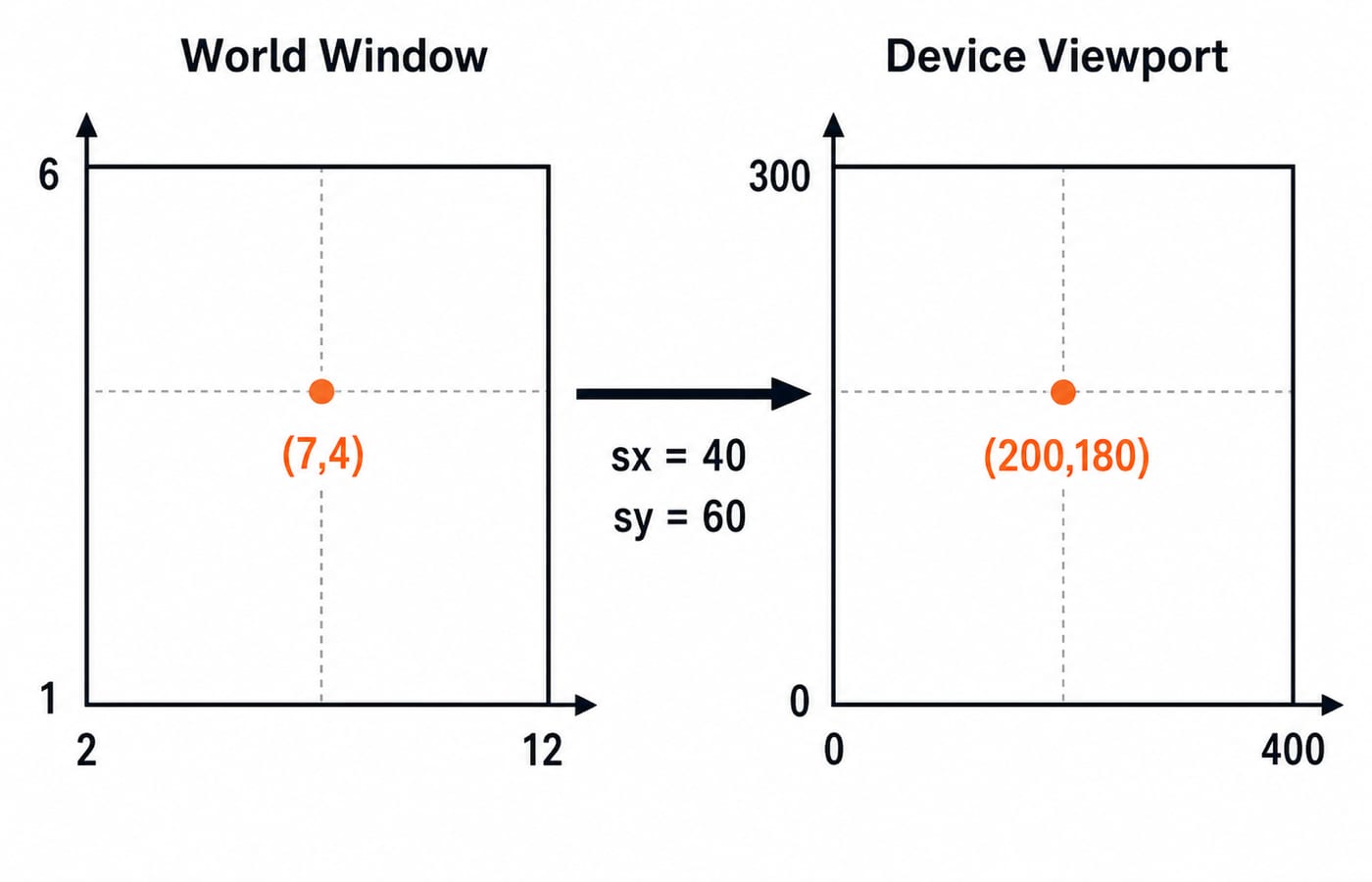
Take a window with xw in [2, 12] and yw in [1, 6], and a viewport with xv in [0, 400] and yv in [0, 300].
sx = 400 / (12 - 2) = 400 / 10 = 40, while sy = 300 / (6 - 1) = 300 / 5 = 60. For the world point (7, 4), xv = 0 + (7 - 2)40 = 5x40 = 200 and yv = 0 + (4 - 1)60 = 3x60 = 180. Therefore, (7, 4) -> (200, 180).
Check backwards: 200 / 40 + 2 = 7 and 180 / 60 + 1 = 4, so both coordinates return to the original point. Unequal scale factors stretch the picture. Real screens often put row zero at the top, so a device may also invert y. That is a coordinate convention, not an arithmetic error.
Clipping is the next viewing step. For example, Cohen-Sutherland gives each line endpoint a four-bit region code so a system can discard or trim parts outside the window.
Common traps that quietly cost marks
Wrong rotation sign: counter-clockwise is positive by convention. Use
-thetafor clockwise rotation.Wrong calculator mode:
cos(90)only gives the intended zero when the calculator is in degree mode.Missing the final translation: after rotating about a pivot, add the pivot coordinates back.
Reading products left to right: with column vectors, the rightmost transform acts first.
Swapping axes: match window x with viewport x, and window y with viewport y.
Ignoring the device y direction: confirm whether y increases upwards or downwards on the screen.
How exams and interviews test these transforms
The official UGC NET Computer Science syllabus lists Computer Science and Applications as subject 87 and includes Computer Graphics. The topic also appears in university graphics courses, ISRO and PSU computer science papers, and graphics-oriented interviews. Typical questions ask you to transform a point about a pivot or line, find a composite matrix, identify a shear or reflection, or compute viewport coordinates.
Computer Graphics is not in the current GATE CS core syllabus. For a GATE aspirant, these calculations are useful linear-algebra practice, but they should not displace core-paper preparation. Use the GATE CS Subject Weightage guide to allocate study time honestly, and strengthen the matrix foundation through the Engineering Mathematics for GATE course.
The short version
Points are column vectors. Homogeneous 3 by 3 matrices put translation, scaling, rotation, reflection, and shear into one system. For an arbitrary pivot, translate, perform the operation, and translate back. Composite matrices act right to left, and the order is not interchangeable. Viewing applies separate x and y scales to move a world window into a device viewport.
For the complete Computer Graphics unit, continue with the NTA UGC NET Unit 3 learning module. Reinforce the matrix foundations with Linear Algebra for GATE CS, and connect these ideas to abstract algebra in Group Theory: Groups, Rings and Fields for GATE CS.
Keep learning

Browsers and Search Engines MCQs: 9 Solved Questions with Explanations
Solve nine published browser and search engine questions, check each answer, and rebuild the browser, cache, crawler and indexing distinctions that exam distractors blur.
Updated 6 Oct 20267 min readTeaching Recruitment (Computer Science)

IT Act, 2000 Explained: Key Sections, Digital Signatures and Worked Exam Examples
Build an exam-ready map of the IT Act, then apply it to an exact digital-signature walkthrough and a section 43, 66, 66C and 66D caselet.
Updated 2 Oct 20266 min readTeaching Recruitment (Computer Science)

Emerging Trends Introduction MCQs: 12 Solved Questions with Explanations
Solve 12 Emerging Trends Introduction questions with clear answer logic, exam-year labels and a compact trap check for focused revision.
Updated 27 Sep 20268 min readTeaching Recruitment (Computer Science)

MS Word Basics MCQs with Answers: 12 Solved Questions Explained
Work through 12 MS Word questions covering everyday commands, page layout, formatting, links, file features and mail merge. Each answer explains the decisive clue and the closest distractor.
Updated 25 Sep 20267 min readTeaching Recruitment (Computer Science)