Perspective vs Parallel Projection and View-Volume Clipping: Worked Examples
Follow one 3-D segment through orthographic and perspective projection, then clip it against a parallel box and a perspective frustum step by step.
KnowledgeGate Team
Exam prep & CS education
Updated 16 Sep 20266 min read
You may recognise a perspective picture instantly but still lose marks when a question mixes the centre of projection, view plane, frustum and clipping inequalities. A positive-z camera convention projects the same 3-D segment in two ways and clips it exactly against a perspective frustum and a parallel box. Projection maps visible 3-D geometry to the image plane. Clipping decides which part is eligible to be mapped.
1. Place projection and clipping in the viewing pipeline
The minimum viewing pipeline is:
model coordinates -> world coordinates -> view or eye coordinates -> projection transform into homogeneous clip coordinates -> clipping -> perspective divide and normalisation -> viewport mapping -> rasterisation
The projection transform and perspective divide jointly determine where a point lands. Clipping answers a separate question: is the whole primitive inside the permitted 3-D region, or must part of it be removed?
Keep four terms separate. The view plane is the 2-D plane on which projected coordinates are formed. The viewing direction says where the camera looks. The view volume is the 3-D region retained for display. Clipping rejects or trims primitives outside it. A viewport is different again: it is the rectangle on the final screen to which the normalised result is mapped.
The camera, or centre of projection, is at O = (0,0,0), looking along positive z, with view plane z = d = 2. Some textbooks point the camera along negative z, so signs can change even though the geometry does not.
2. Parallel projection: projectors stay parallel
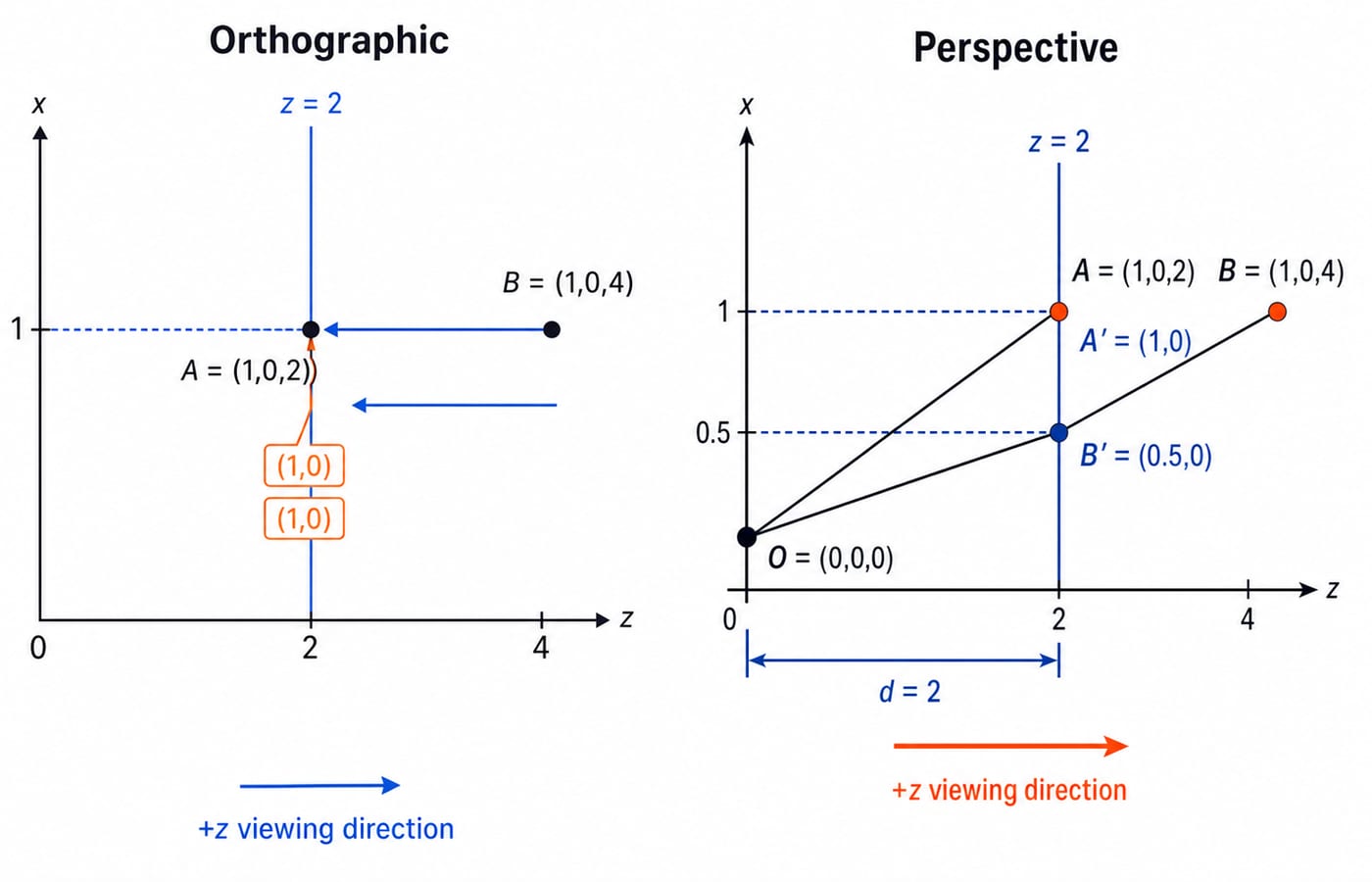
In parallel projection, the centre of projection is treated as being at infinity. Every projector therefore has the same direction. For orthographic projection along the z-axis onto z = 2,
(x', y') = (x, y)
Depth is discarded, but it does not rescale x or y. For example, A = (1,0,2) and B = (1,0,4) both project to (1,0). Equal object lengths at different depths keep the same image-plane scale, and parallelism is preserved where geometrically meaningful. This is useful in technical views, but it does not imitate human depth perception.
Orthographic projection is only one kind of parallel projection. Its projectors meet the view plane at right angles. In oblique projection, they meet the plane at a slant, so depth produces a shear-like offset.
3. Perspective projection: depth changes image scale
For perspective projection, draw the ray from O through (x,y,z). Similar triangles give
x'/x = d/z and y'/y = d/z.
Therefore, for z > 0,
(x', y') = (dx/z, dy/z).
With d = 2, point A becomes A' = (1,0), while B becomes B' = (0.5,0). The farther point moves towards the image centre. This depth scaling creates foreshortening, and parallel lines not parallel to the view plane can converge towards vanishing points. Under the ideal pinhole model, straight lines still project to straight lines.
In a homogeneous-coordinate pipeline, the transform stores a depth-dependent component w. Dividing by w produces x and y values proportional to 1/z. Pipelines normally clip before this divide because clipping in homogeneous clip space is more robust. If the matrix and coordinate steps feel unfamiliar, use the Linear Algebra for GATE CS worked guide as a refresher.
4. Worked example: project the same 3-D segment both ways
Take the segment from P = (-2, 0.5, 3) to Q = (2, 0.5, 5). Its parametric form is
L(t) = P + t(Q-P) = (-2 + 4t, 0.5, 3 + 2t), for 0 <= t <= 1.
First ignore clipping. Orthographic projection along z gives
P_o = (-2,0.5)Q_o = (2,0.5)
Perspective projection onto z = 2 gives
P_p = (2(-2)/3, 2(0.5)/3) = (-4/3, 1/3)Q_p = (2(2)/5, 2(0.5)/5) = (0.8, 0.2)
The orthographic endpoints have x separation 2 - (-2) = 4. The perspective separation is
0.8 - (-4/3) = 4/5 + 4/3 = 32/15, about 2.13.
Although P and Q have the same world y, their perspective y values differ because their depths differ. These are unclipped image-plane coordinates, not screen pixels.
5. Clip the segment against a frustum and a parallel box
For the perspective case, let the view window on z = 2 be -1 <= x' <= 1 and -1 <= y' <= 1, with near plane z = 2 and far plane z = 6. In 3-D, this positive-z frustum is
2 <= z <= 6-z/2 <= x <= z/2-z/2 <= y <= z/2
P violates the left plane because -2 < -3/2. Q is inside. Substitute L(t) into the left-plane condition:
-2 + 4t >= -(3 + 2t)/2
-2 + 4t >= -3/2 - t
5t >= 1/2, so t >= 0.1.
The right, top, bottom, near and far tests add no tighter bound within 0 <= t <= 1. The accepted interval is therefore [0.1,1]. Its new first endpoint is
R = L(0.1) = (-1.6,0.5,3.2).
Project R and Q onto z = 2:
R_p = (2(-1.6)/3.2, 2(0.5)/3.2) = (-1,0.3125)Q_p = (0.8,0.2)
Both lie inside the view window.
For the parallel case, use the orthographic box -1 <= x <= 1, -1 <= y <= 1, 2 <= z <= 6. Its x constraint gives
-1 <= -2 + 4t <= 1, hence 0.25 <= t <= 0.75.
The y and z coordinates already pass. The clipped endpoints are
S = L(0.25) = (-1,0.5,3.5), projecting to(-1,0.5)T = L(0.75) = (1,0.5,4.5), projecting to(1,0.5)
The same 3-D segment retains different parameter intervals because a perspective view volume widens with depth while a parallel view volume does not. Clipping selects the accepted portion. It does not change the projection formula.
![Perspective frustum clips the P-to-Q segment to interval [0.1,1] with endpoint R=(-1.6,0.5,3.2); the parallel box clips it to [0.25,0.75].](https://cdn.knowledgegate.ai/blog-assets/blog_asset_1784568318682_x2esb5.jpg)
6. Common traps and the correct replacement idea
“Parallel projection makes all 3-D parallel lines overlap.” No. Parallel projectors preserve parallelism where it is geometrically meaningful.
“Perspective projection bends straight lines.” Ideal perspective projection maps straight lines to straight lines.
“Every parallel projection is orthographic.” Oblique projection is parallel too.
“Clipping and projection mean the same thing.” Clipping finds the retained portion; projection determines its image coordinates.
“Clip after converting to pixels.” Standard pipelines clip in homogeneous clip space before the perspective divide and viewport mapping.
“A perspective camera uses a rectangular 3-D box.” Its view volume is a frustum. A parallel camera uses a box-shaped volume.
“One outside endpoint means reject the whole line.” Intersect the primitive with every boundary and retain any valid
tinterval.
Also keep one camera convention throughout, test the near and far planes, and divide both x and y by depth. A fast sanity check catches many errors: with this positive-z convention and fixed x, increasing positive z must reduce |x'|. If it grows, the ratio or sign convention is wrong.
7. How objective CS exams test this and what to do next
Recurring question forms include identifying a projection from its projectors, calculating a projected point, comparing a box with a frustum, finding a line's accepted t interval, and selecting the correct pipeline order. Check the current syllabus or notification for the exam you plan to take rather than assuming this subtopic is included.
Use this answer routine:
Write the camera convention and view plane.
Decide whether the projectors converge.
Write the correct box or frustum inequalities.
Parameterise the primitive.
Intersect every constraint to update
t_enterandt_leave.Project only the accepted portion.
Run the depth sanity check.
For wider preparation context, use the UGC NET Computer Science syllabus-area map.
The short version
Parallel projection uses a constant projector direction and does not scale x or y with depth. Perspective projection scales them by depth. Clipping retains the part inside a box or frustum before the accepted geometry is mapped to the screen.
For structured subject preparation, continue with the NTA UGC NET Paper 2 Computer Science course. The NET courses and test series category is the neutral hub for related options.
Keep learning

ICT in Education MCQs: 12 Solved Questions on Digital Learning Tools
Solve 12 ICT in Education MCQs, then use clear explanations and a five-layer model to separate files, tools, platforms and public initiatives.
Updated 3 Oct 20268 min readUGC NET Computer Science

Requirements Elicitation Techniques and Use Case Development: Worked Library Example
Follow a fictional library reservation from interviews and observation through testable requirements, a UML use-case model, UC-07, and acceptance checks.
Updated 28 Sep 20266 min readUGC NET Computer Science

Quality Factors: McCall’s and ISO 9126 Models with a Worked Scoring Example
Build both quality models around one maintainability audit. This guide maps their vocabulary, calculates McCall-style and ISO-style scores, and ends with exam-focused checks.
Updated 25 Sep 20265 min readUGC NET Computer Science

Cohesion and Coupling MCQs: 10 Solved Questions on Functional Independence
Practise 10 solved MCQs on cohesion, coupling, functional independence, module dependencies, and the distinctions that make closely matched options easier to separate.
Updated 24 Sep 20267 min readUGC NET Computer Science