Basics of Computer Graphics: Complete Guide with Worked Examples
Build a usable map of computer graphics, then apply it to frame buffer sizing, a complete Bresenham trace, pivot rotation, and Cohen-Sutherland clipping.
KnowledgeGate Team
Exam prep & CS education
Updated 15 Sep 20266 min read
Computer Graphics appears in UGC NET Computer Science, teaching recruitment papers, semester exams, and some game-development interviews. Yet many students can recite “Bresenham” but cannot run four iterations on paper. The difference between reciting and scoring is mechanical: size the frame buffer in bits before bytes, run the decision parameter by hand, and keep the pivot sandwich in order.
Related reading: geometrical transformations and display technologies.
What computer graphics covers: raster, vector, and the pipeline
Computer graphics turns geometric models into display pixels. A raster stores a grid of pixels, as in photographs and frame buffers. A vector stores equations and primitives such as lines and curves, as in logos and CAD. A raster pixelates when enlarged; a vector scales cleanly.
The basic display pipeline has four stages:
Model: define primitives and their coordinates.
Geometric processing: transform objects and clip away invisible parts.
Scan conversion or rasterisation: choose discrete pixels for continuous primitives.
Display: store the result in a frame buffer and refresh it on the screen.
Raster, vector, and pipeline concepts fit into these stages. Graphics synthesises an image from a model, while image processing analyses or changes an existing image.
Pixels, resolution, aspect ratio, and the frame buffer
A pixel is the smallest addressable picture element. Resolution gives dimensions such as 1024 × 768. Aspect ratio is width/height, so 1024/768 = 4/3, written 4:3. Bit depth is bits per pixel. Refresh rate in hertz is screen refreshes per second.
For a 1024 × 768 display at 24 bits per pixel:
Number of pixels = 1024 × 768 = 786,432.
Frame buffer size = 786,432 × 24 = 18,874,368 bits.
In bytes, 18,874,368/8 = 2,359,296 bytes.
In binary megabytes, 2,359,296/1,048,576 = 2.25 MB.
At 8 bits per pixel, the same screen needs 786,432 × 8 bits = 786,432 bytes = 0.75 MB. An 8-bit pixel can select 2^8 = 256 simultaneous colours.
Displays use additive RGB. A 24-bit RGB pixel represents 2^24 = 16,777,216, or about 16.7 million, colours. CMY is the subtractive print counterpart.
Scan conversion of a line: DDA and Bresenham
A mathematical line has infinitely many points; a screen has a finite integer grid. Scan conversion chooses pixels that approximate the line.
For |m| ≤ 1, DDA increments x by 1 and y by slope m, then rounds y. Floating-point addition and repeated rounding can accumulate error. Bresenham instead uses integer additions and a decision parameter.
Consider the line from (2, 3) to (10, 8):
dx = 10 - 2 = 8 and dy = 8 - 3 = 5.
Slope = dy/dx = 5/8, which is less than 1, so x advances by 1.
Initial parameter p0 = 2dy - dx = 2(5) - 8 = 2.
If p < 0, add 2dy = 10 and keep y unchanged.
If p ≥ 0, add 2dy - 2dx = 10 - 16 = -6 and increment y.
Start by plotting (2, 3) with p = 2. Then apply the decision before each next pixel:
Current p | Decision | Next pixel | Updated p |
|---|---|---|---|
2 | p ≥ 0, increment y | (3, 4) | 2 - 6 = -4 |
-4 | p < 0, keep y | (4, 4) | -4 + 10 = 6 |
6 | p ≥ 0, increment y | (5, 5) | 6 - 6 = 0 |
0 | p ≥ 0, increment y | (6, 6) | 0 - 6 = -6 |
-6 | p < 0, keep y | (7, 6) | -6 + 10 = 4 |
4 | p ≥ 0, increment y | (8, 7) | 4 - 6 = -2 |
-2 | p < 0, keep y | (9, 7) | -2 + 10 = 8 |
8 | p ≥ 0, increment y | (10, 8) | done |
The final pixel set is (2,3), (3,4), (4,4), (5,5), (6,6), (7,6), (8,7), (9,7), (10,8).
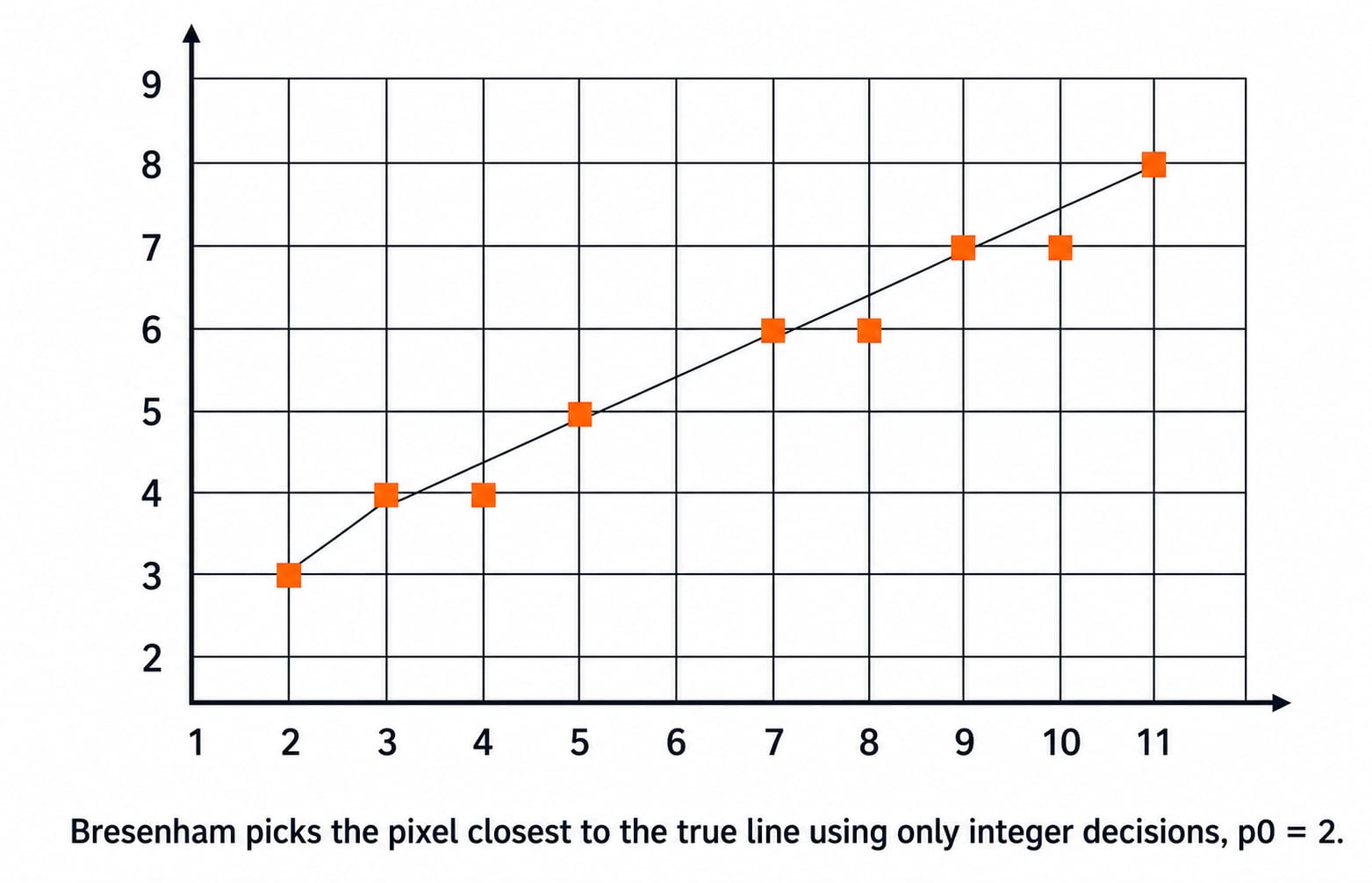
DDA uses floating point and rounding; Bresenham uses integers and a decision parameter. Both aim at the same visual result.
2D transformations and homogeneous coordinates
The four basics are translation by (tx, ty), scaling by (sx, sy), rotation by θ, and reflection. With column vectors, their homogeneous matrices are:
Transformation | 3 × 3 matrix |
|---|---|
Translation | [[1, 0, tx], [0, 1, ty], [0, 0, 1]] |
Scaling | [[sx, 0, 0], [0, sy, 0], [0, 0, 1]] |
Rotation | [[cos θ, -sin θ, 0], [sin θ, cos θ, 0], [0, 0, 1]] |
Reflection about x-axis | [[1, 0, 0], [0, -1, 0], [0, 0, 1]] |
Translation is not linear in 2 × 2 form. Homogeneous coordinates embed a point as (x, y, 1), so all transformations compose through 3 × 3 matrix multiplication.
Rotate P(4, 3) by 90 degrees anticlockwise about pivot (1, 1):
Translate by (-1, -1): (4, 3) becomes (3, 2).
Rotate 90 degrees using (x, y) → (-y, x): (3, 2) becomes (-2, 3).
Translate back by (+1, +1): (-2, 3) becomes P' = (-1, 4).
Matrices act right to left: T(1,1) · R(90) · T(-1,-1). Fixed-point scaling uses the same translate, transform, translate-back sandwich.
Windowing and clipping: the Cohen-Sutherland idea
A window is the selected world-coordinate region. A viewport is the device-coordinate region that displays it.
Cohen-Sutherland gives each endpoint a four-bit outcode ordered top, bottom, right, left. If both are 0000, accept. If their bitwise AND is nonzero, reject. Otherwise, intersect one boundary and repeat.
For xmin = 2, ymin = 2, xmax = 8, ymax = 6, point (1, 1) is left and below, so its code is 0101. Point (9, 7) is right and above, so its code is 1010. Their AND is 0000, so the line is not trivially rejected. It must be clipped step by step.
Traps that cost marks
Using the wrong Bresenham increments: 2dy and 2(dy - dx) assume |m| ≤ 1. For a steep line, swap the roles of x and y after checking the slope.
Mixing bits and bytes: the 24 bpp buffer above is 18,874,368 bits but 2,359,296 bytes. Divide by 8 exactly once.
Ignoring the pivot: rotating (4, 3) directly gives (-3, 4), which is wrong for pivot (1, 1). The translate sandwich gives (-1, 4).
Mixing clipping tests: OR equal to zero means trivial acceptance. AND nonzero means trivial rejection.
How exams and interviews test computer graphics basics
Computer Graphics is listed in the UGC NET Computer Science Paper 2 syllabus, as shown in the official NTA bulletin and syllabus at ugcnet.nta.nic.in. The UGC NET Computer Science syllabus areas guide places it in the preparation map. Teaching recruitment and university papers test traces, buffer arithmetic, matrix composition, and outcodes.
Computer Graphics is not in the current GATE CS core syllabus. The GATE Computer Science category covers what GATE tests, so treat graphics as NET, semester, or interview-side learning.
Questions ask you to run Bresenham decisions, size a frame buffer, order a transformation product, or apply outcode tests. Game, frontend canvas, and graphics-adjacent interviews may check the pipeline and raster versus vector.
Key points and next step
The pipeline moves from model to geometric processing, rasterisation, and display.
Frame buffer size is width × height × bit depth, measured first in bits.
Bresenham uses the integer parameter p0 = 2dy - dx for a gentle positive slope.
A pivot operation follows translate, transform, translate back.
Cohen-Sutherland accepts when the combined OR is zero and rejects when the AND is nonzero.
For structured coverage, use the UGC NET CS Paper 2 course. Semester learners can follow the complete CS fundamentals course, while the NET category keeps the broader exam path together.
Line drawing, transformations, and clipping share one habit: replace continuous geometry with small integer tests, then verify every step on paper before trusting it in the exam hall.
Keep learning

Browsers and Search Engines MCQs: 9 Solved Questions with Explanations
Solve nine published browser and search engine questions, check each answer, and rebuild the browser, cache, crawler and indexing distinctions that exam distractors blur.
Updated 6 Oct 20267 min readTeaching Recruitment (Computer Science)
IT Act, 2000 Explained: Key Sections, Digital Signatures and Worked Exam Examples
Build an exam-ready map of the IT Act, then apply it to an exact digital-signature walkthrough and a section 43, 66, 66C and 66D caselet.
Updated 2 Oct 20266 min readTeaching Recruitment (Computer Science)
Emerging Trends Introduction MCQs: 12 Solved Questions with Explanations
Solve 12 Emerging Trends Introduction questions with clear answer logic, exam-year labels and a compact trap check for focused revision.
Updated 27 Sep 20268 min readTeaching Recruitment (Computer Science)
MS Word Basics MCQs with Answers: 12 Solved Questions Explained
Work through 12 MS Word questions covering everyday commands, page layout, formatting, links, file features and mail merge. Each answer explains the decisive clue and the closest distractor.
Updated 25 Sep 20267 min readTeaching Recruitment (Computer Science)