MS Word Basics MCQs with Answers: 12 Solved Questions Explained
Work through 12 MS Word questions covering everyday commands, page layout, formatting, links, file features and mail merge. Each answer explains the decisive clue and the closest distractor.
KnowledgeGate Team
Exam prep & CS education
Updated 25 Sep 20267 min read
MS Word MCQs often look like memory tests, but their distractors usually confuse a feature with its output, a page setting with a fixed side, or a shortcut with a nearby command. Attempt each item before reading the explanation, then use its practice link to repeat it without the answer key.
How to use this 12-question MS Word set
Hide the answer line, allow yourself 30 to 45 seconds for each question, and write one reason for your choice before checking. A score of 10 to 12 calls for revising distractor pairs, 7 to 9 calls for revisiting your two weakest concept groups, and 0 to 6 calls for first reading MS Office for CS Teaching Exams.
The questions address document commands (2), page layout (2), formatting (2), links and navigation (3), file and presentation features (2), and mail merge (1). Use this spread as a worked starting set, then continue with whichever concept group produced your errors.
Document commands: page breaks and Save As
Question 1: Insert a page break
Which of the following is the way to break a page in Microsoft Word?
A. Pressing “Ctrl + Page Down”
B. Double Clicking at the end of the page
C. Pressing “Ctrl + Enter”
D. Double Clicking at the beginning of the page
Correct answer: C. Pressing “Ctrl + Enter”
Suppose page 1 has only 17 typed lines, but the next chapter must begin on page 2. Ctrl + Enter inserts a page break at the cursor, so the chapter starts on the next page. Ctrl + Page Down navigates instead of inserting a break, while repeated blank lines can shift when earlier text changes.
Question 2: Save an existing document under another name
You need to save an existing word document in another name. Which of the following options will you use?
A. Insert
B. Save
C. Save As
D. Edit
Correct answer: C. Save As
If Report.docx is open, Save updates that same file. Save As can create Report-Final.docx while leaving Report.docx intact. Insert and Edit are not commands for assigning a new file name.
Page layout: gutter margins and vertical alignment
Question 3: Define a gutter margin
What is gutter margin?
A. Margin that is added to the left margin when printing
B. Margin that is added to right margin when printing
C. Margin that is added to the binding side of page when printing
D. Margin that is added to the outside of the page when printing
Correct answer: C. Margin that is added to the binding side of page when printing
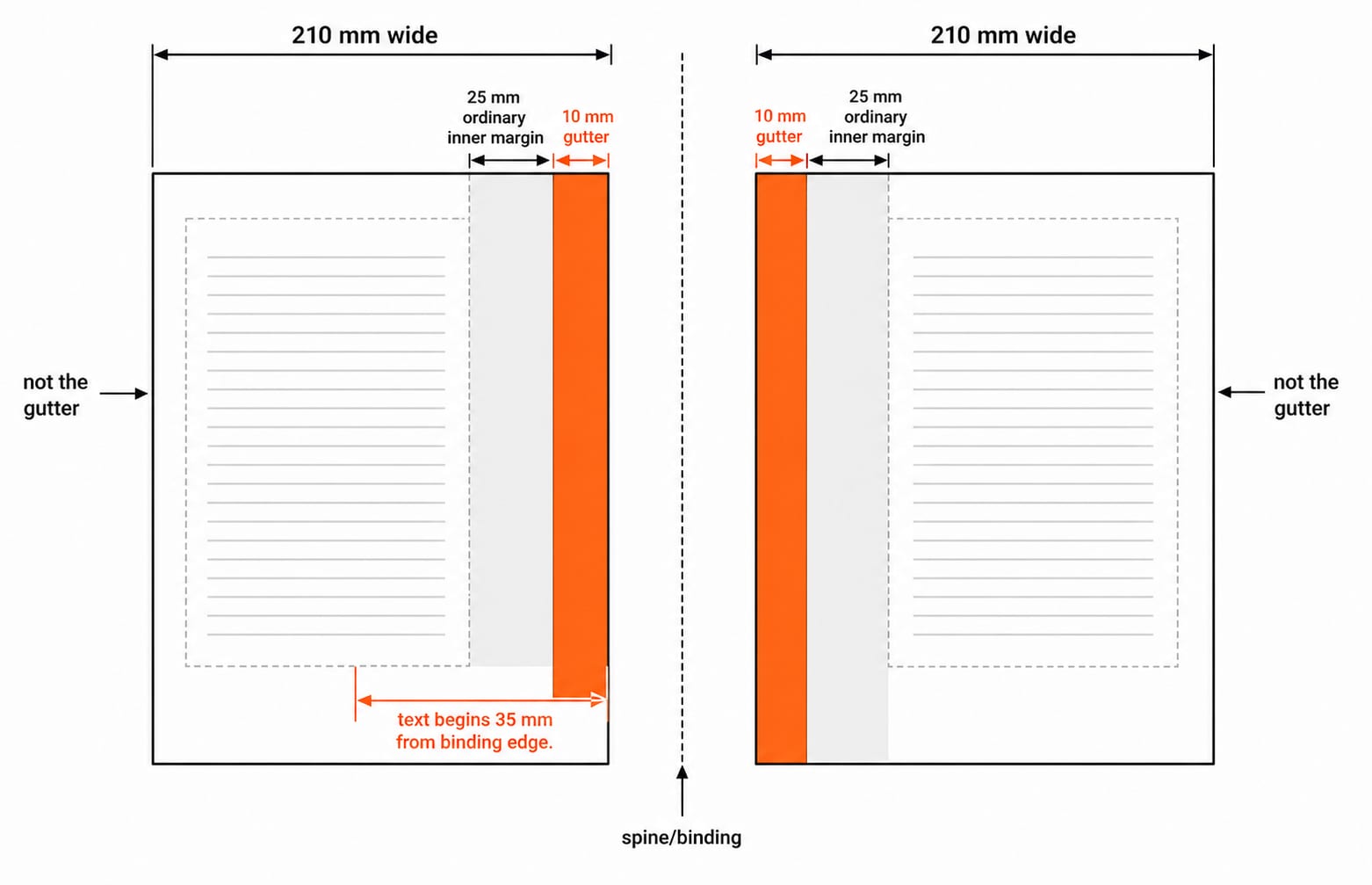
On an A4 page 210 mm wide, start with a 25 mm inner margin and add a 10 mm gutter. The text then begins 25 + 10 = 35 mm from the binding edge. “Left” is only a possible single-sided case because the definition follows the binding side, and the inner edge alternates on facing pages.
Practise this question
Question 4: Vertical alignment choices
In MS Word options available for vertical alignment is/are:
A. Top
B. Bottom
C. Center
D. All options are correct
Correct answer: D. All options are correct
Vertical alignment positions content between the top and bottom page margins, unlike paragraph alignment across the left and right margins. On a 297 mm-high A4 title page with 25 mm top and bottom margins, the usable height is 297 - 25 - 25 = 247 mm. Center places the title within that area, while Top and Bottom use its respective ends.
Formatting: paragraph alignment and Format Painter
Question 5: Right-align a paragraph
What is the shortcut key for right alignment of the paragraph in a Microsoft Word document?
A. Ctrl + R
B. Ctrl + L
C. Ctrl + J
D. Ctrl + E
Correct answer: A. Ctrl + R
Select a three-line date-and-place block and press Ctrl + R to move the block to the right margin. Map the other three too: Ctrl + L is left, Ctrl + J is justify, and Ctrl + E is centre. The letter in the shortcut identifies the required right alignment here.
Question 6: Copy formatting, not content
What is the purpose of the "Format Painter" feature in Microsoft Office applications?
A. To create custom animations for objects
B. To copy the formatting from one object and apply it to another
C. To help you manage your contacts and address book
D. To provide access to various text formatting options
Correct answer: B. To copy the formatting from one object and apply it to another
Copy the formatting of a heading that is 16 pt, bold and blue, then apply it to a plain 11 pt black heading. The destination words stay the same, while the font size, bold property and colour change. Format Painter applies existing formatting; it does not merely open formatting controls or copy the source text.
Practise this question
Hyperlinks and bookmarks: destination versus navigation
Question 7: Build a list of online research sites
In a Word document, Simrat has to display the list of online sites which can further be used by a student for preparing a research paper on, “The Effect of Social Media on the behaviour of Students.” Which feature of Word is the best suitable to prepare the list?
A. Linking
B. Bullets
C. Numbering
D. Graph
Correct answer: A. Linking
Bullets and numbering organise the appearance of a list, but linking makes a site name open its destination. For example, link the label Research source 1 to https://example.org/report; selecting the label can then open the site. A bullet alone cannot create that destination.
Practise this question
Question 8: What can a Word hyperlink target?
Hyperlinks can be created between a Word document and -
A. Another Word document
B. A webpage on the WWW
C. A file on Internet
D. All of these
E. None of these
Correct answer: D. All of these
Test the destination types separately: Appendix.docx is another Word document, https://www.example.org is a webpage, and https://www.example.org/data.pdf is an internet file. A, B and C are therefore valid destination categories. “All of these” is the inclusive answer.
Question 9: Jump within a long document
Why bookmarks are used in MS Word?
A. Save alignment
B. Correct spellings
C. Change paragraph
D. To jump to a specific location in a document
Correct answer: D. To jump to a specific location in a document
In a 40-page report, place a bookmark named ResultsTable at page 27. Go To, or a link to that bookmark, reaches the marked location without scrolling through the report. A bookmark does not correct spelling, save alignment or change paragraph formatting.
File format and page-wide presentation features
Question 10: Word 2007 default extension
The file extension of Microsoft (MS) Word document in office 2007 is
A. .docx
B. .png
C. .doc
D. .jpg
Correct answer: A. .docx
Save a standard Word 2007 document as notes.docx. The .doc extension belongs to the older Word 97-2003 format, while .png and .jpg are image formats. The file-type clue rules out all three distractors.
Question 11: Background text across pages
............. is a drawing object which is usually printed as the background of text on all the pages of document.
A. Clip
B. Art
C. Watermark
D. Header
Correct answer: C. Watermark
In a 12-page document, a DRAFT watermark can appear behind the main text on every page. A header occupies the header region rather than serving as the page-wide background object the question describes. “Clip” and “Art” do not name that feature.
Mail merge: one master document, many recipients
Question 12: Send the same letter to different addresses
The option for sending same document or letter at different addresses is
A. Form letters
B. Mailmerge
C. Printing
D. None of the above
Correct answer: B. Mailmerge
One master letter contains Dear «Name» and «Address». A three-row source lists Asha/Delhi, Bilal/Jaipur and Charu/Lucknow, so the merge produces three personalised letters while the fixed body stays unchanged. Mailmerge is the process, form letters are its outputs, and printing only renders a document that has already been prepared.
Answer pattern recap and the next practice step
Answer key: 1-C, 2-C, 3-C, 4-D, 5-A, 6-B, 7-A, 8-D, 9-D, 10-A, 11-C, 12-B.
If you missed Q1 or Q5, revise shortcut confusion. Errors in Q6, Q7 or Q12 point to feature-versus-output confusion; Q3 and Q4 test layout; Q8 to Q10 expose gaps in navigation and file formats.
Redo only the missed questions after 24 hours. Then use RSSB Basic Computer Instructor for MS Office-heavy computer-instructor preparation, or DSSSB TGT Computer Science Section B for broader teaching-computer-science content. The Govt Teaching Jobs category is the catalogue route, while the ICT fundamentals explainer is the next read when your weak area extends beyond Word.
Keep learning
Browsers and Search Engines MCQs: 9 Solved Questions with Explanations
Solve nine published browser and search engine questions, check each answer, and rebuild the browser, cache, crawler and indexing distinctions that exam distractors blur.
Updated 6 Oct 20267 min readTeaching Recruitment (Computer Science)
IT Act, 2000 Explained: Key Sections, Digital Signatures and Worked Exam Examples
Build an exam-ready map of the IT Act, then apply it to an exact digital-signature walkthrough and a section 43, 66, 66C and 66D caselet.
Updated 2 Oct 20266 min readTeaching Recruitment (Computer Science)
Emerging Trends Introduction MCQs: 12 Solved Questions with Explanations
Solve 12 Emerging Trends Introduction questions with clear answer logic, exam-year labels and a compact trap check for focused revision.
Updated 27 Sep 20268 min readTeaching Recruitment (Computer Science)
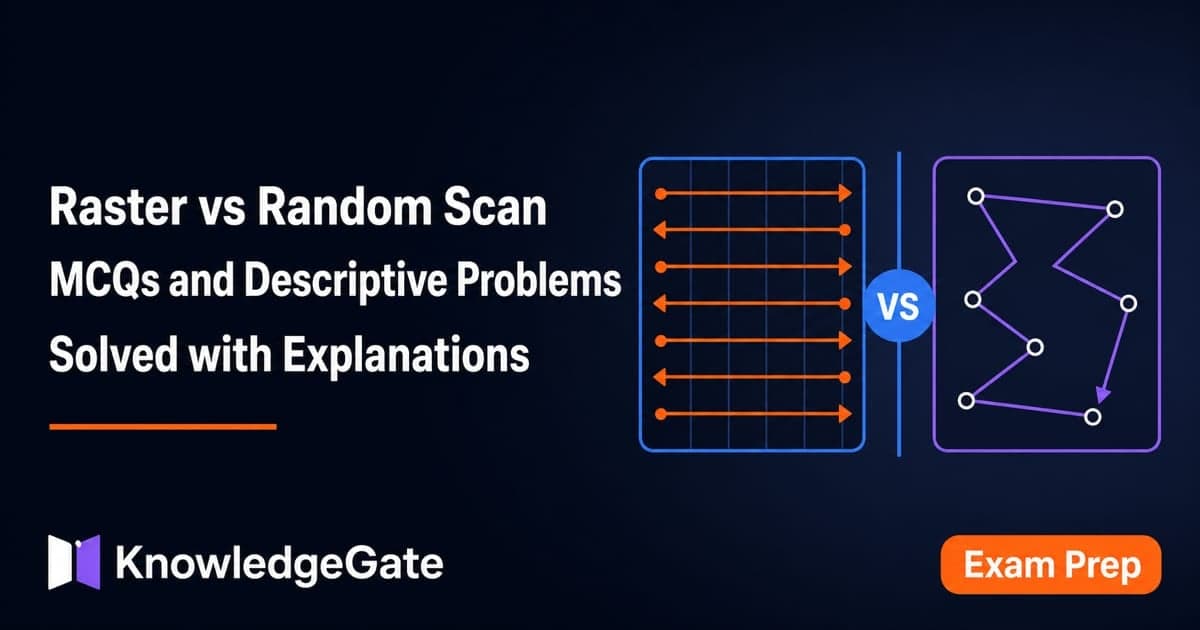
Raster vs Random Scan MCQs and Descriptive Problems: Solved Questions with Explanations
Attempt seven option-based questions and four descriptive problems on raster and random scan systems, then check each answer with a compact explanation.
Updated 23 Sep 20267 min readTeaching Recruitment (Computer Science)