Virtual Machines in Operating Systems: Hypervisors, Isolation and a Worked Resource Plan
Follow one three-VM host plan from the hypervisor layer to CPU scheduling, address translation, virtual I/O, isolation, snapshots and migration.
KnowledgeGate Team
Exam prep & CS education
Updated 19 Aug 20266 min read
A virtual machine is called “a computer inside a computer”, but that phrase does not explain privileged instructions, six virtual CPUs sharing four cores, or 240 GiB of thin disks on a 200 GiB datastore. One host, H1, carries three VMs through all of it: hypervisor control, CPU and memory translation, virtual I/O, isolation, snapshots and live migration. Virtual machines are an Operating System topic in their own right, and not the same mechanism as virtual memory.
Virtual machines: the abstraction and its layers
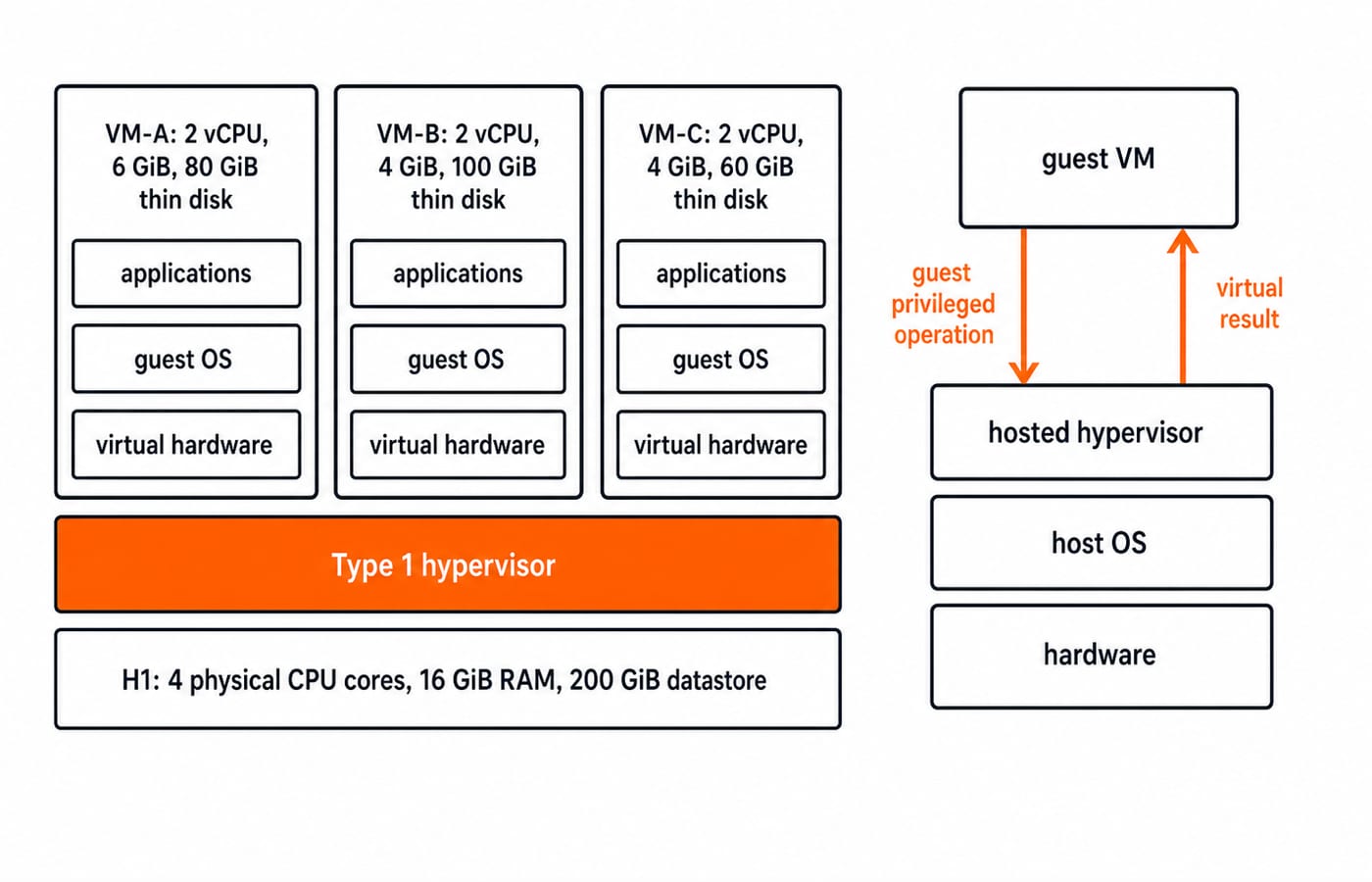
A system VM is a software-defined computer with virtual CPU, memory, storage, network and firmware. H1 has 4 cores, 16 GiB RAM and a 200 GiB datastore. Its hypervisor presents three isolated VMs with guest kernels and applications.
The layers are hardware, hypervisor or virtual machine monitor, virtual hardware, guest OS, then applications. The host owns physical resources; the guest controls its interface. A process VM, such as a language runtime, supports one program instead of a whole computer.
Virtualisation presents a machine abstraction on the same architecture. Emulation reproduces another machine or device, usually with more translation work. Virtual memory gives one process a private address space inside a single OS, a different mechanism at a different layer, as the Virtual Memory and Demand Paging MCQs set shows.
Hypervisors and privilege: control of the physical host
Model | Layer order | Important boundary |
|---|---|---|
Type 1 | Hardware, hypervisor, guest VMs | Hypervisor runs directly on hardware |
Type 2 | Hardware, host OS, hosted hypervisor, guest VMs | Hypervisor runs as a host application |
Neither model is automatically faster or restricted to one use. Both keep privileged state under hypervisor control.
When VM-A arms a 5 ms virtual timer, the guest kernel never touches the physical timer. That privileged operation traps to the hypervisor, which records the deadline, resumes VM-A and later injects the interrupt into the guest. VM-A sees a timer it believes it owns; the hardware only ever saw the hypervisor.
Full virtualisation preserves the guest-machine interface. Paravirtualised drivers reduce emulation through a guest-aware interface. Hardware assistance transfers sensitive CPU events. One platform can combine hardware-assisted CPU execution with paravirtualised I/O.
CPU and memory virtualisation: exact translations
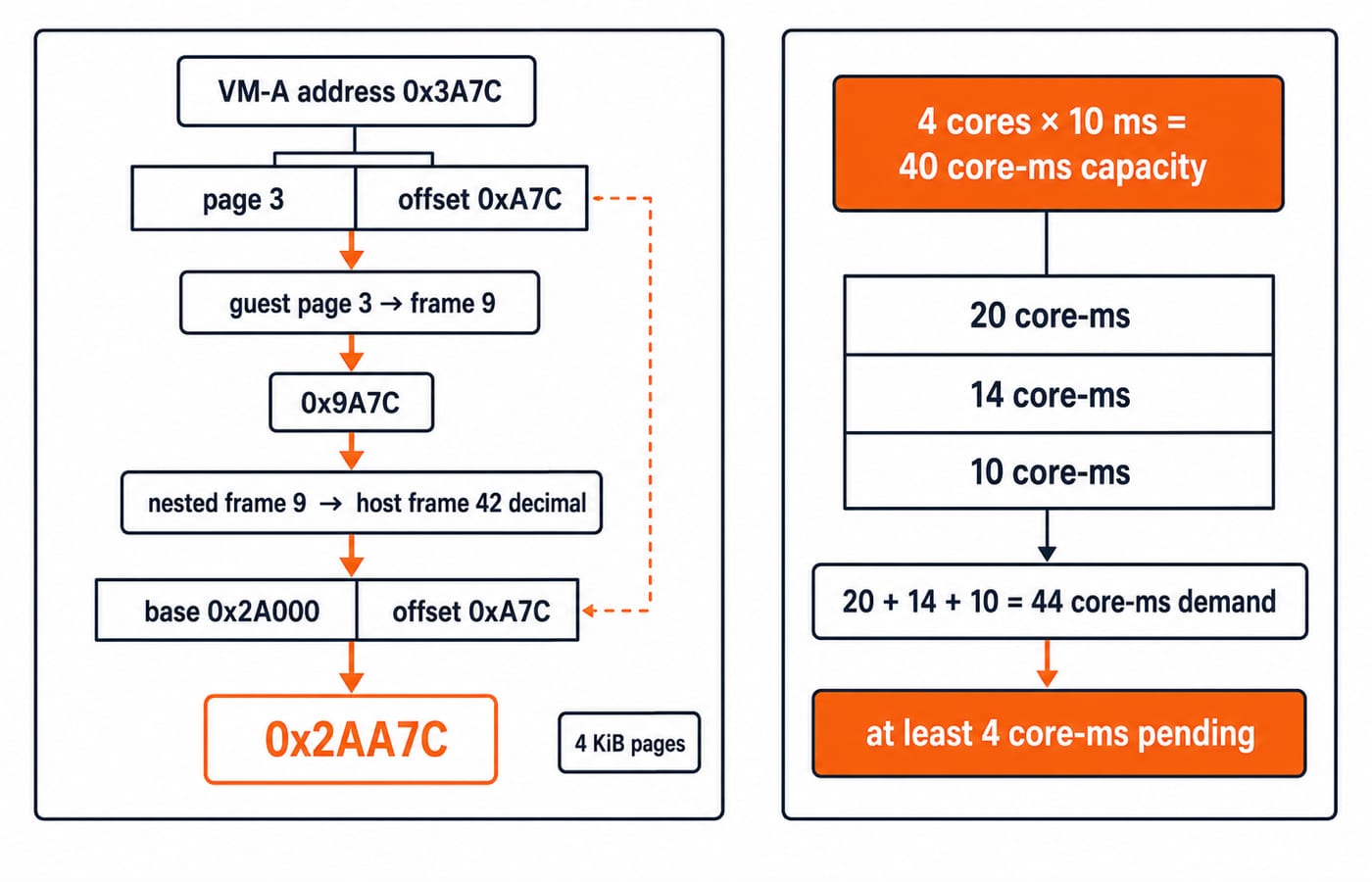
A vCPU is schedulable, not a permanently owned core. H1 assigns 2 + 2 + 2 = 6 vCPUs across 4 cores, or 6 / 4 = 1.5:1. In 10 ms, capacity is 4 x 10 = 40 core-ms. Demand is 20 + 14 + 10 = 44 core-ms, so at least 44 - 40 = 4 core-ms remains pending. Scheduler rules determine which VM waits.
With 4 KiB pages, 0x3A7C has page 3 and offset 0xA7C. VM-A maps page 3 to guest frame 9, forming 0x9A7C. The nested map sends frame 9 to host frame 42 decimal at base 0x2A000; the offset gives 0x2AA7C. Translation caches reduce lookups.
Reserve 2 GiB of H1's 16 GiB for overhead. The 14 GiB guest budget is filled by 6 + 4 + 4 = 14 GiB, even if active use is 5 + 3 + 2 = 10 GiB. Another 3 GiB VM means 17 GiB assigned, 3 GiB over budget. Ballooning reclaims pages the guest agrees to give up, page sharing deduplicates identical pages across guests, and host swapping pushes guest memory to disk, which is the one that turns an overcommit into a latency problem.
Virtual disks, networks and device paths
Device emulation reproduces the behaviour of a real device, so an unmodified guest driver works. Paravirtualised I/O replaces that with a virtual-interface driver the guest must install. Direct assignment hands the guest the device itself and needs IOMMU support to constrain DMA, at the cost of easy migration.
For a 4 KiB write at VM-B block 1200, the driver submits the request, the hypervisor maps it, and the datastore records the changed block. Thin-disk size need not equal physical use.
Networking follows application -> guest TCP/IP -> vNIC-A -> vSwitch0 -> VM-B's vNIC-B or external pNIC0. Traffic from VM-A to VM-B can stay inside vSwitch0 and never reach pNIC0, so a firewall placed outside the host never sees it.
Worked VM host-capacity plan
VM | vCPU | RAM | Provisioned disk | Used disk |
|---|---|---|---|---|
VM-A | 2 | 6 GiB | 80 GiB | 30 GiB |
VM-B | 2 | 4 GiB | 100 GiB | 45 GiB |
VM-C | 2 | 4 GiB | 60 GiB | 20 GiB |
CPU assignment is 6 / 4 = 1.5:1. Guest RAM is 6 + 4 + 4 = 14 GiB; the 2 GiB reserve fills all 16 GiB. Provisioned disk is 80 + 100 + 60 = 240 GiB, or 240 / 200 x 100 = 120%. Current use is 30 + 45 + 20 = 95 GiB, or 47.5%, leaving 200 - 95 = 105 GiB.
A 35 GiB VM-B snapshot raises use to 95 + 35 = 130 GiB, leaving 70 GiB. Full growth creates a 40 GiB shortfall. VM-D, with 1 vCPU, 3 GiB RAM and a 40 GiB thin disk, exceeds the memory budget by 3 GiB. Reject, resize or monitor overcommit.
VM isolation, snapshots, migration and containers
Each guest has a kernel, page tables, virtual devices and failure domain. VM-A can crash without VM-B crashing, but H1 failure can affect all guests. Isolation cannot remove shared-host dependence.
An image or template is reusable; a clone creates another instance. A snapshot records state or changed-block relationships for rollback. A backup is an independently managed recovery copy. That 35 GiB growth shows snapshots are neither free nor automatic backups.
In a simplified pre-copy model, 4096 MiB moves at 512 MiB/s while 64 MiB/s becomes dirty. Pass one takes 4096 / 512 = 8 s and dirties 8 x 64 = 512 MiB. Pass two takes 512 / 512 = 1 s and dirties 64 MiB. The shrinking remainder enables a short switchover; actual stop conditions and downtime vary.
A VM has a guest kernel above virtual hardware; containers isolate processes while normally sharing the host kernel. VMs offer stronger kernel separation, while containers avoid a full guest OS per workload. Neither is universally superior.
How questions and interviews test virtual machines
Questions ask you to label hypervisor stacks, distinguish vCPU from core, calculate overcommit, follow translation, or choose snapshot, clone or backup. An interviewer works the same ground from the other side: why 1.5:1 is not a 1.5 times speed-up, why a snapshot chain is not a backup policy, and what breaks first when H1 loses power. Exams want the number, interviews want the consequence. KnowledgeGate carries over 10 Virtual Machines practice questions across these angles.
Self-check: six vCPUs on four cores is 1.5:1, not 1.5 times the capacity. 0x3A7C reaches 0x2AA7C. Provisioning 240 GiB on 200 GiB is 120%, while 95 GiB used is 47.5%; neither alone proves safe growth.
Traps are direct: VM is not virtual memory; virtualisation is not necessarily cross-architecture emulation; vCPU is not a dedicated core; used disk is not provisioned disk; snapshot is not automatically backup; guest isolation still depends on the host. Use Operating Systems for GATE for wider revision and GATE CS Exam Preparation to find the rest of the GATE CS material.
Virtual machines in short and the next step
Recall: hypervisor control, virtual hardware, scheduled vCPUs, second translation, controlled I/O and host-dependent isolation. Checkpoints are 1.5:1, 0x2AA7C, 14 GiB RAM, 120% provisioned and 47.5% used.
Remove VM-C: totals become 4 / 4 = 1:1, 10 GiB guest RAM, 12 GiB with reserve, 180 GiB provisioned and 75 GiB used. Or raise VM-A's use from 30 to 75 GiB: use becomes 140 GiB, 60 GiB remains, and provisioning stays 240 GiB.
For a structured GATE route, use GATE Guidance by Sanchit Sir after checking the current official syllabus. For broader OS interview preparation, use CS Fundamentals for Placements by Sanchit Sir. Next, redraw the hypervisor stack and the two-level translation from memory, then recompute the plan with VM-C removed.
Keep learning
Paging and TLB Explained: Address Translation, EMAT and Exam Traps
Follow one virtual address from its VPN through the TLB to a physical frame, then calculate page-table size, TLB reach and effective memory access time.
Updated 4 Oct 20266 min readOperating Systems
Operating System Scenarios: Solve Scheduling, Concurrency, and Page Replacement
Learn one state-trace method for three common OS problem families, then apply it to complete Round Robin, concurrency, FIFO, and LRU examples.
Updated 29 Sep 20265 min readOperating Systems
Tower Research Hiring Process: Stage-by-Stage Prep for Quant and Dev Roles
Prepare for a Tower Research application without treating one online account as a universal process. Use this role-led map, worked drills, and seven-day plan.
Updated 25 Sep 20265 min readOperating Systems
Capital One Recruitment Process: Stage-by-Stage Guide for India Applicants
Prepare for a Capital One India application with a cautious five-stage map, worked technical and case drills, and a practical 14-hour schedule.
Updated 24 Sep 20265 min readOperating Systems