Operating Systems for GATE: How to Study Deadlocks, Scheduling and Memory
Operating Systems is one of the densest, most-tested GATE CS subjects. Here is how to study its three biggest areas (scheduling, deadlocks and memory) so the marks actually come.
KnowledgeGate Team
Exam prep & CS education
Updated 26 Jul 202610 min read138 views
Operating Systems is one of those GATE CS subjects that feels intuitive when you watch a lecture and then falls apart the moment you face a numerical question. Our own practice bank carries over 2,000 Operating System questions, and CPU scheduling, deadlocks and memory management account for close to half of them. Those three are also where marks are lost to arithmetic rather than to understanding: a process table has to become an average waiting time, a Banker's state has to yield a safe sequence, a reference string has to be traced frame by frame. Doing that on paper, with the numbers in front of you, is the only thing that makes those marks reliable.
Related reading: CPU scheduling and Memory management.
Why Operating Systems trips people up
The subject sits exactly on the boundary between concept and calculation. You need the concept to know what is happening, and calculation practice to answer how much (waiting time, page faults, frame counts). Students who do only one of the two lose marks: the concept-only student cannot finish a numerical, and the formula-only student picks the wrong formula because the scenario never registered. The fix is to pair every concept with its previous-year numericals immediately.
CPU scheduling: from process table to average waiting time
Scheduling is the friendliest place to start because the questions are concrete: you are given processes with arrival and burst times and asked for average waiting, turnaround, or response time under a particular algorithm. The algorithms you must know cold:
First-Come-First-Served (FCFS). Simple, but watch the convoy effect.
Shortest Job First (SJF) and its preemptive form, Shortest Remaining Time First. Optimal for average waiting time, and a frequent source of tricky preemption questions.
Round Robin, where the time quantum changes everything; small quanta approach processor sharing, large quanta approach FCFS.
Priority scheduling, and the starvation problem it creates, solved by ageing.
A worked comparison on one process set
Take four processes:
Process | Arrival time | Burst time |
|---|---|---|
P1 | 0 | 7 |
P2 | 2 | 4 |
P3 | 4 | 1 |
P4 | 5 | 4 |
Under FCFS you run them in arrival order: P1 from 0 to 7, P2 to 11, P3 to 12, P4 to 16. Turnaround is completion minus arrival, waiting is turnaround minus burst, so the waiting times are 0, 5, 7 and 7, averaging 19/4 = 4.75.
Now run Shortest Remaining Time First on the same set. P1 starts at 0. At t = 2, P2 arrives needing 4 while P1 still needs 5, so P1 is preempted. At t = 4, P3 arrives needing 1 against P2's remaining 2, so P2 is preempted in turn. P3 finishes at 5, where P4 has just arrived and the ready set is P1 (5 left), P2 (2 left) and P4 (4 left). So P2 runs to 7, P4 to 11, and P1 finishes at 16. The Gantt chart reads P1, P2, P3, P2, P4, P1, and the waiting times are 9, 1, 0 and 2, averaging 12/4 = 3.00.
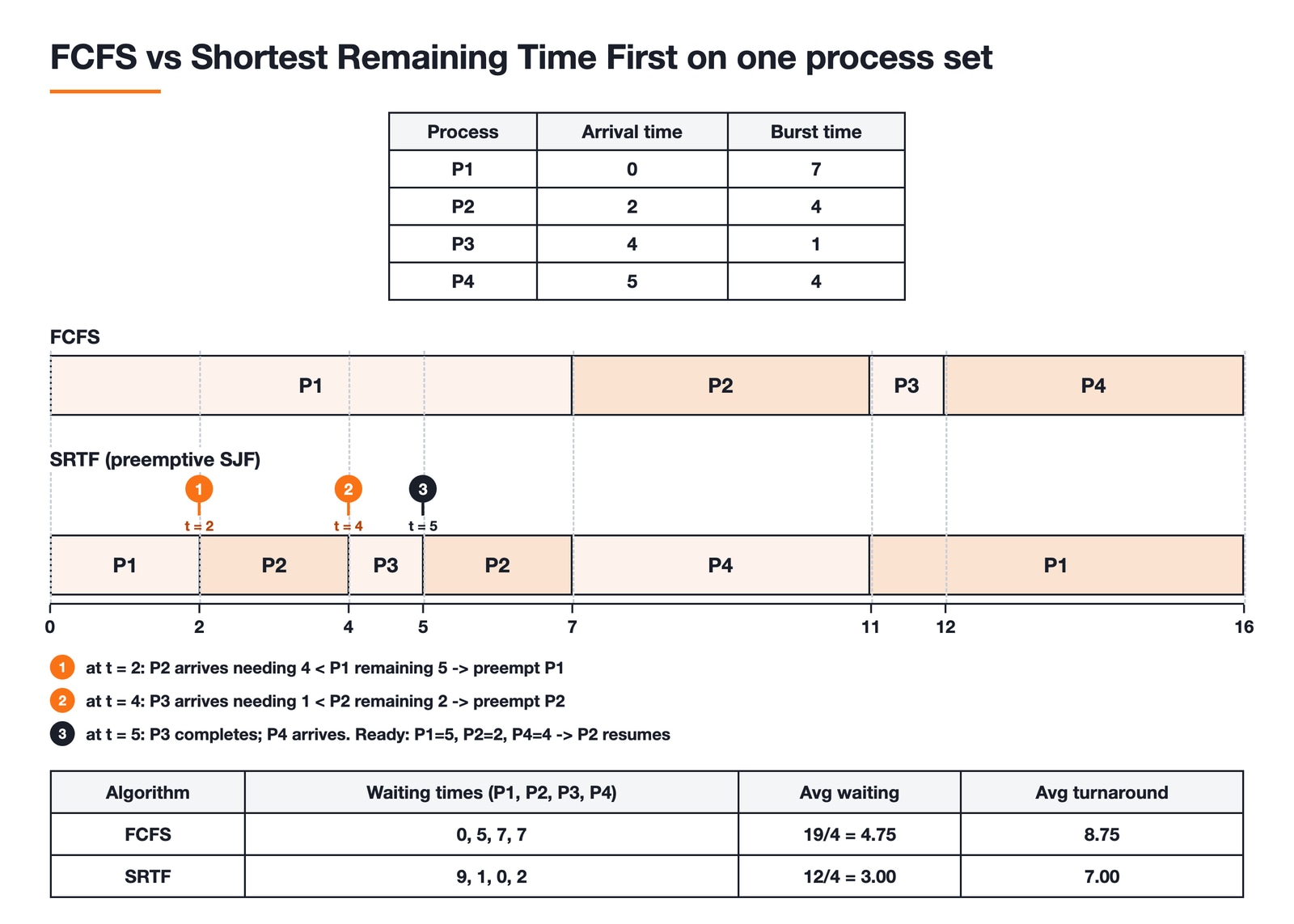
Algorithm | Average waiting time | Average turnaround time |
|---|---|---|
FCFS | 4.75 | 8.75 |
Shortest Remaining Time First | 3.00 | 7.00 |
Round Robin (quantum 2) | 5.00 | 9.00 |
That spread is the whole point of the topic. Shortest Remaining Time First is provably optimal for average waiting time; Round Robin is worse on this metric and buys something else instead, namely that no process can be made to wait indefinitely whatever else arrives. Note too that the total burst is 16 units, so all three schedules end at t = 16. Only the distribution of waiting changes, never the total work.
Master this by mechanical repetition: draw the chart, compute the times, check against the answer, repeat until you never slip. CPU scheduling is the single largest topic in our Operating System question bank, so the drilling pays back directly.
Deadlocks: the four Coffman conditions and a worked safe sequence
Deadlocks are more conceptual and, for that reason, more error-prone. Anchor everything on the four Coffman conditions (mutual exclusion, hold and wait, no preemption, and circular wait), because every deadlock question is really testing whether one of these can occur. The topics that generate questions:
The four necessary conditions and how each prevention strategy removes one of them.
Resource-allocation graphs and how to detect a cycle, and why a cycle means deadlock only when each resource has a single instance.
The Banker's algorithm for deadlock avoidance, a favourite because it is purely procedural.
Banker's algorithm, worked step by step
Take five processes and three resource types A, B and C, with 10, 5 and 7 instances.
Process | Allocation (A B C) | Maximum (A B C) | Need (A B C) |
|---|---|---|---|
P0 | 0 1 0 | 7 5 3 | 7 4 3 |
P1 | 2 0 0 | 3 2 2 | 1 2 2 |
P2 | 3 0 2 | 9 0 2 | 6 0 0 |
P3 | 2 1 1 | 2 2 2 | 0 1 1 |
P4 | 0 0 2 | 4 3 3 | 4 3 1 |
Need is simply Maximum minus Allocation, computed row by row. Allocation sums to (7, 2, 5), so Available is the total (10, 5, 7) minus that, which is (3, 3, 2).
Now search for a safe sequence, restarting the scan from the lowest-numbered process after every success so the method is reproducible. Work starts at (3, 3, 2). P0 needs (7, 4, 3) and does not fit; P1 needs (1, 2, 2) and does, so P1 runs, releases its allocation, and Work becomes (5, 3, 2). Rescanning: P0 still fails, P2 needs (6, 0, 0) and 6 exceeds 5, but P3 needs (0, 1, 1) and fits, so Work becomes (7, 4, 3). Rescanning again, P0 now fits exactly and Work becomes (7, 5, 3), then P2 fits taking Work to (10, 5, 5), then P4 takes it to (10, 5, 7).
Every process finished, so the state is safe and the sequence is P1, P3, P0, P2, P4.
Two checks are worth building into the habit. No entry in the Need matrix may be negative, and if one is, you have misread a row. The final Work vector must equal the total resource vector, here (10, 5, 7), because every process eventually returns everything it held. A single misread cell propagates through the entire search, and these two catch it before it costs you the question.
Safe sequences are also not unique. Choosing P4 instead of P0 at the third step gives P1, P3, P4, P0, P2, which is equally valid. Any correct sequence earns the mark, so do not panic when yours does not match the answer key exactly.
One more distinction the exam loves to test: deadlock prevention removes one of the four conditions in advance, avoidance (the Banker's algorithm) uses runtime information to stay in safe states, and detection and recovery lets deadlock happen and then resolves it. Mixing these three up is a classic way to lose an easy conceptual mark.
Memory management: paging, replacement and fragmentation
Memory is the widest of the three areas, and it splits into three distinct question families, each with its own drill.
Address translation and effective access time
Understand the translation from logical to physical addresses, page tables, the translation lookaside buffer (TLB), and how multi-level paging trades table size for lookup time. Effective access time is the recurring numerical here.
Suppose the TLB is searched in 10 ns, a main-memory access takes 100 ns, the page table has a single level, and the TLB hit ratio is 90 per cent. On a hit you pay the TLB search plus one memory access for the data, so 110 ns. On a miss you pay the TLB search, one memory access to read the page-table entry, and a second for the data, so 210 ns. The effective access time is 0.9 × 110 + 0.1 × 210, which is 99 + 21, or 120 ns. The same machine with no TLB would need 200 ns every time.
Read the setup before you plug in numbers. Many papers treat the TLB search as negligible or fold it into the quoted memory access, and under that convention the same hit ratio gives 0.9 × 100 + 0.1 × 200, or 110 ns. The arithmetic is trivial; the marks are lost on which convention the question is using.
Page replacement and Belady's anomaly
FIFO, Optimal, and Least Recently Used (LRU) are the core algorithms. Know how to simulate each against a reference string to count page faults.
Take the reference string 1, 2, 3, 4, 1, 2, 5, 1, 2, 3, 4, 5. FIFO with three frames gives 9 page faults; the identical string with four frames gives 10. That is Belady's anomaly: giving FIFO more memory made it perform worse. LRU on the same string moves the way intuition expects, 10 faults with three frames and 8 with four, because LRU is a stack algorithm and can never exhibit the anomaly.
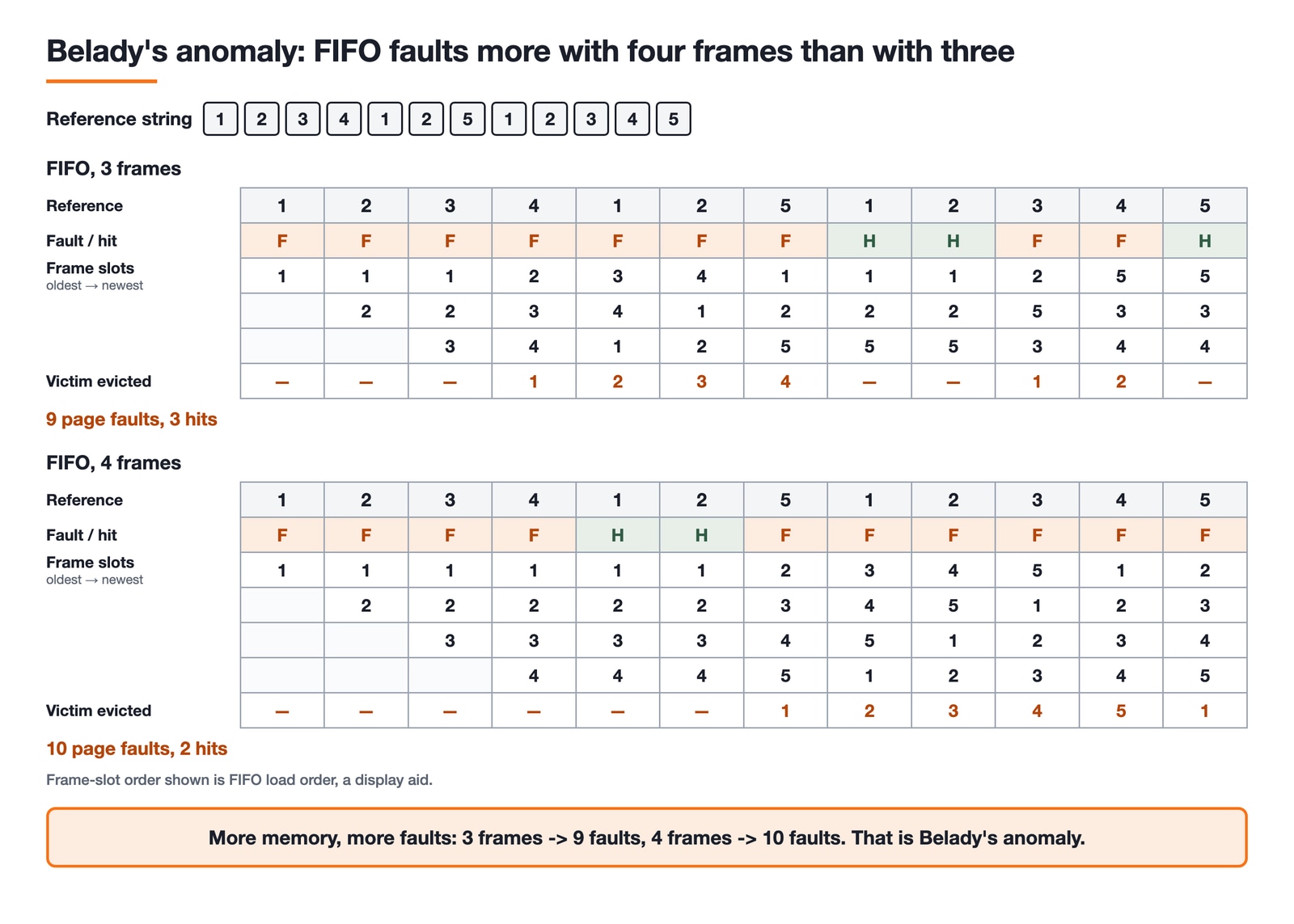
Notice what else that shows. On this string, LRU with three frames faults more often than FIFO with three. Page-replacement questions are decided by the specific reference string in front of you, so trace it rather than reasoning about which algorithm ought to be cleverer.
Segmentation and fragmentation
Segmentation splits a process by its logical parts (code, stack, heap) instead of into equal-sized pages, so a logical address is a segment number plus an offset, and translation checks the offset against that segment's limit before adding its base. Segments therefore vary in size, and so do the gaps they leave behind, which is why fragmentation is the pair of definitions the exam expects you to keep straight. Internal fragmentation is space wasted inside an allocated block, because allocation happens in fixed-size units and the last unit is rarely filled exactly. Paging causes it: a 9 KB process in 4 KB pages occupies three frames and wastes 3 KB in the last. External fragmentation is free memory that exists but cannot be used, because it is scattered into holes too small for any waiting request. Contiguous allocation and pure segmentation cause it, since variable-sized segments leave gaps as processes come and go.
The follow-ups are predictable. Compaction cures external fragmentation by sliding allocations together, and it is only possible when relocation is dynamic. Placement policies (first fit, best fit, worst fit) change how fast the holes accumulate, and best fit, despite the name, tends to leave the largest number of unusably small ones. Segmentation with paging, the scheme real systems actually use, keeps the logical segment view while allocating in frames, trading external fragmentation for internal.
Operating Systems topics ranked by question volume
Our Operating System question bank is a fair proxy for where the questions live, since it is built from previous-year papers and their close variants:
Area | Questions in our bank |
|---|---|
CPU scheduling | about 290 |
Virtual memory | about 260 |
Memory management | about 225 |
Deadlock | about 160 |
Scheduling and the two memory topics together outweigh deadlock by roughly five to one, which tells you where the drilling hours belong. Deadlock still earns its slot, because the Banker's algorithm is procedural enough to be near-guaranteed marks once the steps are automatic. For official subject-wise weightage and exact syllabus wording, the GATE information brochure for the current cycle is the authority.
How to actually practise
Reading about operating systems is comfortable and mostly useless on its own. The subject is learned through solved numericals:
Learn one mechanism (say, LRU page replacement) conceptually.
Immediately solve its previous-year questions, tracing each by hand exactly as the worked examples above do.
Review every mistake and note whether it was a concept slip or an arithmetic slip; they need different fixes.
Return to it a week later to confirm it stuck.
This mirrors the broader case for practising previous-year questions first. Because OS is so dense and so consistently tested, it deserves a prominent place in your calendar. Our subject weightage guide explains why the systems subjects earn your best study hours.
Fitting Operating Systems into your prep
If you are working through a full plan, OS belongs in the systems-subjects phase alongside DBMS, Networks and COA. Line up a structured GATE test series so you practise OS questions inside timed, full-length papers rather than in isolation, and use the broader computer science course to shore up any fundamentals that feel shaky. The full CS fundamentals catalogue has the companion subjects when you are ready for them.
Master scheduling, deadlocks and memory and you have captured most of what Operating Systems will ever ask you. Work every example above with a pen before you trust that you have.
Keep learning
Paging and TLB Explained: Address Translation, EMAT and Exam Traps
Follow one virtual address from its VPN through the TLB to a physical frame, then calculate page-table size, TLB reach and effective memory access time.
Updated 4 Oct 20266 min readOperating Systems
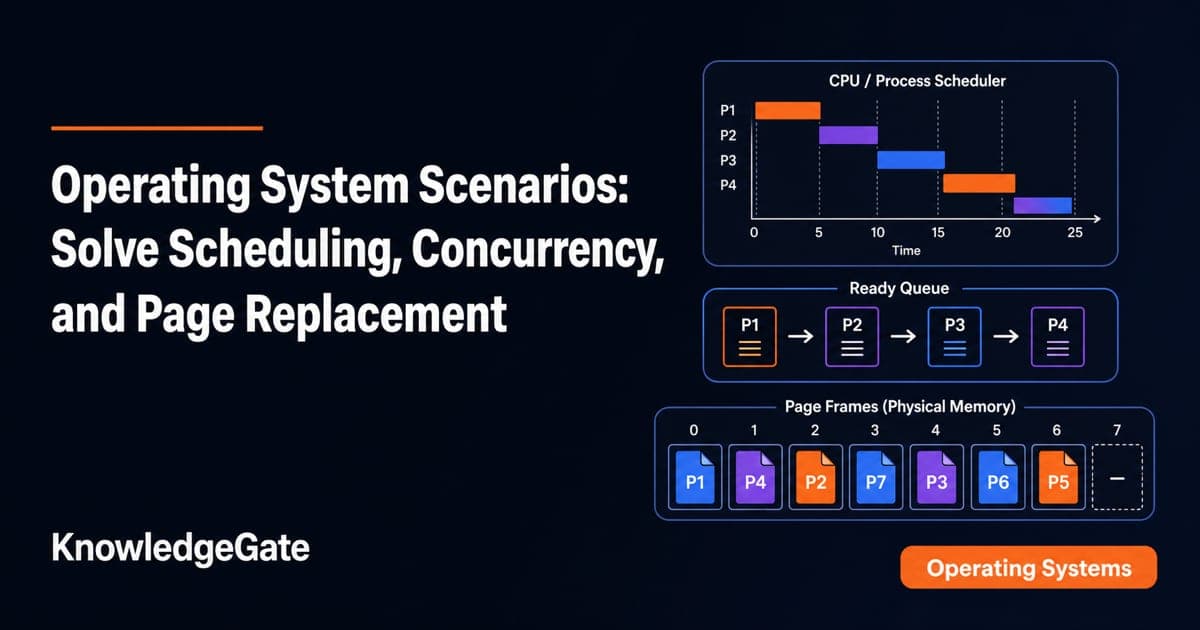
Operating System Scenarios: Solve Scheduling, Concurrency, and Page Replacement
Learn one state-trace method for three common OS problem families, then apply it to complete Round Robin, concurrency, FIFO, and LRU examples.
Updated 29 Sep 20265 min readOperating Systems
Tower Research Hiring Process: Stage-by-Stage Prep for Quant and Dev Roles
Prepare for a Tower Research application without treating one online account as a universal process. Use this role-led map, worked drills, and seven-day plan.
Updated 25 Sep 20265 min readOperating Systems

Capital One Recruitment Process: Stage-by-Stage Guide for India Applicants
Prepare for a Capital One India application with a cautious five-stage map, worked technical and case drills, and a practical 14-hour schedule.
Updated 24 Sep 20265 min readOperating Systems