UP Police Computer Operator MS Office: File Types and Keyboard Shortcuts
Build four files in one folder, practise the shortcuts in context, calculate an Excel result and check yourself with four answered objective questions.
KnowledgeGate Team
Exam prep & CS education
Updated 28 Jul 20266 min read
You may know how to type a letter or enter marks, yet still confuse an application with its file, Save with Save As, a workbook with a worksheet, or F5 with Shift+F5. These small distinctions decide many objective questions. This connected office drill produces a Word notice, an Excel score sheet, a PowerPoint briefing and a PDF inside one folder. Building all four in sequence is what fixes the distinctions, because every step turns on a choice you made in the one before. Keep the UP Police Computer Operator preparation hub beside you for the wider study route.
1. Begin with the file and folder model
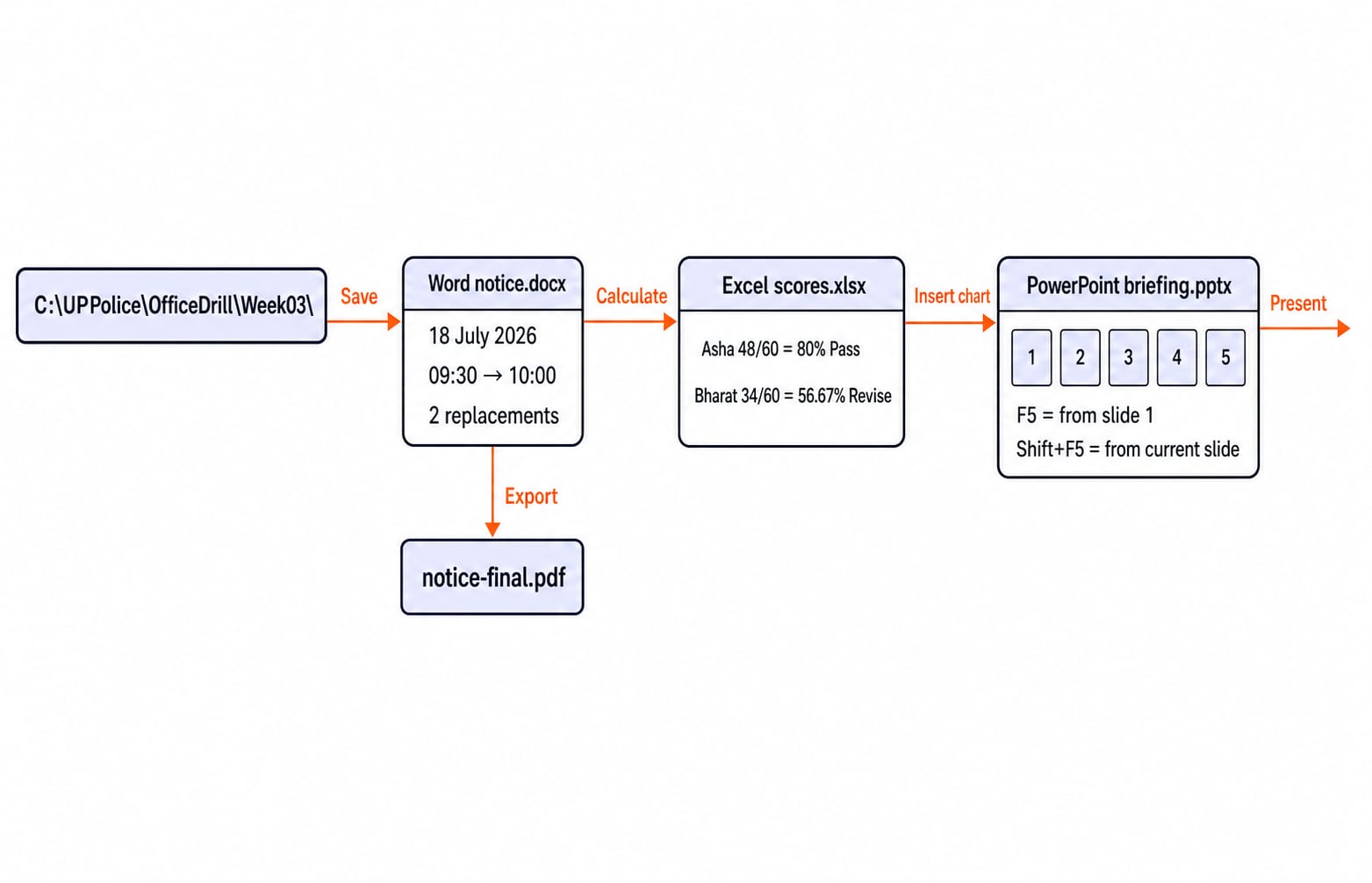
Build C:\UPPolice\OfficeDrill\Week03\. Here, C: is the drive; UPPolice, OfficeDrill and Week03 are nested folders. A file's final component is its filename. Add notice.docx, scores.xlsx, briefing.pptx and notice-final.pdf.
Extensions reveal their roles. A .docx is an editable Word document, .xlsx an Excel workbook, .pptx an editable PowerPoint presentation, and .pdf a fixed-layout sharing format. Word and Excel are applications; notice.docx and scores.xlsx are files they open.
Save updates notice.docx. Save As can create notice-v2.docx while the original remains. Copy can place another notice-v2.docx in C:\UPPolice\Backup\; Move changes its location; Rename changes only its name. Normally, Delete sends an eligible local file to the Recycle Bin; Shift+Delete bypasses it.
2. Use Word to create, revise and export one notice
Create a two-page notice.docx with the centred, bold title Week 3 Office Drill. Its left-aligned body has Practice date: 18 July 2026, Reporting time: 09:30, Candidate code: UPCO-017 and a three-item numbered instruction list. Press Ctrl+Enter to start page 2 instead of adding blank lines.
Place 09:30 twice. Ctrl+F finds both occurrences, while Ctrl+H opens Find and Replace in desktop Word. Replace both with 10:00; the result is 2 replacements made. Ctrl+B bolds selected text, Ctrl+S saves, and Ctrl+P opens print settings.
Export the final document as notice-final.pdf. Export does not convert the working file in place, so both files remain. The .docx stays editable with Word formatting, .pdf retains a fixed layout for sharing, and .txt stores plain text with little formatting. Exact command locations can differ by Office version.
3. Work an Excel score sheet from values to formulas
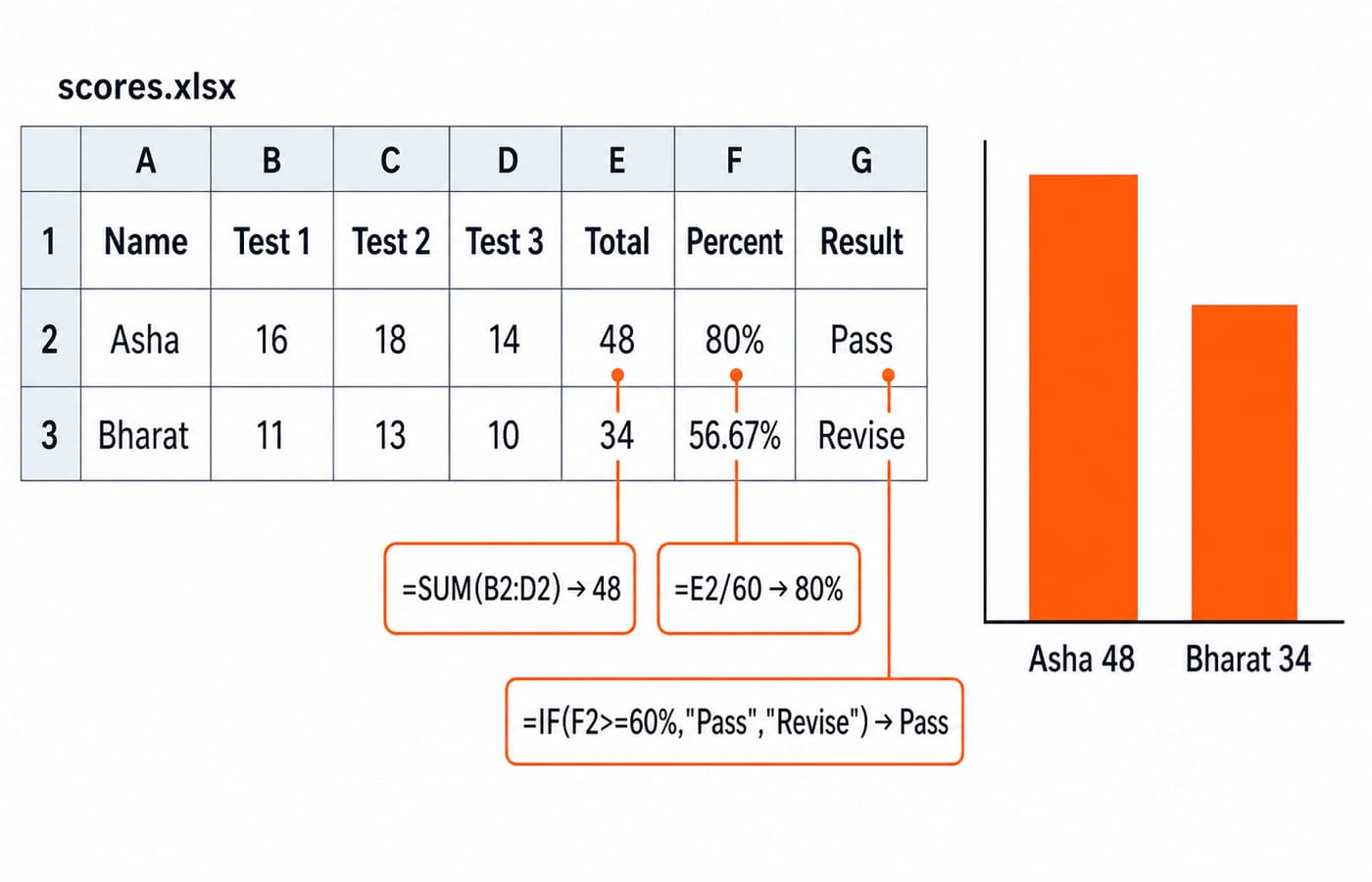
A workbook can contain worksheets. A cell intersects a row and column, and B2:D2 is a range, not subtraction. Enter this grid in scores.xlsx:
Candidate | Word | Excel | PowerPoint | Total | Percentage | Result |
|---|---|---|---|---|---|---|
Asha | 16 | 18 | 14 | 48 | 80% | Pass |
Bharat | 11 | 13 | 10 | 34 | 56.67% | Revise |
Each skill is out of 20, making the maximum 60. In E2, enter =SUM(B2:D2): 16 + 18 + 14 = 48. In F2, enter =E2/60 and apply Percentage format: 48 / 60 = 0.8 = 80%. In G2, enter =IF(F2>=60%,"Pass","Revise"), which returns Pass.
Copy E2:G2 down. Relative references change to row 3, giving 11 + 13 + 10 = 34, 34 / 60 = 0.5666... = 56.67%, and Revise. For Asha, =AVERAGE(B2:D2) returns 48 / 3 = 16, a different measure from total 48.
Create a clustered column chart from names and totals only, with bars labelled Asha 48 and Bharat 34.
4. Turn the same material into a five-slide PowerPoint
Build briefing.pptx with exactly five slides:
Week 3 Office DrillFour File Types:.docx,.xlsx,.pptx,.pdfScore Summary:Asha 48/60andBharat 34/60Shortcut Check:Ctrl+S,Ctrl+H,F5,Shift+F5Three Checks:application,extension,shortcut context
A layout arranges placeholders; a theme controls the coordinated appearance. A transition acts between slides; an animation acts on an object within a slide. Use one restrained transition and no decorative animation.
Press Ctrl+M for a new slide, F5 to present from slide 1, Shift+F5 to present from the current slide, and Esc to exit. A .pptx is editable, a .ppsx normally opens as a slide show, and a .pdf preserves a fixed layout without the editing workflow.
5. Learn shortcuts by context, not as one flat list
These are desktop Windows and Microsoft Office conventions. Versions and platforms can differ.
Context | Shortcut | Action |
|---|---|---|
Common Office |
| Copy, cut, paste, undo, save |
File Explorer |
| Open Explorer, rename selected item, create folder, open properties |
Word |
| Replace, insert page break |
Excel |
| Edit active cell, AutoSum, Format Cells |
PowerPoint |
| New slide, show from slide 1, show from current slide |
Context is the rule. F2 renames a selected File Explorer item but edits Excel's active cell. First identify the application or selected object.
For a ten-minute drill, press Win+E, enter C:\UPPolice\OfficeDrill, press Ctrl+Shift+N, and name the folder Week03. Select notice.docx, press F2, and rename it notice-final.docx. Open it, press Ctrl+H, and replace both 09:30 instances with 10:00. Use MS Office for Teaching CS Exams for a second pass over the same commands in a different order.
6. Show how objective questions test the same workflow
Which file is normally an Excel workbook?
.docx,.xlsx,.pptx, or.txtAnswer:
.xlsx. A.pptxfile is a PowerPoint presentation.Which formula totals Asha's three scores?
=ADD(B2:D2),=SUM(B2:D2),=TOTAL(B2:D2), or=B2-D2Answer:
=SUM(B2:D2), yielding48.ADDis not the required Excel function name.In desktop Word, which shortcut opens Replace?
Ctrl+F,Ctrl+H,Ctrl+P, orCtrl+SAnswer:
Ctrl+H.Ctrl+Ffinds text but is not the Replace shortcut.In PowerPoint, which starts from the current slide?
F5,Shift+F5,Esc, orCtrl+MAnswer:
Shift+F5.F5starts the slide show from slide 1.
Notice what the four questions test: one extension, one function name, and two shortcuts that each sit right beside a near-identical wrong answer. Whichever one you miss names the distinction to redrill first. The SSC CGL Tier 2 Computer Knowledge Module covers adjacent computer-knowledge ground when you want a second set to attempt.
7. Fix the eight traps with a short error loop
Correct each pair in one line:
Application performs the task; file stores data.
Save updates; Save As creates another name, location or format.
Workbook contains worksheets.
Row runs horizontally; column runs vertically.
Find locates text; Replace changes matched text.
Transition acts between slides; animation acts within one.
F5starts at slide 1;Shift+F5starts at the current slide.Copied to E3,
=SUM(B2:D2)becomes=SUM(B3:D3)and returns34because the references are relative.
In a 20-question mixed check, 16 correct and 4 wrong gives 16 / 20 × 100 = 80%. Classify the errors as 2 extension, 1 shortcut-context and 1 formula-result. Begin the next session with an eight-item retest, two fresh items per error. Log Cue | Chosen answer | Correct rule | Fresh example. Continue with the UP Police Computer Operator Test Series as a practice route.
8. The short version and the next action
Identify the application, read the extension, trace the file operation, calculate the spreadsheet result, and interpret the shortcut in context. Rebuild the four-file Week03 folder without notes, then redo the four mini-questions and eight-item retest. KnowledgeGate's question bank carries over 390 practice questions on MS Office, file formats and keyboard shortcuts. Use the complete UP Police Computer Operator course for a structured next step and the test series for practice.
Keep learning
UP Police Computer Operator DBMS and SQL: Learn Tables, Keys and Queries with a Police-Records Database
Build one fictional police-records database from schema to SQL. Learn key types, relationships, 3NF, table constraints and exact query results from consistent data.
Updated 18 Aug 20266 min read70 viewsUP Police Computer Operator

UP Police Computer Operator Typing Test: Build Speed Without Losing Accuracy
Build typing speed without letting errors undo the gain. This practice plan separates Hindi and English, tracks accuracy, and turns each weak attempt into a focused repair drill.
Updated 16 Aug 20265 min readUP Police Computer Operator

UP Police Computer Operator PYQs: Diagnose Recurring Skill Gaps
Turn solved papers into a ranked repair list. Tag the recurring errors, repair the exact skill behind each one, then measure the change with a fresh 18-question mixed check.
Updated 14 Aug 20265 min readUP Police Computer Operator

UP Police Computer Operator Job Profile: Salary, Duties and Promotion Path
Understand the UP Police Computer Operator Grade-A role, its duties, historical pay matrix, probation, transfers, and selection-based promotion path.
Updated 12 Aug 20265 min read112 viewsUP Police Computer Operator