

React State Management Options: Choose the Right Tool with Runnable Examples
Follow one cart and inventory example to decide where state belongs, trace each update, and choose the smallest React state tool that fits.
KnowledgeGate Team
Exam prep & CS education
Updated 6 Nov 20266 min read

React offers several places to keep a value. The right choice depends on who owns it, how long it must live, and whether the server is authoritative. A cart and inventory scenario illustrates useState, useReducer, Context, Redux Toolkit, TanStack Query, and URL state. Not every app needs every tool.
Start with three questions before choosing a state tool
State is changing data that affects the interface. Ask: who reads or writes it, how long must it live, and what is its source of truth?
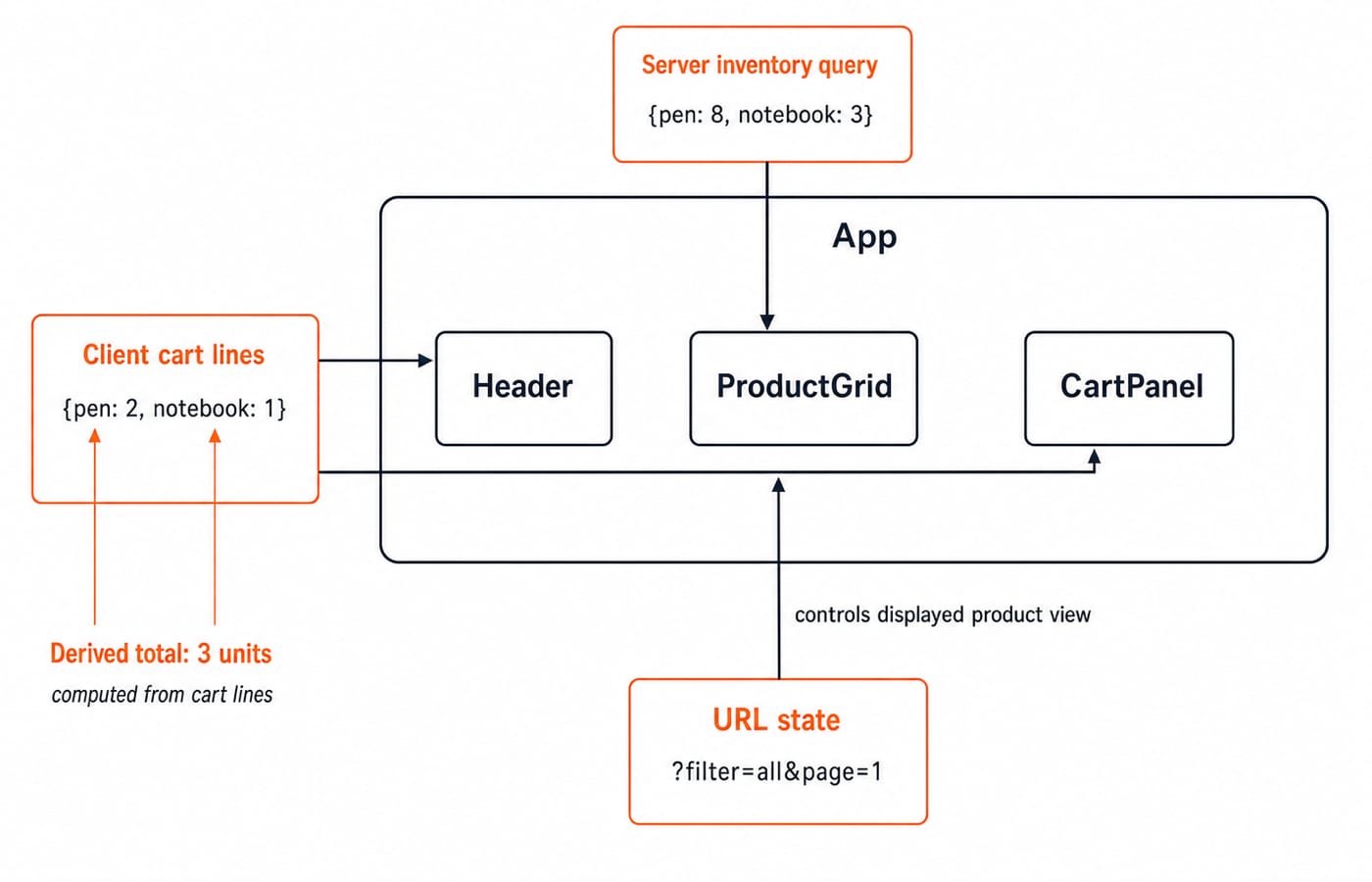
Our baseline has cart lines [{ id: "pen", qty: 2 }, { id: "notebook", qty: 1 }], remote stock { pen: 8, notebook: 3 }, and URL ?filter=all&page=1. The cart is client state, stock is server state, and total units is derived with lines.reduce((sum, line) => sum + line.qty, 0).
The starting total is 2 + 1 = 3. Incrementing the pen gives 3 + 1 = 4 units. Reserving one pen changes server stock from 8 to 7, but does not change the cart.
Keep truly local state in useState
Run each example separately in App.jsx. This picker starts at Quantity: 2; one plus click shows Quantity: 3, and minus cannot cross zero.
import { useState } from "react";

export default function QuantityPicker() {
  const [qty, setQty] = useState(2);
  return (
    <div>
      <button onClick={() => setQty(q => Math.max(0, q - 1))}>-</button>
      <span>Quantity: {qty}</span>
      <button onClick={() => setQty(q => q + 1)}>+</button>
    </div>
  );
}
Use a functional setter when the next value depends on the previous one. Two queued setQty(q => q + 1) calls apply 2 -> 3 -> 4. Two setQty(qty + 1) calls in one handler both capture 2, so the result can stop at 3. Keep the value local until CartSummary needs it, then lift it to their nearest common owner.
Move related transitions into useReducer
A reducer centralises cart rules, but the calling component still owns the state.
import { useReducer } from "react";

const initialState = { lines: [
  { id: "pen", qty: 2 }, { id: "notebook", qty: 1 }
] };

function reducer(state, action) {
  switch (action.type) {
    case "increment":
      return { lines: state.lines.map(line =>
        line.id === action.id ? { ...line, qty: line.qty + 1 } : line) };
    case "setQuantity":
      return { lines: state.lines
        .map(line => line.id === action.id ? { ...line, qty: action.qty } : line)
        .filter(line => line.qty > 0) };
    case "add":
      return { lines: [...state.lines, { id: action.id, qty: 1 }] };
    default:
      return state;
  }
}

export default function Cart() {
  const [state, dispatch] = useReducer(reducer, initialState);
  const total = state.lines.reduce((sum, line) => sum + line.qty, 0);
  return <><pre>{JSON.stringify(state.lines)}</pre><p>{total} units</p>
    <button onClick={() => dispatch({ type: "increment", id: "pen" })}>Increment pen</button>
    <button onClick={() => dispatch({ type: "setQuantity", id: "notebook", qty: 0 })}>Remove notebook</button>
    <button onClick={() => dispatch({ type: "add", id: "eraser" })}>Add eraser</button></>;
}
Run the buttons in order. Incrementing gives {pen: 3, notebook: 1} and 3 + 1 = 4 units. Removing notebook leaves {pen: 3} and 3 units. Adding eraser produces {pen: 3, eraser: 1} and 3 + 1 = 4 units. map, filter, and spread keep updates immutable.
Use Context for reach, not for every update
Context gives distant components access. useState or useReducer still updates the value.
import { createContext, useContext } from "react";

const UiPreferencesContext = createContext(null);
function Toolbar() {
  const { density, accent } = useContext(UiPreferencesContext);
  return <p>{density} / {accent}</p>;
}
export default function App() {
  const preferences = { density: "compact", accent: "blue" };
  return <UiPreferencesContext.Provider value={preferences}>
    <Toolbar />
  </UiPreferencesContext.Provider>;
}
The output is compact / blue. Cross-route preferences suit Context; a cart used by only Header and CartPanel can live in their parent. For frequent distant updates, split contexts or consider an external store. A fresh provider object changes identity each render, so memoise only after measuring a problem.
Choose Redux Toolkit for complex shared client state
Redux Toolkit fits cross-route workflows needing predictable events, middleware, DevTools, or shared team ownership.
import { configureStore, createSlice } from "@reduxjs/toolkit";

const cart = createSlice({
  name: "cart",
  initialState: { lines: [{ id: "pen", qty: 2 }, { id: "notebook", qty: 1 }] },
  reducers: { increment(state, action) {
    state.lines.find(line => line.id === action.payload).qty += 1;
  } }
});
export const store = configureStore({ reducer: { cart: cart.reducer } });
export const { increment } = cart.actions;
export const selectTotalUnits = state =>
  state.cart.lines.reduce((sum, line) => sum + line.qty, 0);

store.dispatch(increment("pen"));
console.log(JSON.stringify(store.getState().cart.lines), selectTotalUnits(store.getState()));
// [{"id":"pen","qty":3},{"id":"notebook","qty":1}] 4
From ProductGrid, dispatch(increment("pen")) changes pen 2 -> 3. CartPanel reads {pen: 3, notebook: 1}, while Header selects 3 + 1 = 4 items. Apparent mutation is valid inside a slice because Immer produces an immutable update. Continue with the React and Redux Course, but do not add Redux to avoid passing one prop down one level.
Keep server state in TanStack Query and view state in the URL
TanStack Query manages request status, caching, invalidation, and refetching. The server remains authoritative.
import { QueryClient, QueryClientProvider, useMutation, useQuery } from "@tanstack/react-query";

let remoteStock = { pen: 8, notebook: 3 };
const fetchInventory = async () => ({ ...remoteStock });
const reserve = async id => {
  remoteStock = { ...remoteStock, [id]: remoteStock[id] - 1 };
  return { ...remoteStock };
};
const client = new QueryClient();

function Inventory() {
  const query = useQuery({ queryKey: ["inventory"], queryFn: fetchInventory });
  const mutation = useMutation({ mutationFn: reserve,
    onSuccess: () => client.invalidateQueries({ queryKey: ["inventory"] }) });
  if (query.isPending) return <p>Loading...</p>;
  return <><p>Pen stock: {query.data.pen}</p>
    <button onClick={() => mutation.mutate("pen")}>Reserve pen</button></>;
}
export default function App() {
  return <QueryClientProvider client={client}><Inventory /></QueryClientProvider>;
}
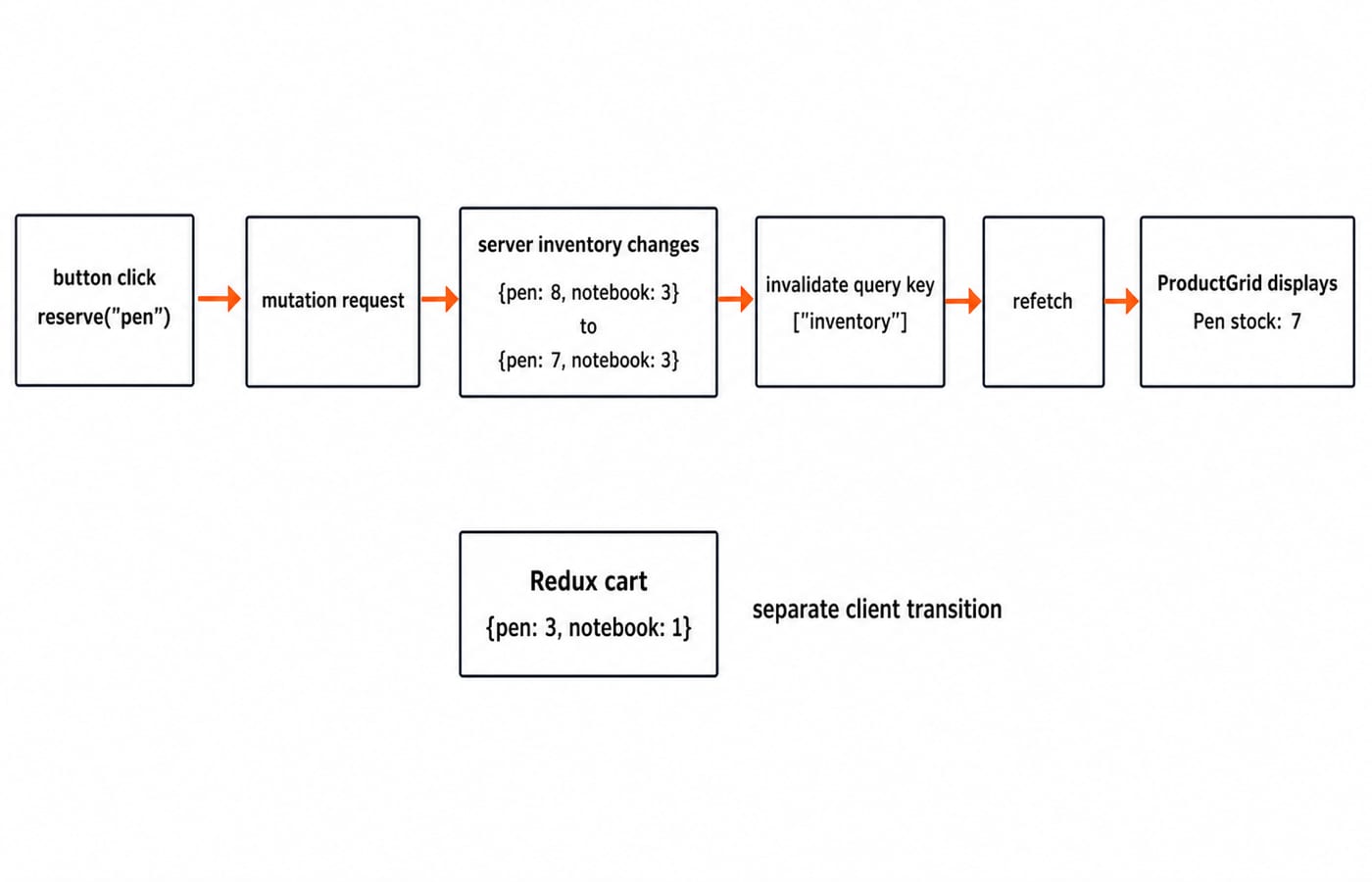
One reservation changes {pen: 8, notebook: 3} to {pen: 7, notebook: 3}. Invalidation refetches, so the screen says Pen stock: 7. Copying the response into local state or Redux creates a second source of truth. For a full-stack build, take the MERN Stack Course, then study API-side inventory modelling in Mongoose Schemas and Models.
Shareable view choices belong in the URL:
const params = new URLSearchParams({ filter: "low", sort: "qty-asc", page: "2" });
console.log(`?${params.toString()}`);
// ?filter=low&sort=qty-asc&page=2
Bookmarks and the Back button now preserve the view without an in-memory global store.
Avoid common state management traps
Trap | Fix |
|---|---|
Store | Derive it with |
Mutate ordinary reducer arrays | Return new arrays and objects |
Use one giant Context | Split unrelated concerns |
Copy inventory into Redux | Keep it in the query cache |
Call | Use functional setters |
For an interview decision matrix: local and simple means useState; local and transition-heavy means useReducer; distant and stable means Context; complex shared client workflow means Redux Toolkit; fetched cacheable data means TanStack Query; shareable navigation means the URL. Name the owner, trace one update, and justify the smallest adequate tool.
Check yourself from {pen: 3, notebook: 1}: add {id: "eraser", qty: 1} and confirm 4 + 1 = 5. Reset to {pen: 3, notebook: 1}, set notebook from 1 to 0, remove its line, and confirm 4 - 1 = 3. Separately, change URL page 2 to 3 without losing filter=low; reserve a pen and confirm stock is 7 while cart pen quantity remains 3.
The short version
Colocate first and lift only as far as necessary. Use reducers for transition complexity, external stores for shared client workflows, query tools for server state, and URLs for shareable views. Build with the Coding & Skill Development Courses, then use HTML Interview Questions for Freshers for related frontend practice.
Keep learning

MongoDB Aggregation Pipeline: `$match` to `$group` with a Worked Example
Build one MongoDB aggregation pipeline step by step. Follow five fictional orders through filtering, array expansion, grouping, projection, and deterministic sorting.
Updated 17 Nov 20266 min readWeb Development

Future Internet Explained: Architecture, a Worked IoT Example and Exam Traps
Learn how device, edge, network, cloud and application layers cooperate, then solve a smart-campus example for data reduction and control-loop latency.
Updated 16 Nov 20266 min readWeb Development

Testing React Components: A Runnable Vitest and Testing Library Tutorial
Build and test a small React progress component from its initial render through completion. The examples use accessible queries, awaited actions, and an exact mock assertion.
Updated 15 Nov 20266 min readWeb Development

React Performance Optimization Tutorial: Profiler, memo, useMemo, and useCallback Examples
Build one React lab, measure its render and calculation counts, then remove avoidable work while keeping typing responsive.
Updated 14 Nov 20266 min readWeb Development