

React useRef Tutorial: Refs, DOM Focus, Timers, and Examples
Learn when a React ref fits better than state or a local variable. Build an attempt counter, focus an input, manage a timer, and diagnose common ref mistakes.
KnowledgeGate Team
Exam prep & CS education
Updated 5 Nov 20266 min read

A value sometimes needs to survive a render without appearing on screen; a button may also need direct access to an input or timer. Local variables reset on the next render, while state may trigger a render the UI does not need. The examples trace an attempt counter, input selection, and a timer from 0 to 3 and back to 0.
What a React ref is and where useRef fits
A ref is a stable object with one mutable property, current. The official React useRef reference explains that const attemptsRef = useRef(0) returns the same object on later renders, starting with attemptsRef.current === 0.
Choose storage from the UI requirement. On a dashboard, keep a visible score such as 40 in state because a change must update JSX. Keep a timer handle in a ref because it must survive renders but is not displayed. Keep remaining = 10 - 7 = 3 as a local calculation because each render can recompute it. Changing ref.current does not ask React to render, so a ref is an escape hatch for non-rendering information, not a substitute for visible state. Web Development provides the broader UI context.
Persistent value example: count attempts without re-rendering
This component stores attempts in a ref and reveals the total when state changes:
import { useRef, useState } from "react";

export default function PracticeCounter() {
  const attemptsRef = useRef(0);
  const [shownAttempts, setShownAttempts] = useState(0);

  function recordAttempt() {
    attemptsRef.current += 1;
    console.log(`Recorded: ${attemptsRef.current}`);
  }

  function revealTotal() {
    setShownAttempts(attemptsRef.current);
  }

  return (
    <section>
      <h2>Ref practice</h2>
      <button onClick={recordAttempt}>Record attempt</button>
      <button onClick={revealTotal}>Show total</button>
      <p>Shown attempts: {shownAttempts}</p>
    </section>
  );
}
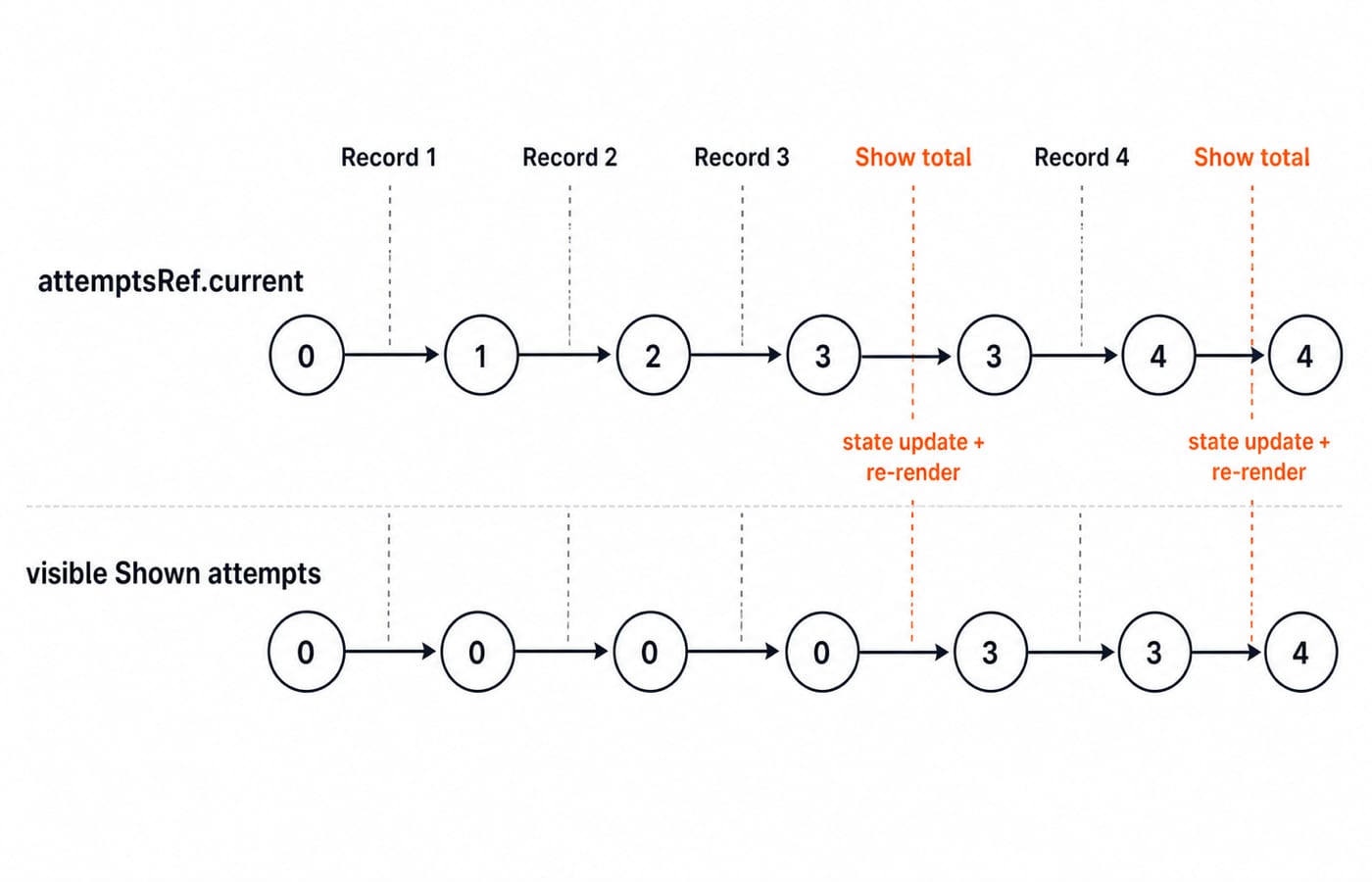
At initialization, the ref and state are both 0. recordAttempt mutates the ref; revealTotal copies it into visible state. Both writes occur in event handlers after rendering, and each record click adds 1 to the previous current value.
Click Record attempt three times. The assignments produce 1, 2, and 3, while the console logs Recorded: 1, Recorded: 2, and Recorded: 3. The page still says Shown attempts: 0 because no state changed. Click Show total, and React copies 3 into state and renders Shown attempts: 3.
One more record click changes the ref to 4 and logs Recorded: 4, while the page remains at 3. The next Show total click renders 4. The ref survives renders, but mutation alone does not refresh the UI.
DOM ref example: focus and select an input value
For controlled-versus-uncontrolled ownership and submit-time value reading, use React Forms: Controlled vs Uncontrolled Components, Validation and the Interview Questions. The example below focuses on imperative focus and selection through a DOM ref.
import { useRef } from "react";

export default function AnswerBox() {
  const answerRef = useRef(null);

  function focusAnswer() {
    answerRef.current?.focus();
    answerRef.current?.select();
  }

  return (
    <section>
      <label htmlFor="answer">Answer</label>
      <input id="answer" ref={answerRef} defaultValue="42" />
      <button onClick={focusAnswer}>Focus and select answer</button>
    </section>
  );
}
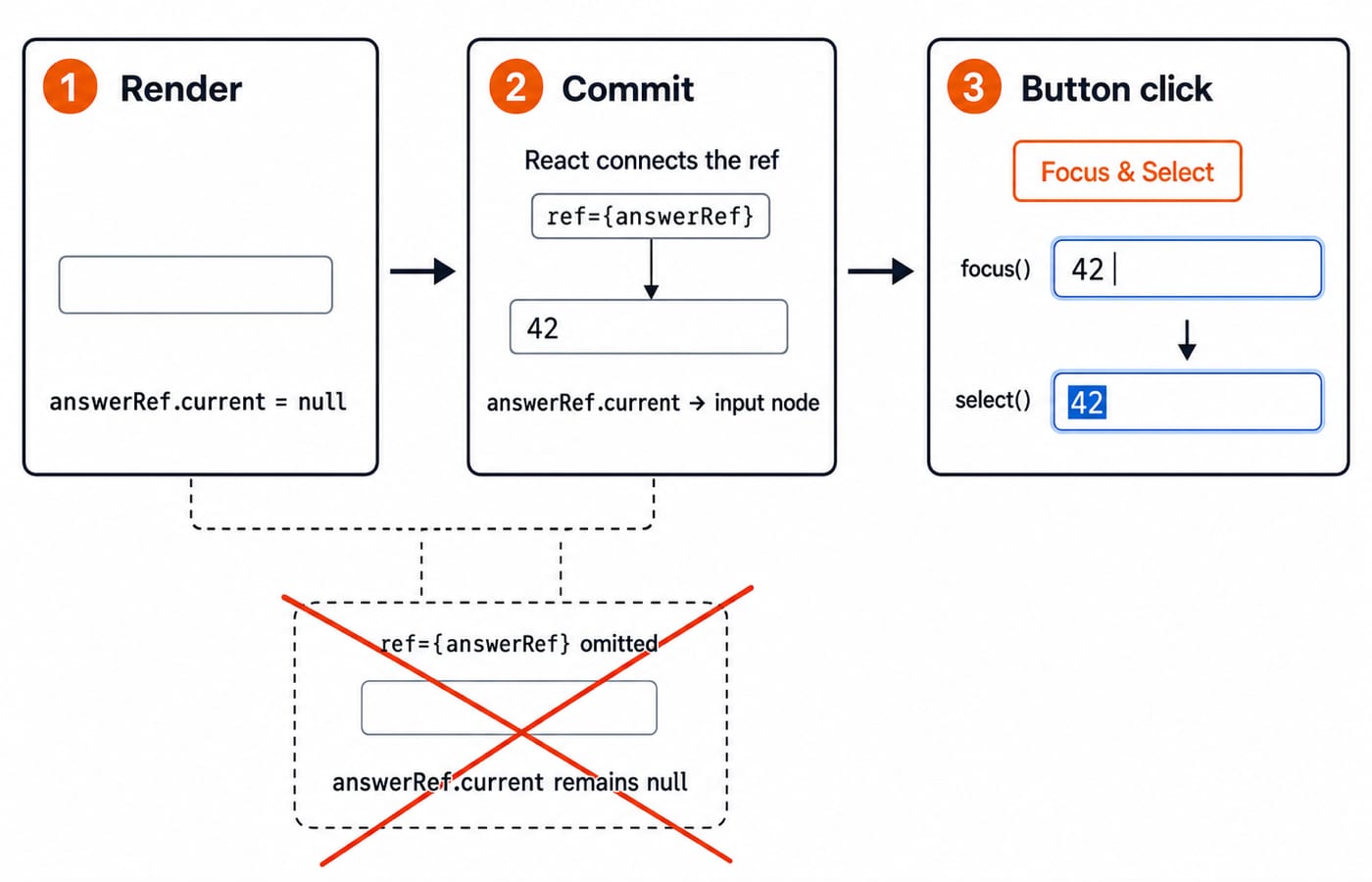
The ref prop connects React to the browser element after commit. focus() moves focus into the field; select() highlights its contents for replacement.
On the first render, answerRef.current is null. After commit React assigns the input node to current. The button then focuses the field and selects both characters in 42 without changing the value or state. Removing the node clears the ref.
Optional chaining guards null. Without ref={answerRef}, React never populates current, so no node can be focused or selected.
Timer example: store an interval handle without displaying it
The timer keeps visible seconds in state and its interval handle in a ref:
import { useEffect, useRef, useState } from "react";

export default function StudyTimer() {
  const [seconds, setSeconds] = useState(0);
  const intervalRef = useRef(null);

  function start() {
    if (intervalRef.current !== null) return;
    intervalRef.current = setInterval(() => {
      setSeconds((current) => current + 1);
    }, 1000);
  }

  function stop() {
    if (intervalRef.current === null) return;
    clearInterval(intervalRef.current);
    intervalRef.current = null;
  }

  function reset() {
    stop();
    setSeconds(0);
  }

  useEffect(() => {
    return () => clearInterval(intervalRef.current);
  }, []);

  return (
    <section>
      <p>{seconds} seconds</p>
      <button onClick={start}>Start</button>
      <button onClick={stop}>Stop</button>
      <button onClick={reset}>Reset</button>
    </section>
  );
}
Initially, the UI reads 0 seconds and intervalRef.current is null. Start stores the interval handle. After three interval callbacks, the functional updates calculate 0 -> 1 -> 2 -> 3, so the UI reads 3 seconds. This traces callbacks, not exact wall-clock boundaries.
The guard prevents two Start clicks from creating two intervals while the ref remembers only the latest. The functional updater reads current state rather than a stale capture. Repeated stop() calls are safe because they return when no handle exists; cleanup releases the timer without resetting visible seconds.
A second Start does nothing while the handle is non-null. Stop clears the interval and ref, leaving 3 seconds on screen. Reset also sets state to 0. Seconds belong in state because users see them; the handle belongs in a ref because only code needs it across renders. Cleanup clears an active interval on unmount.
Ref, state, or local variable: choose from the UI requirement
Choose according to the UI requirement:
Question | Choice | Worked value |
|---|---|---|
Must JSX update when it changes? | State |
|
Must it survive renders without being shown? | Ref |
|
Can it be calculated from current inputs? | Local constant |
|
For a counterexample, move seconds into const secondsRef = useRef(0) and increment secondsRef.current. The number survives, but <p>{secondsRef.current} seconds</p> stays stale until some unrelated render happens. That is a design bug, not a performance improvement.
JavaScript objects, mutation, closures, and event handlers are useful prerequisites. The rule stays simple: visible changing data goes in state; refs hold information rendering does not need.
Five common useRef mistakes and their fixes
Expecting a visible update. Setting
scoreRef.current = 45will not change a visible40. Put the visible score in state.Writing during render. Running
attemptsRef.current += 1in the component body makes rendering impure. Write in event handlers or effects. React permits predictable initialization as the only exception.Using a DOM node too early.
inputRef.current.focus()fails before the node exists. Call it after commit, such as in a click handler, and retain thenullguard.Recreating the container.
const inputRef = { current: null }creates a new object during every render. UseuseRef(null)to receive the stable object again.Leaking intervals. Guard against a second interval, clear the handle on Stop, and clear it during unmount cleanup.
Debug in order: inspect current, confirm the JSX ref attachment, decide whether the value belongs in state, then check cleanup.
Practise useRef with three exact exercises
Predict output. Start with
const clicksRef = useRef(5). Make a button handler add2and logclicksRef.current. Two clicks must log7and9. With no state change, JSX from the original render stays unchanged. Explain why before running it.Clear a DOM input. Change
AnswerBoxtodefaultValue="React". Add aClearbutton that setsanswerRef.current.value = ""and then callsfocus(). Clicking it removes all five characters, leaves focus in the input, and uses no state. A controlled input would use state instead.Record timer laps. Add
const lapsRef = useRef([])and aLapbutton. At3 seconds, append3; after two more callbacks, append5. Log a snapshot withconsole.log([...lapsRef.current])so the outputs are[3]and then[3, 5]. An on-screen lap list would require state.
Answer these before checking the docs: why does a ref survive a render, and why does mutating it not refresh JSX?
The short version and the next step
Four rules: useRef returns a stable container, current changes without a render, DOM refs populate after commit, and visible changing data belongs in state. Attempts reached 4 before reveal, the input selected 42, and the timer moved 0 -> 3 -> 0 while its handle stayed outside the UI.
Use the React and Redux Course, the MERN Stack Course for broader work, or browse Coding & Skill Development Courses.
Keep learning

MongoDB Aggregation Pipeline: `$match` to `$group` with a Worked Example
Build one MongoDB aggregation pipeline step by step. Follow five fictional orders through filtering, array expansion, grouping, projection, and deterministic sorting.
Updated 17 Nov 20266 min readWeb Development

Future Internet Explained: Architecture, a Worked IoT Example and Exam Traps
Learn how device, edge, network, cloud and application layers cooperate, then solve a smart-campus example for data reduction and control-loop latency.
Updated 16 Nov 20266 min readWeb Development

Testing React Components: A Runnable Vitest and Testing Library Tutorial
Build and test a small React progress component from its initial render through completion. The examples use accessible queries, awaited actions, and an exact mock assertion.
Updated 15 Nov 20266 min readWeb Development

React Performance Optimization Tutorial: Profiler, memo, useMemo, and useCallback Examples
Build one React lab, measure its render and calculation counts, then remove avoidable work while keeping typing responsive.
Updated 14 Nov 20266 min readWeb Development