HTML Interview Questions for Freshers: Semantic Tags, Forms and the Attributes That Get Tested
Learn the HTML details interviews actually probe, from semantic landmarks and form submission to script loading, labels, and accessibility.
KnowledgeGate Team
Exam prep & CS education
Updated 20 Jul 20265 min read

HTML feels too basic to prepare, which is exactly why it filters candidates. An interviewer asks why clicking a label does not focus its box, or why a field never reaches the server, and the fresher who "knows HTML" stalls.
The real test is semantics, form mechanics, and a small set of important attributes, not whether you can spell <div>. These are the parts worth being able to explain and build. If tags, structure and the head/body split still feel shaky, rebuild that ground first with HTML Basics: Complete Guide to Tags, Structure and a Worked Web Page.
Semantic HTML tags are not prettier divs
Semantic elements tell the browser, accessibility tools, developers, and search systems what a region means.
<header>contains introductory content for a page or section.<nav>groups the page's major navigation links.<main>holds the page's dominant content. A page should have one visible<main>.<article>is a self-contained item that could make sense on its own, such as a post or product card.<section>groups a meaningful topic and should normally have a heading.<aside>contains related but secondary material.<footer>holds closing information for a page or section.<figure>wraps self-contained media, while<figcaption>supplies its caption.
The benefits are concrete. Screen-reader users can jump by landmark instead of moving through every element. Crawlers can identify the main article more reliably. Developers can read the document structure without decoding a forest of generic containers.
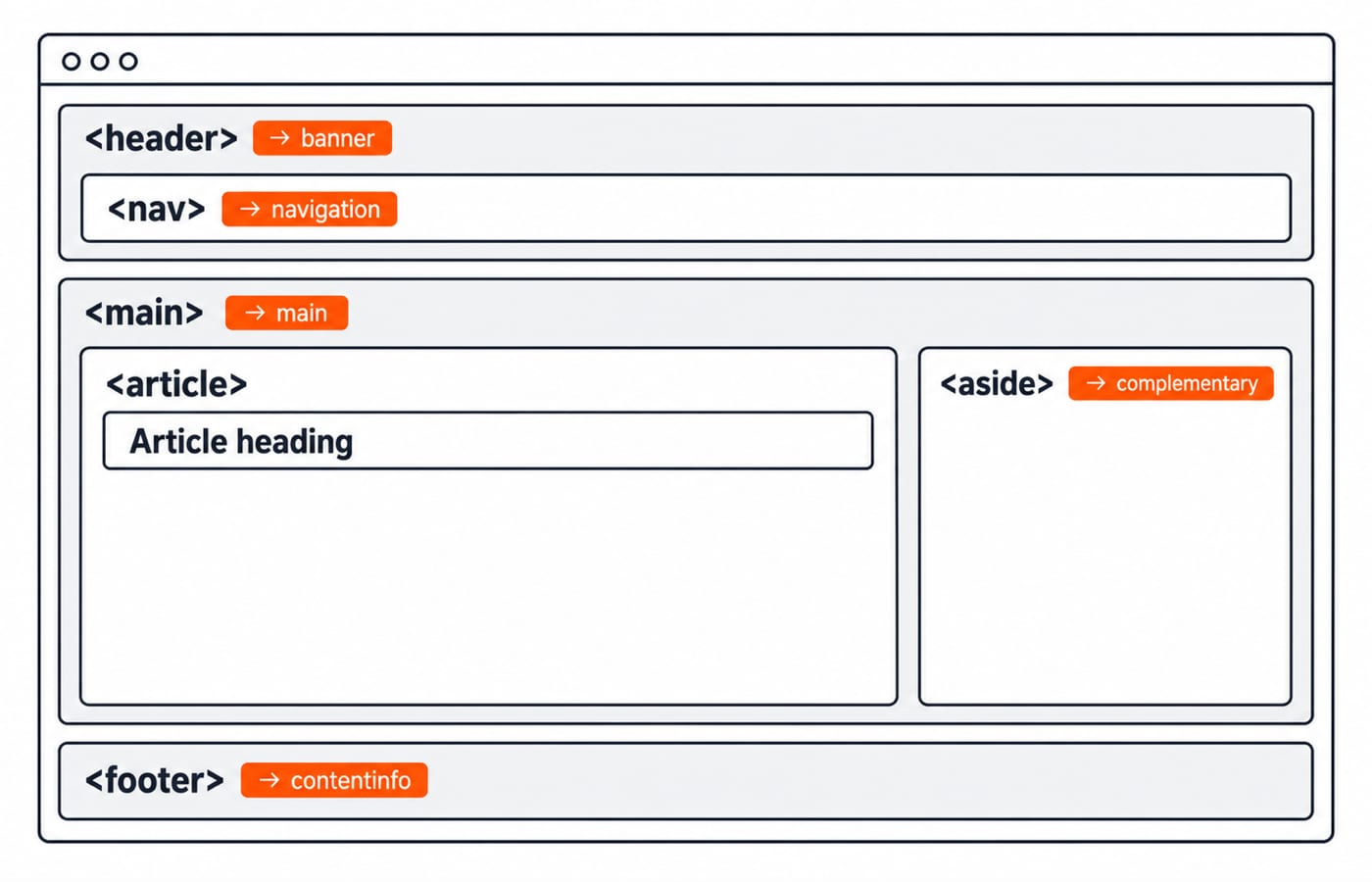
Three interview rules deserve a precise answer: use one visible <main> for the page's dominant content; give a <section> an accessible name, normally through its heading; and use <article> only when the content is independently meaningful. Web technologies for teaching exams: HTML, HTTP and the internet explained connects these tags to the wider browser model.
Forms: name, id, payload, and native validation
The commonest form question is some version of: what exactly reaches the server when this is submitted? Work it out on this registration form:
<form action="/register" method="post">
  <label for="email">Email</label>
  <input type="email" id="email" name="userEmail" required>

  <label for="password">Password</label>
  <input type="password" id="password" name="pw" minlength="8" required>

  <label for="nickname">Nickname</label>
  <input type="text" id="nickname">

  <label><input type="radio" name="plan" value="free" checked> Free</label>
  <label><input type="radio" name="plan" value="pro"> Pro</label>

  <button type="submit">Register</button>
</form>
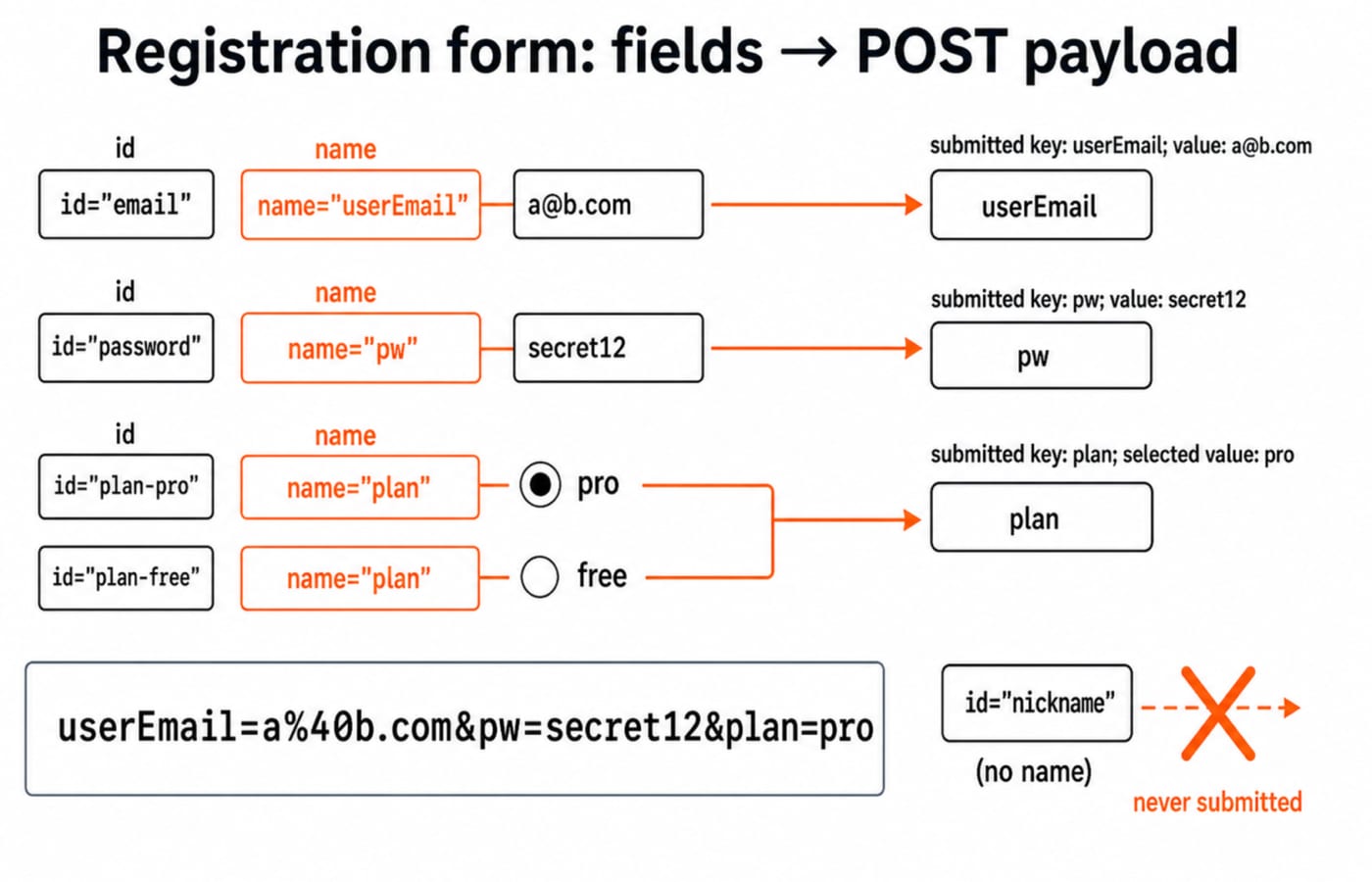
action="/register" is the submission target and method="post" puts the form data in the request body. The browser submits successful controls by name, not by id. The email input therefore arrives under the key userEmail, and the password input, whose id is password, arrives under pw. The nickname input has an id but no name, so it never reaches the server at all.
The two radios share name="plan", so they form one mutually exclusive group. checked makes Free the initial choice, but choosing Pro changes the submitted value to pro.
With email a@b.com, password secret12, and plan Pro, the URL-encoded POST body is exactly:
userEmail=a%40b.com&pw=secret12&plan=proThe @ becomes %40; the other characters here need no change. Reading the pairs back gives userEmail = a@b.com, pw = secret12, and plan = pro.
Native validation runs before submission. type="email" plus required rejects an empty or malformed email and shows the browser's validation message. minlength="8" rejects a shorter password. This improves the first interaction, but server-side validation is still required because clients can bypass HTML controls.
Finally, <label for="email"> is linked to the control whose id is email. Clicking the label focuses that input. If for does not exactly match an existing id, that useful behaviour is lost.
The HTML attributes that get tested
Attribute questions are where an interviewer checks whether you have built pages or only read about them. Five come up again and again.
defer vs async on scripts: both allow parsing to continue while a classic external script downloads. A deferred script waits until parsing finishes and deferred scripts preserve document order. An async script runs as soon as it is ready, so order is not guaranteed.
alt on images: useful alternative text communicates the image's purpose to assistive technology and appears when the image cannot be displayed. Decorative images normally use an empty alt="" rather than repeating noise.
data-* attributes: these hold application-specific data without inventing invalid attributes. For example, data-user-id="42" is available in JavaScript as element.dataset.userId.
Metadata: put <meta charset="UTF-8"> early so character decoding is known. <meta name="viewport" content="width=device-width, initial-scale=1"> tells mobile browsers to match the layout viewport to the device width.
Input types: email, number, and date provide type-specific controls or validation where supported. checkbox represents independent on/off choices; radios sharing one name represent one choice from a group.
Explain-the-difference staples
Pair | Interview-safe distinction |
|---|---|
Block vs inline vs inline-block | A block box normally starts on a new line, an inline box flows within text, and |
|
|
|
|
|
|
GET vs POST forms | GET encodes data in the URL and suits retrievable, bookmarkable requests; POST sends a body and suits state changes or larger and sensitive payloads, with HTTPS still required. |
Common HTML interview traps
Only
id, noname: the field can be targeted by CSS or a label but is absent from normal form submission.Broken label wiring: a
forvalue with no matchingidmeans clicking the label does not focus or toggle the intended control.Missing
alt: accessibility checks cannot determine the image's alternative or decorative status.GET for a password: the value can appear in the URL, browser history, logs, and copied links.
Treating
<br/>as special HTML5 syntax: the slash is unnecessary for a void HTML element; XHTML parsing rules are different.
A fresher round usually opens with rapid definitions and compare-the-two questions, then sets a small hands-on task such as "build this form". In that task, correct name, for, id, input types, and validation matter far more than decorative whitespace. When a platform detail is genuinely disputed, settle it against the current WHATWG HTML standard or MDN rather than a memorised answer list.
The short version and your next step
Semantic elements give regions meaning. name, not id, determines the submitted key. A short list of attributes handles much of script loading, validation, metadata, and accessibility.
Build the example once, inspect its network payload, then practise variations. The Complete HTML course provides the concept sequence, and the Coding Skills catalogue gives the wider route. KnowledgeGate also carries around 200 HTML practice questions. For the larger plan, use Technical interview prep: OS, DBMS, CN and OOP questions freshers face.
Keep learning

Regular Expressions in JavaScript: Match, Extract, Replace, and Validate
Learn JavaScript regex by tracing what each token consumes. Build a validator and a named-group log parser, then practise extraction, replacement, flags, and common traps.
Updated 23 Oct 20265 min readWeb Development

Functions and Arrow Functions in JavaScript: Syntax, Scope and Runnable Examples
Build function declarations, expressions and arrows in JavaScript, then trace parameters, closures, lexical this and array callbacks through exact outputs.
Updated 19 Oct 20266 min readWeb Development

Modules in JavaScript: Import, Export, and Runnable Examples
Build JavaScript modules from scratch with a shopping-cart project that runs in Node.js and the browser. Learn live bindings, re-exports, lazy loading, and practical fixes.
Updated 15 Oct 20265 min readWeb Development

LocalStorage and Cookies in JavaScript: Store, Read and Delete Data
Run one lesson-progress object and one preference cookie through their complete life cycles, then learn which browser store fits a feature and which security traps to avoid.
Updated 11 Oct 20266 min readWeb Development