

MongoDB Aggregation Pipeline: `$match` to `$group` with a Worked Example
Build one MongoDB aggregation pipeline step by step. Follow five fictional orders through filtering, array expansion, grouping, projection, and deterministic sorting.
KnowledgeGate Team
Exam prep & CS education
Updated 17 Nov 20266 min read

In a MERN report, find() can return paid orders, but application code would still need to expand every items array, calculate line revenue, group rows by month and category, and order the result. A MongoDB aggregation pipeline keeps those transformations on the server. The JavaScript map, filter and reduce order pipeline is the in-memory alternative for an order array already loaded by the application; MongoDB instead filters, expands, groups, and sorts before returning report rows. Track the document count after every stage to understand the dataflow instead of memorising a stage glossary.
1. See the pipeline as a document stream, not a long find()
The MongoDB Database Manual defines an aggregation pipeline as an ordered sequence of stages. Each stage receives documents, processes them, and passes its output to the next stage. A find() is enough when the required result is still a set of matching order documents. Our report also needs array expansion, computed totals, grouping, and reshaping.
Keep this five-stage dataflow in mind:
$matchreduces the stream to relevant orders.$unwindcreates one document per line item.$groupaccumulates totals at the month-category grain.$projectgives the totals reader-facing fields.$sortputs the report in its required order.
Changing that order changes the meaning and intermediate volume. Aggregation requires a known document shape; use Mongoose schemas, models, validation, and population as the prerequisite.
2. Fix the exact orders data and the report question
Insert this fictional collection in mongosh:
db.orders.insertMany([
  { _id: "O1001", orderedAt: ISODate("2026-01-05T10:00:00Z"), status: "paid",
    items: [{ category: "electronics", qty: 2, unitPrice: 1500 },
            { category: "books",       qty: 1, unitPrice: 500  }] },
  { _id: "O1002", orderedAt: ISODate("2026-01-20T12:00:00Z"), status: "paid",
    items: [{ category: "electronics", qty: 1, unitPrice: 1500 },
            { category: "books",       qty: 3, unitPrice: 400  }] },
  { _id: "O1003", orderedAt: ISODate("2026-02-03T09:00:00Z"), status: "paid",
    items: [{ category: "electronics", qty: 1, unitPrice: 2000 },
            { category: "books",       qty: 2, unitPrice: 600  }] },
  { _id: "O1004", orderedAt: ISODate("2026-02-10T11:00:00Z"), status: "cancelled",
    items: [{ category: "electronics", qty: 4, unitPrice: 1500 }] },
  { _id: "O1005", orderedAt: ISODate("2026-02-15T14:00:00Z"), status: "paid",
    items: [{ category: "books",       qty: 1, unitPrice: 800  }] }
]);
The contract is precise: for paid orders from 2026-01-01T00:00:00Z inclusive to 2026-03-01T00:00:00Z exclusive, return one row per calendar month and category. Each row needs revenue, units, and distinct orderCount. Sort months ascending and revenue descending within each month.
3. Use $match and $unwind: five orders become seven item rows
Start with the two stages that control the calculation:
{ $match: {
    status: "paid",
    orderedAt: {
      $gte: ISODate("2026-01-01T00:00:00Z"),
      $lt:  ISODate("2026-03-01T00:00:00Z")
    }
} },
{ $unwind: "$items" }
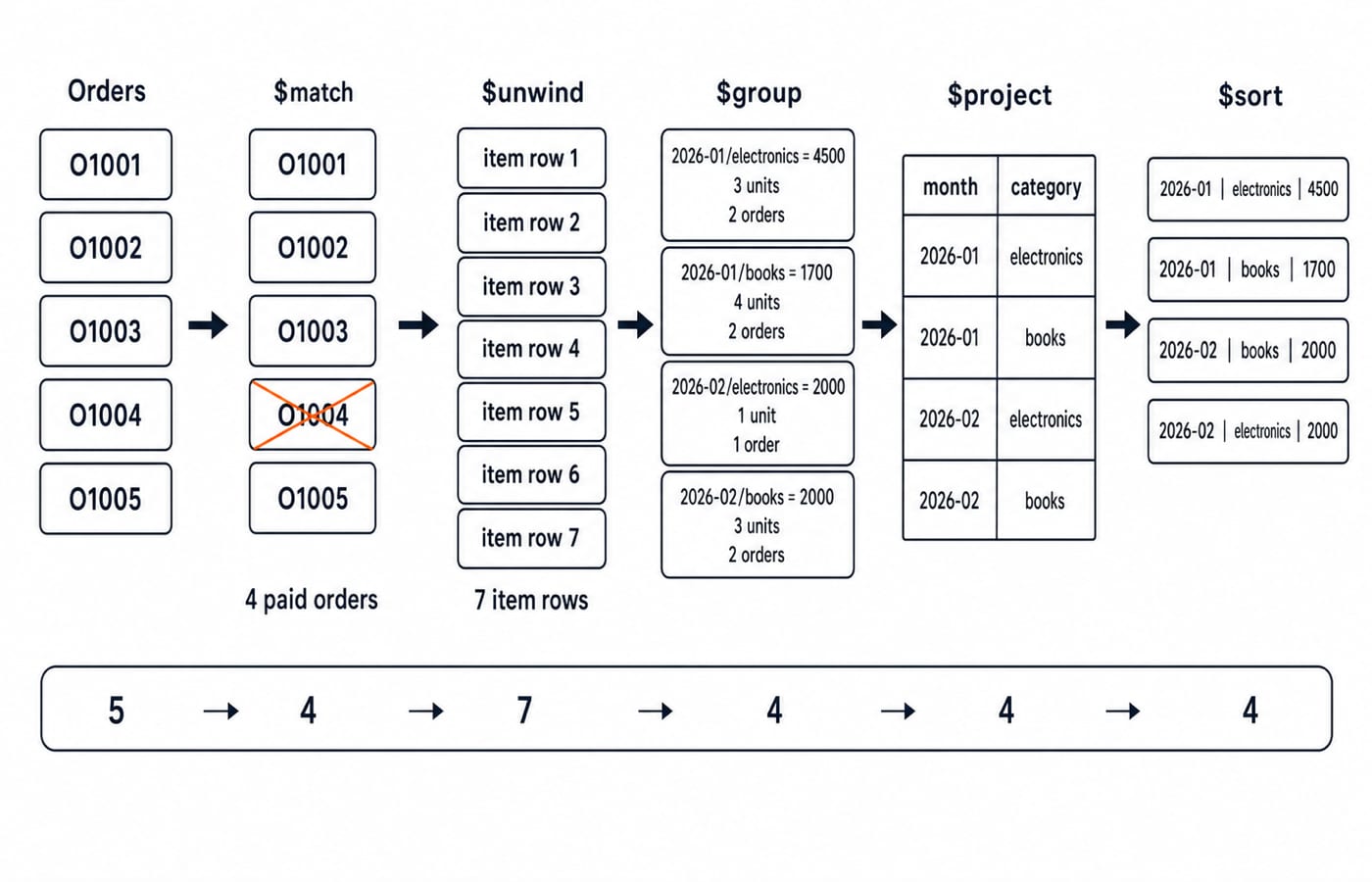
$match keeps O1001, O1002, O1003, and O1005; cancelled O1004 contributes nothing. $unwind then produces one output document for each array element, so 2 + 2 + 2 + 1 = 7 item rows.
Order | Category | Qty | Unit value | Line revenue |
|---|---|---|---|---|
O1001 | electronics | 2 | 1500 | 3000 |
O1001 | books | 1 | 500 | 500 |
O1002 | electronics | 1 | 1500 | 1500 |
O1002 | books | 3 | 400 | 1200 |
O1003 | electronics | 1 | 2000 | 2000 |
O1003 | books | 2 | 600 | 1200 |
O1005 | books | 1 | 800 | 800 |
MongoDB's $match reference recommends an early selective filter and says a first-stage $match may use a suitable index. Its $unwind reference specifies one output document per array element.
4. Build $group around the report grain
The report grain is the meaning of one output row. Here it is one month + category, so both fields belong in the compound _id:
{ $group: {
    _id: {
      month: { $dateToString: { format: "%Y-%m", date: "$orderedAt" } },
      category: "$items.category"
    },
    revenue: { $sum: { $multiply: ["$items.qty", "$items.unitPrice"] } },
    units: { $sum: "$items.qty" },
    orderIds: { $addToSet: "$_id" }
} }
$multiply calculates each line's revenue, $sum accumulates revenue and units, and $addToSet retains distinct input order IDs. MongoDB's $group documentation defines these accumulator semantics and identifies $group as a blocking stage.
The four groups are:
Month | Category | Revenue | Units |
|
|---|---|---|---|---|
2026-01 | electronics | 4500 | 3 | {O1001, O1002} |
2026-01 | books | 1700 | 4 | {O1001, O1002} |
2026-02 | electronics | 2000 | 1 | {O1003} |
2026-02 | books | 2000 | 3 | {O1003, O1005} |
Set display order is not guaranteed. As a full check, January books is (1 * 500) + (3 * 400) = 500 + 1200 = 1700. Using { $sum: 1 } after $unwind would count item rows, not distinct orders.
5. Use $project and $sort to produce the final report
Now flatten the compound key, remove _id, count each distinct-ID set, and add a category tie-breaker:
{ $project: {
    _id: 0,
    month: "$_id.month",
    category: "$_id.category",
    revenue: 1,
    units: 1,
    orderCount: { $size: "$orderIds" }
} },
{ $sort: { month: 1, revenue: -1, category: 1 } }
MongoDB's $project rules allow existing and computed fields. Its $sort documentation warns that sorting is not stable when documents have equal sort keys. The explicit category key therefore resolves February's revenue tie alphabetically instead of relying on insertion order.
{ month: "2026-01", category: "electronics", revenue: 4500, units: 3, orderCount: 2 }
{ month: "2026-01", category: "books",       revenue: 1700, units: 4, orderCount: 2 }
{ month: "2026-02", category: "books",       revenue: 2000, units: 3, orderCount: 2 }
{ month: "2026-02", category: "electronics", revenue: 2000, units: 1, orderCount: 1 }
6. Read and debug the complete pipeline as dataflow
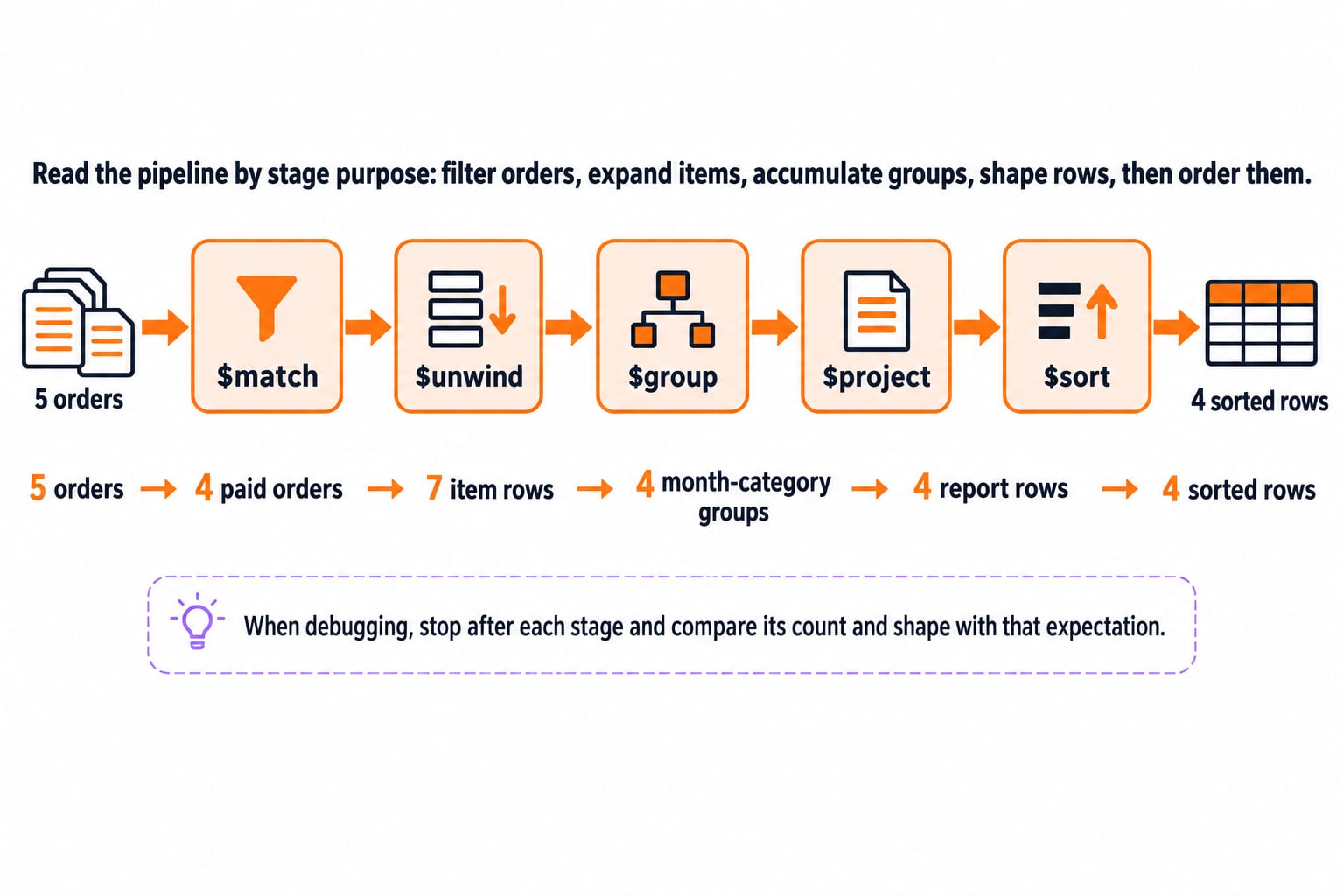
Read the pipeline by stage purpose: filter orders, expand items, accumulate groups, shape rows, then order them.
db.orders.aggregate([
  { $match: {
      status: "paid",
      orderedAt: {
        $gte: ISODate("2026-01-01T00:00:00Z"),
        $lt:  ISODate("2026-03-01T00:00:00Z")
      }
  } },
  { $unwind: "$items" },
  { $group: {
      _id: {
        month: { $dateToString: { format: "%Y-%m", date: "$orderedAt" } },
        category: "$items.category"
      },
      revenue: { $sum: { $multiply: ["$items.qty", "$items.unitPrice"] } },
      units: { $sum: "$items.qty" },
      orderIds: { $addToSet: "$_id" }
  } },
  { $project: {
      _id: 0,
      month: "$_id.month",
      category: "$_id.category",
      revenue: 1,
      units: 1,
      orderCount: { $size: "$orderIds" }
  } },
  { $sort: { month: 1, revenue: -1, category: 1 } }
]);
Keep a cardinality ledger beside the code: 5 orders -> 4 paid orders -> 7 item rows -> 4 month-category groups -> 4 report rows -> 4 sorted rows. When debugging, stop after each stage and compare its count and shape with that expectation.
7. Avoid the traps that skill checks expose
Use each mistake to identify the correction:
Grouping before unwinding groups arrays instead of individual item categories. Unwind first.
Summing
unitPriceignores quantity. Sum$multiplyof quantity and unit value.Using
{ $sum: 1 }for orders counts item rows. Collect order IDs, then use$size.Using an inclusive end timestamp can mishandle boundary records. Use the half-open range.
Omitting the final tie-breaker leaves equal-revenue order unspecified. Sort by category too.
With field-path syntax,
$unwindproduces no output for a null, missing, or empty array unless the documented preservation option is enabled.
Early $match reduces downstream work and can use an index when first. $group and $sort are blocking stages, so inspect execution plans and production data instead of assuming this small example scales automatically.
Skill checks may ask you to predict counts after $unwind, choose a group key, trace $sum with $multiply, debug duplicated order counts, or explain deterministic sorting.
8. Short version and the next practical build
Remember five verbs: filter orders, expand items, group at the report grain, shape fields, then sort. Four paid orders become seven line items and four month-category rows, with January electronics at 4500 and February's 2000 tie resolved by category.
For practice, add paid order O1006 on 2026-02-20 with one books item where qty: 2 and unitPrice: 500. Predict the new February books row before running it: revenue: 3000, units: 5, orderCount: 3. Then build the backend version with the Node.js, Express.js & MongoDB course, broaden it through the MERN Stack full-stack development course, or browse the Coding & Skill Development courses.
Keep learning

Future Internet Explained: Architecture, a Worked IoT Example and Exam Traps
Learn how device, edge, network, cloud and application layers cooperate, then solve a smart-campus example for data reduction and control-loop latency.
Updated 16 Nov 20266 min readWeb Development

Testing React Components: A Runnable Vitest and Testing Library Tutorial
Build and test a small React progress component from its initial render through completion. The examples use accessible queries, awaited actions, and an exact mock assertion.
Updated 15 Nov 20266 min readWeb Development

React Performance Optimization Tutorial: Profiler, memo, useMemo, and useCallback Examples
Build one React lab, measure its render and calculation counts, then remove avoidable work while keeping typing responsive.
Updated 14 Nov 20266 min readWeb Development

Node.js Path and OS Modules: Build Portable Scripts with Runnable Examples
Learn how Path and OS remove hard-coded assumptions from Node.js scripts. Follow deterministic examples, memory maths, and a complete system-report build.
Updated 13 Nov 20265 min readWeb Development