Mongoose Schemas and Models: Validation, Population, and the Pitfalls That Silently Break Node Apps
Build User and Course schemas, populate ObjectId references, and avoid the unique-index, update-validator, equality, and timestamp mistakes that damage data.
KnowledgeGate Team
Exam prep & CS education
Updated 20 Jul 20266 min read

Most people learn Mongoose by copying a schema and moving on. The trouble appears later, when a duplicate email follows a different error path, an update skips validation, or population returns no matching document. A schema handles shape, validation, defaults, and references, and each job has a rule worth learning explicitly.
Schema and Model are different objects
A Mongoose Schema is a blueprint. It declares field names, types, validators, defaults, instance methods, and relationships. Creating a schema alone does not read or write MongoDB.
A Model is created from that blueprint:
const User = mongoose.model('User', userSchema);The model is both a constructor for documents and the interface to a collection. new User(data) makes a document, while User.find(), User.updateOne(), and User.findById() operate through the bound MongoDB collection. Under the default naming convention, Mongoose lowercases and pluralises User to use the users collection.
Keep this mental model: schema is the class definition; model is the class connected to its collection. The Node.js, Express.js, and MongoDB course shows that connection inside a full server application.
Field types, validators, and defaults
These two schemas will support the rest of the example:
const userSchema = new mongoose.Schema({
  email: {
    type: String,
    required: true,
    unique: true,
    lowercase: true,
    trim: true,
    match: /^\S+@\S+\.\S+$/
  },
  name: {
    type: String,
    required: true,
    minlength: 2,
    maxlength: 60
  },
  role: {
    type: String,
    enum: ['student', 'admin'],
    default: 'student'
  },
  enrolledCourses: [{
    type: mongoose.Schema.Types.ObjectId,
    ref: 'Course'
  }],
  createdAt: {
    type: Date,
    default: Date.now
  }
});

const courseSchema = new mongoose.Schema({
  title: { type: String, required: true },
  slug: { type: String, required: true, unique: true },
  lessons: { type: Number, min: 0 }
});
required rejects a missing value. minlength and maxlength constrain the name length. enum accepts only student or admin, while match applies the email regular expression. The course's min: 0 rejects a negative lesson count.
Defaults run when a field is missing or undefined. default: 'student' supplies a fixed string. default: Date.now passes a function reference, so Mongoose calls it for each new document. Writing Date.now() would evaluate the function once while the schema is defined and reuse that captured timestamp as the default.
Mongoose also casts values before validation. For example, the string "25" can become the number 25 for lessons. A value such as "many" cannot be cast to a number, so Mongoose reports a CastError for that path and does not continue with its normal validators. During document validation, that path error can appear inside the larger validation error object, so handlers should inspect the error name and path rather than assuming every bad input failed an ordinary validator.
ObjectId references and population
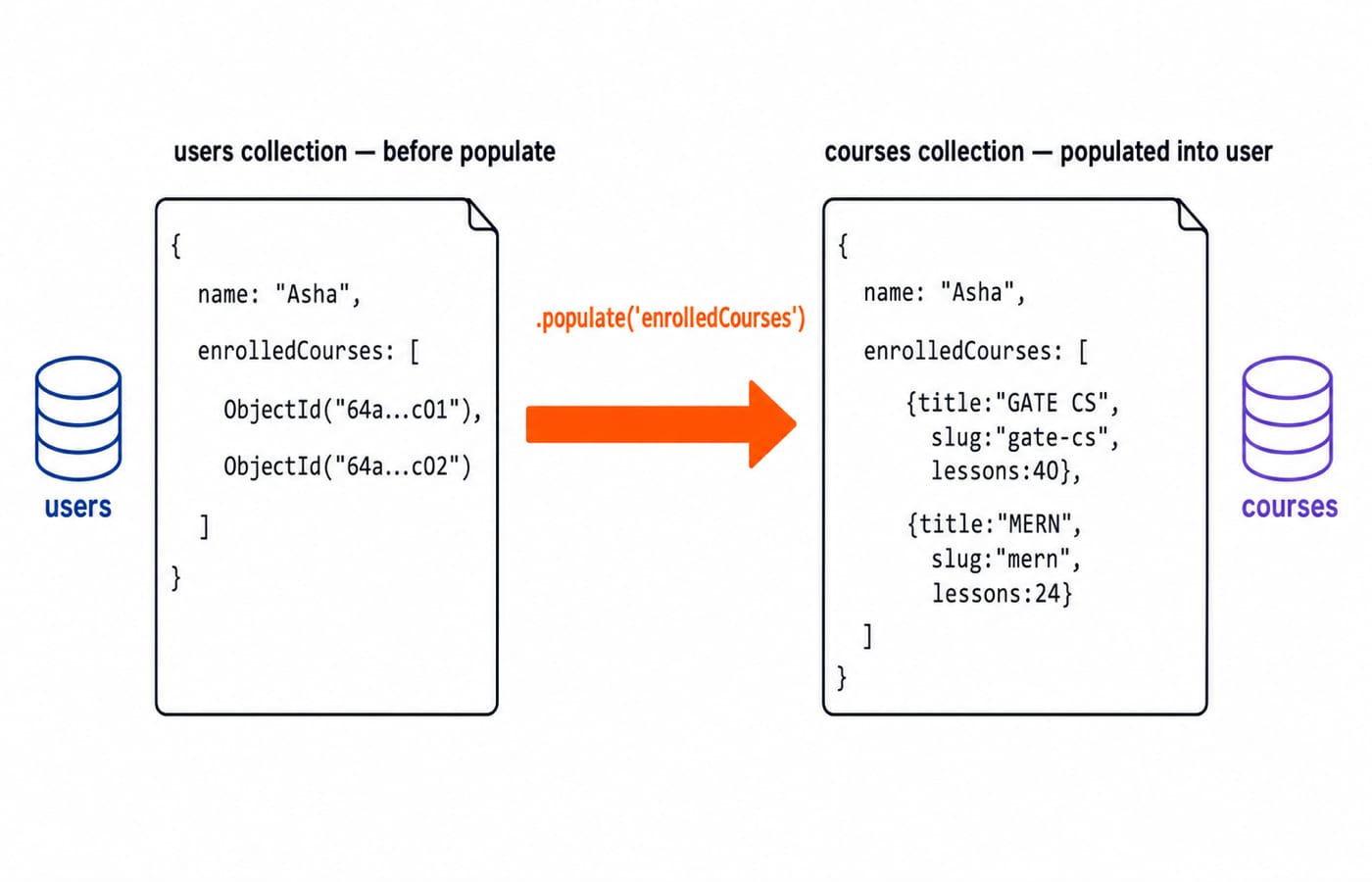
enrolledCourses does not store complete course documents inside each user. Before population, one user might look like this:
{
  email: 'learner@example.com',
  enrolledCourses: [
    ObjectId('64a...c01'),
    ObjectId('64a...c02')
  ]
}
Each ObjectId refers to a document created through the Course model. The ref: 'Course' option tells Mongoose which model to use when population is requested.
const user = await User.findById(id).populate('enrolledCourses');After population, the same field contains course documents rather than bare ids:
{
  email: 'learner@example.com',
  enrolledCourses: [
    {
      _id: ObjectId('64a...c01'),
      title: 'GATE CS',
      slug: 'gate-cs',
      lessons: 40
    },
    {
      _id: ObjectId('64a...c02'),
      title: 'MERN',
      slug: 'mern',
      lessons: 24
    }
  ]
}
Population is convenient, but it adds lookup work. Select only the fields the response needs, and watch query behaviour on read-heavy endpoints. Sometimes an application deliberately duplicates a stable display value, such as a course title, to avoid repeated population. That is denormalisation, and it trades faster reads for the responsibility of keeping copies consistent. Underneath, populate() is not a server-side join by default: Mongoose runs an extra query per populated path and stitches the results together in the application, so the cost grows with the number of paths you populate rather than staying flat.
Mongoose pitfalls that break applications
These failures are dangerous because the schema can look correct while a different rule applies at runtime.
unique is an index, not a validator
unique: true asks MongoDB to maintain a unique index. It is not a Mongoose validation rule. A duplicate email normally produces an E11000 duplicate key error during the write, not a standard validator message. Ensure the index exists, catch that database error explicitly, and return a useful conflict response.
Update validators are off by default
Document validation runs when a document is saved. Update methods skip it unless you ask for it, so the same schema that rejects an invalid role on save() will write that role straight through findOneAndUpdate. The option has to be requested on the call itself:
await User.findOneAndUpdate(
  { email: 'learner@example.com' },
  { role: 'superuser' },
  { runValidators: true, new: true }
);
With runValidators: true the update respects the enum, so superuser is rejected instead of stored. Drop the option and the same call succeeds. Add it deliberately on every update path, and test those paths, not just document creation.
ObjectIds are objects
Two ObjectId instances can represent the same value without being the same JavaScript object. Therefore, a === b may be false even when both print the same id. Use a.equals(b) when working with ObjectIds, or compare a.toString() and b.toString() after checking that both values exist.
Missing references do not become population errors
Population is a lookup, not referential-integrity enforcement. A missing single reference usually populates as null. For arrays, unmatched referenced documents may be absent from the populated result rather than causing an exception. Code for missing data, and decide whether stale references should be cleaned up.
A called timestamp function freezes the default
default: Date.now() stores the value returned during schema creation. New documents can then receive the same old timestamp. Pass Date.now so Mongoose invokes it when each document is created.
The Express.js routing, middleware, and error-handling guide shows where these database errors should enter the server's response path.
How interviews and MCQs test Mongoose
Expect questions on schema versus model, reference versus embedding, what populate() returns, and the read cost of population. Interviewers also ask why unique is not validation, why a model update can bypass schema rules, and why two ObjectIds fail an identity comparison.
A written question usually pins one of these to a single behaviour. A common one gives you a schema that declares email with unique: true, then saves a second document carrying an email that already exists, and asks what the application sees. The tempting answer is a validation error, because unique sits in the schema beside required and reads like a rule. The correct answer is a duplicate-key error, E11000, raised by the MongoDB index while the write is executing, which is why the code that handles it belongs in the catch block rather than in a validator.
KnowledgeGate's question bank holds well over 600 full-stack MERN practice questions, including dedicated Node.js, Express.js, and MongoDB modules. Solve enough of them to recognise the runValidators and E11000 traps without relying on memory from a copied schema. The Coding & Skills category connects that practice to the wider development path.
The short version and your next step
A schema defines shape, validation, defaults, and references. A model turns that blueprint into the document constructor and collection interface. Remember that unique creates an index, updates need runValidators, ObjectIds need value comparison, population can miss documents, and Date.now must be passed as a function.
Build the two schemas, create both course documents, and inspect the user before and after population. Then use the MERN Stack course to wire the same data layer into routes and a working interface.
Keep learning

Ecosystem Fundamentals MCQs: 10 Solved Questions on Meaning and Ecological Organisation
Solve 10 ecosystem MCQs with clear explanations of ecological organisation, productivity, sustainability, environmental ethics, energy balance and conservation.
8 Sep 20268 min readMCQ Practice

Architectural and Component Design MCQs: 12 Solved Questions
Solve 12 bank MCQs on software architecture, component roles, repositories, MVC, DFDs, structure charts and UML, each with a direct worked explanation.
Updated 6 Sep 20268 min readMCQ Practice

C++ Constructors MCQs: 12 Solved Object-Initialization Questions
Solve 12 published C++ constructor questions by tracing object creation, copy semantics, arrays, access, virtual rules, and dynamic allocation.
Updated 5 Sep 20267 min readMCQ Practice

Clipping Algorithms MCQs: 11 Solved Cohen-Sutherland and Cyrus-Beck Questions
Solve 11 clipping questions with fresh explanations, checked outcodes, line classifications, boundary intersections and a practical revision routine.
Updated 3 Sep 20268 min readMCQ Practice