Python File Handling and Data Analysis: A Complete Worked Guide
Follow one Python standard-library program from safe CSV reading and row validation to exact topic summaries, rejected-row tracking, and reproducible output files.
KnowledgeGate Team
Exam prep & CS education
Updated 9 Sep 20265 min read
Python's open() looks simple, but the wrong mode, a missing encoding, malformed rows, or a careless write can turn a small script into lost data or incorrect analysis. One seven-row CSV file goes through validation, exact calculations, and clean CSV and JSON output. Python's standard library exposes the file and analysis logic directly, without a dataframe library.
Build the right mental model for file handling and analysis
A file-processing pipeline moves through distinct stages: stored bytes, decoding with an explicit encoding, text lines, structured records, validation, aggregation, and serialized results. A text file must be decoded into characters. A binary file, opened with b, gives the program bytes instead. Within text files, free-form notes are unstructured, while CSV and JSON use rules that a format-aware parser can understand.
File handling controls how data enters and leaves the program. Data analysis starts after parsing and asks what the records mean. The broader Coding Skills path connects these mechanics to other programming topics.
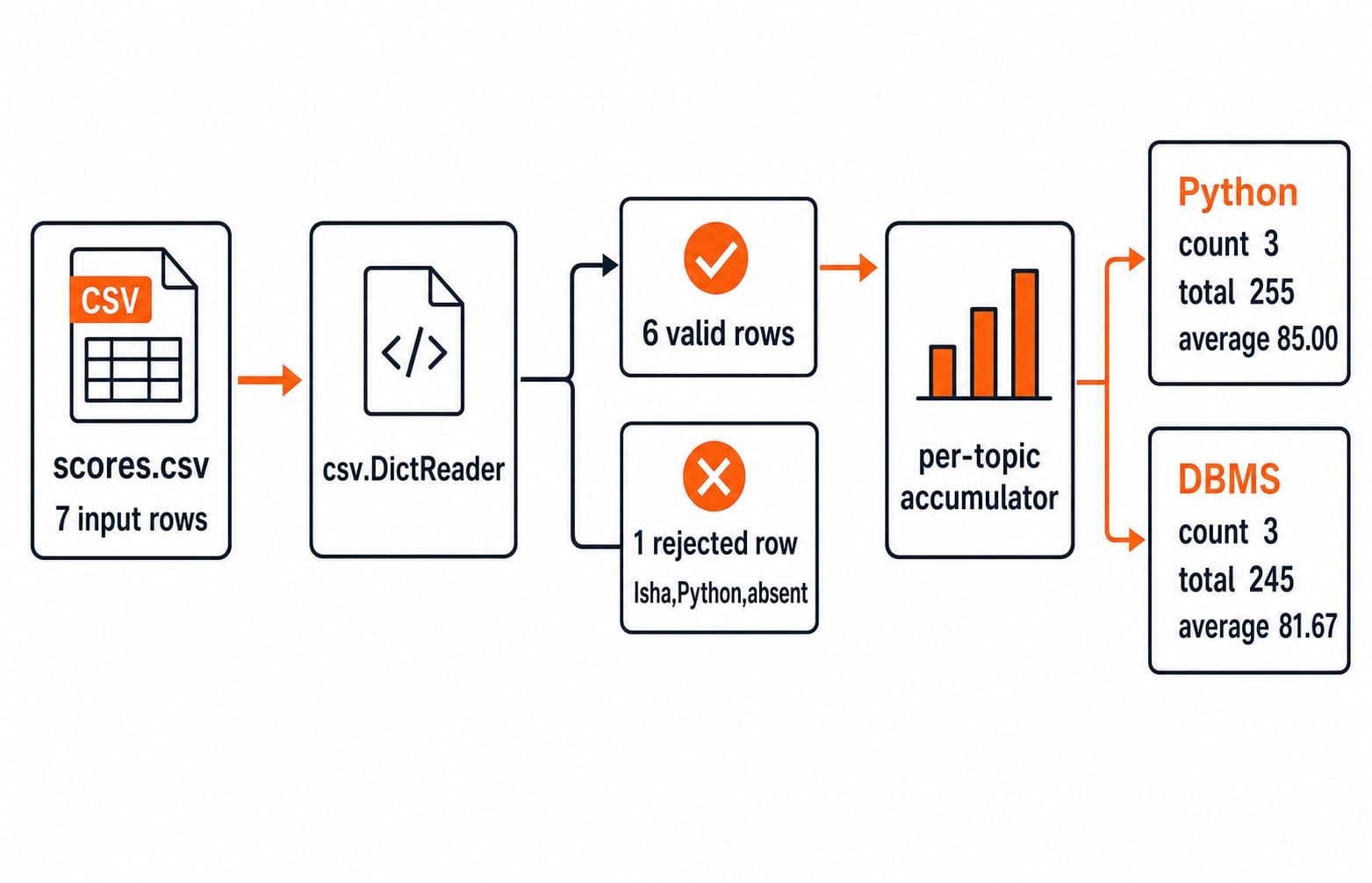
The script reads scores.csv, accepts six numeric rows, rejects one non-numeric row, calculates per-topic summaries, finds the highest valid score, and writes reproducible reports.
Open files safely and choose a mode deliberately
Choose a mode by its consequence. r requires an existing file. w creates a file or immediately truncates an existing one. a writes only at the end, while x refuses to overwrite an existing path. b returns bytes rather than text, and + permits both reading and writing. The dangerous mistake is opening a valuable source file with w before reading it, because its old contents can disappear at once.
Use this safe baseline for CSV input:
with open("scores.csv", "r", encoding="utf-8", newline="") as file:
    reader = csv.DictReader(file)
The context manager closes the handle even if parsing fails. UTF-8 makes decoding intentional. newline="" lets the csv module handle CSV newlines correctly.
A cursor trace makes r+ concrete. Suppose demo.txt contains ABCDEF. After read(2), the result is AB and the cursor follows the second byte. Calling seek(2), writing XY, calling seek(0), and then reading returns ABXYEF. The stored file is also ABXYEF. This byte-oriented demonstration should not be generalized into treating every text-file offset as a character count across every encoding.
Parse and validate one concrete CSV dataset
Save this exact input as scores.csv:
student,topic,score
Asha,Python,78
Ravi,Python,92
Meera,DBMS,88
Kabir,Python,85
Asha,DBMS,81
Ravi,DBMS,76
Isha,Python,absent
csv.DictReader maps each row to its header names. Strip the fields, then convert score with int() inside try/except ValueError. The word absent must not become zero, because zero would silently corrupt the Python average.
import csv
import json

valid = []
rejected = []

with open("scores.csv", "r", encoding="utf-8", newline="") as file:
    for row in csv.DictReader(file):
        clean = {key: value.strip() for key, value in row.items()}
        try:
            clean["score"] = int(clean["score"])
        except ValueError:
            rejected.append(clean)
        else:
            valid.append(clean)
This preserves six records with integer scores and one rejected record exactly as Isha,Python,absent.
Aggregate the records and show every calculation
Build an accumulator whose values hold count and total, updating it once per valid record:
summary = {}
for row in valid:
    item = summary.setdefault(row["topic"], {"count": 0, "total": 0})
    item["count"] += 1
    item["total"] += row["score"]

for item in summary.values():
    item["average"] = round(item["total"] / item["count"], 2)

highest = max(valid, key=lambda row: row["score"])
For Python, 78 + 92 + 85 = 255, then 255 / 3 = 85.00. For DBMS, 88 + 81 + 76 = 245, then 245 / 3 = 81.666..., displayed as 81.67. Together, (255 + 245) / 6 = 500 / 6 = 83.33 after rounding for display. The highest valid record is Ravi,Python,92.
The rejected row counts in the data-quality report but not in numeric totals. Conceptually, this accumulator resembles grouping database rows by topic, which makes SQL queries and joins in DBMS a useful related read.
Write deterministic CSV, JSON, and log outputs
Regenerated reports should use w, fixed fields, and sorted topics. A cumulative audit log should use a.
with open("topic_summary.csv", "w", encoding="utf-8", newline="") as file:
    writer = csv.DictWriter(
        file, fieldnames=["topic", "count", "total", "average"]
    )
    writer.writeheader()
    for topic in sorted(summary):
        item = summary[topic]
        writer.writerow({
            "topic": topic,
            "count": item["count"],
            "total": item["total"],
            "average": f'{item["average"]:.2f}',
        })

with open("summary.json", "w", encoding="utf-8") as file:
    json.dump({topic: summary[topic] for topic in sorted(summary)}, file, indent=2)

with open("rejected_rows.csv", "w", encoding="utf-8", newline="") as file:
    writer = csv.DictWriter(file, fieldnames=["student", "topic", "score"])
    writer.writeheader()
    writer.writerows(rejected)

with open("run_log.txt", "a", encoding="utf-8") as file:
    file.write("processed=7 valid=6 rejected=1\n")
topic_summary.csv is exactly:
topic,count,total,average
DBMS,3,245,81.67
Python,3,255,85.00
The JSON data is {"DBMS": {"count": 3, "total": 245, "average": 81.67}, "Python": {"count": 3, "total": 255, "average": 85.0}}. Object order is not the analytical result. The named keys and values are. rejected_rows.csv contains its header plus Isha,Python,absent, while the log gains processed=7 valid=6 rejected=1. Overwriting regenerated reports prevents duplicate rows across runs; appending preserves the audit history.
Diagnose wrong or unsafe results
Most failures have a direct correction:
Opening the source with
wtruncates it. Read first and write to a separate path.file.read()loads a large input unnecessarily. Iterate row by row.Omitting an encoding makes decoding environment-dependent. Specify UTF-8.
Comparing scores as strings gives lexical, not numeric, ordering. Convert early with
int().line.split(",")breaks fields containing quoted commas. Use thecsvmodule.Omitting
newline=""can cause blank-line problems on some systems. Use the CSV baseline shown above.Swallowing
ValueErrorconceals data loss. Preserve and report every rejected row.
Sorting the summary makes repeated outputs easier to test and compare, a practical connection to sorting algorithms and complexity.
How interviews and exam-style questions test the concept
Three question shapes exercise the concept directly. First, predict the cursor trace from ABCDEF to ABXYEF. Second, repair code that opens its source in w mode. Third, implement the seven-row aggregator without loading the full file. A correct implementation ends with seven processed, six valid, one rejected, Python 85.00, DBMS 81.67, and Ravi's 92 as the maximum.
Together, the exercises test cursor state, data representation, and one-pass algorithmic reasoning. Placement-focused readers can continue with DSA Using Python, which combines a Python foundation with data-structures and algorithm practice.
The short version and the next useful step
Open deliberately, use a context manager, parse with a format-aware module, validate before calculating, and write deterministic outputs. Here, seven input rows became six valid records and one rejected record, with topic averages of 85.00 and 81.67 and an overall valid average of 83.33.
Now replace Kabir,Python,85 with Kabir,Python,95. Before rerunning, predict the result: Python total 265, Python average 88.33, overall total 510, overall average 85.00, and a new maximum of Kabir,Python,95.
For a structured continuation, use the Python Programming course and practise the same pipeline with a larger CSV of your own.
Keep learning

Pandas Basics in Python: Build, Clean and Analyse a DataFrame Step by Step
Follow one student dataset from its first DataFrame to a clean city summary, while learning how selection, missing values and vectorised calculations really work.
Updated 24 Sep 20265 min readPython
Python Operators and Expressions: Precedence, Types and Worked Output Traces
Trace Python expressions without guessing. This guide connects operator families, precedence, types, short-circuiting and exact output through worked examples.
Updated 23 Sep 20266 min readPython
CSV Files Explained: Parsing Rules, Worked Records and Exam Traps
Learn why commas and newlines are not always boundaries, trace a quote-aware parser, validate text fields with a schema, and calculate processing costs.
Updated 22 Sep 20265 min readPython

Polymorphism and Dunder Methods in Python: Runnable Examples and Exercises
See how one Python operation supports different types, then build a Vector2D class with readable output, addition, magnitude and equality. Includes runnable code, protocol failures and exercises.
Updated 21 Sep 20265 min readPython