

Date and Time in Python: datetime Tutorial with Parsing, Arithmetic and Time Zones
Build reliable Python date-time values from input text, calculate across midnight, and convert one instant between Asia/Kolkata and UTC.
KnowledgeGate Team
Exam prep & CS education
Updated 8 Nov 20265 min read

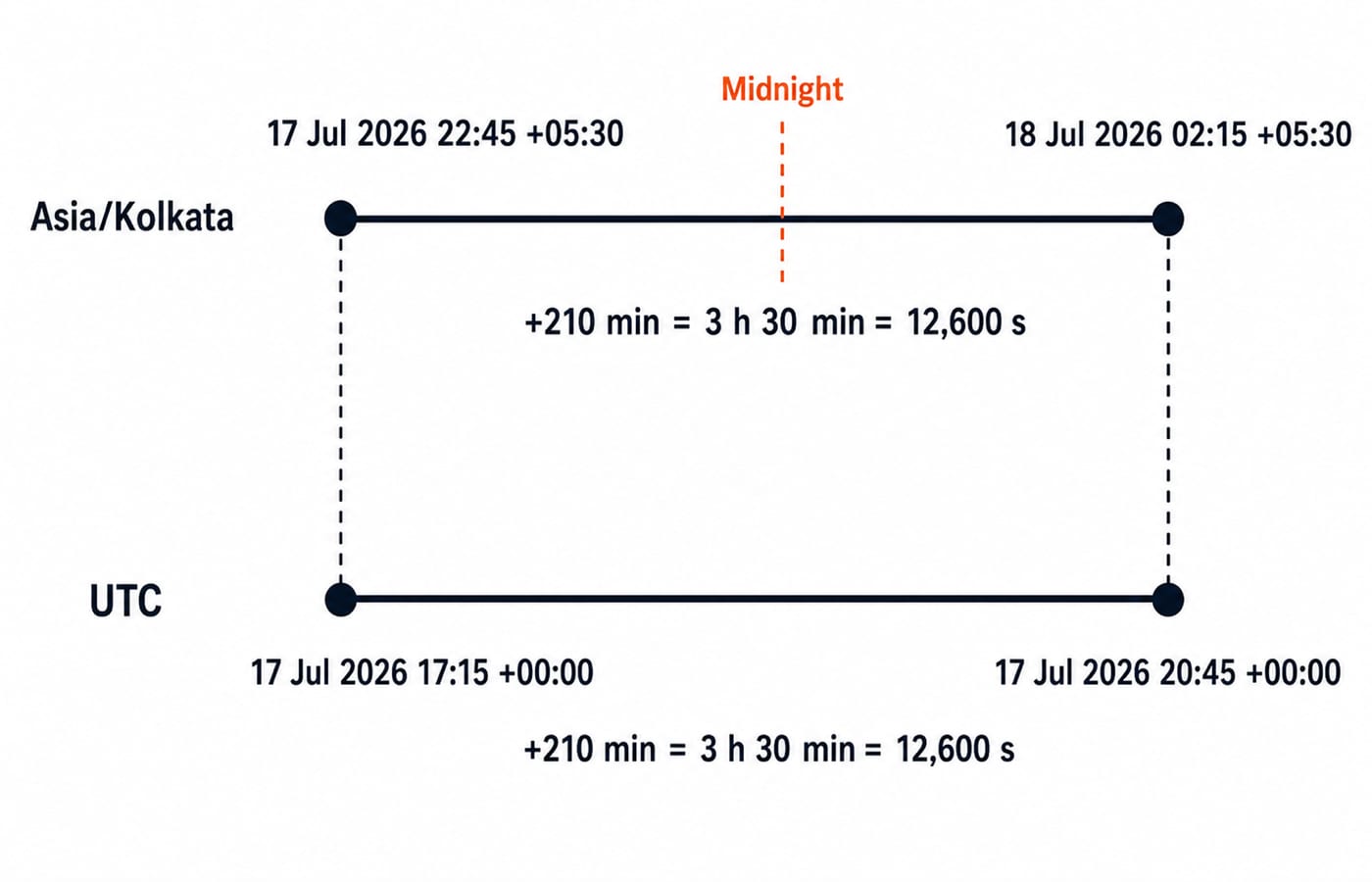
Printing the current clock is easy, but real programs must validate input, cross midnight, calculate durations and preserve an instant across time zones. Treating every value as plain text makes these jobs fragile. A study session starts at 17-07-2026 22:45 in Asia/Kolkata, lasts 210 minutes, ends at 18-07-2026 02:15, and spans 17:15 to 20:45 UTC. The Coding & DSA courses connect these operations to broader Python problem solving.
Python date and time objects: choose the meaning before the format
The Python datetime documentation defines date for a calendar date, time for a wall-clock time, datetime for both, timedelta for a duration, and timezone for a fixed UTC offset. The zoneinfo module defines ZoneInfo, which supplies named-zone rules. A display string such as "17-07-2026 22:45" is not yet a datetime.
Constructor | Meaning and value |
|---|---|
| Date: |
| Time: |
| Naive datetime: |
| Duration: |
Keep strings at input and display boundaries. Use temporal objects for validation, comparison and arithmetic. datetime.now() returns a naive reading in the process's local environment, while datetime.now(timezone.utc) returns an aware UTC reading; neither has a fixed output.
Parse and format date-time strings with strptime() and strftime()
strptime() converts text to a datetime; strftime() converts a temporal object to presentation text.
from datetime import datetime

raw = "17-07-2026 22:45"
start_naive = datetime.strptime(raw, "%d-%m-%Y %H:%M")

print(start_naive)
print(start_naive.strftime("%A, %d %B %Y at %I:%M %p"))
The output is:
2026-07-17 22:45:00
Friday, 17 July 2026 at 10:45 PM
The directives read %d = 17, %m = 07, %Y = 2026, %H = 22 and %M = 45. Lowercase %m means month; uppercase %M means minute.
Construction also validates input. Parsing "29-02-2026 10:00" raises ValueError because 2026 has no 29 February. Parsing "07-17-2026 22:45" with this day-first format also fails because 17 cannot be a month. Catch ValueError at the input boundary and report the expected format. The Python Course: Concepts, MCQs & Coding builds the strings, functions and exceptions needed here.
For ISO input, datetime.fromisoformat("2026-07-17T22:45:00+05:30") creates an aware datetime. Calling .isoformat() on it returns 2026-07-17T22:45:00+05:30.
Date arithmetic with timedelta: cross midnight correctly
Continue from start_naive and let Python handle the date rollover:
from datetime import timedelta

duration = timedelta(minutes=210)
finish_naive = start_naive + duration
elapsed = finish_naive - start_naive

print(finish_naive)
print(elapsed)
print(elapsed.total_seconds())
The outputs are 2026-07-18 02:15:00, 3:30:00 and 12600.0. The check is 210 minutes = 3 hours 30 minutes = 3 x 3,600 + 30 x 60 = 12,600 seconds. The calculation crosses from 17 July to 18 July without manual carry logic.
Pure-date subtraction works too. date(2026, 8, 1) - date(2026, 7, 17) gives timedelta(days=15), printed as 15 days, 0:00:00. That is elapsed-day arithmetic, not an inclusive count of date labels.
Add or subtract a timedelta from a date or datetime, or subtract compatible datetimes to obtain a timedelta. Do not add two datetimes. Use total_seconds() for the full duration, not only .seconds.
Naive and aware datetimes: label, then convert
The parsed value is naive because it has no zone. Here the input is explicitly an Asia/Kolkata wall time, so start_naive.replace(tzinfo=ZoneInfo("Asia/Kolkata")) assigns that known meaning. It does not convert from another zone.
from datetime import timezone
from zoneinfo import ZoneInfo

start = start_naive.replace(tzinfo=ZoneInfo("Asia/Kolkata"))
finish = start + timedelta(minutes=210)

print(start.isoformat())
print(finish.isoformat())
print(start.astimezone(timezone.utc).isoformat())
print(finish.astimezone(timezone.utc).isoformat())
The four lines are 2026-07-17T22:45:00+05:30, 2026-07-18T02:15:00+05:30, 2026-07-17T17:15:00+00:00 and 2026-07-17T20:45:00+00:00. The local date crosses midnight while both UTC readings remain on 17 July. The elapsed time stays 3 hours 30 minutes.
The safe sequence is to parse or construct the source wall time, attach its source zone only when known, then call astimezone() to convert. Named zones carry rule data; fixed-offset zones carry only the stated offset. Never use replace(tzinfo=...) as a conversion shortcut.
A reusable Python session-window function
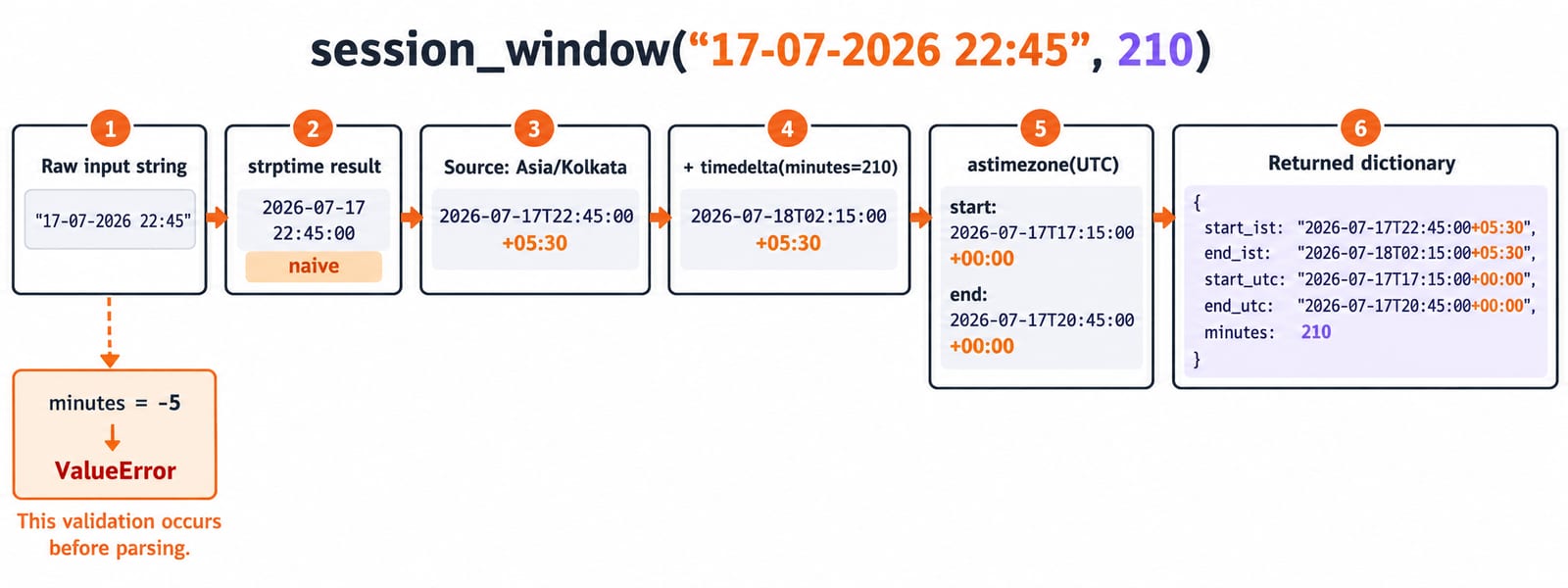
This function keeps parsing, validation, arithmetic, conversion and output formatting in one place:
from datetime import datetime, timedelta, timezone
from zoneinfo import ZoneInfo

def session_window(text: str, minutes: int) -> dict[str, str | int]:
    if minutes < 0:
        raise ValueError("minutes must be non-negative")

    local_start = datetime.strptime(text, "%d-%m-%Y %H:%M").replace(
        tzinfo=ZoneInfo("Asia/Kolkata")
    )
    local_end = local_start + timedelta(minutes=minutes)

    return {
        "start_ist": local_start.isoformat(),
        "end_ist": local_end.isoformat(),
        "start_utc": local_start.astimezone(timezone.utc).isoformat(),
        "end_utc": local_end.astimezone(timezone.utc).isoformat(),
        "minutes": minutes,
    }

print(session_window("17-07-2026 22:45", 210))
The result is {'start_ist': '2026-07-17T22:45:00+05:30', 'end_ist': '2026-07-18T02:15:00+05:30', 'start_utc': '2026-07-17T17:15:00+00:00', 'end_utc': '2026-07-17T20:45:00+00:00', 'minutes': 210}. The transformations are string to naive datetime, source-zone assignment, duration addition, UTC conversion, then ISO strings at the output boundary.
session_window("29-02-2026 10:00", 60) fails during parsing. session_window("17-07-2026 22:45", -5) raises ValueError("minutes must be non-negative") before parsing. Neither error should be swallowed or turned into a partly valid record.
Python date and time mistakes: symptom, cause and repair
Mistake | What goes wrong | Repair |
|---|---|---|
Use | It reads the month directive | Use |
Parse | Invalid input raises | Validate through |
Compare naive | Python raises | Define the intended zone before comparison |
Use | Wall-clock fields stay fixed, changing the represented instant | Use |
Assume the computer's local zone |
| Request the intended zone explicitly |
Duration components create another trap. For gap = timedelta(days=1, seconds=7200), gap.days is 1, gap.seconds is only 7200, and gap.total_seconds() is 93600.0. The .seconds field is the within-day remainder because 1 x 86,400 + 7,200 = 93,600.
Do not model “next calendar month” as timedelta(days=30). Month lengths differ, and end-of-month handling is a product rule. Also avoid comparing or subtracting datetimes whose source-zone meanings are unknown.
How coding exercises and interviews test Python date and time
Common exercises ask you to predict formatted output, find a mismatched directive, calculate a rollover, distinguish naive from aware, compare two forms of one instant, or choose between replace() and astimezone(). The Python documentation defines the APIs; the exercise must define the input-zone assumption.
Try these before reading their answers:
Parse
"31-12-2026 23:30", add 90 minutes, then format with%d-%m-%Y %H:%M. Answer:01-01-2027 01:00.Parse and sort
['18-07-2026', '16-07-2026', '17-07-2026']. Answer:['16-07-2026', '17-07-2026', '18-07-2026'].Compare
datetime(2026, 7, 17, 17, 15, tzinfo=timezone.utc)withdatetime(2026, 7, 17, 22, 45, tzinfo=ZoneInfo("Asia/Kolkata")). Answer:True, because they represent the same instant.
Write the format beside the input, mark every value naive or aware, convert before comparing zones, use timedelta for duration arithmetic, and format only at the end. After correctness, Time Complexity & Asymptotic Notation: Big-O is the later step for reasoning about program efficiency.
Date and time in Python: the short version and next step
Keep six rules: choose the temporal type by meaning; parse with strptime(); format with strftime() or isoformat(); use timedelta for elapsed time; make the source zone explicit; convert instants with astimezone(). The anchor result is 17 Jul 2026 22:45 +05:30 plus 210 minutes equals 18 Jul 2026 02:15 +05:30, the same UTC interval from 17:15 to 20:45.
Now change the input to 31-12-2026 23:30 and the duration to 90 minutes. Predict 01-01-2027 01:00 and 5400.0 elapsed seconds before running the function. If you are ready to apply Python in structured problem solving, DSA Using Python is the natural next step.
Keep learning

JSON and CSV in Python: Read, Write and Convert Data with Worked Examples
Use Python's standard library to read, update, write and convert JSON and CSV safely. The examples trace types, quoting, calculations and validation.
Updated 9 Nov 20265 min readPython

Python Collections Module: Counter, defaultdict, deque and namedtuple with Worked Examples
Counter counts values, defaultdict creates missing groups, deque works at both ends, and namedtuple gives fixed records readable fields.
Updated 7 Nov 20265 min readPython

Python for GATE: DA Syllabus, Observed Weightage and Prep Order
Settle the DA-versus-CS language question, see what one official DA paper contained, and build Python, data structures and algorithms in the right sequence.
Updated 6 Nov 20265 min readPython

Type Hints in Python: Functions, Collections and Checked Examples
Learn what Python type hints do, how to annotate common data shapes, and how a checker catches mistakes through exact, runnable examples.
Updated 5 Nov 20266 min readPython