Introduction to Python: Syntax, Execution and Worked Examples
Build a reliable Python mental model, then trace values, branches, loops, aliases and a five-score function without skipping a state change.
KnowledgeGate Team
Exam prep & CS education
Updated 8 Sep 20266 min read
Python can look like readable English and still fail because input is text, indentation changes a block, a name is rebound, or a loop boundary is misunderstood. Code, values, branches, loops and functions work together. An exact score-analysis trace makes every state change visible. Python fundamentals transfer directly to interview tracing and general programming, while the GATE CS syllabus specifies C rather than Python.
What Python code is and how it runs
Python source is organised into executable code blocks. The Python Software Foundation's execution reference includes modules, function bodies, class definitions, interactive commands and scripts as blocks. Each executes in a frame where names refer to objects.
You can enter commands interactively or save statements in a .py script. Trace the language's operations instead of assuming simple line-by-line execution.
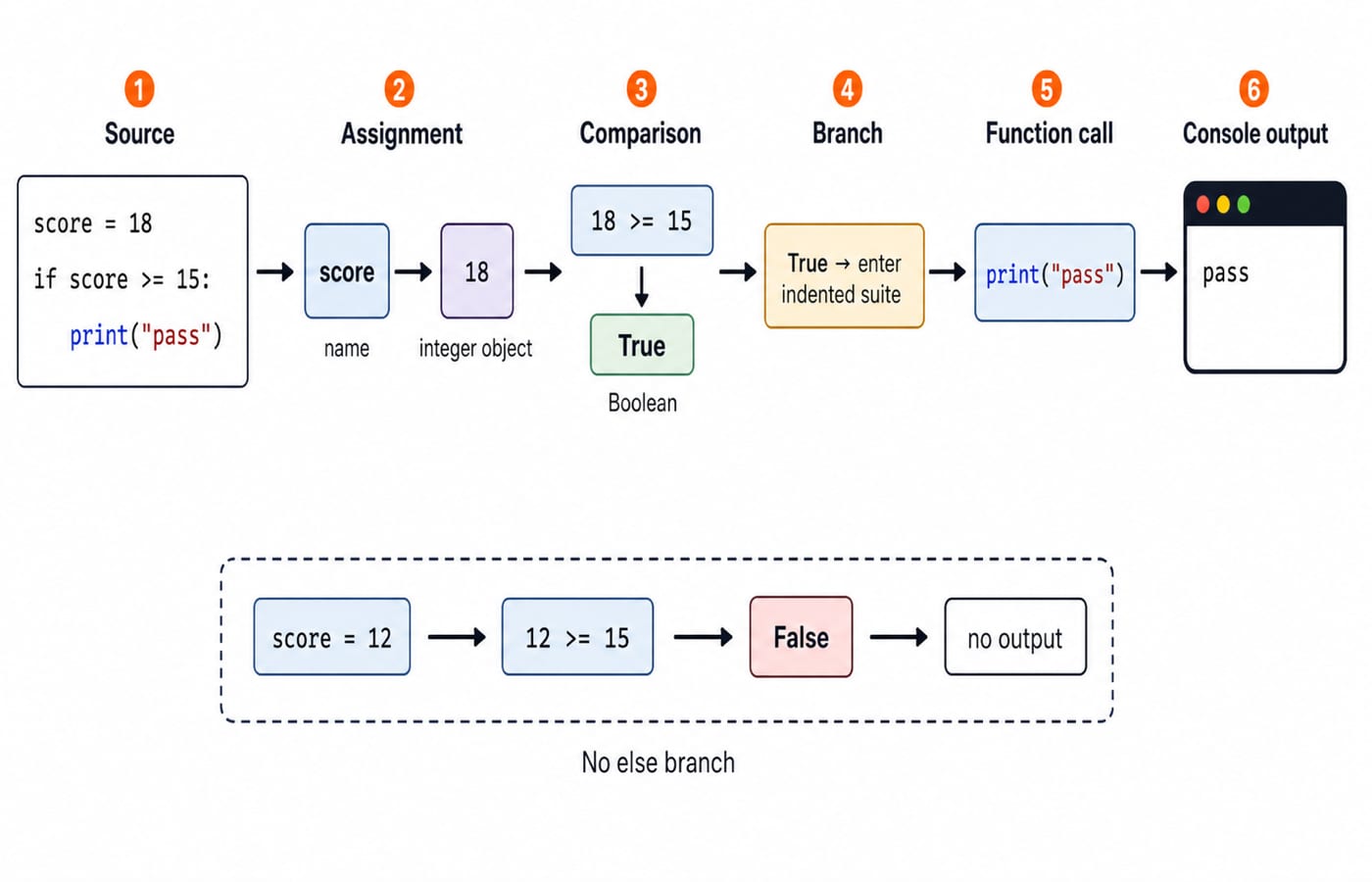
score = 18
if score >= 15:
    print("pass")
The top-level script block binds score to the integer object 18. The comparison 18 >= 15 produces True, so Python enters the indented suite and the only output is pass. Change the value to 12, and 12 >= 15 is False; this version prints nothing because there is no else branch.
Use this loop: write, predict, run, inspect, revise. A syntax error prevents a normal start; an unhandled runtime exception stops the flow and reports a traceback.
Python syntax and values: names, objects, types and statements
A literal writes a value, while an expression produces a value. Assignment binds a name, a statement performs an action, a comment begins with #, and indentation groups a suite of statements.
For student = "Asha", attempts = 3, accuracy = 0.8, eligible = True and missing = None, the object types are str, int, float, bool and NoneType. Python is dynamically typed because names can be rebound, while objects retain definite types.
After attempts = 3; backup = attempts; attempts = 4, the final values are attempts == 4 and backup == 3. Rebinding one name did not alter the other's integer. Mutation differs: after marks = [12, 18], alias = marks and alias.append(21), both names reach [12, 18, 21].
Containers serve different jobs: list [12, 18, 21] is an ordered mutable sequence; tuple (4, 7) is an ordered fixed-slot record; set {12, 18, 21} models unique membership without a promised display order; and dictionary {"Asha": 18, "Ravi": 12} maps keys to values. Coding and Skill Development Courses places these foundations within broader language learning.
Expressions, input, decisions and loops with exact values
With a = 7 and b = 3, a + b == 10, a / b == 2.3333333333333335, a // b == 2 and a % b == 1. Both a > b and (a > b) and (b > 0) are True. The operator = assigns; == tests equality. Formatting controls displayed decimal places.
Official beginner documentation shows that input() supplies text. Simulate it with raw = "6", then convert using limit = int(raw).
raw = "6"
limit = int(raw)
even_total = 0
for value in range(1, limit + 1):
    if value % 2 == 0:
        even_total += value
print(even_total)
range(1, 7) supplies 1, 2, 3, 4, 5, 6. Only 2, 4 and 6 enter the branch, changing even_total from 0 -> 2 -> 6 -> 12. Output: 12.
if/elif/else chooses paths, for visits an iterable, and while repeats while a condition is true. break exits a loop; continue skips an iteration.
Functions and decomposition: turn steps into reusable logic
A function is a named block with parameters, local names and an optional return value. For def add_bonus(score, bonus=2): return score + bonus, add_bonus(18) returns 20 and add_bonus(18, 5) returns 23, without changing the caller's score. return hands back a value; print writes to the console.
For each step, ask what input it needs, what it returns, and which names stay local. len, sum, append and tuple unpacking combine naturally in a score-summary function.
Set rate = 2 at module level, then define scale with local factor = 3 and return value * factor. scale(4) returns 12; using factor after the call raises NameError. Prefer parameters and return values over global state.
Fully worked Python example: analyse five scores
This function totals five scores, keeps the scores meeting a pass mark, computes the average, and returns all three results.
def summarise(scores, pass_mark=15):
    total = 0
    passed = []
    for score in scores:
        total += score
        if score >= pass_mark:
            passed.append(score)
    average = total / len(scores)
    return total, average, passed

scores = [12, 18, 7, 21, 15]
total, average, passed = summarise(scores)
print(f"total={total}, average={average:.1f}, passed={passed}")
Start with total = 0 and passed = [].
Current score | Total before | Total after |
| Passed after |
|---|---|---|---|---|
12 | 0 | 12 | False |
|
18 | 12 | 30 | True |
|
7 | 30 | 37 | False |
|
21 | 37 | 58 | True |
|
15 | 58 | 73 | True |
|
The average is 73 / 5 = 14.6. Tuple unpacking binds returned (73, 14.6, [18, 21, 15]) to total, average and passed. Exact output: total=73, average=14.6, passed=[18, 21, 15]. Three scores pass even though the average is below 15; these are different questions.
![Score trace for inputs 12, 18, 7, 21 and 15, ending at total 73, average 14.6 and passed list [18, 21, 15].](https://cdn.knowledgegate.ai/blog-assets/blog_asset_1784178494040_ysc211.jpg)
Python beginner traps: symptom, cause and correction
Symptom | Why it happens | Correction |
|---|---|---|
| Text and an integer cannot be added directly | Convert first: |
| Assignment is used where equality is required | Write |
| The stop value is excluded | Use |
A body after | The suite is missing or inconsistently indented | Indent the suite consistently |
| Both names reach the same list | Use |
|
| Return a value when the caller needs it |
Naming a list | The new name shadows | Use a descriptive name such as |
Two boundaries matter. summarise([]) reaches division by zero, so choose an explicit empty-list policy. [12, "18"] fails during addition, so validate or convert input values.
For debugging, predict state, inspect type(value).__name__ and repr(value), read the traceback's last line, then find your code's first frame.
How GATE-style reasoning and interviews test these ideas
IIT Guwahati's completed-cycle GATE 2026 CS syllabus names Programming in C in Section 4, not Python. Python syntax, indentation and built-ins are not official GATE CS requirements. Transferable skills include tracing assignments, branches and loops, decomposition, and reasoning about lists and algorithm cost.
Interview prompts may ask you to predict output, repair a bug, explain binding and aliasing, or write a collection function. The even loop produces 12, the analyser returns (73, 14.6, [18, 21, 15]), and the first branch with score = 12 produces no output.
Introduction to Python: short version and next step
Source is organised into code blocks.
Assignment binds names to objects.
Expressions produce values.
Indentation controls suites.
Conditions and loops select and repeat work.
Functions package steps and return results.
Before running, trace two variants. [12, 18, 7, 21, 25] gives total 83, average 16.6, and passed == [18, 21, 25]. [15, 14, 13] gives total 42, average 14.0, and passed == [15]. Write every state first.
For a full language sequence, use Python Course: Concepts, MCQs and Coding. To move into data structures and interview problems, use DSA Using Python. Both are optional; choose by your present gap.
Keep learning
Pandas Basics in Python: Build, Clean and Analyse a DataFrame Step by Step
Follow one student dataset from its first DataFrame to a clean city summary, while learning how selection, missing values and vectorised calculations really work.
Updated 24 Sep 20265 min readPython
Python Operators and Expressions: Precedence, Types and Worked Output Traces
Trace Python expressions without guessing. This guide connects operator families, precedence, types, short-circuiting and exact output through worked examples.
Updated 23 Sep 20266 min readPython
CSV Files Explained: Parsing Rules, Worked Records and Exam Traps
Learn why commas and newlines are not always boundaries, trace a quote-aware parser, validate text fields with a schema, and calculate processing costs.
Updated 22 Sep 20265 min readPython
Polymorphism and Dunder Methods in Python: Runnable Examples and Exercises
See how one Python operation supports different types, then build a Vector2D class with readable output, addition, magnitude and equality. Includes runnable code, protocol failures and exercises.
Updated 21 Sep 20265 min readPython