

JSON and CSV in Python: Read, Write and Convert Data with Worked Examples
Use Python's standard library to read, update, write and convert JSON and CSV safely. The examples trace types, quoting, calculations and validation.
KnowledgeGate Team
Exam prep & CS education
Updated 9 Nov 20265 min read
JSON and CSV both move data between programs, but toy-file code often breaks on nested values, quoted commas, numeric strings or malformed input. JSON can preserve nested structures and basic value types, while CSV is a flat table whose parsed cells begin as strings. The same student records can remain nested in JSON or become flat CSV rows, but the conversion must define a schema and preserve intended types. The Coding & Skill Development path connects these format boundaries to broader file-processing and programming practice.
JSON and CSV in Python represent different data shapes
JSON contains objects, arrays, strings, numbers, booleans and null. Its Python type map is: object to dict, array to list, string to str, integer-looking number to int, decimal to float, true and false to True and False, and null to None. Object keys are strings.
CSV is delimited rows, normally with a header. In 101,Asha,88,79,"Needs Python, SQL", the quoted comma belongs to one field. line.split(",") gives the wrong field count, so let csv.reader or csv.DictReader parse it.
Question | JSON | CSV |
|---|---|---|
Nesting | Natural | Needs flattening |
Parsed types | Basic types preserved | Cells start as strings |
Row schema | Not required | Repeated under a header |
Common fit | Nested API or configuration | Spreadsheet export or row processing |
Main risk | Bad syntax or shape | Quoting or conversion errors |
Neither is universally better; choose by shape.
Python's JSON and CSV APIs: choose by input boundary
json.loads(text) converts a JSON string to Python objects; json.load(file_object) reads an open text file. json.dumps(value) returns a string; json.dump(value, file_object) writes to a file. The trailing s means the boundary is a string.
import json

item = json.loads(
    '{"topic": "CSV", "rows": 3, "ready": true, "note": null}'
)
print(item)
print(type(item["rows"]).__name__)
print(type(item["ready"]).__name__)
print(item["note"] is None)
The outputs are {'topic': 'CSV', 'rows': 3, 'ready': True, 'note': None}, int, bool and True. json.dumps({"b": 2, "a": 1}, sort_keys=True) returns '{"a": 1, "b": 2}' without altering the dictionary.
For CSV, reader and writer handle positional rows; DictReader and DictWriter use header-named fields. Header values become keys, but "101", "88" and "79" remain strings. CSV Files Explained: Parsing Rules, Worked Records and Exam Traps traces embedded newlines, escaped quotes and parser states; Python's csv module applies those rules after receiving the text.
Read, update and write a JSON file in Python
Start with students.json:
[
  {"roll_no": 101, "name": "Asha", "scores": {"python": 88, "sql": 79}, "active": true},
  {"roll_no": 102, "name": "Ravi", "scores": {"python": 76, "sql": 91}, "active": false}
]
Read, change and write the data:
import json

with open("students.json", "r", encoding="utf-8") as file:
    students = json.load(file)

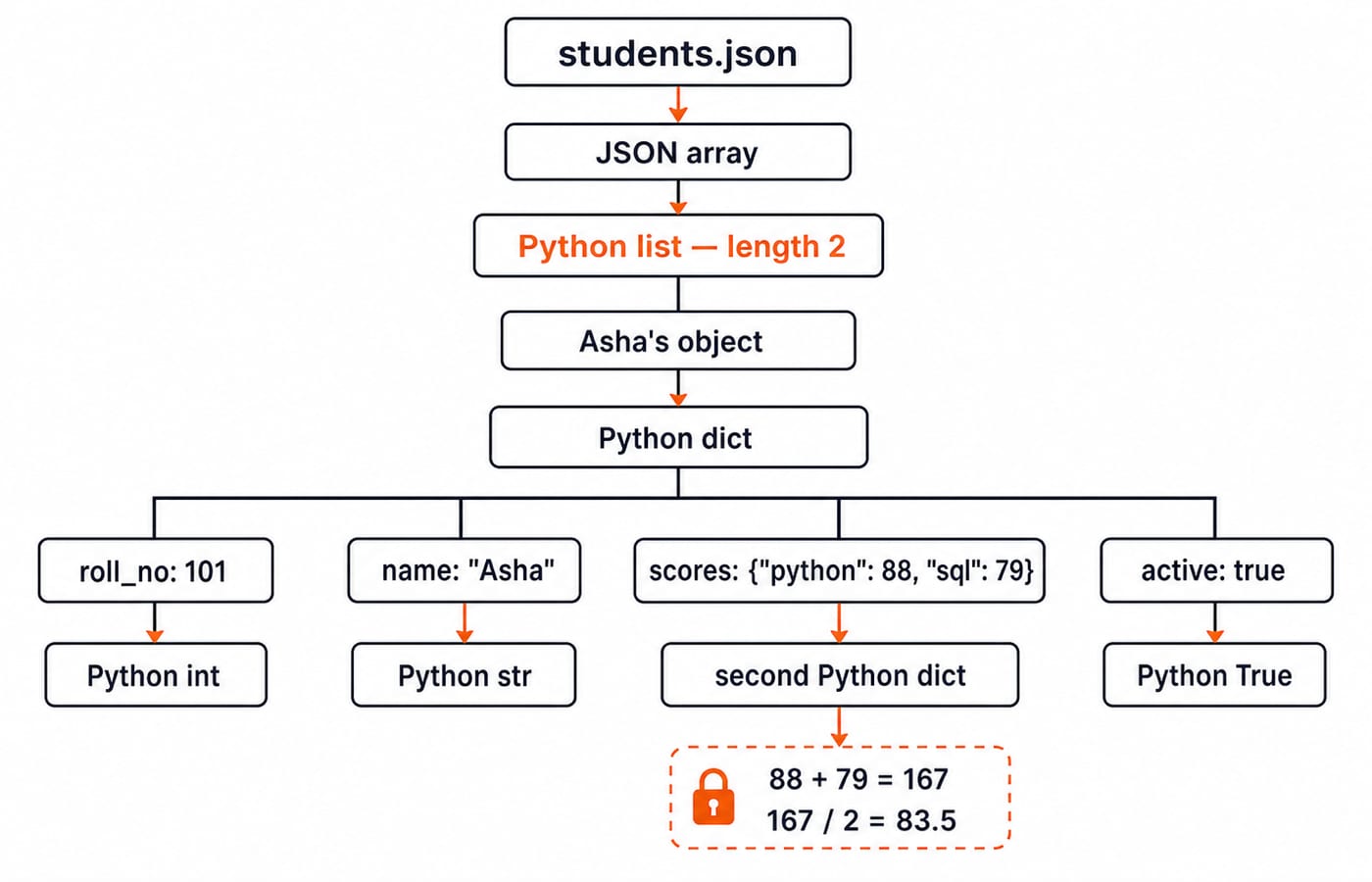
asha_total = students[0]["scores"]["python"] + students[0]["scores"]["sql"]
asha_average = asha_total / 2

students[1]["active"] = True
students.append({
    "roll_no": 103, "name": "Meera",
    "scores": {"python": 84, "sql": 90}, "active": True
})

with open("students-updated.json", "w", encoding="utf-8") as file:
    json.dump(students, file, indent=2, ensure_ascii=False)
Before updating, students is a list of length 2; Asha's name is Asha, her Python score is integer 88, and Ravi's active value is Boolean False. Asha's total is 88 + 79 = 167, and her average is 167 / 2 = 83.5. indent=2 changes presentation; with UTF-8, ensure_ascii=False keeps Unicode readable.
Read, calculate and write CSV data with DictReader and DictWriter
Use this scores.csv with its quoted comma:
roll_no,name,python,sql,note
101,Asha,88,79,"Needs Python, SQL"
102,Ravi,76,91,Strong SQL
103,Meera,84,90,Balancedimport csv
qualified = []
with open("scores.csv", "r", encoding="utf-8", newline="") as file:
reader = csv.DictReader(file)
for row in reader:
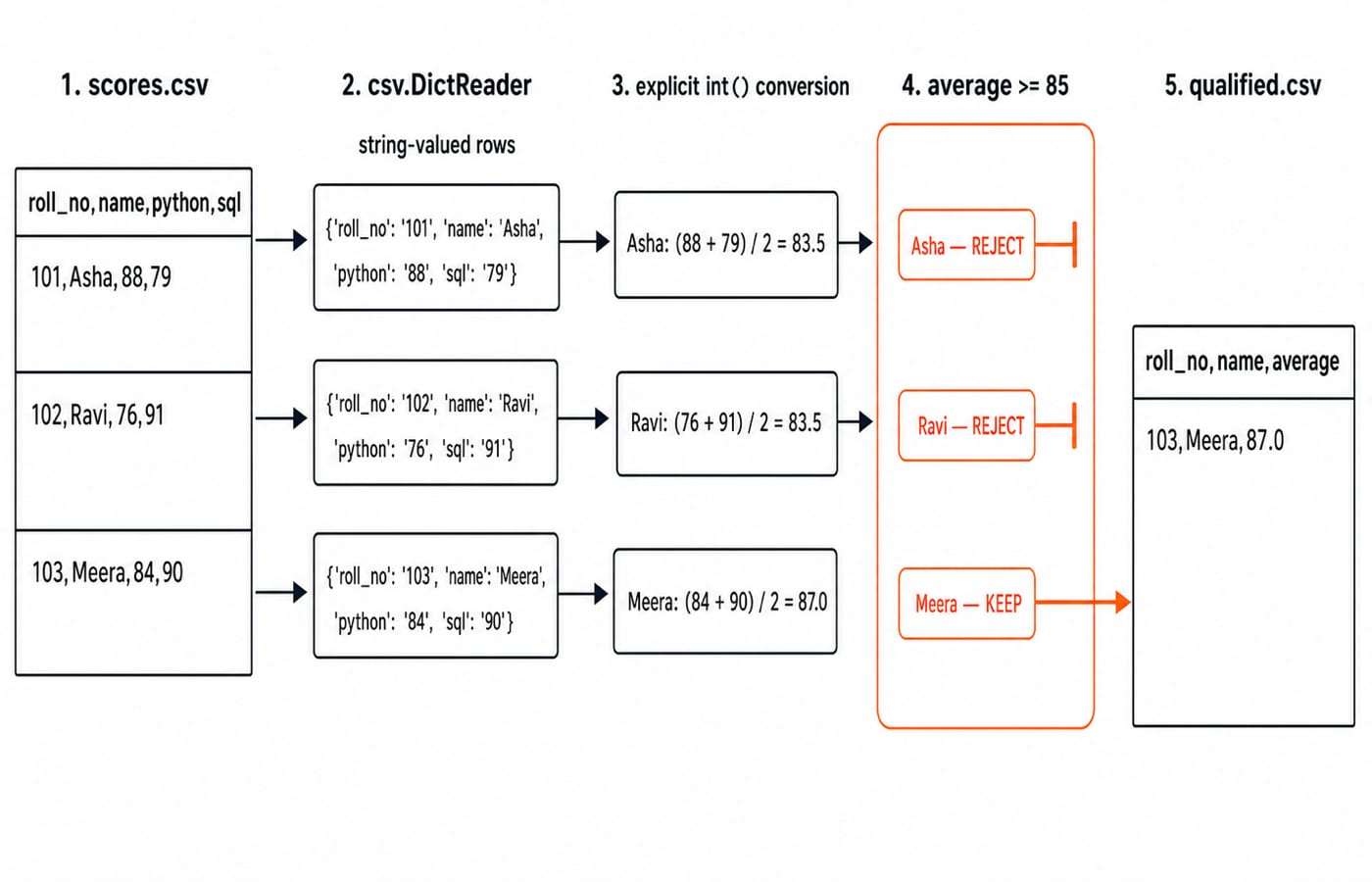
average = (int(row["python"]) + int(row["sql"])) / 2
if average >= 85:
qualified.append({
"roll_no": row["roll_no"], "name": row["name"],
"average": average
})
with open("qualified.csv", "w", encoding="utf-8", newline="") as file:
writer = csv.DictWriter(file, fieldnames=["roll_no", "name", "average"])
writer.writeheader()
writer.writerows(qualified)The calculations are Asha (88 + 79) / 2 = 83.5, Ravi (76 + 91) / 2 = 83.5, and Meera (84 + 90) / 2 = 87.0. Only Meera passes average >= 85, so qualified.csv contains:
roll_no,name,average
103,Meera,87.0
The module handles quoting. newline="" prevents text-mode translation from interfering with CSV newline handling.
Convert JSON to CSV only after defining a flat schema
For the updated list, define roll_no,name,python,sql,active. Flatten student["scores"]["python"] into python and its SQL counterpart into sql:
import csv

with open("students.csv", "w", encoding="utf-8", newline="") as file:
    fields = ["roll_no", "name", "python", "sql", "active"]
    writer = csv.DictWriter(file, fieldnames=fields)
    writer.writeheader()
    for student in students:
        writer.writerow({
            "roll_no": student["roll_no"], "name": student["name"],
            "python": student["scores"]["python"],
            "sql": student["scores"]["sql"], "active": student["active"]
        })
The rows are 101,Asha,88,79,True, 102,Ravi,76,91,True and 103,Meera,84,90,True. All are true: Ravi was updated; Asha and Meera were already active.
Conversion back is not automatic. Apply int() to roll_no, python and sql, rebuild scores, and map active only through {"True": True, "False": False}. Reject other spellings. Validation and aggregation are a separate step; Python File Handling and Data Analysis: A Complete Worked Guide follows that end-to-end workflow after ingestion.
Common JSON and CSV errors: cause, failure and repair
Mistake | What goes wrong | Repair |
|---|---|---|
|
| Use |
| Breaks Asha's quoted note | Use the |
| Produces | Convert numeric cells deliberately |
| Double-encodes the document as a JSON string | Pass |
| Raises | Validate headers or define a missing-field policy |
| Raises | Report the missing path clearly |
Never use eval() for JSON. Where malformed external input is expected, catch JSONDecodeError and report its line and column. Confirm roll_no, name, python and sql occur in reader.fieldnames. Report every skipped row's number and reason.
JSON and CSV exercises: trace types, quoting and one-pass work
After
data = json.loads('{"scores": [72, 88, 95]}'),data["scores"]is a list. Its total is72 + 88 + 95 = 255, average is255 / 3 = 85.0, and maximum is95.next(csv.reader(['Asha,"Python, SQL",88']))returns['Asha', 'Python, SQL', '88']. Quoting protects the comma, but the score stays a string because CSV carries text.Add
104,Neha,92,86,Strong in bothtoscores.csv. Neha's average is(92 + 86) / 2 = 89.0, so the filter output has Meera87.0, then Neha89.0.
DictReader processes a fixed-width record in one pass, so scanning n rows takes O(n) row visits; Time Complexity and Asymptotic Notation: Big-O develops the notation. DictReader can yield one row at a time, while json.load materialises the whole document.
JSON and CSV in Python: the short version and next step
Choose the format by data shape.
Use
loadanddumpfor files,loadsanddumpsfor strings.Open text files with UTF-8.
Let the
csvmodule handle quoting.Convert CSV strings before arithmetic.
Validate malformed or missing fields explicitly.
Asha's JSON average is 83.5, and the first CSV filter row is 103,Meera,87.0. Read students-updated.json, write roll_no,name,python,sql,active, then read it back and rebuild nested JSON. Meera's final CSV row must be 103,Meera,84,90,True.
For a structured route through Python syntax, file handling and practice, continue with Python Course: Concepts, MCQs & Coding.
Keep learning

Date and Time in Python: datetime Tutorial with Parsing, Arithmetic and Time Zones
Build reliable Python date-time values from input text, calculate across midnight, and convert one instant between Asia/Kolkata and UTC.
Updated 8 Nov 20265 min readPython
Python Collections Module: Counter, defaultdict, deque and namedtuple with Worked Examples
Counter counts values, defaultdict creates missing groups, deque works at both ends, and namedtuple gives fixed records readable fields.
Updated 7 Nov 20265 min readPython

Python for GATE: DA Syllabus, Observed Weightage and Prep Order
Settle the DA-versus-CS language question, see what one official DA paper contained, and build Python, data structures and algorithms in the right sequence.
Updated 6 Nov 20265 min readPython

Type Hints in Python: Functions, Collections and Checked Examples
Learn what Python type hints do, how to annotate common data shapes, and how a checker catches mistakes through exact, runnable examples.
Updated 5 Nov 20266 min readPython