Introduction to Python: Core Concepts, Worked Trace and Exam Patterns
Build a reliable Python tracing method from names and types to loops and mutable lists. Follow one function across every iteration and check its exact output.
KnowledgeGate Team
Exam prep & CS education
Updated 16 Sep 20266 min read
Python can look familiar until one output question combines types, operators, indentation and mutation. Trace each statement, object binding and state change instead of guessing the final line. First learn the broad syntax-to-execution model in Introduction to Python: Syntax, Execution and Worked Examples. For exact output, track operator results, qualifying-branch state, adjusted totals and alias mutation.
Introduction to Python: what the interpreter needs from your code
Python is a high-level, general-purpose programming language. For tracing, follow executable statements in order and track which object each name refers to.
Consider three assignments:
student = "Asha"
attempts = 2
eligible = attempts < 3
Three rules explain it. Names bind to objects, object types control available operations, and indentation defines blocks. Here, student refers to a str, attempts to an int, and eligible to the bool value True because 2 < 3 is true.
For a structured path through syntax and core ideas, use Python Course: Concepts, MCQs & Coding.
Python variables and data types: names, objects and containers
A scalar holds one value, while a container groups values. A name is not permanently locked to one type, but its current object has a definite type.
Assignment | Type | Value or role |
|---|---|---|
|
| integer |
|
|
|
|
| text |
|
| truth value |
|
| ordered, mutable container |
|
| ordered, immutable container |
|
| unique elements |
|
| key-value pairs |
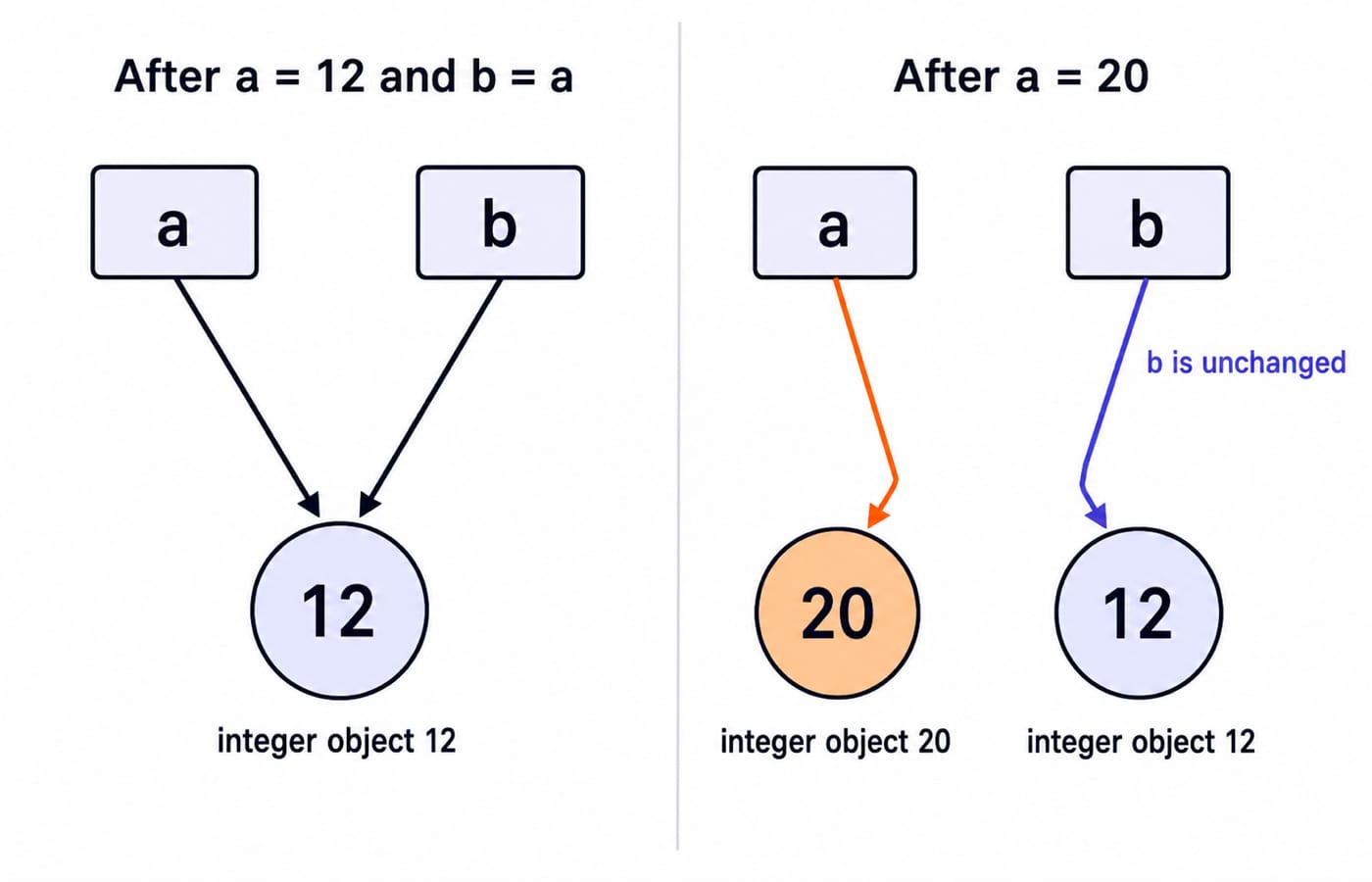
Trace a = 12, b = a, and a = 20. After the first two statements, both names refer to 12. The third rebinds only a to 20. Therefore, a == 20 and b == 12; the object referenced by b did not change.
Once this binding model is clear, Coding & DSA Courses for Placements shows the broader progression from language basics to problem solving.
Python operators and conversions: compute before you guess
Let x = 17 and y = 5. Work each operator separately:
x / y = 17 / 5 = 3.4x // y = 17 // 5 = 3x % y = 17 % 5 = 2x ** 2 = 17 ** 2 = 289
For these positive operands, / performs true division, while // performs floor division. Precedence matters. Multiplication runs before addition, so 2 + 3 * 4 = 2 + 12 = 14. Parentheses change the order: (2 + 3) * 4 = 5 * 4 = 20. An exam-style combination is 17 // 5 + 17 % 5 = 3 + 2 = 5.
Type conversion changes the operation. With raw = "17", raw + raw joins strings to produce "1717". In contrast, int(raw) + 3 = 17 + 3 = 20, an integer. This matters because input() returns text unless converted.
Python control flow and functions: read indentation as structure
This program combines a function, a loop, a condition and a return value:
def adjusted_average(scores, cutoff, bonus):
    total = 0
    count = 0
    for score in scores:
        if score >= cutoff:
            total += score + bonus
            count += 1
    return total, count, round(total / count, 2)

result = adjusted_average([72, 65, 81, 76], 70, 3)
print(result)
The list supplies four scores. The inclusive cutoff is 70, so a score of exactly 70 would qualify, although this call contains none. The bonus 3 applies only to a qualifying score. The function returns the adjusted total, qualifying count and rounded average as a tuple.
Read indentation as structure. The if is inside the for, so its condition is checked per score. The updates are inside the if, so they run only when true. The return is outside the loop and runs after all four scores.
Python worked example: trace all four loop iterations
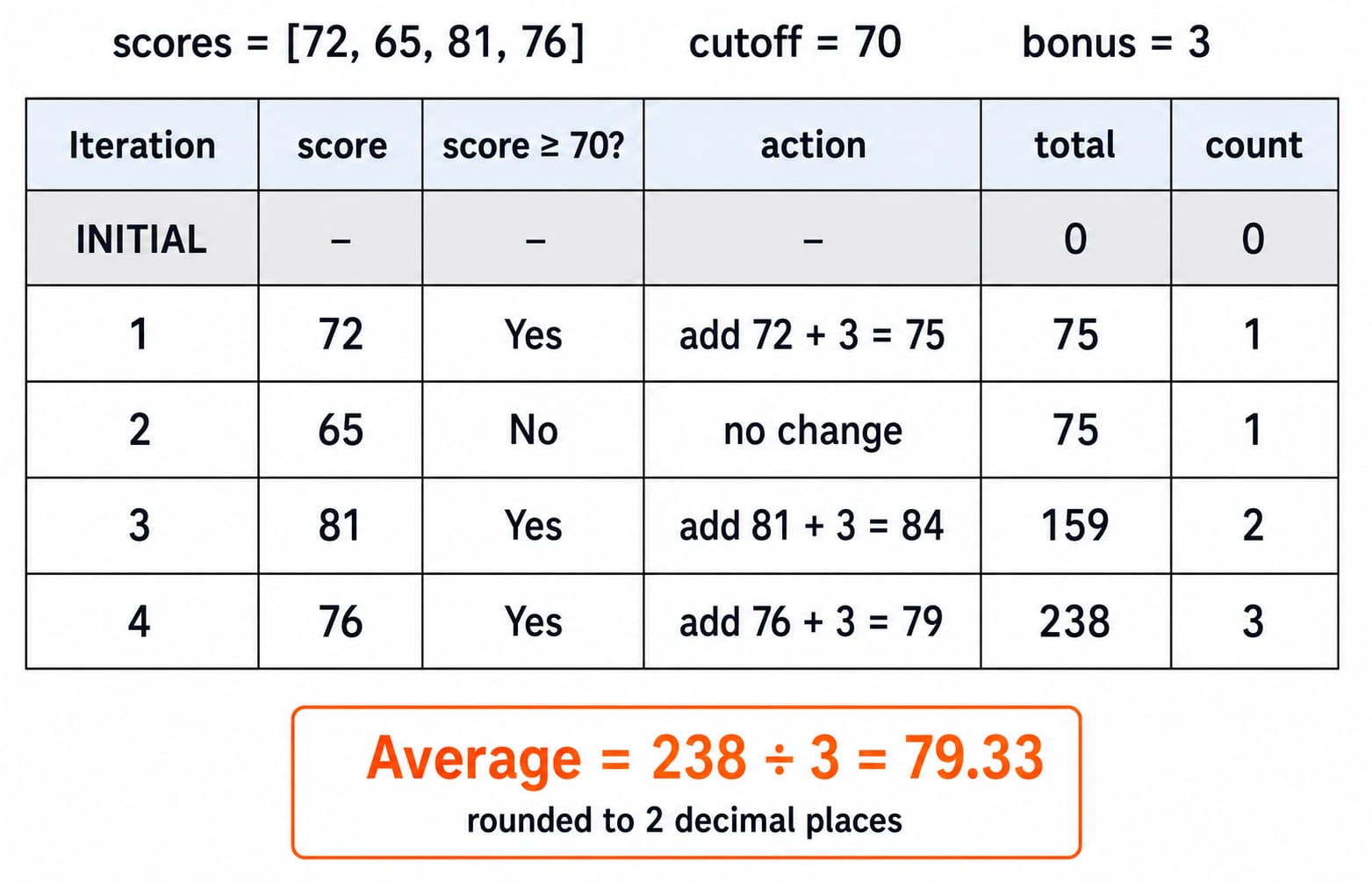
Start with (total, count) = (0, 0). Then record every change instead of jumping to the output.
Iteration and input score |
| Added amount | Running | Running |
|---|---|---|---|---|
1, score |
|
|
|
|
2, score |
|
|
|
|
3, score |
|
|
|
|
4, score |
|
|
|
|
The adjusted values are 75, 84 and 79. Independently, 75 + 84 + 79 = 159 + 79 = 238. Then 238 / 3 = 79.333..., and round(79.333..., 2) = 79.33. The function prints (238, 3, 79.33).
Python mistakes and traps: type, indentation and mutation
Assignment and comparison look similar but do different jobs. score = 70 binds the value 70 to the name. score == 70 asks whether two values are equal and returns a Boolean.
Indentation is syntax, not decoration. This fragment raises IndentationError because the if has no indented body:
if score >= 70:
print(score)
Division is another common trap. In the worked function, total / count gives 238 / 3 = 79.333.... Replacing it with floor division gives 238 // 3 = 79, which loses the fractional part before rounding.
Mutation requires you to track shared objects. After a = [2, 4], b = a, and b.append(6), both names refer to the same list. Therefore, print(a) gives [2, 4, 6]. If you instead use b = a.copy() before b.append(6), the lists are separate: a stays [2, 4], while b becomes [2, 4, 6].
The worked function also has an edge case. A call with scores [60, 65], cutoff 70 and bonus 3 leaves count = 0. The expression total / count then raises ZeroDivisionError. Add a guard before the final return:
if count == 0:
    return 0, 0, None
Python exam patterns: output, errors and semantics
Python questions commonly ask you to trace output, identify an error, or choose the correct statement about types or mutation. For each family, write a variable-state table instead of executing the whole program mentally.
Check 17 // 5 + 17 % 5. Floor division and remainder are evaluated before addition, producing 3 + 2 = 5. Now check a = [2, 4]; b = a; b.append(6); print(a). Since a and b share one list, the output is [2, 4, 6].
Exam labels do not change the trace. For an output question, write the state after each statement. For an error question, identify whether parsing, name resolution, type conversion or arithmetic fails. For a semantics question, compare binding with mutation. In every case, state the exact output or exception rather than selecting an option by resemblance.
Introduction to Python: the short version and next step
Use a five-step checklist: record names and initial objects, evaluate operators by precedence, follow only the true branch, update mutable state after each statement, then write the exact printed value and type.
The qualifying adjusted values are 75, 84 and 79. Their total is 238, the count is 3, and the rounded average is 79.33. That reproduces the exact output (238, 3, 79.33) without skipping a state change.
The Python Course: Concepts, MCQs & Coding is the full language sequence for a beginner who wants to continue from these foundations. Once you can reliably trace variables, branches, loops and functions, DSA Using Python is the natural next step into structured problem solving.
Keep learning
Pandas Basics in Python: Build, Clean and Analyse a DataFrame Step by Step
Follow one student dataset from its first DataFrame to a clean city summary, while learning how selection, missing values and vectorised calculations really work.
Updated 24 Sep 20265 min readPython
Python Operators and Expressions: Precedence, Types and Worked Output Traces
Trace Python expressions without guessing. This guide connects operator families, precedence, types, short-circuiting and exact output through worked examples.
Updated 23 Sep 20266 min readPython
CSV Files Explained: Parsing Rules, Worked Records and Exam Traps
Learn why commas and newlines are not always boundaries, trace a quote-aware parser, validate text fields with a schema, and calculate processing costs.
Updated 22 Sep 20265 min readPython
Polymorphism and Dunder Methods in Python: Runnable Examples and Exercises
See how one Python operation supports different types, then build a Vector2D class with readable output, addition, magnitude and equality. Includes runnable code, protocol failures and exercises.
Updated 21 Sep 20265 min readPython