

React.lazy Code Splitting Tutorial with Suspense Examples
Build a small React dashboard that loads its report only after a click. Trace the pending, resolved, closed, and reopened states, then verify the split in DevTools.
KnowledgeGate Team
Exam prep & CS education
Updated 30 Oct 20266 min read

A React application can make users download code for a report, editor, or admin panel before they ask to see it. The runnable Vite example starts with one button and requests the report module only when that button opens it. Code splitting changes when code loads, while React.lazy and <Suspense> define React's rendering contract around that asynchronous module. If you need the wider foundation first, browse KnowledgeGate's coding and web-development courses.
Code splitting, import(), lazy, and Suspense: separate the jobs
These four pieces have different responsibilities:
A static
importplaces a dependency in the eager module graph.JavaScript
import()returns a Promise and gives the bundler a possible split point.lazy(load)turns the loaded module's default export into a React component.<Suspense fallback={...}>says what React should render while that component is not ready.
The official React lazy reference documents the first-render loading, default-export, caching, and rejection behaviour. A Suspense boundary shows its fallback while its children are waiting.
Compare the imports:
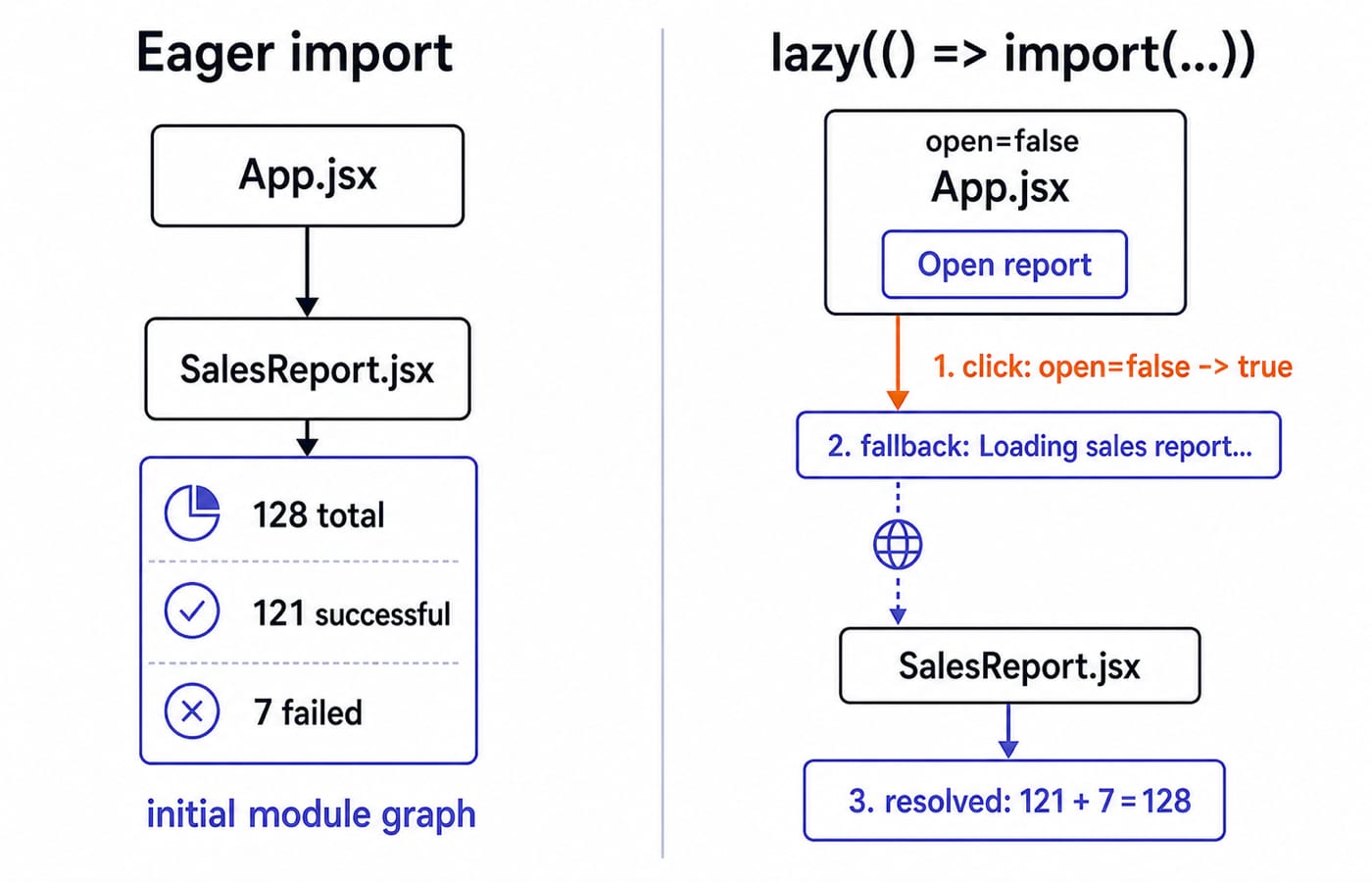
import SalesReport from './SalesReport.jsx';That is eager. The deferred form is:
const SalesReport = lazy(() => import('./SalesReport.jsx'));React requests the module when it first tries to render SalesReport. The bundler creates the production asset and decides its filename and size, so measure the result instead of promising a kilobyte saving.
Our fixture starts with open=false. A click changes it to true, then the report shows 128 processed orders: 121 successful and 7 failed.
Build the runnable React.lazy example
With a current Node.js environment, create and start the project:
npm create vite@latest react-lazy-demo -- --template react
cd react-lazy-demo
npm install
npm run dev
Open the address printed by Vite. Retain its generated main.jsx, replace src/App.jsx, and add src/SalesReport.jsx.
// src/SalesReport.jsx
const rows = [
  { label: 'Successful', value: 121 },
  { label: 'Failed', value: 7 },
];

export default function SalesReport() {
  return (
    <section aria-labelledby="sales-report-title">
      <h2 id="sales-report-title">Sales report</h2>
      <p>Processed orders: 128</p>
      <ul>
        {rows.map((row) => (
          <li key={row.label}>{row.label}: {row.value}</li>
        ))}
      </ul>
      <p>Check: 121 + 7 = 128</p>
    </section>
  );
}// src/App.jsx
import { lazy, Suspense, useState } from 'react';
const SalesReport = lazy(() => import('./SalesReport.jsx'));
export default function App() {
const [open, setOpen] = useState(false);
return (
<main>
<h1>Store dashboard</h1>
<button onClick={() => setOpen((value) => !value)}>
{open ? 'Close report' : 'Open report'}
</button>
{open && (
<Suspense fallback={<p role="status">Loading sales report...</p>}>
<SalesReport />
</Suspense>
)}
</main>
);
}Before the click, you see Store dashboard and Open report, but no report. During a delayed first load, you can see Loading sales report.... After resolution, the page shows Processed orders: 128, Successful: 121, Failed: 7, and Check: 121 + 7 = 128.
Trace the first open, close, and reopen
The first open follows a five-step timeline:
The initial state is
open=false.The first click sets
open=true.React now tries to render
SalesReportfor the first time.While the loader Promise is pending, Suspense renders the fallback.
When the module resolves, the report replaces the fallback.
A fast local request may make the fallback too brief to notice. Use Network throttling in browser DevTools when you want to observe it.
Clicking Close report returns to open=false. Clicking Open report again returns to open=true. React caches the loader Promise and resolved module for this lazy component definition, so it does not call the load function again during that application session.
Keep const SalesReport = lazy(...) at module scope. Declaring it inside App can create a new component type during rendering and reset child state. This is the first implementation rule to remember.
Put the Suspense boundary around the part allowed to wait
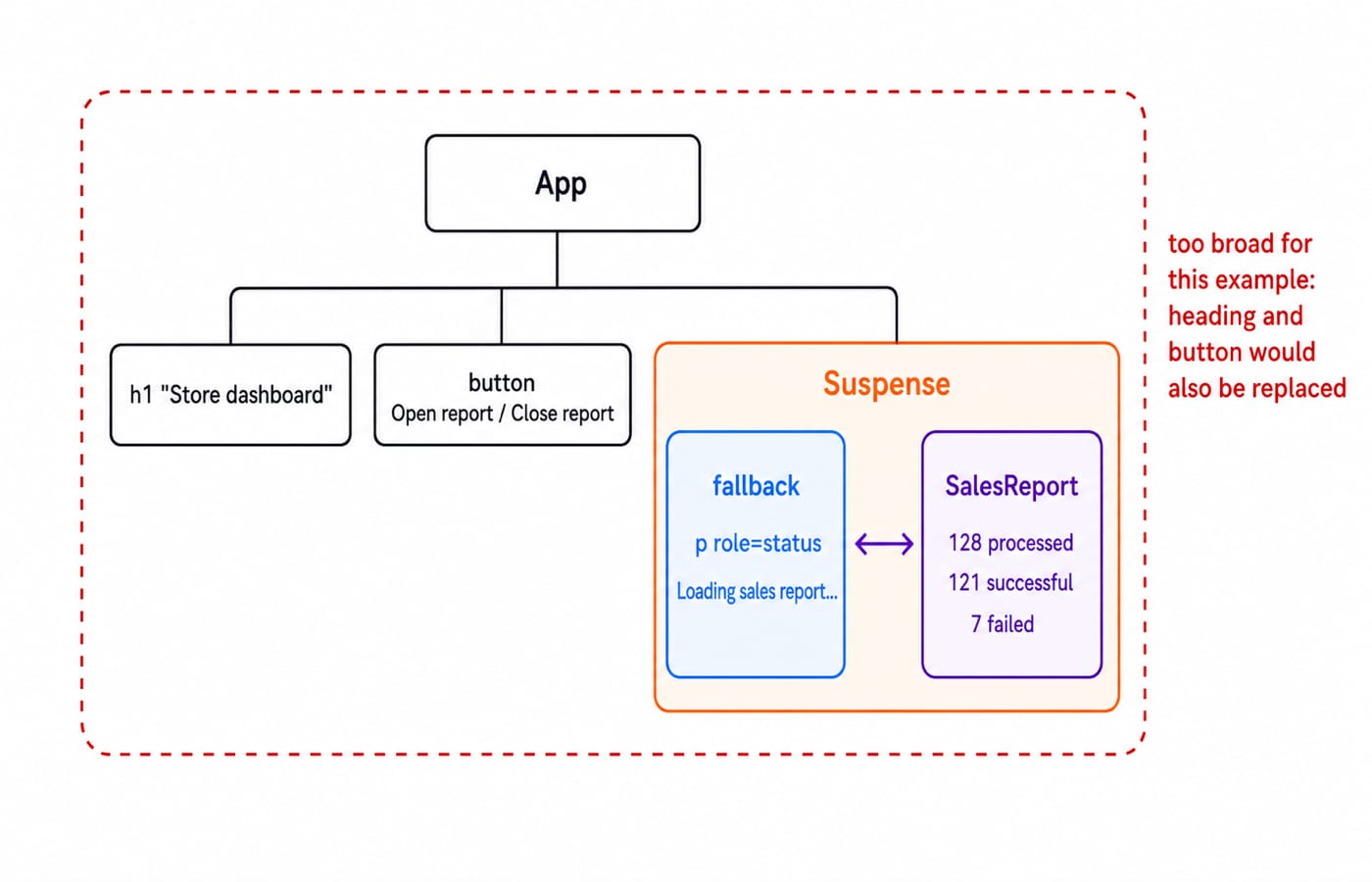
If Suspense wraps all of <main>, a pending report can replace the dashboard heading and button with the fallback. In the example, Suspense wraps only <SalesReport />. Store dashboard and the toggle button therefore remain visible and usable while the report area waits.
The fallback prop accepts a React node. It should communicate progress, which is why the example uses <p role="status">Loading sales report...</p> instead of a blank region or a spinner with no accessible text. Suspense coordinates pending UI, not error UI.
Use one decision test: Which part of this screen may temporarily disappear together? Components that should reveal together can share a boundary. Persistent navigation and controls usually belong outside it.
Verify that a real split happened
In development, open browser DevTools, select Network, filter to JavaScript, and reload while the report is closed. SalesReport.jsx should be absent from the initial requests. Click Open report and observe the new request. This behaviour is the proof, and it does not require a target request duration.
For a production-oriented check, run:
npm run build
npm run preview
Read Vite's emitted asset list after the build, open the preview address it prints, and repeat the Network test. Hashed filenames and reported sizes can change with the source, dependencies, and bundler version. Quote only what your build prints.
Finally, close and reopen the loaded report without refreshing. It should return from the resolved lazy module. To inspect the first-load fallback again, reload and use throttling instead of adding a fake delay to production code.
Common errors and the exact repair for each
Symptom | Cause | Repair |
|---|---|---|
No default export |
| Add |
| Rendering can create a new component type and reset its state. | Move the declaration to module scope. |
No Suspense ancestor | The lazy component has no intended loading UI. | Wrap the smallest region that is allowed to wait. |
Wrong path or failed chunk request | The import Promise rejects. | Correct filename casing and path, then use an Error Boundary for the failure state. |
The React lazy contract makes both module shape and failure handling important. A pending import activates the nearest Suspense boundary. A rejected import makes React raise the rejection for the nearest Error Boundary. These are separate channels: Suspense handles waiting, while an Error Boundary handles failure.
Do not turn every small component into a lazy component. Start with naturally deferred screens such as a report, editor, modal workflow, or route. Then inspect the build output and Network panel to decide whether the split improved the loading path.
How interviews and practical assessments test this topic
An interviewer may ask you to convert import AdminPanel from './AdminPanel.jsx' to a lazy import and place the closest useful Suspense boundary. Another common prompt asks why lazy(() => import('./charts.jsx')) fails when the file exports only export function SalesChart(). The repair is a default export or a default-exporting adapter. A third prompt asks which UI remains visible when Suspense wraps only a deferred child instead of the whole page.
A strong answer separates the bundler split point, import(), from the React wrapper, lazy, the pending boundary, Suspense, and the failure boundary, an Error Boundary. It also keeps lazy declarations at module scope and measures performance rather than promising a fixed gain. For broader front-end practice, use these HTML interview questions for freshers. React-specific behaviour here follows the official references linked above.
Exercises, the short version, and the next learning step
Exercise A: Replace the report with a default-exported InventoryPanel containing SKU-17: 12 units and SKU-42: 0 units. Use Loading inventory... as the fallback, then prove the module is absent before the first click.
Exercise B: Change the component to the named export SalesChart. Add an adapter module that re-exports it as default, and confirm that the lazy import works without changing the Suspense boundary in App.
Dynamic import(), lazy, Suspense, and an Error Boundary divide responsibility across splitting, deferred rendering, pending UI, and failure UI. Dynamic import() makes the split point. lazy creates the deferred component from a default export. Suspense owns the pending UI. An Error Boundary owns failure UI. Keep the lazy declaration at module scope, and verify the bundle impact instead of guessing.
For the next step, take structured React practice through the React and Redux Course. If you are continuing into full-stack development, follow the MERN Stack Course, then connect the front end to persistence with the tutorial on Mongoose schemas, models, validation, and population.
Keep learning

MongoDB Aggregation Pipeline: `$match` to `$group` with a Worked Example
Build one MongoDB aggregation pipeline step by step. Follow five fictional orders through filtering, array expansion, grouping, projection, and deterministic sorting.
Updated 17 Nov 20266 min readWeb Development

Future Internet Explained: Architecture, a Worked IoT Example and Exam Traps
Learn how device, edge, network, cloud and application layers cooperate, then solve a smart-campus example for data reduction and control-loop latency.
Updated 16 Nov 20266 min readWeb Development

Testing React Components: A Runnable Vitest and Testing Library Tutorial
Build and test a small React progress component from its initial render through completion. The examples use accessible queries, awaited actions, and an exact mock assertion.
Updated 15 Nov 20266 min readWeb Development

React Performance Optimization Tutorial: Profiler, memo, useMemo, and useCallback Examples
Build one React lab, measure its render and calculation counts, then remove avoidable work while keeping typing responsive.
Updated 14 Nov 20266 min readWeb Development