

Data Fetching Patterns in React: Tutorial with Fetch, AbortController, and Cache Examples
Build a complete TodoPanel, stop stale searches, choose between parallel and dependent requests, and decide when server data deserves a shared cache.
KnowledgeGate Team
Exam prep & CS education
Updated 31 Oct 20266 min read

Calling fetch() is easy. A useful React screen must also represent loading, success, empty, error, cancellation, and a newer request overtaking an older one. Choose an effect, an event handler, parallel requests, or a shared cache based on what triggers the request and whether data is shared.
React data fetching is a request-state problem
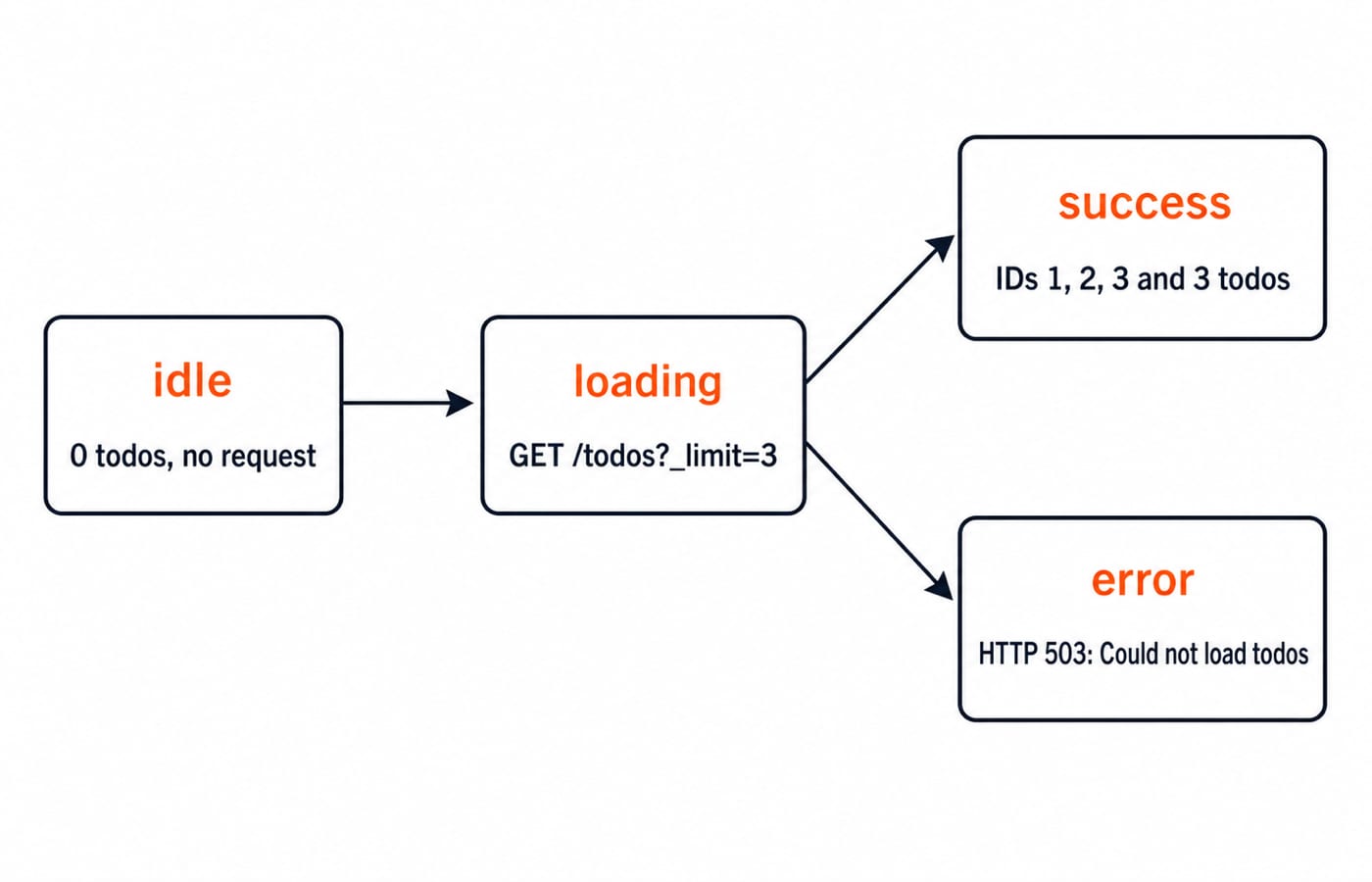
Keep the states explicit:
{ status: "idle", data: [], error: null }A request moves from idle to loading, then to success or error. An empty array is a successful empty response. This model fits into the wider component, state, effect, and browser API path in Web Development.
GET https://jsonplaceholder.typicode.com/todos?_limit=3 returns IDs 1, 2, and 3, titled delectus aut autem, quis ut nam facilis et officia qui, and fugiat veniam minus. All have completed: false, so the UI says 3 todos. A simulated 503 must instead say Could not load todos: HTTP 503.
Use an effect when appearing on screen or changing a reactive value requires synchronisation. Use an event handler when a click or submission causes the request. A Save button should make its POST in the click handler, not toggle a shouldSave flag for an effect.
Fetch data in useEffect with a complete TodoPanel
The effect callback stays synchronous. Its inner function can be asynchronous:
import { useEffect, useState } from "react";

const url = "https://jsonplaceholder.typicode.com/todos?_limit=3";

export default function TodoPanel() {
  const [request, setRequest] = useState({ status: "idle", data: [], error: null });
  const [attempt, setAttempt] = useState(0);

  useEffect(() => {
    async function loadTodos() {
      setRequest({ status: "loading", data: [], error: null });
      try {
        const response = await fetch(url);
        if (!response.ok) throw new Error("HTTP " + response.status);
        const data = await response.json();
        setRequest({ status: "success", data, error: null });
      } catch (error) {
        setRequest({ status: "error", data: [], error: error.message });
      }
    }
    loadTodos();
  }, [attempt]);

  if (request.status === "idle") return <p>0 todos</p>;
  if (request.status === "loading") return <p>Loading...</p>;
  if (request.status === "error") return <>
    <p>Could not load todos: {request.error}</p>
    <button onClick={() => setAttempt(value => value + 1)}>Retry</button>
  </>;
  if (request.data.length === 0) return <p>No todos found</p>;
  return <><ul>{request.data.map(todo => <li key={todo.id}>{todo.title}</li>)}</ul><p>{request.data.length} todos</p></>;
}
Retry increments attempt, so the effect runs the same request again without duplicating the Fetch logic. fetch() rejects for network failures. HTTP 404 or 503 still fulfils its promise, so the response.ok check stops an error payload entering the success path. Do not write useEffect(async () => ...): an effect may return cleanup, while an async function always returns a Promise.
Cancel stale React requests with AbortController
Each request needs its own controller. Pass controller.signal to fetch(url, { signal: controller.signal }). Cleanup runs before changed-dependency setup and on unmount. Here is a deterministic search:
function mockSearch(query, { signal }) {
  const test = query === "re"
    ? { wait: 800, items: ["Redux Toolkit Guide", "React Query Notes", "REST API Checklist"] }
    : { wait: 200, items: ["React Handbook", "React Hooks Lab"] };
  return new Promise((resolve, reject) => {
    const timer = setTimeout(() => resolve(test.items), test.wait);
    signal.addEventListener("abort", () => {
      clearTimeout(timer);
      reject(new DOMException("Aborted", "AbortError"));
    }, { once: true });
  });
}

useEffect(() => {
  const controller = new AbortController();
  async function search() {
    try {
      setResults(await mockSearch(query, { signal: controller.signal }));
    } catch (error) {
      if (error.name !== "AbortError") setError(error.message);
    }
  }
  search();
  return () => controller.abort();
}, [query]);
Query re starts at t=0 ms and would finish at t=800 ms. Query react starts at t=100 ms, cleanup aborts re, and its 200 ms delay ends at t=300 ms. Only React Handbook and React Hooks Lab remain, so the old three items cannot overwrite them at 800 ms.
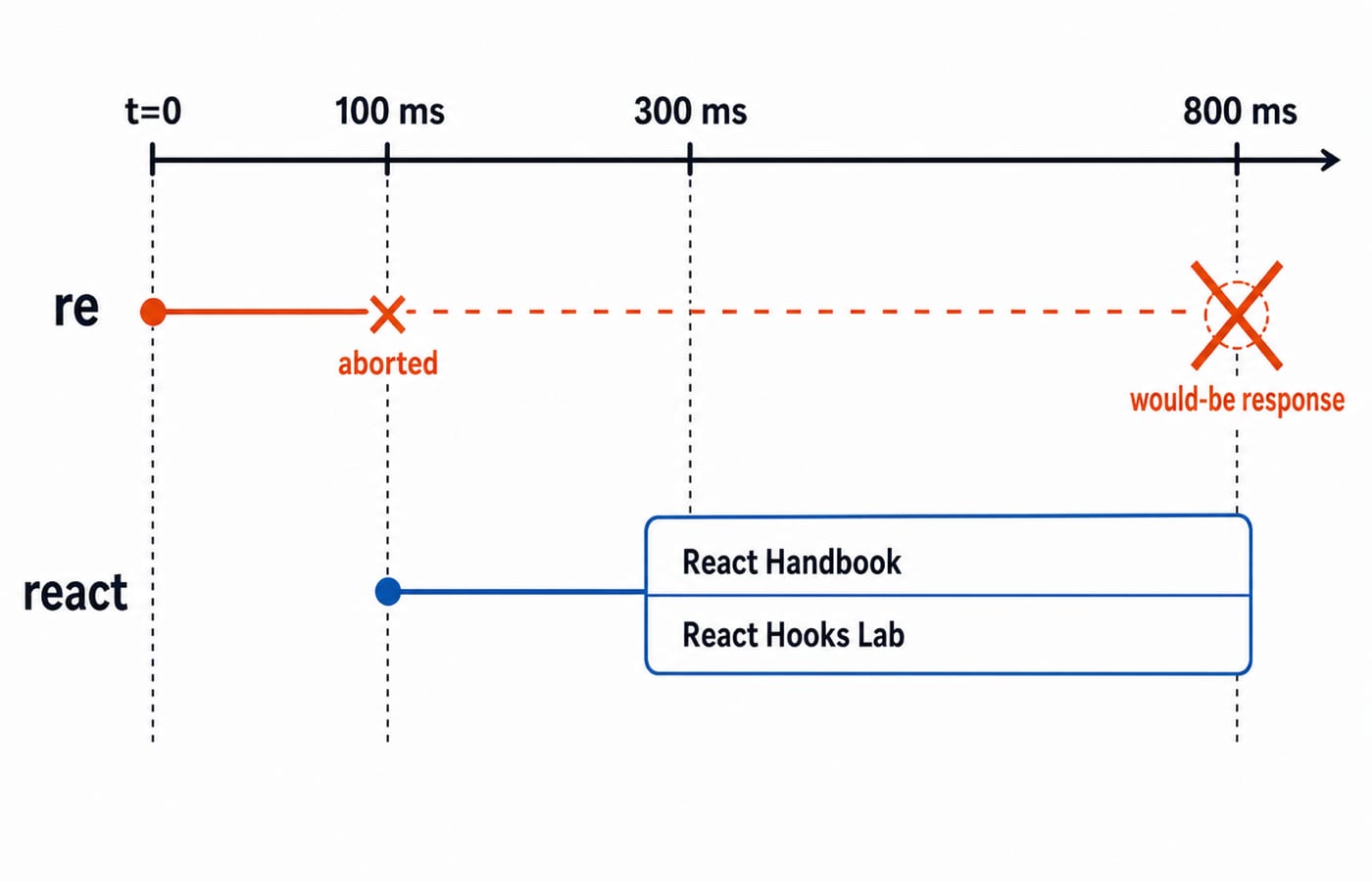
Development Strict Mode may exercise setup and cleanup an extra time. Test that obsolete data cannot update the screen, not that DevTools shows one network line.
Parallel and dependent requests need different shapes
Suppose teaching stubs give /api/users/42 a 180 ms delay and return { id: 42, name: "Asha" }. Permissions take 260 ms and return ["read", "edit"]. Sequential awaits cost about 180 + 260 = 440 ms. Independent calls can start together:
const [user, permissions] = await Promise.all([getUser(), getPermissions()]);Their critical path is max(180, 260) = 260 ms, saving about 440 - 260 = 180 ms. The controlled delays isolate request composition; they are not production performance measurements.
For a dependency, the first 180 ms call supplies organisationId: 7; only then can /api/organisations/7 begin its 260 ms call for Knowledge Labs. That necessary waterfall is about 440 ms. Use Promise.all when both independent results are required. Handle promises separately, or use Promise.allSettled, when the profile may render without permissions.
Cache shared server data instead of multiplying effects
Two plain <TodoPanel /> instances make two identical requests. A custom hook can reuse logic, but it does not automatically share a cache, deduplicate in-flight work, retry, or invalidate stale data. With a QueryClientProvider at the app root, both consumers can call the same TanStack Query definition:
import { useQuery } from "@tanstack/react-query";

const todosQuery = useQuery({
  queryKey: ["todos", 3],
  queryFn: async () => {
    const response = await fetch(url);
    if (!response.ok) throw new Error("HTTP " + response.status);
    return response.json();
  },
  staleTime: 60_000,
});
Both consumers observe one cached result and can share one in-flight request. A remount at t=30 s may reuse fresh data. At t=75 s, window focus may refetch the stale query in the background. Becoming stale does not itself fire a request at exactly 60 seconds.
Use an effect for a small request with one owner. Extract a hook when logic repeats but ownership stays simple. Choose a route loader or server-aware cache when screens share data, navigation waits for it, or mutations need invalidation. The earlier JavaScript Fetch and AJAX Tutorial: GET, POST and Error Handling owns browser-level GET, POST, two-stage response parsing, and standalone cancellation. This React tutorial owns effect lifecycle, stale-result races, parallel composition, and shared-cache decisions.
React data-fetching mistakes and their fixes
An async effect callback returns a Promise, not cleanup. Put async work inside the effect.
A newly created object or function dependency can loop requests. Depend on stable primitives, or memoise when justified.
An omitted dependency leaves a stale query. Include it and cancel superseded work.
Skipping
response.oktreats 503 as success. Check before parsing.Showing
AbortErrorflashes a false failure. Ignore only that cancellation case.Letting the oldest request resolve last replaces current data. Abort it or use a request sequence number.
Architecture matters too. Sequential independent calls create the 440 ms waterfall instead of the 260 ms parallel path. Caching a one-off read adds machinery, while never caching shared reads turns one shared request into two requests and inconsistent refreshes.
How interviews and practical tests check React fetching
Explain why useEffect(async () => {}) breaks cleanup, repair the re versus react race, and choose Promise.all for independent 180 ms and 260 ms calls. Name cleanup, stale responses, and the 260 ms critical path.
Try these checkpoints:
Make the todo endpoint return 503. Expect
Could not load todos: HTTP 503; Retry must then show the three fixed titles.Start
reat 0 ms andreactat 100 ms. The final rows must be onlyReact HandbookandReact Hooks Lab.Mount two panels. The plain version logs 2 requests;
queryKey: ["todos", 3]logs 1 shared in-flight request.
For any solution, check the trigger, request states, HTTP handling, cancellation, dependencies, request composition, cache ownership, and visible empty and error UI.
Data fetching in React, the short version
Model idle, loading, success, empty, and error clearly. Check response.ok, and cancel obsolete work. Parallelise only independent calls. Add a shared cache when server data has multiple consumers.
Continue with the React and Redux Course for a structured path through components, hooks, and shared state. If promises, async and await, or array rendering are still uncertain, start with the Complete JavaScript Course. The Free Courses & Guidance by Prashant Sir category contains both routes.
Now rebuild TodoPanel with a plain effect and AbortController. Then mount it twice with the shared query key and verify that the request count changes from 2 to 1.
Keep learning

MongoDB Aggregation Pipeline: `$match` to `$group` with a Worked Example
Build one MongoDB aggregation pipeline step by step. Follow five fictional orders through filtering, array expansion, grouping, projection, and deterministic sorting.
Updated 17 Nov 20266 min readWeb Development

Future Internet Explained: Architecture, a Worked IoT Example and Exam Traps
Learn how device, edge, network, cloud and application layers cooperate, then solve a smart-campus example for data reduction and control-loop latency.
Updated 16 Nov 20266 min readWeb Development

Testing React Components: A Runnable Vitest and Testing Library Tutorial
Build and test a small React progress component from its initial render through completion. The examples use accessible queries, awaited actions, and an exact mock assertion.
Updated 15 Nov 20266 min readWeb Development
React Performance Optimization Tutorial: Profiler, memo, useMemo, and useCallback Examples
Build one React lab, measure its render and calculation counts, then remove avoidable work while keeping typing responsive.
Updated 14 Nov 20266 min readWeb Development