

React Components and Props Tutorial: Build Reusable UI Step by Step
Build one reusable React progress card, follow its props from parent to child, compose a panel with children, and practise by predicting exact output.
KnowledgeGate Team
Exam prep & CS education
Updated 30 Oct 20266 min read

When every card, label and value sits inside one large App component, JSX soon becomes hard to scan and harder to change. Components split that interface into named pieces, while props let the same piece render different data without copied markup. Build a runnable study dashboard with strings, numbers and a boolean, compose content with children, predict exact output and fix the mistakes beginners meet most often.
1. Components and props: the mental model before the code
A React component is a JavaScript function that returns JSX. BuildProgressCard is the component definition, <BuildProgressCard /> is a JSX request to render it, and the resulting <article> is the UI placed on the page. React's component documentation explains both the rendering model and why custom component names must begin with an uppercase letter.
Props are read-only inputs supplied by a parent for one render. In BuildProgressCard({ feature, step, phase, blocked }), destructuring selects values from the props object. The markup stays fixed while each progress card receives different values. The child reads those inputs; it does not rewrite them.
Use React Tutorial: The Complete Learning Path from JSX to Your First Full App to connect JavaScript prerequisites with state, routing and projects. A reusable child solves a narrower problem: one UI shape accepts different inputs through a prop contract. Use JSX in React: Syntax, Expressions, Lists and a Runnable Worked Example for expressions, conditionals and lists. BuildProgressCard demonstrates parent-to-child data, while LessonPanel demonstrates composition.
2. Build and render the first custom component
Start with this src/App.jsx file:
function WelcomeMessage() {
  return <h2>Welcome to React practice</h2>;
}

export default function App() {
  return (
    <main>
      <h1>React Study Dashboard</h1>
      <WelcomeMessage />
    </main>
  );
}
React renders App, reaches <WelcomeMessage />, calls that component, receives its <h2>, and places Welcome to React practice below React Study Dashboard. The function starts with uppercase W and is rendered through JSX syntax.
Add a second <WelcomeMessage /> immediately after the first. The same Welcome to React practice heading appears twice. Reusing structure works, but fixed text is not flexible. Props solve that limitation.
3. Pass strings, numbers and a boolean through props
Replace the fixed component with this complete example:
function BuildProgressCard({
  feature,
  step,
  phase,
  blocked = false,
}) {
  return (
    <article>
      {blocked && <strong>Needs attention</strong>}
      <h2>{feature}</h2>
      <p>Step: {step}</p>
      <p>Phase: {phase}</p>
    </article>
  );
}

export default function App() {
  return (
    <main>
      <h1>React Study Dashboard</h1>
      <BuildProgressCard
        feature="Course dashboard"
        step={2}
        phase="Component extraction"
        blocked
      />
      <BuildProgressCard
        feature="Practice panel"
        step={4}
        phase="Prop wiring"
      />
    </main>
  );
}
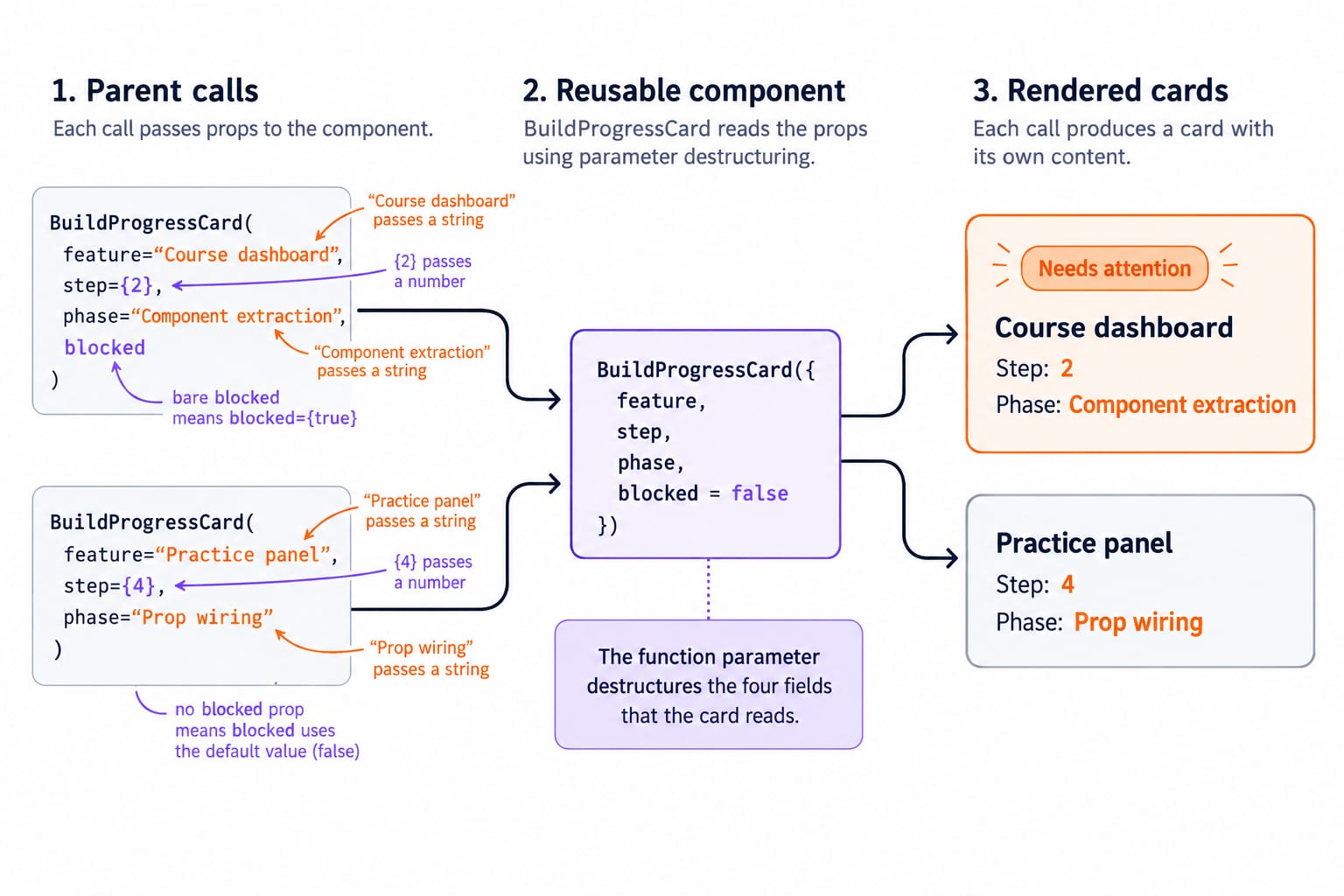
Quoted values pass strings. {2} and {4} pass numbers. Bare blocked means blocked={true}. The second card omits it, so the default is false. The function parameter destructures the four fields that the card reads.
The first parent call supplies feature="Course dashboard", step={2}, phase="Component extraction" and the true Boolean blocked. Its exact output is:
Needs attention
Course dashboard
Step: 2
Phase: Component extraction
The second parent call supplies a different string pair and the number {4}. It omits blocked, so the default is false and no attention label renders. Its exact output is:
Practice panel
Step: 4
Phase: Prop wiring
4. Follow one-way data flow and keep props read-only
React's props model makes the parent call the source of each input for that render. The first card's step={2} belongs to the parent call. The child may combine inputs into a local display value, but it must not run step += 1 or assign props.phase = "Done".
Mutation changes an input that the child does not own. Derivation creates local results, as in const label = `Step ${step}`. If an interactive workflow later advances a step, the component that owns the changing data must manage it and pass the new value down.
Change only the first parent's call to step={3}. Its line becomes Step: 3 because JSX reads the new numeric prop on the next render. The second card remains at Step: 4.
5. Compose a wrapper with the special children prop
React's guide to passing props explains that nested content between a component's opening and closing tags arrives through the special children prop. Add this component below BuildProgressCard:
function LessonPanel({ title, children }) {
  return (
    <section>
      <h2>{title}</h2>
      {children}
    </section>
  );
}
Render it after the two cards:
<LessonPanel title="Practice queue">
  <ol>
    <li>Refactor one repeated card</li>
    <li>Pass one boolean prop</li>
  </ol>
</LessonPanel>
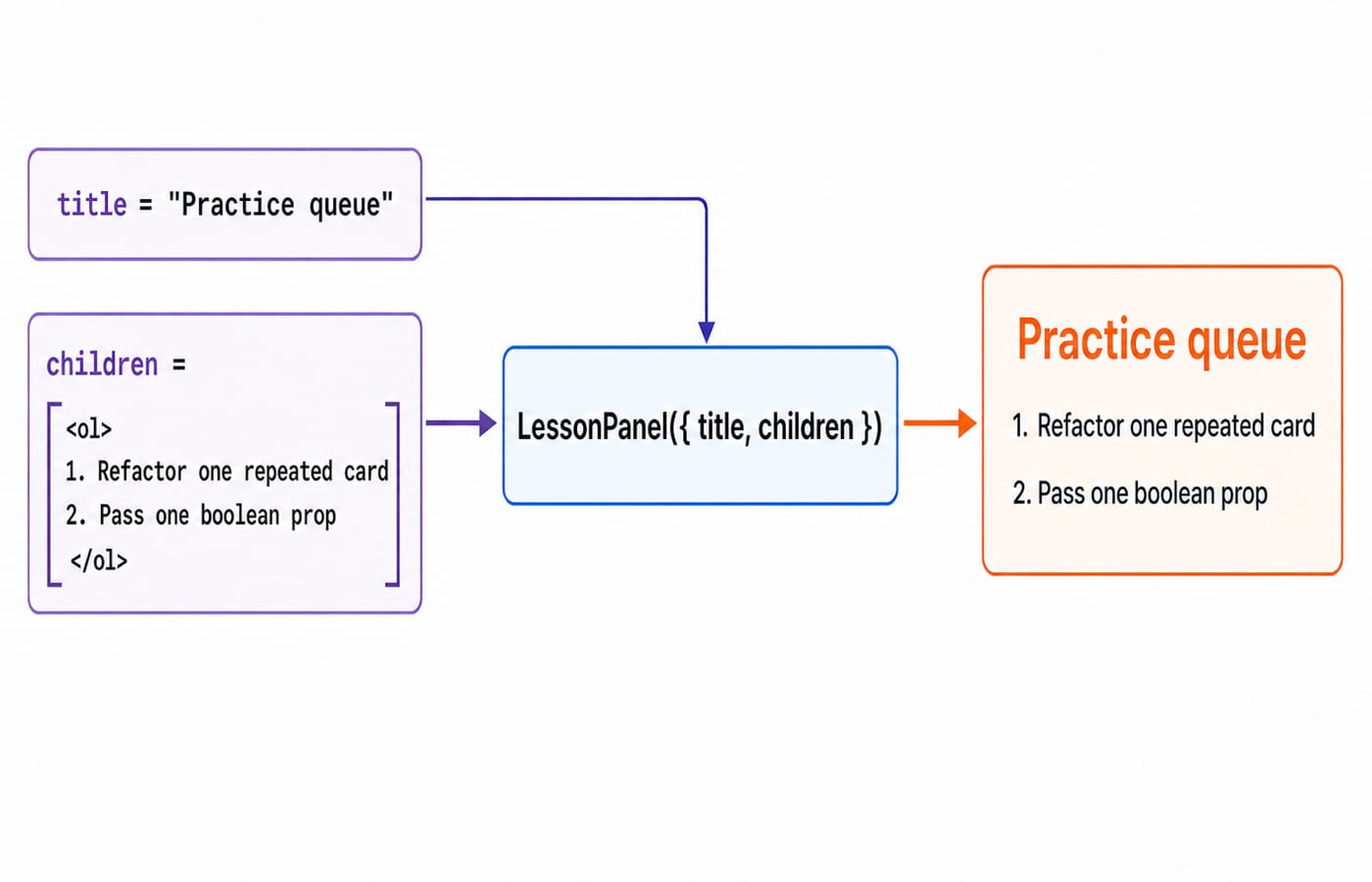
The visible result is the heading Practice queue, followed by item 1, Refactor one repeated card, and item 2, Pass one boolean prop. title is explicitly named, while the complete <ol> arrives as children. The panel controls the frame and its parent supplies the content.
6. Fix five common component and prop errors
Lowercase custom name: <buildProgressCard /> is treated like a built-in tag. Use <BuildProgressCard />.
Missing return: const Card = () => { <p>Ready</p>; }; returns undefined. Add return <p>Ready</p>; or write const Card = () => <p>Ready</p>;.
Number passed as text: step="2" makes step + 1 produce "21". Use step={2}, which produces 3.
False passed as text: blocked="false" is a non-empty, truthy string, so the warning appears. Use blocked={false} or omit it when the default is false.
Mutated prop: step += 1 changes a read-only input. Derive a local value, or let the component that owns changing data update it.
Debug in a fixed order: read the browser error, confirm the component name and import or export, inspect the exact parent-call values, check braces around non-string values, then compare the child's destructured names. Random package reinstalls are not a useful first step.
7. Practise with output prediction, refactoring and a small extension
Predict output. Given function StepLabel({ step, phase }) { return <p>Step {step}: {phase}</p>; } and <StepLabel step={3} phase="Props review" />, predict the exact output before running it: Step 3: Props review.
Refactor repetition. Replace <p>Course dashboard is at step 2</p>, <p>Practice panel is at step 4</p> and <p>Accessibility review is at step 1</p> with one StepLine({ feature, step }) component and three calls using those values. The visible text must remain identical, and the component must contain only one <p> template.
Extend the card. Add owner = "Frontend team" to BuildProgressCard, pass owner="QA team" only to Practice panel, and render <p>Owner: {owner}</p>. Course dashboard shows Owner: Frontend team; Practice panel shows Owner: QA team. Why does the first card receive a value even though its parent call omits the prop?
For a classroom or interview check, explain why a custom component starts uppercase. Then use the exact LessonPanel example to distinguish a named prop from children. Finally, explain why a string such as "2" behaves differently from the number {2} in arithmetic.
8. The short version and the next step
Components are named, reusable UI functions.
Parents render components with JSX.
Props carry values selected by the parent.
Props stay read-only inside the child.
childrencarries nested JSX for composition.
One BuildProgressCard definition rendered Course dashboard at Step: 2 with a Needs attention label and Practice panel at Step: 4 without that label. Rebuild the dashboard without copying the code, then change the first step from {2} to {3} and confirm Step: 3. Complete the three exercises before adding styling.
Use the React and Redux Course as the direct next learning step. Return to the Complete JavaScript Course if functions, destructuring or expressions need work, or browse Free Courses for GATE, Placements & CS for another topic.
Keep learning

MongoDB Aggregation Pipeline: `$match` to `$group` with a Worked Example
Build one MongoDB aggregation pipeline step by step. Follow five fictional orders through filtering, array expansion, grouping, projection, and deterministic sorting.
Updated 17 Nov 20266 min readWeb Development

Future Internet Explained: Architecture, a Worked IoT Example and Exam Traps
Learn how device, edge, network, cloud and application layers cooperate, then solve a smart-campus example for data reduction and control-loop latency.
Updated 16 Nov 20266 min readWeb Development

Testing React Components: A Runnable Vitest and Testing Library Tutorial
Build and test a small React progress component from its initial render through completion. The examples use accessible queries, awaited actions, and an exact mock assertion.
Updated 15 Nov 20266 min readWeb Development

React Performance Optimization Tutorial: Profiler, memo, useMemo, and useCallback Examples
Build one React lab, measure its render and calculation counts, then remove avoidable work while keeping typing responsive.
Updated 14 Nov 20266 min readWeb Development