

WWW Basics and Cookies Explained: URL Flow, Cookie Scope and Exam Traps
Trace a complete shop.example page load, then decide which cookies survive host, path, security and expiry checks across five requests. The examples turn common WWW traps into a repeatable exam method.
KnowledgeGate Team
Exam prep & CS education
Updated 31 Oct 20265 min read
You use a browser every day, yet one exam question can make the Internet, the Web, a website, a URL, HTTP and a cookie sound like the same thing. They are not. A shop.example page can be traced from URL to response, and the resulting values can be tested in a five-request cookie table. RFC 3986 defines URI syntax, RFC 9110 defines HTTP semantics and RFC 6265 defines cookie behavior.
1. Build the WWW Mental Model Before Memorising Terms
The Internet is a network of networks. The World Wide Web is a system of linked resources accessed by clients and servers through HTTP or HTTPS.
Here, shop.example is the website, /prefs/view is a page and /assets/logo.png is a separate resource. The browser is the client; the web server answers it. DNS resolves the host name, lower layers carry data, HTTP gives request-response semantics, HTML describes the document and hyperlinks connect resources. Application Layer Protocols: DNS and HTTP compares DNS and HTTP across the wider application layer. In the running example, the URL and resource count become inputs to the cookie-scope trace.
A browser retrieves resources; a search engine discovers them. The Web is one application system carried by the Internet, not the whole Internet.
2. Decode One URL and Trace a Three-Resource Page Load
Consider this URL:
https://shop.example:443/prefs/view?mode=compact#tips
Its components are:
Component | Value |
|---|---|
Scheme |
|
Host |
|
Explicit port |
|
Path |
|
Query |
|
Fragment |
|
RFC 3986 defines this generic URI structure. Under RFC 9110, the HTTP request target is /prefs/view?mode=compact; client-side #tips is excluded. See the RFC Editor.
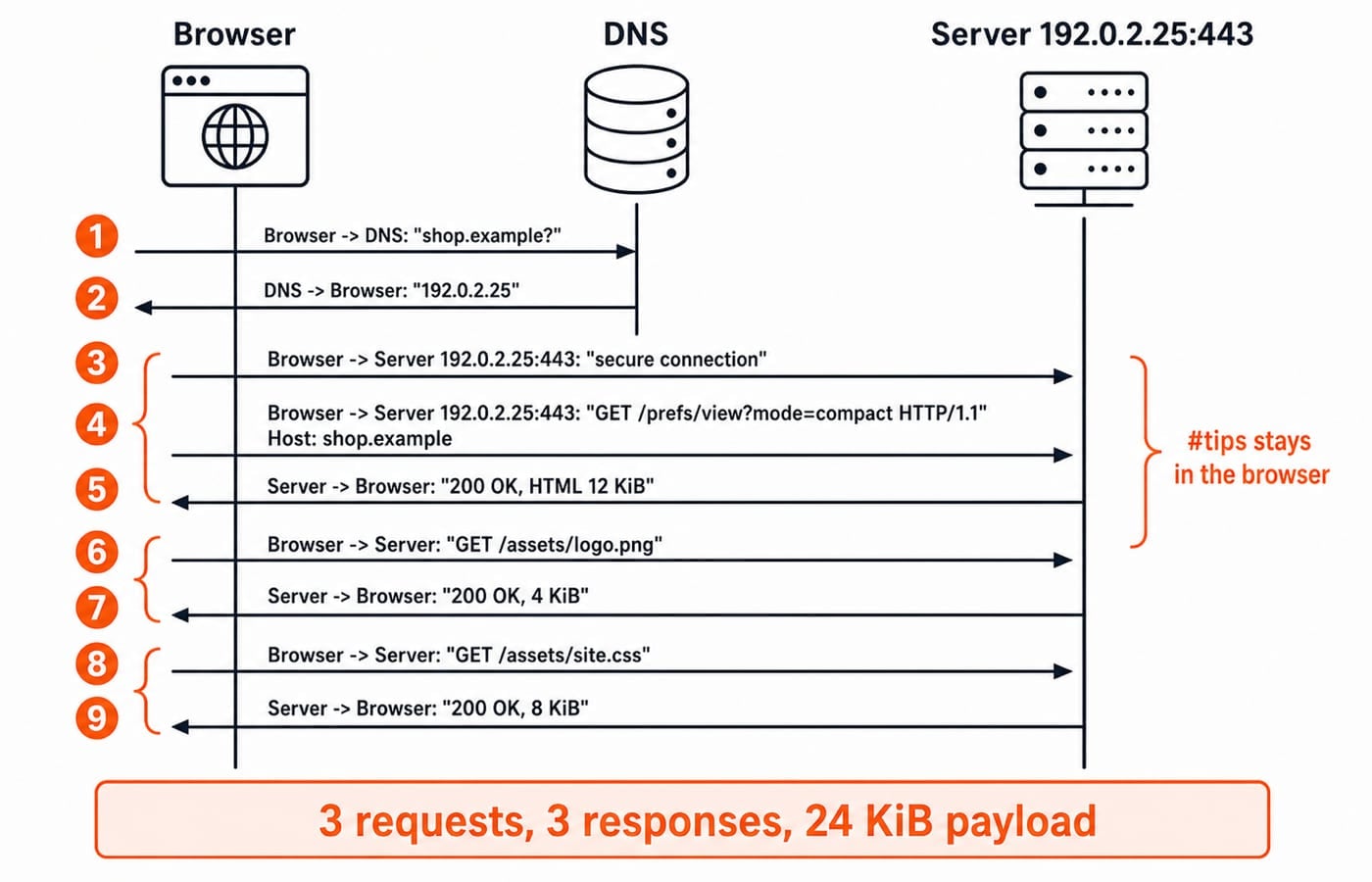
Now assume a cold, uncached load. DNS maps shop.example to the documentation address 192.0.2.25. The browser connects securely to 192.0.2.25:443 and sends:
GET /prefs/view?mode=compact HTTP/1.1
Host: shop.example
The server returns 200 OK with 12 KiB of HTML, which references /assets/logo.png of 4 KiB and /assets/site.css of 8 KiB.
HTTP requests:
1 + 2 = 3HTTP responses:
3Payload downloaded:
12 + 4 + 8 = 24 KiB
This calculation excludes headers, compression, cache hits, redirects and retransmissions. For message syntax, status codes, caching and RTT calculations, use HTTP Protocol Explained: Requests, Caching, RTT Examples and Exam Traps. Here, resource counting identifies the requests that may carry cookies.
3. Why Cookies Exist on Top of Stateless HTTP
HTTP does not by itself remember a previous request, but applications need continuity for a login, language choice or cart. Under RFC 6265, a server sends a name-value pair in Set-Cookie; the user agent returns stored pairs in Cookie on qualifying requests.
Here, sid=A7F9 is an opaque key for server-side session state, not necessarily personal data. theme=dark stores a preference.
A cookie is client-held state sent with matching requests. A session is application state, often keyed by a cookie. A cache stores reusable representations. Cookies add continuity to the DNS and HTTP path; they do not change DNS, transport or routing.
4. Worked Cookie Example: Scope, Security and Expiry Across Five Requests
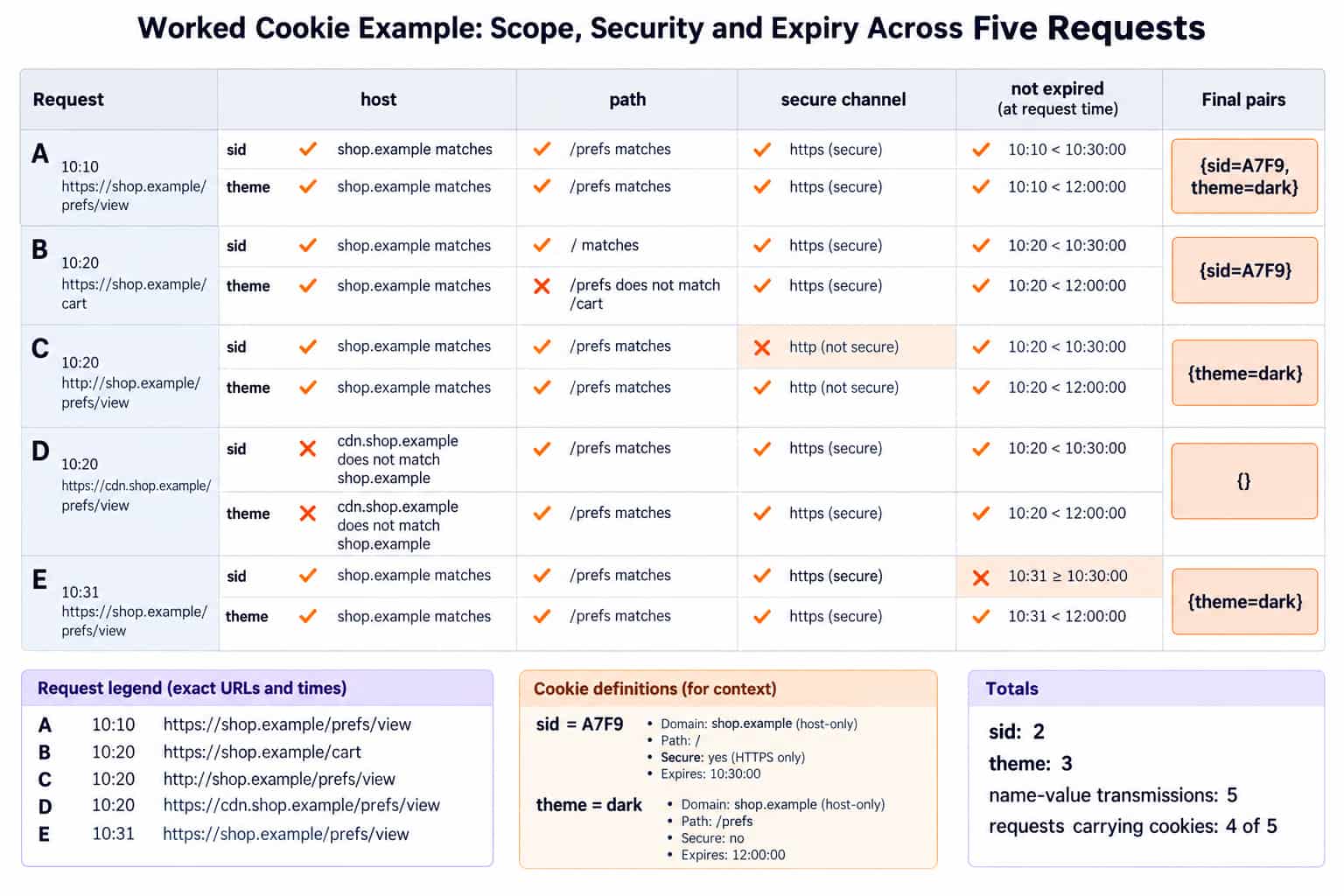
At exactly 10:00:00, https://shop.example/login returns:
Set-Cookie: sid=A7F9; Path=/; Max-Age=1800; Secure; HttpOnly
Set-Cookie: theme=dark; Path=/prefs; Max-Age=86400
Neither header has Domain, so both cookies are host-only for shop.example under RFC 6265:
1800 seconds / 60 = 30 minutes, sosidexpires at10:30:00.86400 seconds / 3600 = 24 hours, sothemeexpires at10:00:00the next day.
Test host, path, secure-channel requirement and expiry for each request:
Time | Request URL | sid eligible? | theme eligible? | Cookie pairs sent | Reason |
|---|---|---|---|---|---|
A, |
| Yes | Yes |
| All checks pass for both cookies. |
B, |
| Yes | No |
|
|
C, |
| No | Yes |
|
|
D, |
| No | No |
| Host-only cookies for |
E, |
| No | Yes |
|
|
Do not assume pair ordering in A. sid is sent in A and B, so 2 times. theme is sent in A, C and E, so 3 times. Total name-value transmissions are 2 + 3 = 5. Requests A, B, C and E carry cookies, which is 4 of 5 requests.
5. Cookie Types and Attributes Without Browser-Policy Guesswork
Idea | What it controls | Running-example effect |
|---|---|---|
Host-only versus | Which host names qualify | No |
| Which request paths qualify |
|
| Persistent lifetime |
|
| Whether sending requires a secure channel |
|
| Access through non-HTTP APIs | Those APIs cannot access |
A session cookie has no persistent expiry attribute and lasts for a user-agent-defined session. The example's two persistent cookies use Max-Age. First-party and third-party describe request context; they do not replace host, path, Secure or expiry checks.
Secure restricts sending, not stored-value encryption. HttpOnly restricts script access, not secure transport. Path selects requests, but is not an isolation guarantee. RFC 6265 defines these boundaries; sid=A7F9 is opaque; its meaning does not affect eligibility. Attributes and request context do.
6. Common WWW and Cookie Traps, With the Replacement Idea
Trap | Correct replacement |
|---|---|
The Web and Internet are synonyms. | The Web is one system over Internet infrastructure. |
The fragment is sent to the server. |
|
One page means one request. | Three resources cause three uncached requests here. |
A cookie is a cache entry. | A cookie carries state; a cache reuses a representation. |
No | Host-only excludes |
| Path matching rejects |
| Request C blocks |
| It restricts API access, not HTTP sending. |
| It expired at |
A session cookie must survive browser closure. | The user agent defines its session boundary. |
Never decide from one attribute. For each cookie, test host or domain, path, secure-channel requirement and expiry in that order. Count only the pairs that survive all four checks.
7. How Exams Test WWW Basics and Cookies, Then the Next Step
Typical questions match browser, server and URL roles; split URL components; count resources; distinguish cookie, session and cache; or trace Domain, Path, Secure and expiry.
Use this five-step routine:
Parse the URL.
List resources and state the cache assumptions.
Copy every
Set-Cookieattribute.Test each later request against host, path, secure channel and time.
Count requests, responses or cookie pairs exactly as asked.
The Application Layer MCQ collection gives you more than 10 questions on WWW basics and cookies.
The short version
The Web links addressable resources. A URL identifies the request. One page can trigger several requests, and cookies add scoped continuity to stateless semantics.
For core-CS revision, use Computer Science Fundamentals for Placements. The CS Fundamentals category groups the wider subject sequence.
Keep learning
WWW Basics & Cookies MCQs: 12 Solved Questions with Explanations
Solve 12 WWW basics and cookies MCQs with explanations that separate URLs, browsers, client-side cookies, server-side sessions and TCP byte streams.
Updated 10 Nov 20268 min readComputer Networks MCQs
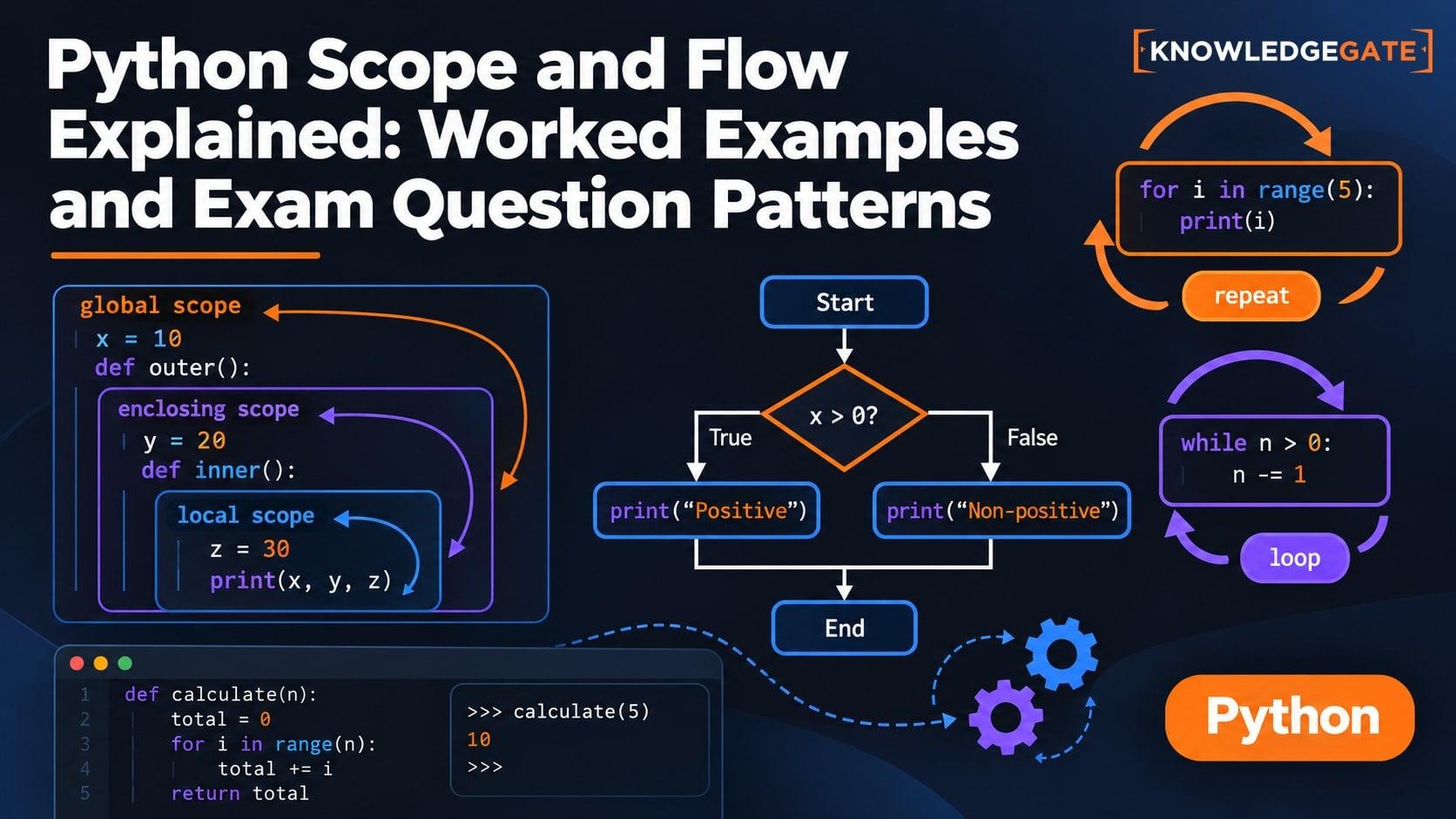
Python Scope and Flow Explained: Worked Examples and Exam Question Patterns
Learn to separate Python name resolution from execution order with a nested-function trace, an UnboundLocalError repair, module examples, and exam-style checks.
Updated 16 Nov 20266 min readPython
Introduction to Web Services MCQs: 12 Solved Questions on WWW, URLs and Web 2.0
Solve 12 Introduction to Web Services MCQs on search engines, URL parts, WWW components, browser flow, hypertext, wikis and Web 2.0, with clear explanations.
Updated 6 Nov 20267 min readComputer Networks MCQs

LocalStorage and Cookies in JavaScript: Store, Read and Delete Data
Run one lesson-progress object and one preference cookie through their complete life cycles, then learn which browser store fits a feature and which security traps to avoid.
Updated 11 Oct 20266 min readWeb Development