HTTP Protocol Explained: Requests, Caching, RTT Examples and Exam Traps
Build a clear HTTP mental model, read an HTTP/1.1 exchange byte by byte, and calculate non-persistent, persistent and pipelined timings correctly.
KnowledgeGate Team
Exam prep & CS education
Updated 26 Oct 20266 min read
You may know that HTTP loads web pages yet still get stuck when a question mixes request lines, status codes, persistent connections, cookies and RTT. A reliable HTTP mental model separates message syntax, method and status semantics, connection timing, and cache validation. The rules come from the RFC Editor's current HTTP specifications: RFC 9110 for semantics, RFC 9111 for caching, and RFC 9112 for HTTP/1.1 syntax and connections.
HTTP's place in the network stack
HTTP is an application-layer, request-response protocol for transferring representations of resources. A URI identifies a resource. The HTML, JSON or image returned is its representation, so the identifier and transferred bytes are different things.
Follow one exchange from the browser to the server. The browser forms an HTTP request, and the server returns an HTTP response. HTTP defines what those messages mean. Lower layers carry them, route packets, provide reliable delivery and control congestion. For the wider map across DNS, email, FTP and port numbers, use Application Layer Protocols. That broader map compares application services; an HTTP-only analysis instead traces message syntax, cache validation, and connection timing with transmission cost.
Keep HTTP semantics, version and transport apart. A GET still means retrieving a representation whether it uses HTTP/1.1 textual message framing or later binary framing over a different transport. HTTP/1.1 also permits persistent connections.
Read one HTTP/1.1 request and response line by line
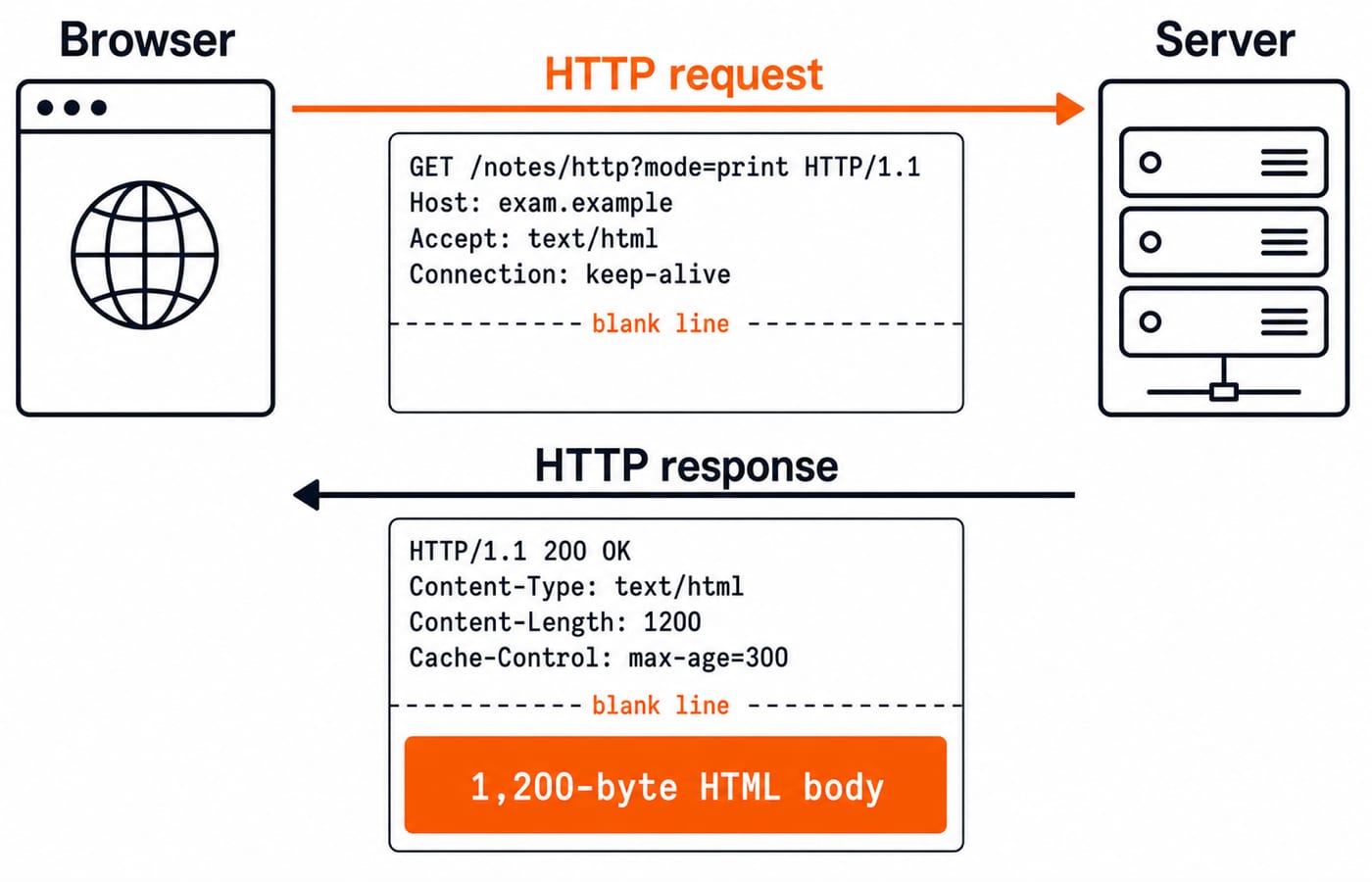
Here is the exact request. The empty line after the headers ends the header section.
GET /notes/http?mode=print HTTP/1.1
Host: exam.example
Accept: text/html
Connection: keep-alive
GET is the method. /notes/http?mode=print is the request target, including its query string, and HTTP/1.1 is the version. Host selects the target host, Accept says that HTML is acceptable, and Connection requests connection reuse. The query string is not a request body.
The server replies:
HTTP/1.1 200 OK
Content-Type: text/html
Content-Length: 1200
Cache-Control: max-age=300

[1,200-byte HTML body]
The first line gives the version, three-digit status code and reason phrase. Headers describe the representation and caching. The blank line marks the body boundary. Content-Length: 1200 counts the body, not the response headers.
HTTP methods and status codes express semantics
Methods state the intended operation. Safe means the client is not asking for a state change. Idempotent means repetition has the same intended effect, not identical response bytes.
Method | Intended use | Request body normally possible? | Safe | Idempotent |
|---|---|---|---|---|
GET | Retrieve a representation | Generally not used | Yes | Yes |
HEAD | Retrieve GET-like headers without response content | Generally not used | Yes | Yes |
POST | Submit data for resource-specific processing | Yes | No | No |
PUT | Create or replace the target resource's state | Yes | No | Yes |
DELETE | Remove the association with the target resource | Uncommon | No | Yes |
Status classes provide the first clue: 1xx is informational, 2xx success, 3xx redirection, 4xx a client-side problem and 5xx a server-side problem. Use these seven as a study set, with one representative for each common situation: 200 OK for plain success, 201 Created for creation, 301 Moved Permanently for a permanent redirect, 304 Not Modified for a conditional-cache hit, 400 Bad Request for a bad request, 404 Not Found for a missing resource and 500 Internal Server Error for a server fault. A 304 carries no selected representation content.
Repeating PUT /profile/7 with the same representation is intended to be idempotent, while repeated POST /orders may create several orders. HEAD uses the corresponding GET headers but has no response content. Poor implementations do not change these semantics.
Worked RTT example for three HTTP connection patterns
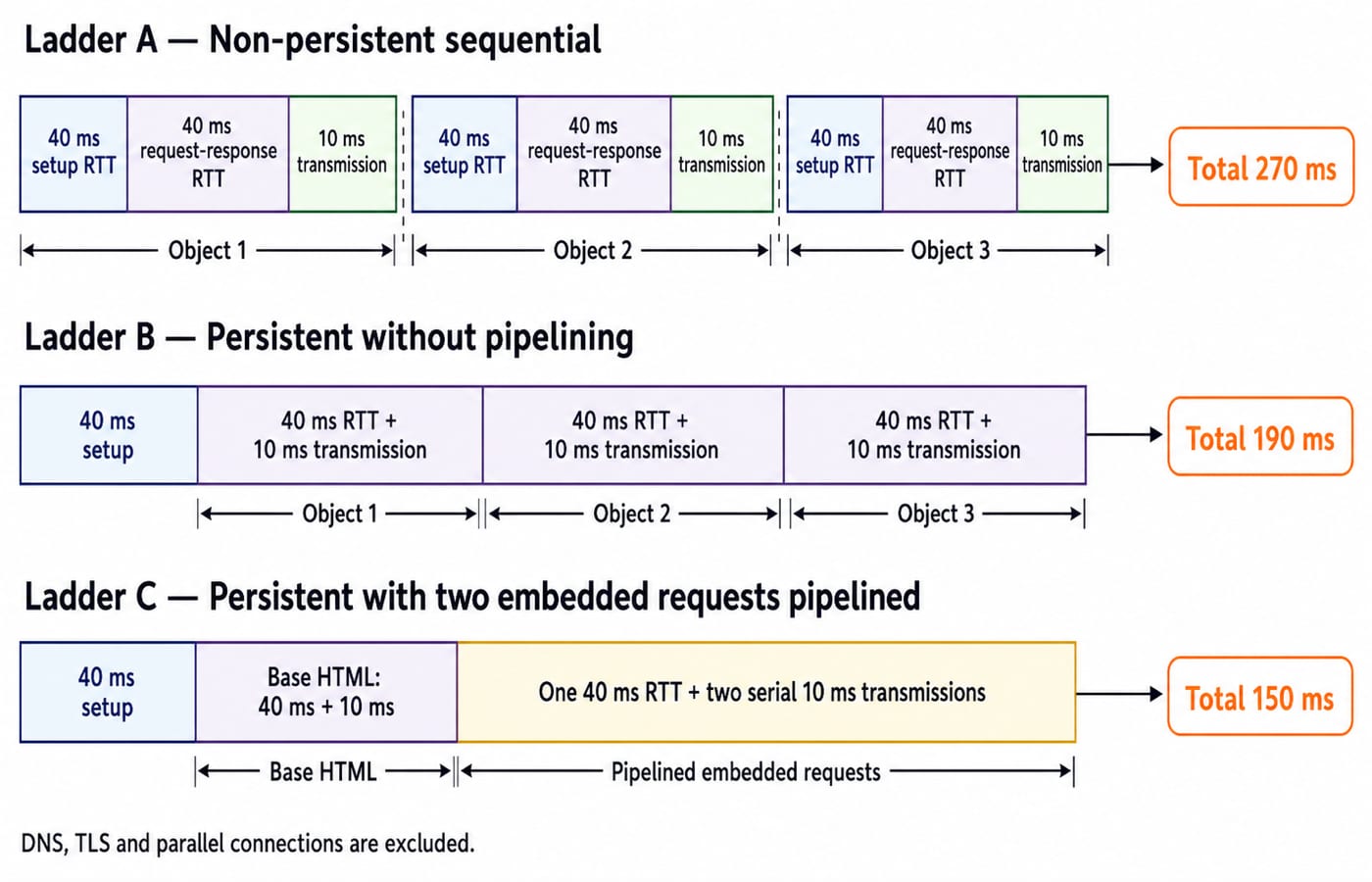
State every assumption. One base HTML object and two embedded objects share a server. RTT is 40 ms, TCP setup costs 1 RTT, and request through first response byte costs 1 RTT. Transmission is 10 ms per object. DNS, TLS, parsing and parallel connections are excluded. Fetches are sequential unless pipelined. Application Layer in Computer Networks compares HTTP with DNS, email and FTP, and its HTTP example counts round trips. This calculation adds 10 ms of transmission for each object.
Non-persistent, sequential HTTP: every object needs a new connection, one request-response RTT and transmission:
2 x 40 + 10 = 90 ms per object
3 x 90 = 270 ms total
One persistent connection without pipelining: pay for setup once, then fetch three objects in sequence:
40 + 3 x (40 + 10) = 40 + 150 = 190 ms total
Persistent HTTP/1.1 with pipelining: fetch the base, then send the two embedded requests together:
40 + (40 + 10) + (40 + 20) = 40 + 50 + 60 = 150 ms total
The last 20 ms is two serial transmissions. Both responses follow one request-response RTT with no extra RTT between them.
HTTP caching and conditional requests with exact times
Suppose the sample response arrives at 10:00:00 with Cache-Control: max-age=300 and validator ETag: "v7". At 10:03:00, only 3 x 60 = 180 seconds have elapsed. Since 180 < 300, the stored response is fresh and the browser may reuse it without contacting the origin.
At 10:06:00, 6 x 60 = 360 seconds have elapsed. Since 360 > 300, the response is stale. The browser can revalidate it conditionally:
If-None-Match: "v7"If the representation has not changed, the server returns 304 Not Modified. The browser reuses the cached 1,200-byte body instead of downloading it again. This is a successful revalidation outcome, not a 4xx client error.
Common HTTP traps and their replacement ideas
These misconceptions usually mix HTTP's stateless request semantics with application state or connection reuse, or misread timing and caching rules.
“HTTP is stateful because a site remembers my login.” Applications layer state over stateless request semantics through cookies or tokens.
“Persistent HTTP means a persistent user session.” Connection reuse and login state solve different problems.
“Cookies live inside the TCP connection.” Cookies are HTTP application data stored by the user agent, not inside a connection.
“HTTPS is a different application protocol.” HTTPS is HTTP protected by TLS.
“Every object needs another handshake.” Not on a reused connection. Count setup only for a new connection.
“Content-Length includes headers.” In the worked response, it describes the 1,200-byte content only.
“304 is an error.” It is a 3xx response used for conditional validation.
“Stateless means every repeated request is safe.” Safety and idempotence belong to method semantics, not to whether the server remembers a session.
The common remedy is to separate HTTP's guarantees from what the application adds on top.
How exams test HTTP
Questions may ask you to identify message fields, classify a method or status, count connections and RTTs, or trace cache freshness and validation.
Use this five-step answer routine:
Write every stated inclusion and exclusion.
Sketch the connections and object-fetch order.
Count setup RTTs only for new connections.
Count request-response RTTs, then add any supplied transmission times.
Check that an optimisation has not increased time under identical assumptions.
Practise the distinctions with the Application Layer MCQ collection. For each timing question, identify whether DNS, TLS, parallel connections, pipelining and transmission time are included before calculating.
The short version and next step
HTTP defines request-response semantics. Parse message lines and headers before computing time. Caching can avoid a transfer while fresh or validate stale content with 304. Every timing answer depends on its connection assumptions.
For interview-oriented revision, use CS Fundamentals for Placements. If you are still choosing your next topic, browse CS Fundamentals and pick the area you feel least sure about.
Keep learning
Computer Networks for GATE: An 8-Week Topic-by-Topic Preparation Plan
Use a 96-hour Computer Networks plan that moves from delay and flow control to subnetting, TCP and timed sets, with worked numericals and recovery rules.
Updated 24 Oct 20265 min readComputer Networks
Data Transmission Modes and Connection Types: Simplex, Half-Duplex and Full-Duplex
Learn to classify simplex, half-duplex, full-duplex, point-to-point and multipoint links, then calculate completion time without relying on memorised examples.
Updated 22 Oct 20265 min readComputer Networks
Computer Networks Interview Questions: Trace OSI, TCP/IP and Routing Step by Step
Follow one synthetic web request across DNS, ARP, TCP, NAT and longest-prefix routing, then turn each step into a strong interview answer.
Updated 18 Oct 20266 min readComputer Networks

Basics of Cyber Security: CIA Triad, Risks and a Worked Defence
Learn a consistent security vocabulary, connect common attack paths to suitable controls, and calculate how two defensive layers reduce account takeovers.
Updated 14 Oct 20266 min readComputer Networks