

Introduction to Web Services MCQs: 12 Solved Questions on WWW, URLs and Web 2.0
Solve 12 Introduction to Web Services MCQs on search engines, URL parts, WWW components, browser flow, hypertext, wikis and Web 2.0, with clear explanations.
KnowledgeGate Team
Exam prep & CS education
Updated 6 Nov 20267 min read
A search engine retrieves indexed web resources, while an operating system runs the computer. A URL identifies a resource, HTTP carries the request and response, and HTML structures the page. Hypertext links text, while Web 2.0 tools such as wikis enable collaboration. Apply those distinctions across the 12 questions before checking each explanation. Direct solved pages are available for Q3 and Q10; the Introduction to Web Services question hub is the stable practice route for the other ten. The GATE CS Exam Preparation Courses & Test Series page places these concepts inside the wider Computer Networks route.
Search engines and web-enabled platforms
Search engines retrieve web resources, operating systems manage computers, and communication platforms support collaboration. Remember: Google -> web search, Windows -> operating system, and Acrobat Reader -> PDF viewer.
Q1. Identify what is not a search engine
Which one of the following is not a search engine?
A.
BingB.
GoogleC.
YahooD.
Windows
Answer: D. Windows.
Bing, Google and Yahoo return indexed web results. Windows manages hardware and runs applications. All may share a browsing session, but they are different layers.
Q2. State what a search engine searches
Search engine is used
A.
to search document on webB.
to search the file on host computerC.
to search data in a fileD.
None of the above
Answer: A. to search document on web.
A web search engine searches indexed web documents. Searching application layer protocols differs from locating report.docx on a laptop or using Find inside it. Practise Q1 and Q2 through the Introduction to Web Services question hub.
Q3. Separate online-class platforms from a document reader (NIACL AO IT Specialist, 2023)
Which of the following is not a popular platform to provide resources for online classes?
A.
ZoomB.
Google MeetC.
Acrobat ReaderD.
Microsoft Teams
Answer: C. Acrobat Reader.
Zoom, Google Meet and Microsoft Teams are class platforms. Acrobat Reader opens PDFs, so it may display a handout but does not manage the class. Review the exact solved page.
URL, IP address, file name and email address
Use an identifier ladder: a URL locates a web resource, a domain names its host, an IP address is numeric, a file name labels an object, and an email address names a mailbox.
Q4. Choose the identifier for a specific web page
Which of the following identifies a specific web page and its computer on the Web?
A.
URLB.
Domain nameC.
WebsiteD.
Website address
Answer: A. URL.
A URL can include a host and resource path. In https://www.india.gov.in/services, www.india.gov.in is the host and /services the resource. A website is the wider collection. A URL identifies a specific web page and its computer.
Q5. Match four identifiers to concrete examples
Match the following computer-related terms (given in List I) with their examples (given in List II). Choose the correct answer from the options provided below.
 List I (Computer-related Terms)                                                List II (Examples)
 a. URL                                                                                             I. report.docx
 b. IP Address                                                                                 II.  george01@yahoo.com
 c. File Name                                                                                   III. https://www.india.gov.in
 d. Email Address                                                                            IV. 192.158.1.38
A.
a-III, b-IV, c-I, d-IIB.
a-II, b-III, c-IV, d-IC.
a-II, b-III, c-I, d-IVD.
a-IV, b-I, c-III, d-II
Answer: A. a-III, b-IV, c-I, d-II.
Match each value: URL -> https://www.india.gov.in gives a-III; IP address -> 192.158.1.38 gives b-IV; file name -> report.docx gives c-I; email address -> george01@yahoo.com gives d-II. The result is a-III, b-IV, c-I, d-II. Review the same identifier set in the Introduction to Web Services question hub.
The three WWW components and full URL anatomy
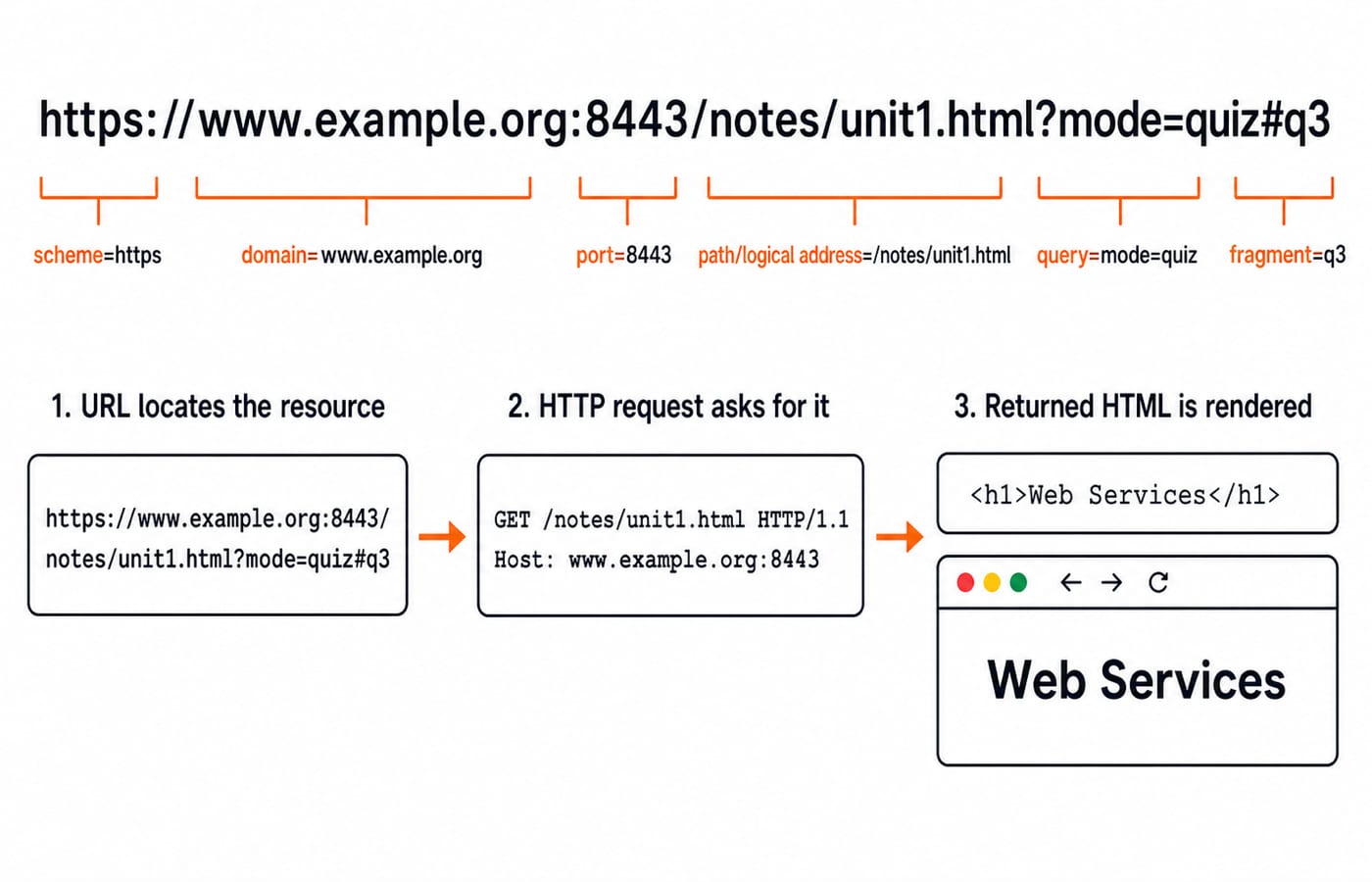
For https://www.example.org/notes/index.html, the URL locates the resource, HTTP request GET /notes/index.html HTTP/1.1 asks for it, and returned HTML <h1>Web Services</h1> structures the rendered page.
Q6. Recall the textbook WWW component set
Which of the following options correctly defines the components of WWW?
A.
URL, HTTP and HTMLB.
HTTP and HTML onlyC.
URL, TCP/IP and HTMLD.
URL and TCP/IP only
Answer: A. URL, HTTP and HTML.
Remember locate, transfer, structure. A URL locates, HTTP transfers, and HTML structures the page. TCP/IP works underneath but does not replace HTTP here.
Q7. Parse domain, port and logical path
Which is the part of Uniform Resource Locator (URL)?
A.
Port NumberB.
Domain NameC.
Logical addressD.
All of these
Answer: D. All of these.
Parse https://www.example.org:8443/notes/unit1.html?mode=quiz#q3: scheme https, domain www.example.org, port 8443, path /notes/unit1.html, query mode=quiz, fragment q3. Every listed part occurs, so “All of these” follows. Repeat the six-part parse for Q6 and Q7, or read Application Layer Protocols: DNS and HTTP Guide.
Hypertext, hypermedia and absolute versus relative URLs
Hypertext links text; hypermedia links images, audio and video. Both lead to other resources, but are not identical.
Q8. Name the linked-page technique
Web links are stored within a page. To jump to a linked page, select the hotspot or anchor. This technique is called:
A.
HypertextB.
HypermediaC.
bothD.
none of the above
Answer: C. both.
A text anchor is hypertext, while an image, audio region or video hotspot is hypermedia. Both can link to another resource, so both are correct.
Q9. Distinguish absolute and relative URLs
_________ is the complete address of a website on the Internet, and it is of ______ types. Fill in the blanks.
A.
URL - TwoB.
URL - ThreeC.
Web address - TwoD.
Web address - Three
Answer: A. URL - Two.
An absolute URL includes the scheme, host and full path, such as https://www.example.org/notes/index.html. A relative URL needs a base. From the base https://www.example.org/notes/, the relative reference unit1.html resolves to https://www.example.org/notes/unit1.html. Therefore the expected pair is URL and two.
What happens after a URL is entered
Q10. Order URL entry, DNS, IP, HTTP and display (UGC NET, 2025)
Arrange the steps involved when a user enters a URL in a browser and accesses a website.
(A) DNS resolution
(B) HTTP request sent
(C) URL entered in the browser
(D) IP address obtained
(E) Webpage displayed
A.
B, A, C, E, DB.
C, B, A, E, DC.
B, C, D, A, ED.
C, A, D, B, E
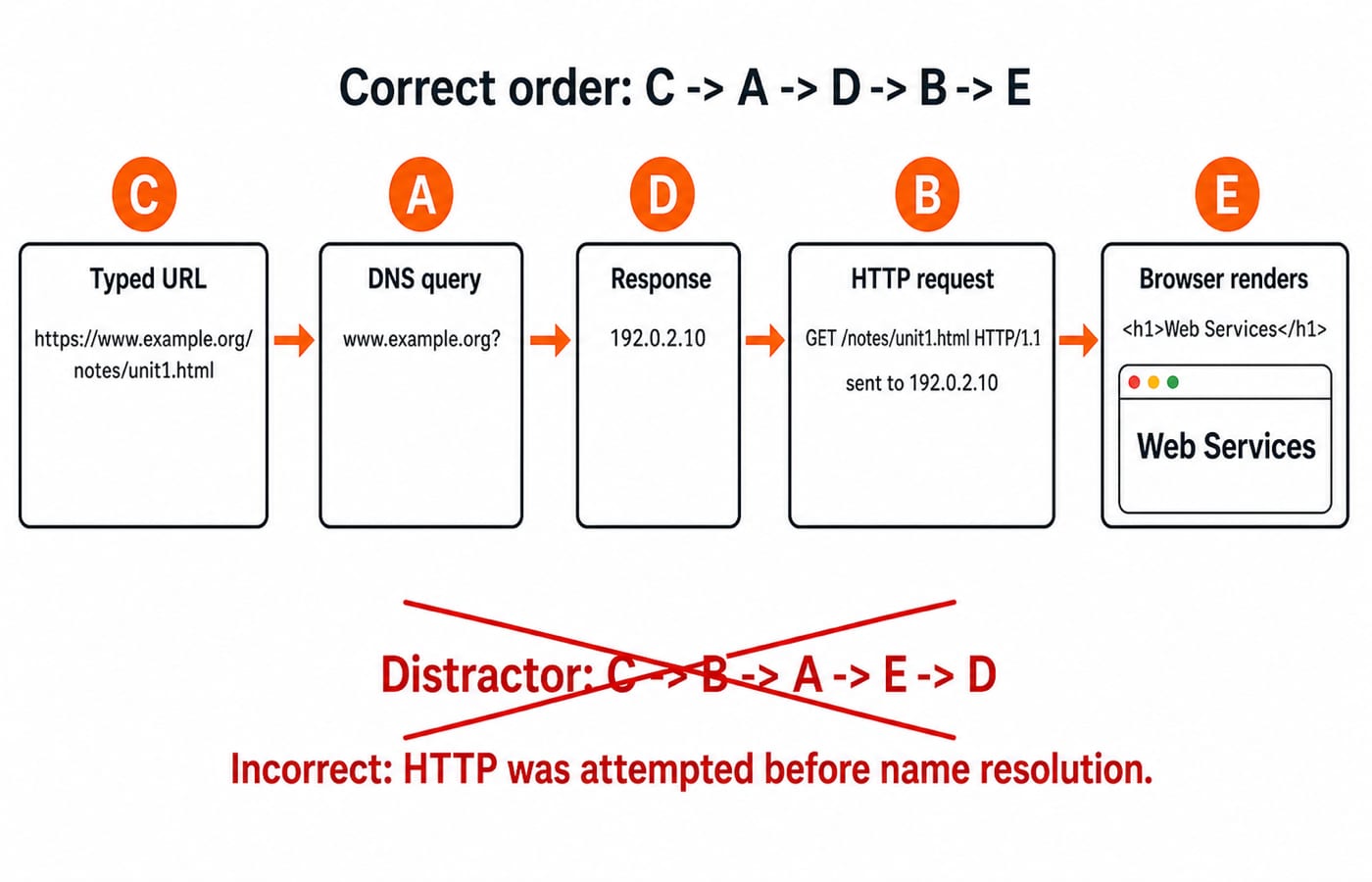
Answer: D. C, A, D, B, E.
For https://www.example.org/notes/unit1.html, the browser receives the URL (C), asks DNS for www.example.org (A), and gets 192.0.2.10 (D). It sends GET /notes/unit1.html HTTP/1.1 (B), then renders Web Services (E). Transport and TLS may occur before HTTPS but sit outside these steps. Option B wrongly puts the request before name resolution. See the exact solved page.
Wikis and the collaborative Web 2.0 model
A static page mainly publishes to users. Web 2.0 applications let users create, edit, comment, tag or share, and a wiki is a collaborative example.
Q11. Identify the defining feature of a wiki
Which of the following best describe a wiki
A.
A system that allows users to add information onto a website but does not change any pre-existing informationB.
A system that allows collaborative modification of its content and structure directly from the web browserC.
A system that serves as a publically accessible personal journal for an individualD.
A system that monitors the modification of content within a blog
Answer: B. A system that allows collaborative modification of its content and structure directly from the web browser.
A wiki enables browser-based shared editing. Option C is closer to a personal blog; Options A and D remove or replace editing.
Q12. Recognise Web 2.0 collaboration
Which of the following is a characteristic of Web 2.0 applications?
A.
Multiple users schedule their time to use Web 2.0 applications one by one.B.
Web 2.0 applications are focused on the ability for people to collaborate and share information online.C.
Web 2.0 applications provide users with content rather than facilitating users to create it.D.
Web 2.0 applications use only static pages.
Answer: B. Web 2.0 applications are focused on the ability for people to collaborate and share information online.
User A creates a wiki page, User B corrects a paragraph, and User C adds a source. Their edits move it from version 1 to version 3 without fixed turns. Options C and D describe one-way static publishing. Practise Q11 and Q12 through the hub.
Score diagnosis and the next practice step
If you missed Q1 to Q3, separate tools from their roles. Errors in Q4 to Q9 call for a component-by-component URL and WWW parse. A miss on Q10 means the dependency order needs work, while errors in Q11 or Q12 point to confusion between static publishing and collaboration.
Use this error map to choose your first revision target.
Redraw the Q7 URL with six labels, reproduce C -> A -> D -> B -> E, and redo all 12 questions after one day without notes. Then try Application Layer MCQs: 12 Solved DNS, HTTP, Email as the next topic-level set. For a structured Computer Networks route, choose GATE Guidance by Sanchit Sir. For timed mixed-topic practice, choose the GATE Test Series.
Keep learning
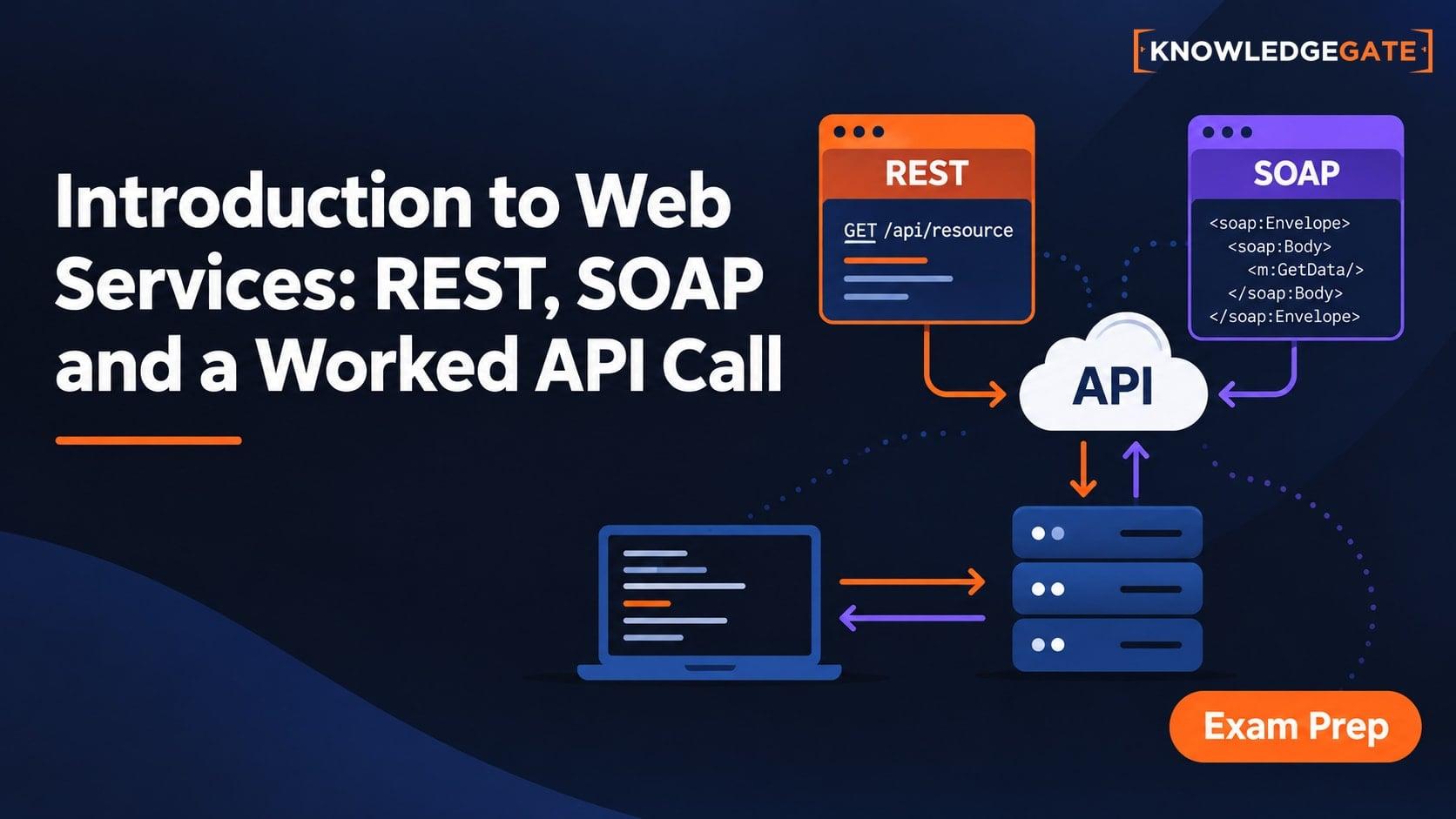
Introduction to Web Services: REST, SOAP and a Worked API Call
Build a clear model of web services, trace a REST request for a library system, calculate cold and reused-connection latency, and compare REST with SOAP.
Updated 27 Oct 20266 min readComputer Networks

Web Publishing and Hosting Explained: DNS, URLs, and HTTP with Worked Examples
Trace one browser request from domain lookup to rendered page, then learn the hosting models, protocol details, and exam traps that make the process click.
Updated 2 Nov 20266 min readComputer Networks
Internet Fundamentals: Architecture, Connections, DNS, URLs and Worked Examples
Build a clean mental model of the Internet and Web, then trace a browser request and calculate transfer time, cache expiry and segment count.
Updated 6 Aug 20266 min readGATE Strategy & Roadmap

Internet Protocols and Web Services: DNS, HTTP, Email and FTP with Worked Examples
Trace a browser request through DNS, TCP and HTTP, then separate email from FTP.
Updated 11 Nov 20265 min readGATE Strategy & Roadmap