LocalStorage and Cookies in JavaScript: Store, Read and Delete Data
Run one lesson-progress object and one preference cookie through their complete life cycles, then learn which browser store fits a feature and which security traps to avoid.
KnowledgeGate Team
Exam prep & CS education
Updated 11 Oct 20266 min read

Both APIs save values after refresh, so beginners often treat them as interchangeable. The difference appears when a cookie travels with a request, an object returns as a string, or deletion misses its path. A lesson-progress object can be saved in localStorage, while a preference cookie can be created and expired to compare what survives a reload. Run these examples on a served page such as http://localhost:5500, since restricted pages may block storage.
LocalStorage and cookies solve different browser-storage problems
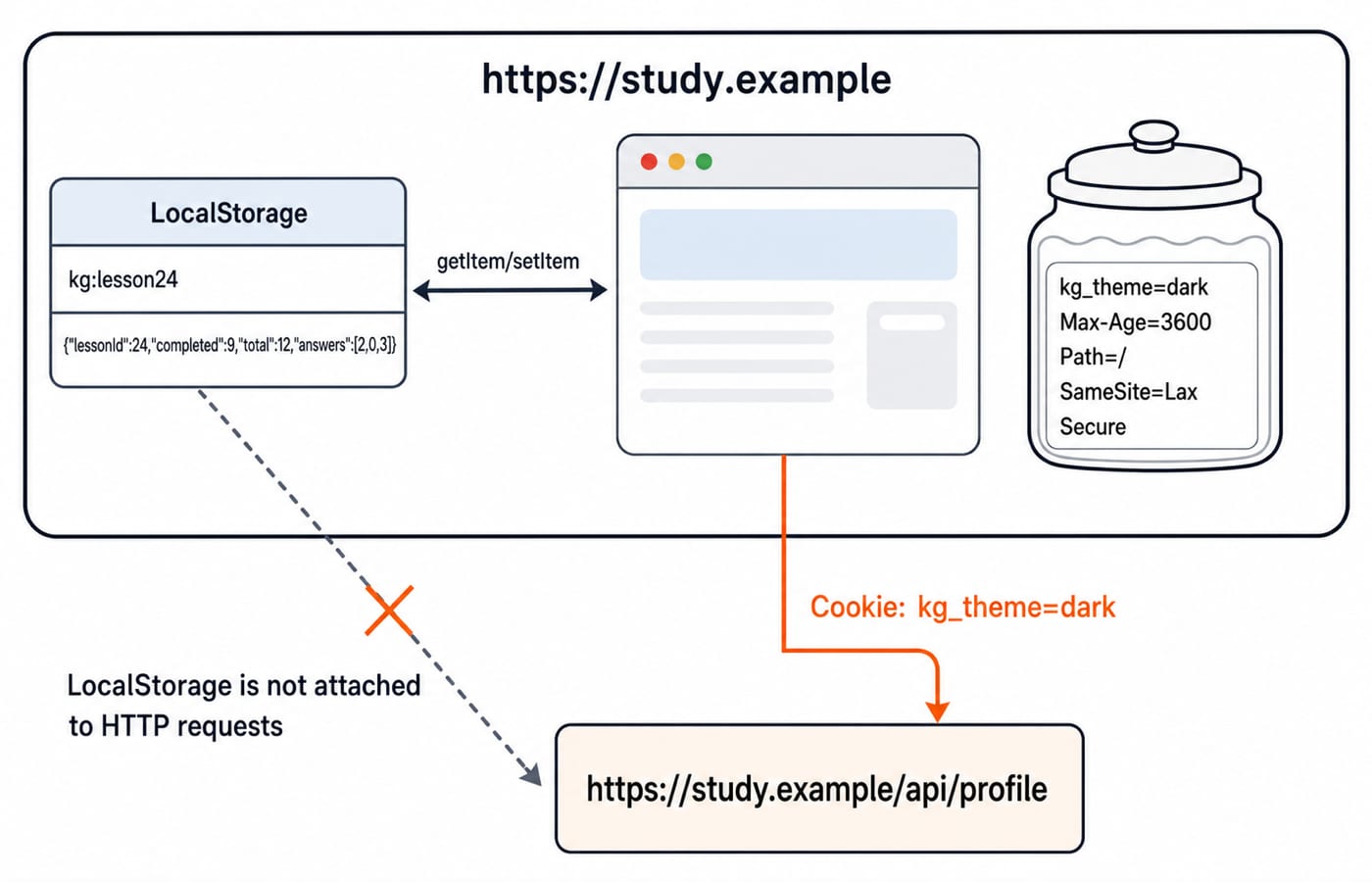
localStorage is a synchronous, origin-scoped key-value store. Its keys and values are strings, and entries remain until code or the user clears them. A cookie is a small name-value record with scope and lifetime attributes. Matching cookies can accompany HTTP requests according to domain, path, expiry, security and same-site rules.
Question | localStorage | JavaScript-readable cookie |
|---|---|---|
Read/write API |
|
|
Value shape | String only |
|
Lifetime | Until removed or cleared | Session or expiry |
Sent with matching requests | No | Yes |
Scope controls | Origin |
|
Security controls | No |
|
Good tutorial use | Lesson progress or theme | Server-needed preference or consent marker |
The Web Development hub places these APIs in the broader browser stack. The Coding & Skills category provides a structured route through related topics.
Work a LocalStorage object through save, reload, update and removal
Use one key and one state object throughout:
const key = "kg:lesson24";
const progress = {
  lessonId: 24,
  completed: 8,
  total: 12,
  answers: [2, 0, 3]
};

localStorage.setItem(key, JSON.stringify(progress));
const saved = JSON.parse(localStorage.getItem(key));
saved.completed += 1;
localStorage.setItem(key, JSON.stringify(saved));

console.log(localStorage.getItem(key));
// {"lessonId":24,"completed":9,"total":12,"answers":[2,0,3]}

localStorage.removeItem(key);
console.log(localStorage.getItem(key)); // null
JSON.stringify converts the object to a storable string, while JSON.parse rebuilds the object. The update makes completed equal to 8 + 1 = 9, and the second setItem saves it. removeItem deletes only kg:lesson24.
The rule also covers numbers. After localStorage.setItem("attempts", 3), the retrieved value and its typeof are "3" and "string", not the number 3.
Avoid localStorage.clear() for one feature because it removes every key for the origin. Prefer namespaced keys such as kg:lesson24 and targeted removeItem calls.
Create, read, update and delete one cookie with JavaScript
Start on http://localhost:5500, where the first cookie does not need Secure. One assignment sets one cookie. The helper preserves encoded = characters inside a value.
document.cookie = "kg_theme=dark; Max-Age=3600; Path=/; SameSite=Lax";

function getCookie(name) {
  const prefix = `${encodeURIComponent(name)}=`;
  const row = document.cookie
    .split("; ")
    .find(item => item.startsWith(prefix));
  return row ? decodeURIComponent(row.slice(prefix.length)) : null;
}

console.log(getCookie("kg_theme")); // "dark"
document.cookie = "kg_theme=light; Max-Age=3600; Path=/; SameSite=Lax";
console.log(getCookie("kg_theme")); // "light"
document.cookie = "kg_theme=; Max-Age=0; Path=/; SameSite=Lax";
console.log(getCookie("kg_theme")); // null
The second assignment uses the same name and scope, so it updates the value. Max-Age=0 expires it. Deletion must repeat the original Path and any Domain, or a scoped cookie may remain.
On production HTTPS, append Secure. JavaScript cannot create or read an HttpOnly cookie. An authentication cookie needing that protection must come from the server through Set-Cookie.
document.cookie is a semicolon-separated string of readable cookies, not a JavaScript object. Encode and decode names or values that may contain spaces or punctuation.
Choose the store by tracing one feature across time and a request
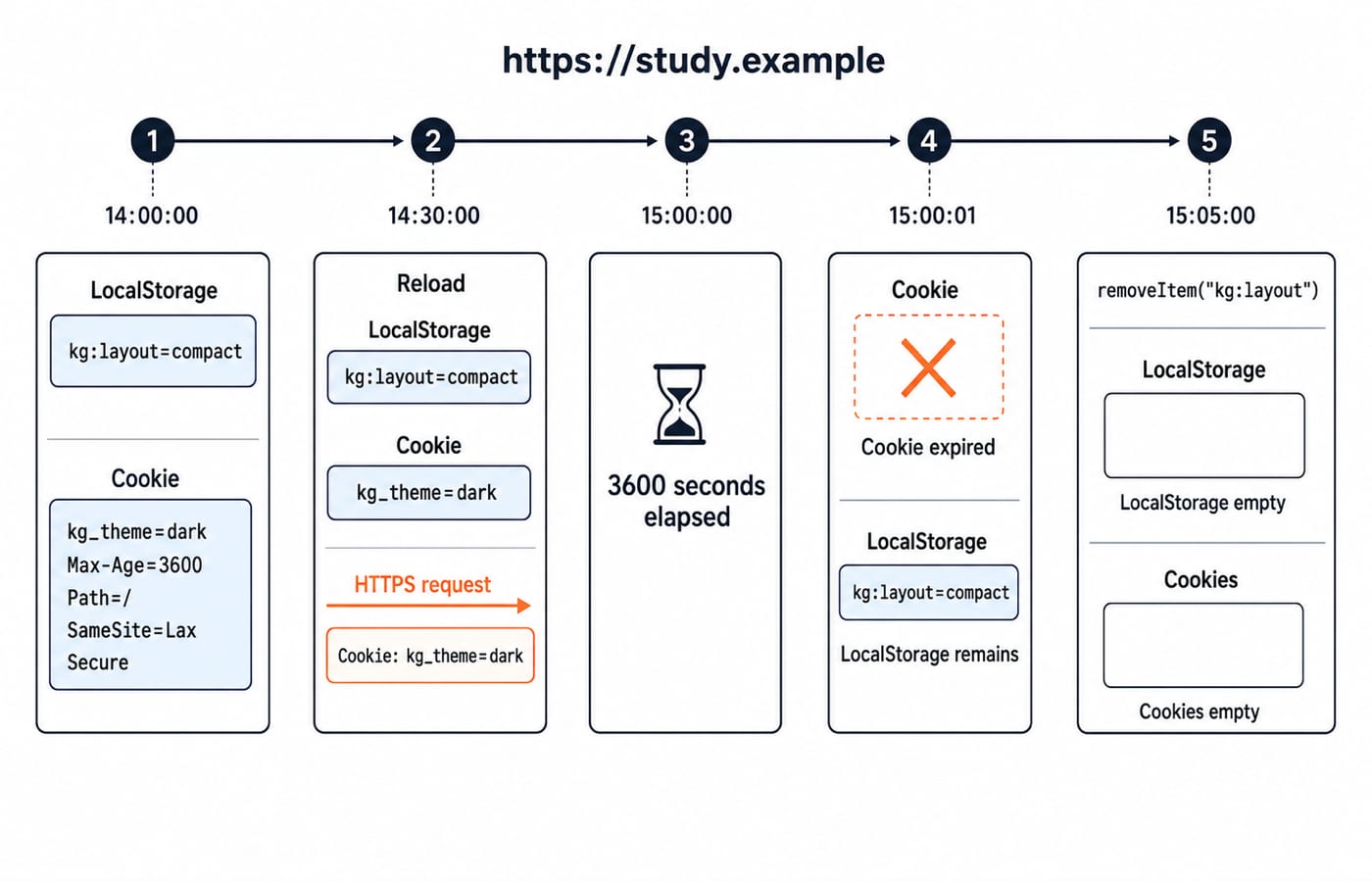
At 14:00:00 on https://study.example, save kg:layout=compact in localStorage and set cookie kg_theme=dark; Max-Age=3600; Path=/; SameSite=Lax; Secure. At 14:30:00, both survive reload. A matching request can carry Cookie: kg_theme=dark, but not kg:layout=compact unless code copies it into the request.
At 15:00:00, the cookie reaches its 3,600-second lifetime. Just after expiry it is absent, while kg:layout remains. At 15:05:00, removeItem("kg:layout") removes that value.
Use localStorage for non-secret, client-only state that should survive refresh. Use a cookie when the server must receive a small scoped value or manage a session. Web Technologies for Teaching Exams: HTML and HTTP explains why cookies participate in HTTP. Use neither as a database. The MERN Stack Course is a later route from browser state to a server-backed application.
Avoid browser-storage errors that become unsafe or confusing
Mistake | What happens | Fix |
|---|---|---|
Store an object directly | It becomes | Use |
Parse a missing or damaged value blindly | A missing read gives | Check the raw value and use |
Use | Unrelated origin data is deleted | Call |
Treat a | One assignment is mistaken for replacing all cookies | Inspect each cookie name separately |
Delete with the wrong | The scoped cookie remains | Repeat its original scope |
Put a session token in | Successful same-origin script injection can read it | Follow the security design; prefer a server-set |
XSS can read localStorage and non-HttpOnly cookies. HttpOnly blocks JavaScript access but not every cookie threat. Automatic cookie sending also requires CSRF-aware design. SameSite, Secure, output encoding, Content Security Policy and server-side validation are layers, not magic switches.
Storage quotas and cookie limits vary by browser and environment, and storage may fail in restricted contexts. Handle important writes as fallible, and persist truly valuable data on the server.
Predict the output before running these snippets
Try each check before reading its answer:
After
localStorage.setItem("score", 10),typeof localStorage.getItem("score")is"string"because Web Storage stores strings.After setting
a=1and thenb=2withPath=/, the second assignment does not erasea; both may appear when their scopes match.Only matching cookies are automatically eligible to travel with a request.
localStorageis not.JavaScript cannot read a server-set
HttpOnlycookie, although the browser may still send it on matching requests.
Now consider a theme needed only by this page after reload and an authenticated session that the server must recognise while protecting it from JavaScript. Use localStorage for the non-secret theme and a server-set secure HttpOnly cookie for the session, subject to the application's threat model.
Practise with three exercises and exact check values
Store
{ day: 6, solved: 42 }underkg:streak, reload it withJSON.parse, increasesolvedby1, and save withJSON.stringify. The raw stored string must be{"day":6,"solved":43}because42 + 1 = 43.Set
kg_layout=compactfor 15 minutes usingMax-Age=900; Path=/; SameSite=Lax. Read"compact", delete it with the same path, and verify thatgetCookie("kg_layout")returnsnull. AddSecureon HTTPS. Here,15 × 60 = 900seconds.Correct these lines, not just their labels:
localStorage.setItem("profile", {name: "Asha"});
JSON.parse(localStorage.getItem("missing")).name;
document.cookie = "kg_layout=; Max-Age=0; Path=/account";
The first coerces the object to "[object Object]", so stringify it. The second tries to access .name after a missing read becomes null, so check the raw value before parsing and accessing it. The third path does not match the original Path=/, so expire the cookie with Path=/.
Keep the short rule, then choose the next browser-storage practice step
localStorage keeps string data for JavaScript within one origin and never travels automatically with requests. Cookies are small scoped records whose matching values can participate in HTTP. Neither is a safe dumping ground for secrets or a replacement for server storage.
Rerun the lesson-progress and one-hour cookie examples, change one value, and predict the result before refreshing. For the full language sequence, continue with the Complete JavaScript Course. The MERN stack is the later path from browser storage to server-backed state.
Keep learning
Functions and Arrow Functions in JavaScript: Syntax, Scope and Runnable Examples
Build function declarations, expressions and arrows in JavaScript, then trace parameters, closures, lexical this and array callbacks through exact outputs.
Updated 19 Oct 20266 min readWeb Development

Modules in JavaScript: Import, Export, and Runnable Examples
Build JavaScript modules from scratch with a shopping-cart project that runs in Node.js and the browser. Learn live bindings, re-exports, lazy loading, and practical fixes.
Updated 15 Oct 20265 min readWeb Development

JavaScript Event Delegation: Bubbling, target and currentTarget with Runnable Examples
Learn how browser events travel through the DOM, then build one delegated listener that handles nested controls and rows added later.
Updated 6 Oct 20265 min readWeb Development

JavaScript Operators: Types, Precedence and Runnable Examples
Learn how JavaScript arithmetic, assignment, comparison, logical and modern operators behave by tracing one score program from inputs to final output.
Updated 2 Oct 20266 min readWeb Development