

Redux Toolkit Integration in React: Store, Slices, Async Thunks, and Runnable Examples
Build a Study Planner that traces each click through Redux Toolkit, calculates progress, filters tasks, loads deterministic async data and exposes failures.
KnowledgeGate Team
Exam prep & CS education
Updated 4 Nov 20266 min read
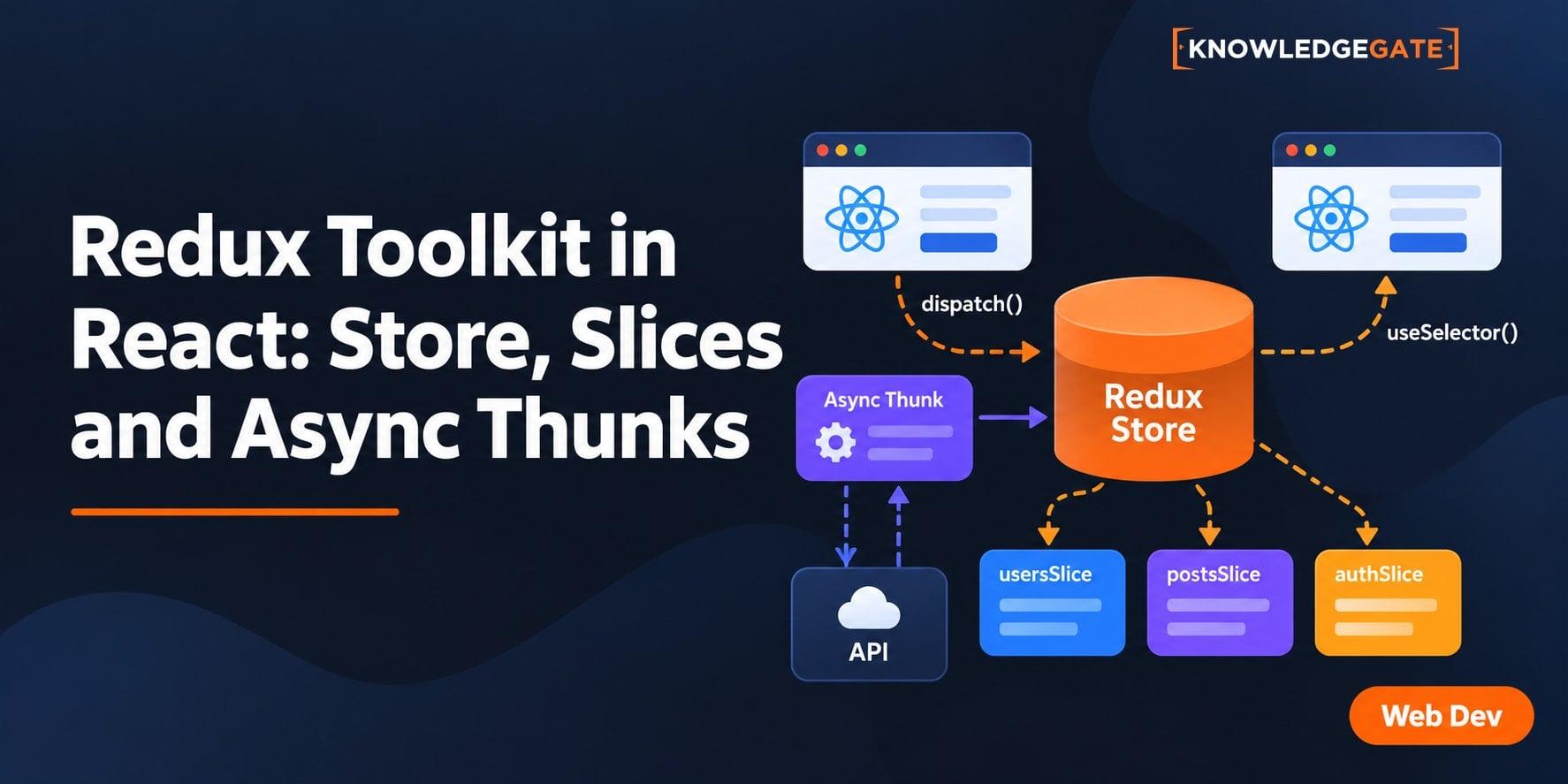
Installing Redux Toolkit is easy. The harder part is tracing a click from React through an action, slice reducer and store, then back through a selector. This runnable Study Planner starts with two tasks, calculates progress, filters the list, loads deterministic async data, exposes failure, and diagnoses common errors.
1. Redux Toolkit integration in React: understand the data flow
The store holds shared state. A slice owns one feature's initial state and update rules. An action describes what happened, dispatch sends it, and a selector reads the result. This follows the official Redux Toolkit Quick Start.
Our study slice begins with Configure the store, 20 minutes, completed, and Build a slice, 30 minutes, not completed. Therefore, completed count is 1, total count is 2, Math.round((1 / 2) * 100) = 50, and remaining time is 30 minutes.
Keep the shared task list, filter, summary and async status in Redux; keep a form-only text field local. The earlier Redux Toolkit Tutorial owns the Redux mental model, Redux-versus-Context choice and interview questions. This Study Planner owns the file-by-file React wiring, derived selector values, filtered views and visible thunk outcomes.
2. Install the packages and create the file layout
npm install @reduxjs/toolkit react-redux@reduxjs/toolkit supplies configureStore, createSlice and createAsyncThunk. react-redux supplies Provider, useSelector and useDispatch.
src/
  app/store.js
  features/study/studySlice.js
  features/study/StudyDashboard.jsx
  App.jsx
  main.jsx
Keep App.jsx small:
import StudyDashboard from "./features/study/StudyDashboard";

export default function App() {
  return <StudyDashboard />;
}
3. Configure the store and provide it to React
Create src/app/store.js:
import { configureStore } from "@reduxjs/toolkit";
import studyReducer from "../features/study/studySlice";

export const store = configureStore({
  reducer: {
    study: studyReducer,
  },
});
The reducer key creates state.study, not state.studyReducer or state.tasks. configureStore includes thunk middleware and development checks by default.
Now wrap the application once in src/main.jsx:
import { StrictMode } from "react";
import { createRoot } from "react-dom/client";
import { Provider } from "react-redux";
import App from "./App.jsx";
import { store } from "./app/store.js";

createRoot(document.getElementById("root")).render(
  <StrictMode>
    <Provider store={store}>
      <App />
    </Provider>
  </StrictMode>,
);
Provider makes this store available to descendant hooks. The app should now render without a missing-context error.
4. Build a study slice with generated actions
Create src/features/study/studySlice.js:
import { createSlice } from "@reduxjs/toolkit";

const initialState = {
  tasks: [
    { id: 1, title: "Configure the store", minutes: 20, completed: true },
    { id: 2, title: "Build a slice", minutes: 30, completed: false },
  ],
  filter: "all",
  status: "idle",
  error: null,
};

const studySlice = createSlice({
  name: "study",
  initialState,
  reducers: {
    taskToggled(state, action) {
      const task = state.tasks.find((item) => item.id === action.payload);
      if (task) task.completed = !task.completed;
    },
    filterChanged(state, action) {
      state.filter = action.payload;
    },
  },
});

export const { taskToggled, filterChanged } = studySlice.actions;
export const selectTasks = (state) => state.study.tasks;
export const selectFilter = (state) => state.study.filter;
export const selectStatus = (state) => state.study.status;
export const selectError = (state) => state.study.error;
export default studySlice.reducer;
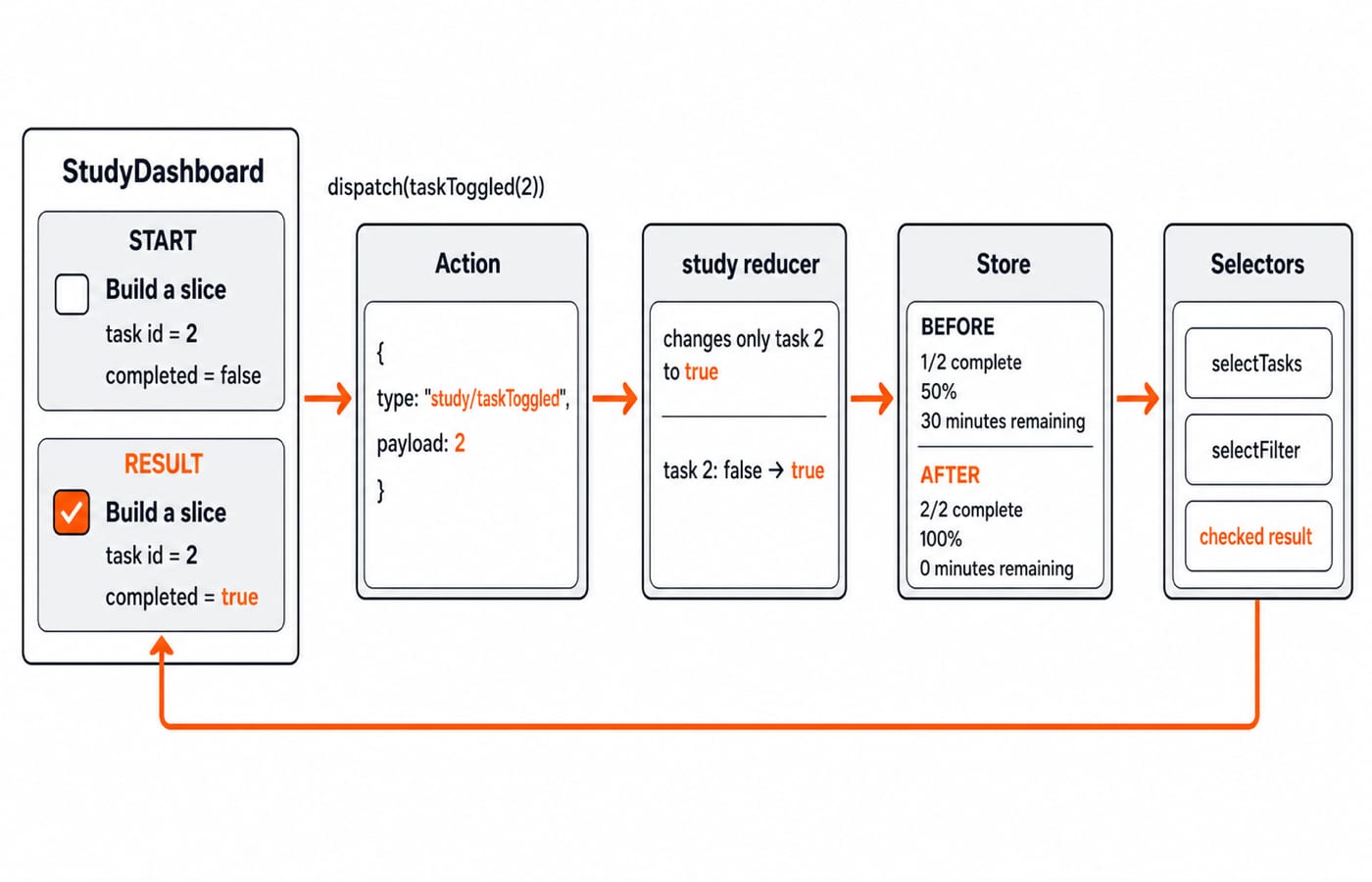
taskToggled(2) creates { type: "study/taskToggled", payload: 2 }; filterChanged("active") creates { type: "study/filterChanged", payload: "active" }. Toolkit's Immer support makes assignment inside this reducer valid, but components must not mutate selected tasks.
For payload 2, find selects Build a slice and changes only its completed value from false to true. Payload 99 finds nothing, so the guard leaves state unchanged.
5. Read state, dispatch actions and verify the values
Create StudyDashboard.jsx:
import { useDispatch, useSelector } from "react-redux";
import { filterChanged, selectFilter, selectTasks, taskToggled } from "./studySlice.js";

export default function StudyDashboard() {
  const dispatch = useDispatch();
  const tasks = useSelector(selectTasks);
  const filter = useSelector(selectFilter);
  const visibleTasks =
    filter === "active"
      ? tasks.filter((task) => !task.completed)
      : tasks;
  const completedCount = tasks.filter((task) => task.completed).length;
  const percent = tasks.length
    ? Math.round((completedCount / tasks.length) * 100)
    : 0;
  const remainingMinutes = tasks
    .filter((task) => !task.completed)
    .reduce((sum, task) => sum + task.minutes, 0);

  return (
    <main>
      <h1>Study Planner</h1>
      <p>{completedCount} of {tasks.length} complete ({percent}%)</p>
      <p>{remainingMinutes} minutes remaining</p>
      <button onClick={() => dispatch(filterChanged("all"))}>All</button>
      <button onClick={() => dispatch(filterChanged("active"))}>Active</button>
      <ul>
        {visibleTasks.map((task) => (
          <li key={task.id}>
            <label>
              <input
                type="checkbox"
                checked={task.completed}
                onChange={() => dispatch(taskToggled(task.id))}
              />
              {task.title} ({task.minutes} minutes)
            </label>
          </li>
        ))}
      </ul>
    </main>
  );
}
Initially, the browser shows 1 of 2 complete (50%) and 30 minutes remaining. Configure the store is checked; Build a slice is unchecked. Select Active and only the second task remains, while the global summary stays 1 of 2 complete (50%). Return to All, then check task 2. The result is 2 of 2 complete (100%), 0 minutes remaining, and an empty Active view.
6. Add createAsyncThunk with success and failure
Change the slice import to import { createAsyncThunk, createSlice } from "@reduxjs/toolkit";. Before createSlice, add a deterministic simulated request:
export const loadTasks = createAsyncThunk(
  "study/loadTasks",
  async (mode = "success") => {
    await new Promise((resolve) => setTimeout(resolve, 500));
    if (mode === "error") throw new Error("Study API unavailable");
    return [
      { id: 10, title: "Read selector docs", minutes: 15, completed: true },
      { id: 11, title: "Trace a thunk", minutes: 25, completed: false },
      { id: 12, title: "Test an error", minutes: 20, completed: false },
    ];
  },
);
Add extraReducers beside reducers:
extraReducers: (builder) => {
  builder
    .addCase(loadTasks.pending, (state) => {
      state.status = "loading";
      state.error = null;
    })
    .addCase(loadTasks.fulfilled, (state, action) => {
      state.status = "succeeded";
      state.tasks = action.payload;
    })
    .addCase(loadTasks.rejected, (state, action) => {
      state.status = "failed";
      state.error = action.error.message;
    });
},
In the dashboard, import loadTasks, selectStatus and selectError. Select the two values beside the existing task and filter selectors:
const status = useSelector(selectStatus);
const error = useSelector(selectError);
Then add this JSX after the filter buttons:
<button
  disabled={status === "loading"}
  onClick={() => dispatch(loadTasks())}
>
  Load server tasks
</button>
<button
  disabled={status === "loading"}
  onClick={() => dispatch(loadTasks("error"))}
>
  Simulate error
</button>
{status === "loading" && <p>Loading tasks...</p>}
{status === "failed" && <p role="alert">{error}</p>}
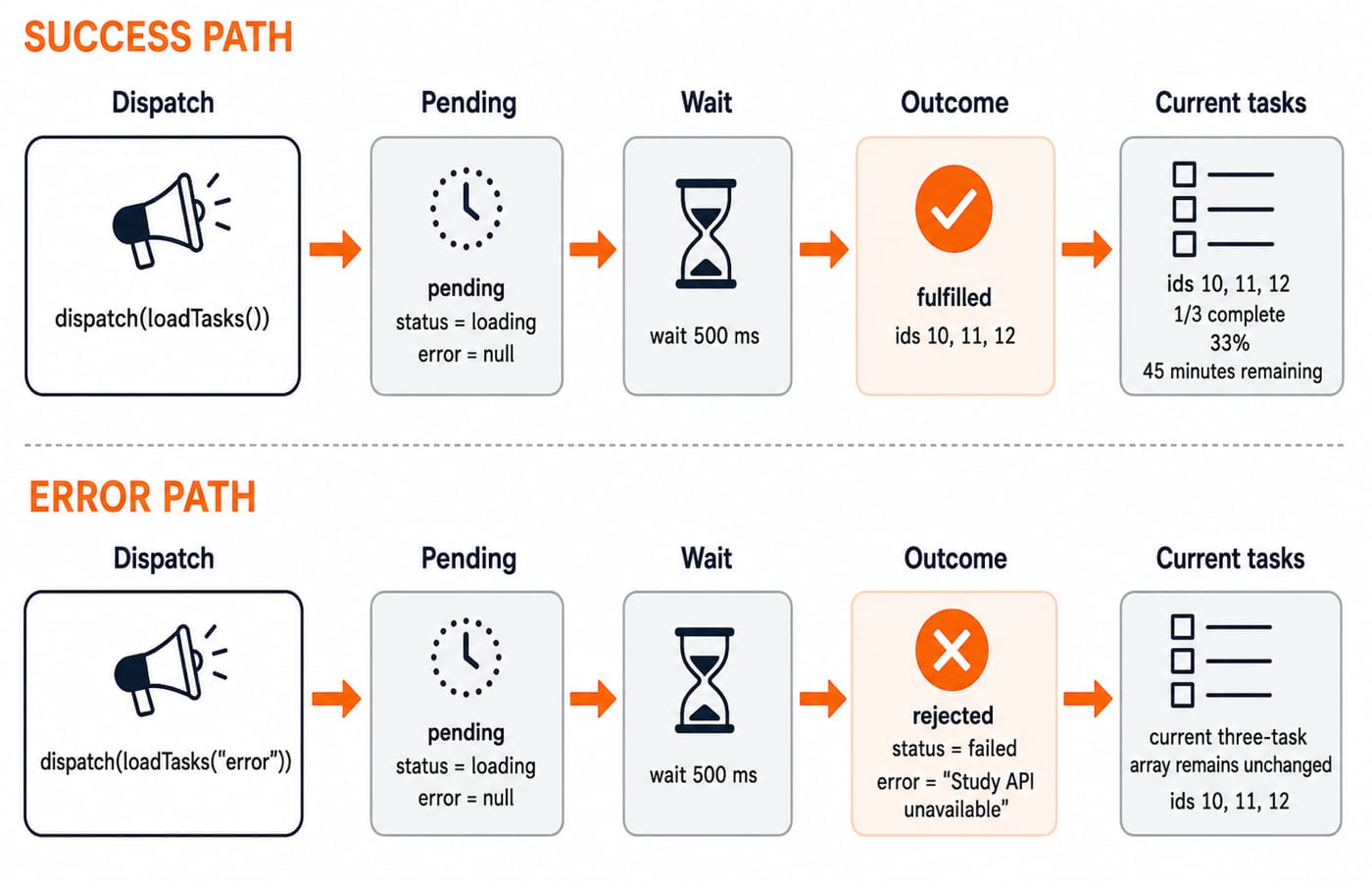
Pending sets loading. After 500 ms, success replaces the list with three tasks: 1 completed out of 3, Math.round((1 / 3) * 100) = 33, and 25 + 20 = 45 minutes remaining. The UI reads 1 of 3 complete (33%) and 45 minutes remaining. A later simulated error moves through loading to failed, displays Study API unavailable, and keeps those three tasks because the rejected reducer never replaces them. These are the pending, fulfilled and rejected createAsyncThunk lifecycle actions.
7. Diagnose six Redux Toolkit integration errors
Missing React Redux context:
StudyDashboardsits outsideProvider. Restore the wrapper andstore={store}.Undefined selector path: the reducer key is
study, so readstate.study.tasks.Checkbox does nothing: dispatch
taskToggled(task.id), not the action creator itself. For task 2, expect{ type: "study/taskToggled", payload: 2 }.Component mutates selected state: replace
tasks.push(...)with a dispatched slice action. Immer-style assignments belong only inside slice reducers.Feature reducer is undefined: confirm
export default studySlice.reducerand the import path fromstore.js.Loading never settles: confirm the component dispatches
loadTasks()andextraReducershandles pending plus fulfilled or rejected.
Debug in order: read the first console error, confirm Provider, inspect store.getState() for study, inspect the action type and payload, inspect the matching reducer, then verify selector output. Use the MERN Stack Course when you are ready to place a real API behind this flow.
8. Practise the transitions, then take the next step
From fresh state, dispatch
taskToggled(1). Both tasks are active, so0 of 2 complete (0%)and20 + 30 = 50 minutes remaining.Add
taskMinutesChangedwith payload{ id: 2, minutes: 45 }. From fresh state, task 2 becomesBuild a slice (45 minutes), progress stays1 of 2 complete (50%), and remaining time becomes45minutes.Export a pure
selectRemainingMinutesusingfilterandreduce. Confirm the checkpoints30,0,45and50minutes for initial state, task 2 completed, async success and exercise 1.
Explain why state.tasks.push(...) is valid only inside a Toolkit reducer, and why the study reducer key fixes the selector path.
In short, configureStore owns state.study; Provider exposes it; createSlice generates actions; the hooks read and dispatch; and createAsyncThunk handles loading, success and failure. Rebuild the slice and dashboard without copying, then pass all three exercises.
Use the React and Redux Course as the direct structured next step, or browse Coding & Skills for another topic.
Keep learning

MongoDB Aggregation Pipeline: `$match` to `$group` with a Worked Example
Build one MongoDB aggregation pipeline step by step. Follow five fictional orders through filtering, array expansion, grouping, projection, and deterministic sorting.
Updated 17 Nov 20266 min readWeb Development

Future Internet Explained: Architecture, a Worked IoT Example and Exam Traps
Learn how device, edge, network, cloud and application layers cooperate, then solve a smart-campus example for data reduction and control-loop latency.
Updated 16 Nov 20266 min readWeb Development
Testing React Components: A Runnable Vitest and Testing Library Tutorial
Build and test a small React progress component from its initial render through completion. The examples use accessible queries, awaited actions, and an exact mock assertion.
Updated 15 Nov 20266 min readWeb Development

React Performance Optimization Tutorial: Profiler, memo, useMemo, and useCallback Examples
Build one React lab, measure its render and calculation counts, then remove avoidable work while keeping typing responsive.
Updated 14 Nov 20266 min readWeb Development