

Node.js Path and OS Modules: Build Portable Scripts with Runnable Examples
Learn how Path and OS remove hard-coded assumptions from Node.js scripts. Follow deterministic examples, memory maths, and a complete system-report build.
KnowledgeGate Team
Exam prep & CS education
Updated 13 Nov 20265 min read

A hard-coded path such as uploads/report.json may resolve from the wrong directory or use the wrong separator. Machine facts such as the temporary directory and usable parallelism also change at runtime. A path-safe system-report script uses node:path for path strings and node:os for operating-system values. Path changes strings only; it does not create, inspect or prove the existence of a file.
1. What path and os do in Node.js
The definitions here follow the current Node.js Path API and OS API. Both modules are built in, so no third-party package is required.
import path from 'node:path';
import os from 'node:os';

console.log(path.basename('/srv/app/data/users.json')); // users.json
console.log(os.platform()); // machine-dependent
os.platform() can return values such as linux, darwin or win32; none is universal. In CommonJS, import the same modules with require('node:path') and require('node:os').
2. Join, normalize, resolve and inspect paths
Use path.posix and path.win32 when an example must follow a fixed path style, regardless of the host:
path.posix.join('/srv/app', 'uploads', '..', 'reports', 'july.csv');
// /srv/app/reports/july.csv
path.posix.normalize('/srv//app/uploads/../reports/./july.csv');
// /srv/app/reports/july.csv
path.win32.join('C:\\apps\\kg', 'uploads', '..', 'reports', 'july.csv');
// C:\apps\kg\reports\july.csv

path.posix.isAbsolute('/srv/app');       // true
path.win32.isAbsolute('C:\\apps\\kg'); // true
uploads/.. cancels, repeated separators collapse, and no directory is created. join() combines segments. resolve() works from right to left until it has an absolute path, so path.posix.resolve('/srv/app', 'logs', '../data', 'users.json') is /srv/app/data/users.json. With no absolute segment, path.resolve('data/users.json') starts from process.cwd().
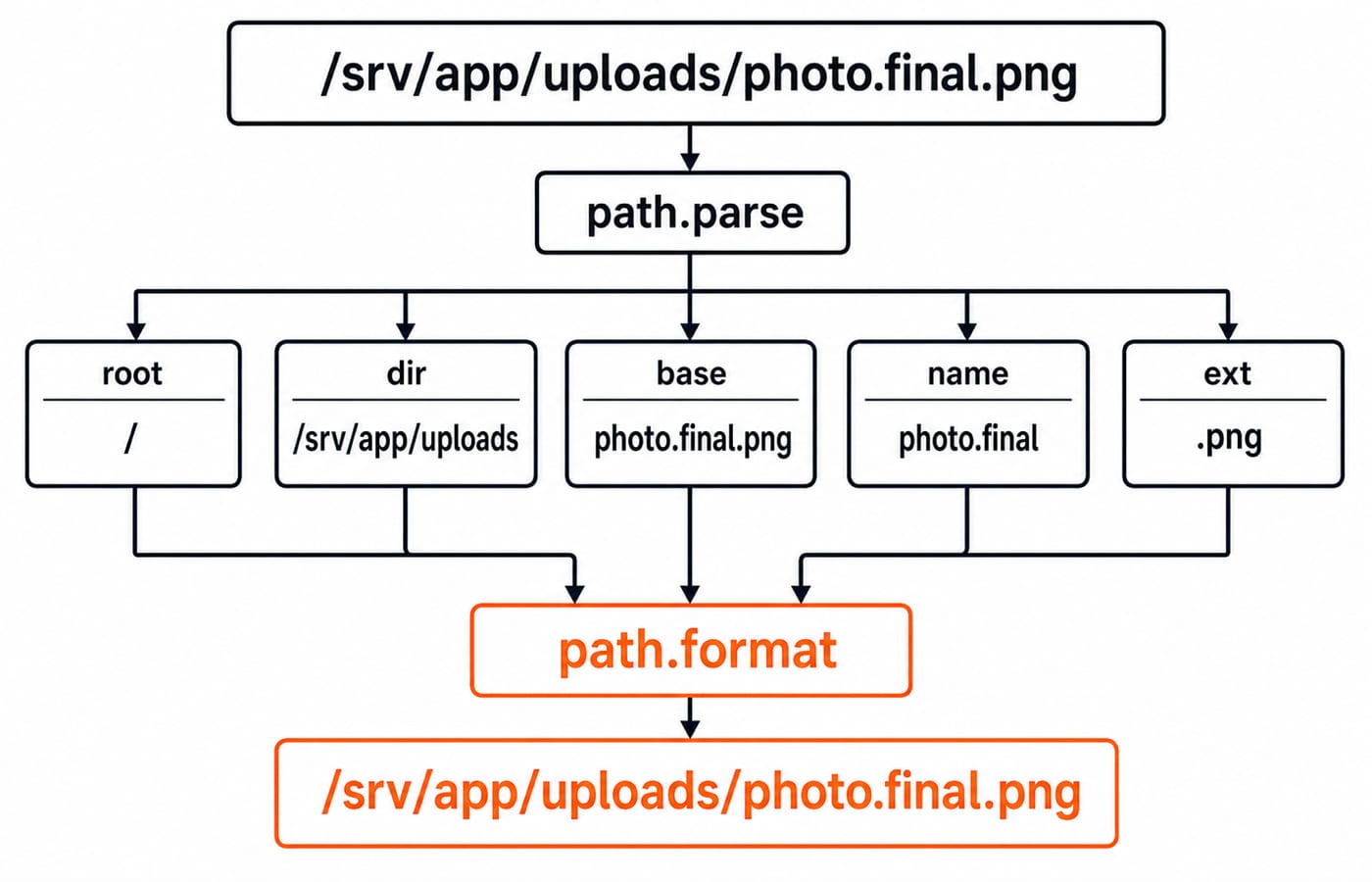
For const file = '/srv/app/uploads/photo.final.png', path.posix.parse(file) returns root: '/', dir: '/srv/app/uploads', base: 'photo.final.png', name: 'photo.final' and ext: '.png'. The related checks are exact:
path.posix.basename(file, '.png');                  // photo.final
path.posix.extname(file);                           // .png
path.posix.relative('/srv/app', file);              // uploads/photo.final.png
path.posix.format(path.posix.parse(file)) === file; // true
An extension is not evidence that the file exists or contains that file type.
3. Read useful operating-system values without hard-coding them
os.platform(), os.arch() and os.type() identify the runtime platform, CPU architecture and operating-system name. os.homedir() and os.tmpdir() return machine-specific directories, while os.EOL supplies the native line ending.
A labelled Linux sample could be platform = linux, arch = x64, type = Linux, homedir = /home/asha, tmpdir = /tmp and EOL = \n. On a sample Windows host, the relevant differences are platform = win32, tmpdir = C:\Users\Asha\AppData\Local\Temp and EOL = \r\n. Build a temporary-log target as path.join(os.tmpdir(), 'kg-node', 'trace.log'). Avoid exposing homedir() or similar machine details in public logs without a reason.
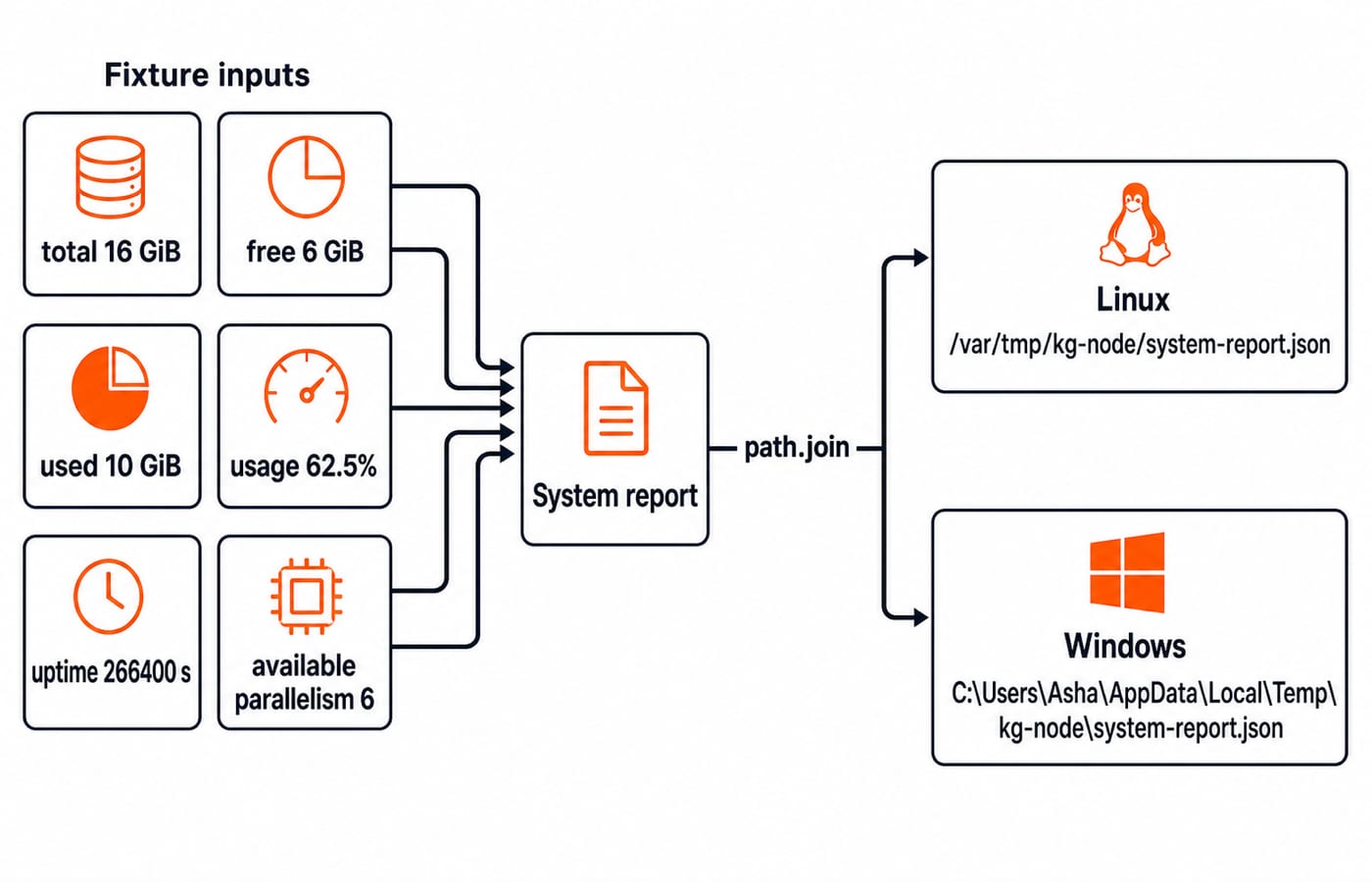
Memory methods return bytes. For a fixed sample, divide by 1024 ** 3 and round only the displayed value:
Total:
17,179,869,184 / 1024 ** 3 = 16 GiB.Free:
6,442,450,944 / 1024 ** 3 = 6 GiB.Used:
17,179,869,184 - 6,442,450,944 = 10,737,418,240 bytes = 10 GiB.Usage:
(10 / 16) x 100 = 62.5%.Uptime:
266,400 seconds = 3 days + 2 hoursbecause3 x 86,400 + 2 x 3,600 = 266,400.
4. Worked example: write a portable system report
Save this as system-report.mjs. Calculations stay in buildReport(runtime, pathApi), which makes the logic testable. The writer creates the joined temporary directory recursively and writes pretty JSON.
import path from 'node:path';
import os from 'node:os';
import { mkdir, writeFile } from 'node:fs/promises';

export function buildReport(runtime, pathApi) {
  const totalBytes = runtime.totalmem();
  const freeBytes = runtime.freemem();
  const usedBytes = totalBytes - freeBytes;
  const toGiB = bytes => Number((bytes / 1024 ** 3).toFixed(2));
  const outputDir = pathApi.join(runtime.tmpdir(), 'kg-node');

  return {
    platform: runtime.platform(),
    arch: runtime.arch(),
    totalGiB: toGiB(totalBytes),
    freeGiB: toGiB(freeBytes),
    usedGiB: toGiB(usedBytes),
    usedPercent: Number(((usedBytes / totalBytes) * 100).toFixed(1)),
    uptimeSeconds: runtime.uptime(),
    availableParallelism: runtime.availableParallelism(),
    outputFile: pathApi.join(outputDir, 'system-report.json'),
  };
}

async function writeSystemReport(runtime, pathApi) {
  const report = buildReport(runtime, pathApi);
  const outputDir = pathApi.join(runtime.tmpdir(), 'kg-node');
  await mkdir(outputDir, { recursive: true });
  await writeFile(report.outputFile, JSON.stringify(report, null, 2));
  return report;
}

const fixture = {
  platform: () => 'linux', arch: () => 'x64', tmpdir: () => '/var/tmp',
  totalmem: () => 17179869184, freemem: () => 6442450944,
  uptime: () => 266400, availableParallelism: () => 6,
};

console.log(await writeSystemReport(fixture, path.posix));
console.log(await writeSystemReport(os, path));
The fixture writes this exact report:
{
  "platform": "linux",
  "arch": "x64",
  "totalGiB": 16,
  "freeGiB": 6,
  "usedGiB": 10,
  "usedPercent": 62.5,
  "uptimeSeconds": 266400,
  "availableParallelism": 6,
  "outputFile": "/var/tmp/kg-node/system-report.json"
}
The second call uses live values, so its numbers and target differ. With the sample Windows temporary directory and path.win32, the target is C:\Users\Asha\AppData\Local\Temp\kg-node\system-report.json.
Here, path and os own string construction and system facts; node:fs performs only the final directory and file writes. The earlier Node.js, Express.js & MongoDB course module owns reading, writing, encodings and file-operation errors. For a wider backend context, continue with the Node.js, Express.js & MongoDB Course.
5. Module-relative files in CommonJS and ESM
process.cwd() is the directory from which Node.js was launched, not the current module's directory. For an ESM module at /srv/app/src/report.mjs:
import path from 'node:path';
import { fileURLToPath } from 'node:url';

const filename = fileURLToPath(import.meta.url);
const dirname = path.dirname(filename);
const dataFile = path.join(dirname, 'data', 'users.json');
// /srv/app/src/data/users.json
CommonJS already provides the base: path.join(__dirname, 'data', 'users.json') gives the same result. If Node launches from /srv, however, path.resolve('data/users.json') becomes /srv/data/users.json, not /srv/app/src/data/users.json. That is a base-directory problem, separate from separator differences.
This section uses module syntax only to establish a stable base directory. The earlier MERN Stack course module owns module-format selection, interoperability and migration; the path and os treatment here starts after that base is known.
6. Common traps and how technical tests probe them
Trap | Better rule |
|---|---|
Manual | Use |
Treating |
|
Treating | Derive the module directory when the asset lives beside code. |
Assuming a path-string operation accesses a file | Use |
Hard-coding | Use |
Using | Prefer |
On a sample machine, os.cpus().length may be 8 while os.availableParallelism() is 6; neither guarantees application performance. Technical tests commonly ask you to trace output, choose the portable snippet, debug a wrong base directory or complete a small path utility. The current Node.js documentation defines supported return values and version availability.
7. Exercises with answer checkpoints
Evaluate
path.posix.relative('/home/asha/project', '/home/asha/project/assets/logo.svg'). Checkpoint:assets/logo.svg.Evaluate
path.win32.parse('C:\\work\\notes\\week1.md'). Checkpoint: rootC:\, dirC:\work\notes, baseweek1.md, nameweek1, ext.md.For total memory
12,884,901,888 bytesand free memory4,831,838,208 bytes, calculate usage. Checkpoint: used is8,053,063,680 bytes, or7.5 GiB;(7.5 / 12) x 100 = 62.5%.Add
type(),release()andEOLto the report while keeping the fixture deterministic. Checkpoint: define fixed fixture values, keep live-only values out of expected output, and do not loghomedir().
8. The short version and next step
Use path for portable path construction and inspection, use os for runtime-aware system values, and remember that a path string is not an existing file. For a wider learning route, browse Coding & Skill Development Courses or take the MERN Stack Course. The focused foundation here is path construction plus runtime-aware system facts.
Keep learning

Future Internet Explained: Architecture, a Worked IoT Example and Exam Traps
Learn how device, edge, network, cloud and application layers cooperate, then solve a smart-campus example for data reduction and control-loop latency.
Updated 16 Nov 20266 min readWeb Development

Testing React Components: A Runnable Vitest and Testing Library Tutorial
Build and test a small React progress component from its initial render through completion. The examples use accessible queries, awaited actions, and an exact mock assertion.
Updated 15 Nov 20266 min readWeb Development

React Performance Optimization Tutorial: Profiler, memo, useMemo, and useCallback Examples
Build one React lab, measure its render and calculation counts, then remove avoidable work while keeping typing responsive.
Updated 14 Nov 20266 min readWeb Development

NPM and package.json in Node.js: Setup, Scripts, Dependencies, and SemVer
Build a small Node.js project from an empty folder, install Lodash, add reusable npm scripts, compare the manifest and lockfile, and practise SemVer ranges.
Updated 12 Nov 20266 min readWeb Development