Python Tokens, Variables, Data Types and I/O: Worked Examples from Input to Output
Trace one Python program from keyboard text through name binding, numeric conversion, a Boolean decision and formatted output, then test the common traps.
KnowledgeGate Team
Exam prep & CS education
Updated 14 Sep 20265 min read
A Python statement becomes predictable once you can classify its tokens and follow each value's type. input() returns text, 31 / 40 produces a float, a comparison creates a Boolean, and formatting produces the exact output line.
Python tokens: the building blocks in one statement
A token is a meaningful unit that Python recognises in source code. Five useful categories are keywords, identifiers, literals, operators and delimiters. Keywords have reserved language meanings, while identifiers are names used by a program.
Consider this expression:
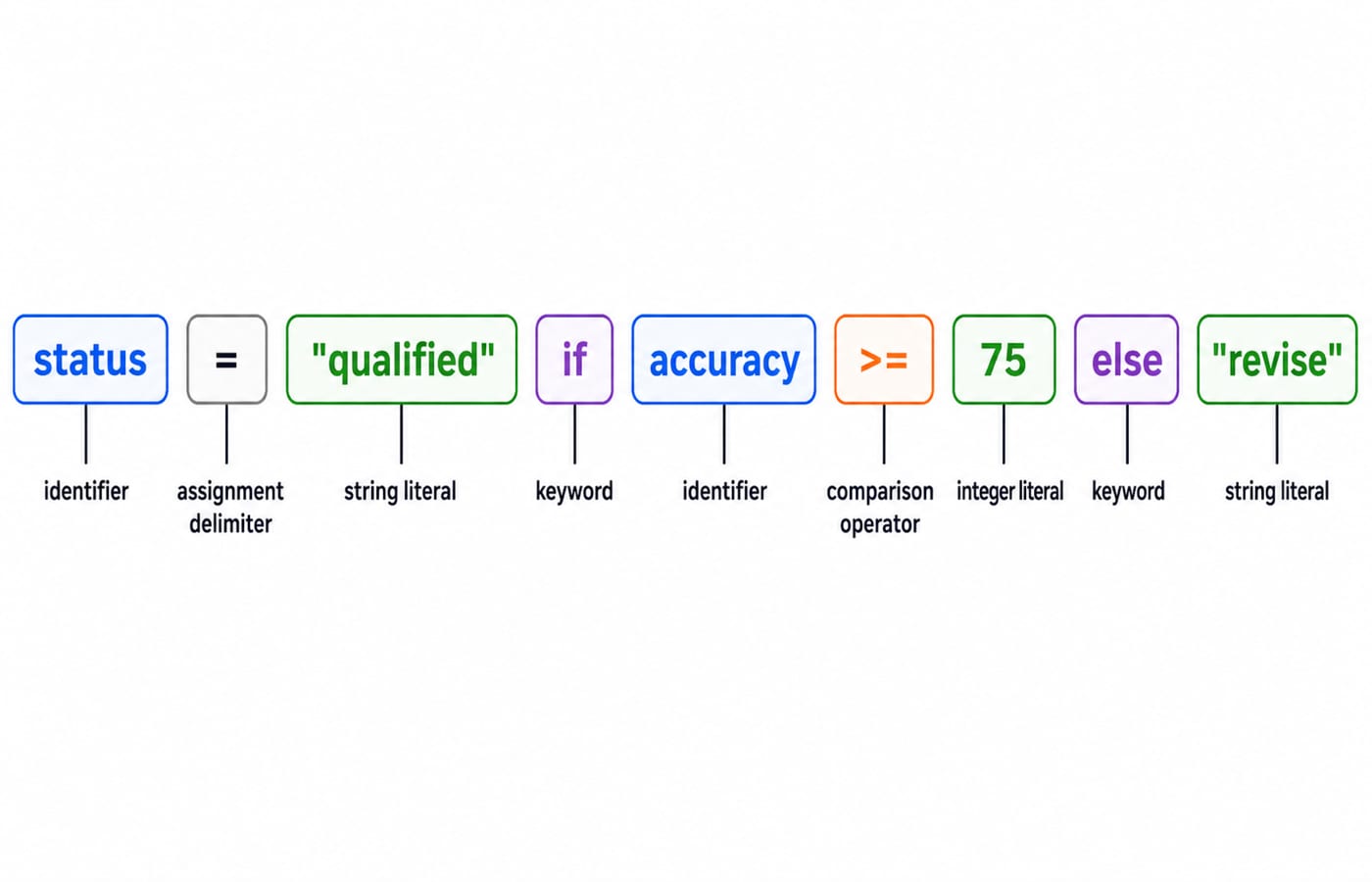
status = "qualified" if accuracy >= 75 else "revise"Its identifiers are status and accuracy. The keywords are if and else. The literals are "qualified", 75 and "revise". The assignment delimiter is =, and the comparison operator is >=. The quotation marks are part of each string literal's notation, not separate values.
Names such as input, int, round and print are built-in names, not Python keywords. That distinction matters when you classify code. For a broader compiler view of how source text becomes tokens and lexemes, read Lexical Analysis in Compiler Design: Tokens and Lexemes. It expands the idea, but it does not replace Python's syntax rules.
Python variables: names bound to values, not fixed boxes
Assignment binds a name to an object. After score = 31, score refers to the integer 31. In score = score + 5, Python first evaluates the right side as 31 + 5 = 36, then rebinds score to the integer 36.
Python also permits score = "36". The name now refers to a string, so later operations can behave differently. A variable name does not have one permanent type.
Identifier rules prevent ambiguity:
_score2andstudent_nameare valid.2scoreis invalid because an identifier cannot begin with a digit.student-nameis parsed as subtraction, not as one name.classis a reserved keyword.Scoreandscoreare different because Python is case-sensitive.
Names can also share an object. With a = [10, 20] and b = a, both names refer to the same list. Python has not created two independent copies.
Python data types: values determine permitted operations
The object's type controls which operations make sense.
Assignment | Type | Value represented |
|---|---|---|
|
|
|
|
|
|
|
|
|
|
|
|
|
|
|
|
|
|
|
|
|
|
| name and attempted pairs |
|
| no value |
Set display order is not guaranteed, so an output question should not depend on the order of topics.
Here, int, float, bool, str, tuple and NoneType values are immutable. Lists, dictionaries and sets are mutable containers. Quick checks such as type(40), type(77.5) and type(True) report <class 'int'>, <class 'float'> and <class 'bool'>.
Conversions create values of the requested type. int("40") gives integer 40, float("77.5") gives float 77.5, and str(31) gives string "31". However, int("77.5") raises ValueError because that text is not an integer literal.
Python input and output: convert at the boundary
Every input() call returns str, even when the user types digits. The useful transitions are "40" -> int("40") -> 40 and "31" -> int("31") -> 31. Converting once at the input boundary keeps later arithmetic clear.
print("Asha", 77.5, sep=" | ") prints Asha | 77.5. Formatting can control presentation too: f"{77.5:.2f}%" produces 77.50%, but the stored float remains 77.5.
For the inputs "Asha", "40" and "31", only the two numeric strings need conversion.
Python worked example: trace values, types and exact output
Run this program and enter Asha, 40 and 31 when prompted:
student = input("Student: ")
attempted = int(input("Questions attempted: "))
correct = int(input("Correct answers: "))
accuracy = correct / attempted * 100
qualified = accuracy >= 75
status = "qualified" if qualified else "revise"
print(f"{student}: {correct}/{attempted}, {accuracy:.2f}%, {status}")
Trace it in execution order:
studentreceives string"Asha".int("40")makesattemptedinteger40.int("31")makescorrectinteger31.31 / 40 = 0.775.0.775 * 100 = 77.5, soaccuracyis float77.5.77.5 >= 75is BooleanTrue.The conditional expression selects string
"qualified"..2fdisplays77.5with two digits after the decimal point.
The exact final line is:
Asha: 31/40, 77.50%, qualified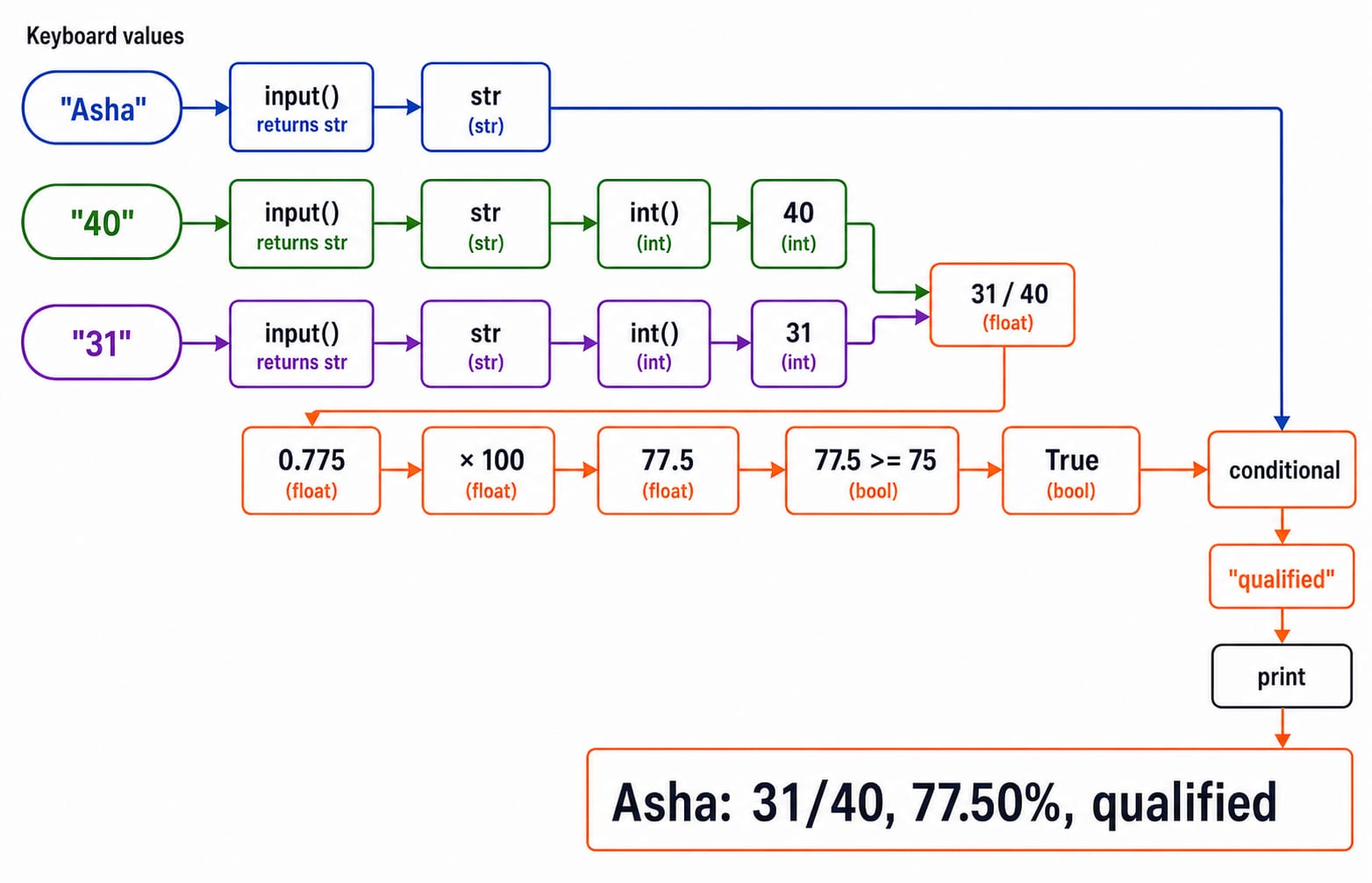
Python type and assignment traps that change the answer
Small type differences can completely change a result. "8" + "2" concatenates two strings to produce "82", while int("8") + 2 performs arithmetic and produces integer 10. The mixed expression "8" + 2 raises TypeError.
Division operators also differ. 7 / 2 = 3.5, but 7 // 2 = 3. They are different operators, not two display formats for the same calculation.
Truth conversion has another common trap. bool("False") is True because every non-empty string is truthy. If answer = "False", the deliberate test answer.strip().lower() == "true" evaluates to False.
Now complete the aliasing example. After a = [10, 20], b = a and b.append(30), both names show [10, 20, 30]. For an independent list, restart with a = [10, 20], use b = a.copy(), then append to b. The result is a as [10, 20] and b as [10, 20, 30].
Python fundamentals in exam and interview questions
Typical questions ask you to classify tokens, validate an identifier, trace a type after conversion, predict exact output, or decide whether a line raises TypeError, ValueError or no error. Use the three checks below to separate lexical classification from runtime evaluation.
Try three short checks:
In
total = 12 + 8,totalis an identifier,=is the assignment operator,12and8are integer literals, and+is an arithmetic operator.If two inputs arrive as
"12"and"8", thenint("12") + int("8")prints20.If the worked example's threshold changes from
75to80, then77.5 >= 80isFalse. The conditional selects"revise", and the exact output becomesAsha: 31/40, 77.50%, revise.
Once you can trace variables and types reliably, Sorting Algorithms: Complexity and Comparison is a useful next application because sorting code depends on values, comparisons and state changes.
The short version and the next Python step
Keep this five-line chain in memory:
Source text becomes tokens.
Assignment binds a name to an object.
The object's type controls valid operations.
input()returns text.Explicit conversion enables arithmetic and precise output.
The checkpoint is concrete: 31 / 40 * 100 = 77.5, 77.5 >= 75 is True, and the final status is qualified.
Use Python Course, Concepts, MCQs & Coding when you want a structured route beyond this lesson. If you are comparing Python with other languages and problem-solving paths, browse Coding & DSA Courses for Placements instead.
Keep learning
Pandas Basics in Python: Build, Clean and Analyse a DataFrame Step by Step
Follow one student dataset from its first DataFrame to a clean city summary, while learning how selection, missing values and vectorised calculations really work.
Updated 24 Sep 20265 min readPython
Python Operators and Expressions: Precedence, Types and Worked Output Traces
Trace Python expressions without guessing. This guide connects operator families, precedence, types, short-circuiting and exact output through worked examples.
Updated 23 Sep 20266 min readPython
CSV Files Explained: Parsing Rules, Worked Records and Exam Traps
Learn why commas and newlines are not always boundaries, trace a quote-aware parser, validate text fields with a schema, and calculate processing costs.
Updated 22 Sep 20265 min readPython
Polymorphism and Dunder Methods in Python: Runnable Examples and Exercises
See how one Python operation supports different types, then build a Vector2D class with readable output, addition, magnitude and equality. Includes runnable code, protocol failures and exercises.
Updated 21 Sep 20265 min readPython